mirror of
https://github.com/samanhappy/mcphub.git
synced 2025-12-24 10:49:35 -05:00
Compare commits
49 Commits
v0.9.0
...
copilot/fi
| Author | SHA1 | Date | |
|---|---|---|---|

|
edd1a4b063 | ||
|
|
1ff542ed45 | ||
|
|
94d5649782 | ||
|
|
f9615c8693 | ||
|
|
29c6d4bd75 | ||
|
|
198ea85225 | ||
|
|
6b39916909 | ||
|
|
9e8db370ff | ||
|
|
5d8bc44a73 | ||
|
|
021901dbda | ||
|
|
f6934a32dc | ||
|
|
7685b9bca8 | ||
|
|
c2dd91606f | ||
|
|
66b6053f7f | ||
|
|
ba50a78879 | ||
|
|
a856404963 | ||
|
|
9a65532a50 | ||
|
|
c5aa97de50 | ||
|
|
271c9fe2c3 | ||
|
|
d59961c4d4 | ||
|
|
d0ec80303a | ||
|
|
69e92b5aa8 | ||
|
|
5acae64b29 | ||
|
|
a5fc4a429d | ||
|
|
ce15330016 | ||
|
|
621bc36560 | ||
|
|
c398223824 | ||
|
|
5dd3e7978e | ||
|
|
f577351f04 | ||
|
|
62de87b1a4 | ||
|
|
bbd6c891c9 | ||
|
|
f9019545c3 | ||
|
|
d778536388 | ||
|
|
976e90679d | ||
|
|
f6ee9beed3 | ||
|
|
69a800fa7a | ||
|
|
83cbd16821 | ||
|
|
9300814994 | ||
|
|
9952927a13 | ||
|
|
4547ae526a | ||
|
|
80b83bb029 | ||
|
|
fa2de88fea | ||
|
|
6020611f57 | ||
|
|
81c3091a5c | ||
|
|
6a8f246dff | ||
|
|
2bef1fb0bd | ||
|
|
bdb5b37cf5 | ||
|
|
cbb3b15ba2 | ||
|
|
77b423fbcc |
1
.dockerignore
Normal file
1
.dockerignore
Normal file
@@ -0,0 +1 @@
|
||||
.git
|
||||
235
.github/copilot-instructions.md
vendored
235
.github/copilot-instructions.md
vendored
@@ -1,50 +1,237 @@
|
||||
# MCPHub Coding Instructions
|
||||
|
||||
**ALWAYS follow these instructions first and only fallback to additional search and context gathering if the information here is incomplete or found to be in error.**
|
||||
|
||||
## Project Overview
|
||||
|
||||
MCPHub is a TypeScript/Node.js MCP server management hub that provides unified access through HTTP endpoints.
|
||||
MCPHub is a TypeScript/Node.js MCP (Model Context Protocol) server management hub that provides unified access through HTTP endpoints. It serves as a centralized dashboard for managing multiple MCP servers with real-time monitoring, authentication, and flexible routing.
|
||||
|
||||
**Core Components:**
|
||||
|
||||
- **Backend**: Express.js + TypeScript + ESM (`src/server.ts`)
|
||||
- **Frontend**: React/Vite + Tailwind CSS (`frontend/`)
|
||||
- **MCP Integration**: Connects multiple MCP servers (`src/services/mcpService.ts`)
|
||||
- **Authentication**: JWT-based with bcrypt password hashing
|
||||
- **Configuration**: JSON-based MCP server definitions (`mcp_settings.json`)
|
||||
|
||||
## Development Environment
|
||||
## Working Effectively
|
||||
|
||||
### Bootstrap and Setup (CRITICAL - Follow Exact Steps)
|
||||
|
||||
```bash
|
||||
# Install pnpm if not available
|
||||
npm install -g pnpm
|
||||
|
||||
# Install dependencies - takes ~30 seconds
|
||||
pnpm install
|
||||
pnpm dev # Start both backend and frontend
|
||||
pnpm backend:dev # Backend only
|
||||
pnpm frontend:dev # Frontend only
|
||||
|
||||
# Setup environment (optional)
|
||||
cp .env.example .env
|
||||
|
||||
# Build and test to verify setup
|
||||
pnpm lint # ~3 seconds - NEVER CANCEL
|
||||
pnpm backend:build # ~5 seconds - NEVER CANCEL
|
||||
pnpm test:ci # ~16 seconds - NEVER CANCEL. Set timeout to 60+ seconds
|
||||
pnpm frontend:build # ~5 seconds - NEVER CANCEL
|
||||
pnpm build # ~10 seconds total - NEVER CANCEL. Set timeout to 60+ seconds
|
||||
```
|
||||
|
||||
## Project Conventions
|
||||
**CRITICAL TIMING**: These commands are fast but NEVER CANCEL them. Always wait for completion.
|
||||
|
||||
### File Structure
|
||||
### Development Environment
|
||||
|
||||
- `src/services/` - Core business logic
|
||||
- `src/controllers/` - HTTP request handlers
|
||||
- `src/types/index.ts` - TypeScript type definitions
|
||||
```bash
|
||||
# Start both backend and frontend (recommended for most development)
|
||||
pnpm dev # Backend on :3001, Frontend on :5173
|
||||
|
||||
# OR start separately (required on Windows, optional on Linux/macOS)
|
||||
# Terminal 1: Backend only
|
||||
pnpm backend:dev # Runs on port 3000 (or PORT env var)
|
||||
|
||||
# Terminal 2: Frontend only
|
||||
pnpm frontend:dev # Runs on port 5173, proxies API to backend
|
||||
```
|
||||
|
||||
**NEVER CANCEL**: Development servers may take 10-15 seconds to fully initialize all MCP servers.
|
||||
|
||||
### Build Commands (Production)
|
||||
|
||||
```bash
|
||||
# Full production build - takes ~10 seconds total
|
||||
pnpm build # NEVER CANCEL - Set timeout to 60+ seconds
|
||||
|
||||
# Individual builds
|
||||
pnpm backend:build # TypeScript compilation - ~5 seconds
|
||||
pnpm frontend:build # Vite build - ~5 seconds
|
||||
|
||||
# Start production server
|
||||
pnpm start # Requires dist/ and frontend/dist/ to exist
|
||||
```
|
||||
|
||||
### Testing and Validation
|
||||
|
||||
```bash
|
||||
# Run all tests - takes ~16 seconds with 73 tests
|
||||
pnpm test:ci # NEVER CANCEL - Set timeout to 60+ seconds
|
||||
|
||||
# Development testing
|
||||
pnpm test # Interactive mode
|
||||
pnpm test:watch # Watch mode for development
|
||||
pnpm test:coverage # With coverage report
|
||||
|
||||
# Code quality
|
||||
pnpm lint # ESLint - ~3 seconds
|
||||
pnpm format # Prettier formatting - ~3 seconds
|
||||
```
|
||||
|
||||
**CRITICAL**: All tests MUST pass before committing. Do not modify tests to make them pass unless specifically required for your changes.
|
||||
|
||||
## Manual Validation Requirements
|
||||
|
||||
**ALWAYS perform these validation steps after making changes:**
|
||||
|
||||
### 1. Basic Application Functionality
|
||||
```bash
|
||||
# Start the application
|
||||
pnpm dev
|
||||
|
||||
# Verify backend responds (in another terminal)
|
||||
curl http://localhost:3000/api/health
|
||||
# Expected: Should return health status
|
||||
|
||||
# Verify frontend serves
|
||||
curl -I http://localhost:3000/
|
||||
# Expected: HTTP 200 OK with HTML content
|
||||
```
|
||||
|
||||
### 2. MCP Server Integration Test
|
||||
```bash
|
||||
# Check MCP servers are loading (look for log messages)
|
||||
# Expected log output should include:
|
||||
# - "Successfully connected client for server: [name]"
|
||||
# - "Successfully listed [N] tools for server: [name]"
|
||||
# - Some servers may fail due to missing API keys (normal in dev)
|
||||
```
|
||||
|
||||
### 3. Build Verification
|
||||
```bash
|
||||
# Verify production build works
|
||||
pnpm build
|
||||
node scripts/verify-dist.js
|
||||
# Expected: "✅ Verification passed! Frontend and backend dist files are present."
|
||||
```
|
||||
|
||||
**NEVER skip these validation steps**. If any fail, debug and fix before proceeding.
|
||||
|
||||
## Project Structure and Key Files
|
||||
|
||||
### Critical Backend Files
|
||||
- `src/index.ts` - Application entry point
|
||||
- `src/server.ts` - Express server setup and middleware
|
||||
- `src/services/mcpService.ts` - **Core MCP server management logic**
|
||||
- `src/config/index.ts` - Configuration management
|
||||
- `src/routes/` - HTTP route definitions
|
||||
- `src/controllers/` - HTTP request handlers
|
||||
- `src/dao/` - Data access layer for users, groups, servers
|
||||
- `src/types/index.ts` - TypeScript type definitions
|
||||
|
||||
### Key Notes
|
||||
### Critical Frontend Files
|
||||
- `frontend/src/` - React application source
|
||||
- `frontend/src/pages/` - Page components (development entry point)
|
||||
- `frontend/src/components/` - Reusable UI components
|
||||
|
||||
- Use ESM modules: Import with `.js` extensions, not `.ts`
|
||||
- Configuration file: `mcp_settings.json`
|
||||
- Endpoint formats: `/mcp/{group|server}` and `/mcp/$smart`
|
||||
- All code comments must be written in English
|
||||
- Frontend uses i18n with resource files in `locales/` folder
|
||||
- Server-side code should use appropriate abstraction layers for extensibility and replaceability
|
||||
### Configuration Files
|
||||
- `mcp_settings.json` - **MCP server definitions and user accounts**
|
||||
- `package.json` - Dependencies and scripts
|
||||
- `tsconfig.json` - TypeScript configuration
|
||||
- `jest.config.cjs` - Test configuration
|
||||
- `.eslintrc.json` - Linting rules
|
||||
|
||||
## Development Process
|
||||
### Docker and Deployment
|
||||
- `Dockerfile` - Multi-stage build with Python base + Node.js
|
||||
- `entrypoint.sh` - Docker startup script
|
||||
- `bin/cli.js` - NPM package CLI entry point
|
||||
|
||||
- For complex features, implement step by step and wait for confirmation before proceeding to the next step
|
||||
- After implementing features, no separate summary documentation is needed - update README.md and README.zh.md as appropriate
|
||||
## Development Process and Conventions
|
||||
|
||||
### Code Style Requirements
|
||||
- **ESM modules**: Always use `.js` extensions in imports, not `.ts`
|
||||
- **English only**: All code comments must be written in English
|
||||
- **TypeScript strict**: Follow strict type checking rules
|
||||
- **Import style**: `import { something } from './file.js'` (note .js extension)
|
||||
|
||||
### Key Configuration Notes
|
||||
- **MCP servers**: Defined in `mcp_settings.json` with command/args
|
||||
- **Endpoints**: `/mcp/{group|server}` and `/mcp/$smart` for routing
|
||||
- **i18n**: Frontend uses react-i18next with files in `locales/` folder
|
||||
- **Authentication**: JWT tokens with bcrypt password hashing
|
||||
- **Default credentials**: admin/admin123 (configured in mcp_settings.json)
|
||||
|
||||
### Development Entry Points
|
||||
- **Add MCP server**: Modify `mcp_settings.json` and restart
|
||||
- **New API endpoint**: Add route in `src/routes/`, controller in `src/controllers/`
|
||||
- **Frontend feature**: Start from `frontend/src/pages/` or `frontend/src/components/`
|
||||
- **Add tests**: Follow patterns in `tests/` directory
|
||||
|
||||
- **MCP Servers**: Modify `src/services/mcpService.ts`
|
||||
- **API Endpoints**: Add routes in `src/routes/`, controllers in `src/controllers/`
|
||||
- **Frontend Features**: Start from `frontend/src/pages/`
|
||||
- **Testing**: Follow existing patterns in `tests/`
|
||||
### Common Development Tasks
|
||||
|
||||
#### Adding a new MCP server:
|
||||
1. Add server definition to `mcp_settings.json`
|
||||
2. Restart backend to load new server
|
||||
3. Check logs for successful connection
|
||||
4. Test via dashboard or API endpoints
|
||||
|
||||
#### API development:
|
||||
1. Define route in `src/routes/`
|
||||
2. Implement controller in `src/controllers/`
|
||||
3. Add types in `src/types/index.ts` if needed
|
||||
4. Write tests in `tests/controllers/`
|
||||
|
||||
#### Frontend development:
|
||||
1. Create/modify components in `frontend/src/components/`
|
||||
2. Add pages in `frontend/src/pages/`
|
||||
3. Update routing if needed
|
||||
4. Test in development mode with `pnpm frontend:dev`
|
||||
|
||||
## Validation and CI Requirements
|
||||
|
||||
### Before Committing - ALWAYS Run:
|
||||
```bash
|
||||
pnpm lint # Must pass - ~3 seconds
|
||||
pnpm backend:build # Must compile - ~5 seconds
|
||||
pnpm test:ci # All tests must pass - ~16 seconds
|
||||
pnpm build # Full build must work - ~10 seconds
|
||||
```
|
||||
|
||||
**CRITICAL**: CI will fail if any of these commands fail. Fix issues locally first.
|
||||
|
||||
### CI Pipeline (.github/workflows/ci.yml)
|
||||
- Runs on Node.js 20.x
|
||||
- Tests: linting, type checking, unit tests with coverage
|
||||
- **NEVER CANCEL**: CI builds may take 2-3 minutes total
|
||||
|
||||
## Troubleshooting
|
||||
|
||||
### Common Issues
|
||||
- **"uvx command not found"**: Some MCP servers require `uvx` (Python package manager) - this is expected in development
|
||||
- **Port already in use**: Change PORT environment variable or kill existing processes
|
||||
- **Frontend not loading**: Ensure frontend was built with `pnpm frontend:build`
|
||||
- **MCP server connection failed**: Check server command/args in `mcp_settings.json`
|
||||
|
||||
### Build Failures
|
||||
- **TypeScript errors**: Run `pnpm backend:build` to see compilation errors
|
||||
- **Test failures**: Run `pnpm test:verbose` for detailed test output
|
||||
- **Lint errors**: Run `pnpm lint` and fix reported issues
|
||||
|
||||
### Development Issues
|
||||
- **Backend not starting**: Check for port conflicts, verify `mcp_settings.json` syntax
|
||||
- **Frontend proxy errors**: Ensure backend is running before starting frontend
|
||||
- **Hot reload not working**: Restart development server
|
||||
|
||||
## Performance Notes
|
||||
- **Install time**: pnpm install takes ~30 seconds
|
||||
- **Build time**: Full build takes ~10 seconds
|
||||
- **Test time**: Complete test suite takes ~16 seconds
|
||||
- **Startup time**: Backend initialization takes 10-15 seconds (MCP server connections)
|
||||
|
||||
**Remember**: NEVER CANCEL any build or test commands. Always wait for completion even if they seem slow.
|
||||
|
||||
169
BUGFIX_SUMMARY.md
Normal file
169
BUGFIX_SUMMARY.md
Normal file
@@ -0,0 +1,169 @@
|
||||
# Bug Fix: Group Creation Not Persisting in v0.9.11
|
||||
|
||||
## Issue Description
|
||||
After deploying version 0.9.11, users were unable to add groups. The group creation appeared to succeed (no errors were reported), but the groups list remained empty.
|
||||
|
||||
## Root Cause Analysis
|
||||
|
||||
The problem was in the `mergeSettings` implementations in both `DataServiceImpl` and `DataServicex`:
|
||||
|
||||
### Before Fix
|
||||
|
||||
**DataServiceImpl.mergeSettings:**
|
||||
```typescript
|
||||
mergeSettings(all: McpSettings, newSettings: McpSettings, _user?: IUser): McpSettings {
|
||||
return newSettings; // Simply returns newSettings, discarding fields from 'all'
|
||||
}
|
||||
```
|
||||
|
||||
**DataServicex.mergeSettings (admin user):**
|
||||
```typescript
|
||||
const result = { ...all };
|
||||
result.users = newSettings.users; // Only copied users
|
||||
result.systemConfig = newSettings.systemConfig; // Only copied systemConfig
|
||||
return result;
|
||||
// Missing: groups, mcpServers, userConfigs
|
||||
```
|
||||
|
||||
### The Problem Flow
|
||||
|
||||
When a user created a group through the API:
|
||||
|
||||
1. `groupService.createGroup()` loaded settings: `loadSettings()` → returns complete settings
|
||||
2. Modified the groups array by adding new group
|
||||
3. Called `saveSettings(modifiedSettings)`
|
||||
4. `saveSettings()` called `mergeSettings(originalSettings, modifiedSettings)`
|
||||
5. **`mergeSettings()` only preserved `users` and `systemConfig`, discarding the `groups` array**
|
||||
6. The file was saved without groups
|
||||
7. Result: Groups were never persisted!
|
||||
|
||||
### Why This Happened
|
||||
|
||||
The `mergeSettings` function is designed to selectively merge changes from user operations while preserving the rest of the original settings. However, the implementations were incomplete and only handled `users` and `systemConfig`, ignoring:
|
||||
- `groups` (the bug causing this issue!)
|
||||
- `mcpServers`
|
||||
- `userConfigs` (in DataServiceImpl)
|
||||
|
||||
## Solution
|
||||
|
||||
Updated both `mergeSettings` implementations to properly preserve ALL fields:
|
||||
|
||||
### DataServiceImpl.mergeSettings (Fixed)
|
||||
```typescript
|
||||
mergeSettings(all: McpSettings, newSettings: McpSettings, _user?: IUser): McpSettings {
|
||||
return {
|
||||
...all,
|
||||
...newSettings,
|
||||
// Explicitly handle each field, preserving from 'all' when not in newSettings
|
||||
users: newSettings.users !== undefined ? newSettings.users : all.users,
|
||||
mcpServers: newSettings.mcpServers !== undefined ? newSettings.mcpServers : all.mcpServers,
|
||||
groups: newSettings.groups !== undefined ? newSettings.groups : all.groups,
|
||||
systemConfig: newSettings.systemConfig !== undefined ? newSettings.systemConfig : all.systemConfig,
|
||||
userConfigs: newSettings.userConfigs !== undefined ? newSettings.userConfigs : all.userConfigs,
|
||||
};
|
||||
}
|
||||
```
|
||||
|
||||
### DataServicex.mergeSettings (Fixed)
|
||||
```typescript
|
||||
if (!currentUser || currentUser.isAdmin) {
|
||||
const result = { ...all };
|
||||
// Merge all fields, using newSettings values when present
|
||||
if (newSettings.users !== undefined) result.users = newSettings.users;
|
||||
if (newSettings.mcpServers !== undefined) result.mcpServers = newSettings.mcpServers;
|
||||
if (newSettings.groups !== undefined) result.groups = newSettings.groups; // FIXED!
|
||||
if (newSettings.systemConfig !== undefined) result.systemConfig = newSettings.systemConfig;
|
||||
if (newSettings.userConfigs !== undefined) result.userConfigs = newSettings.userConfigs;
|
||||
return result;
|
||||
}
|
||||
```
|
||||
|
||||
## Changes Made
|
||||
|
||||
### Modified Files
|
||||
1. `src/services/dataService.ts` - Fixed mergeSettings implementation
|
||||
2. `src/services/dataServicex.ts` - Fixed mergeSettings implementation
|
||||
|
||||
### New Test Files
|
||||
1. `tests/services/groupService.test.ts` - 11 tests for group operations
|
||||
2. `tests/services/dataServiceMerge.test.ts` - 7 tests for mergeSettings behavior
|
||||
3. `tests/integration/groupPersistence.test.ts` - 5 integration tests
|
||||
|
||||
## Test Coverage
|
||||
|
||||
### Before Fix
|
||||
- 81 tests passing
|
||||
- No tests for group persistence or mergeSettings behavior
|
||||
|
||||
### After Fix
|
||||
- **104 tests passing** (23 new tests)
|
||||
- Comprehensive coverage of:
|
||||
- Group creation and persistence
|
||||
- mergeSettings behavior for both implementations
|
||||
- Integration tests verifying end-to-end group operations
|
||||
- Field preservation during merge operations
|
||||
|
||||
## Verification
|
||||
|
||||
### Automated Tests
|
||||
```bash
|
||||
pnpm test:ci
|
||||
# Result: 104 tests passed
|
||||
```
|
||||
|
||||
### Manual Testing
|
||||
Created a test script that:
|
||||
1. Creates a group
|
||||
2. Clears cache
|
||||
3. Reloads settings
|
||||
4. Verifies the group persists
|
||||
|
||||
**Result: ✅ Group persists correctly**
|
||||
|
||||
### Integration Test Output
|
||||
```
|
||||
✅ Group creation works correctly
|
||||
✅ Group persistence works correctly
|
||||
✅ All tests passed! The group creation bug has been fixed.
|
||||
```
|
||||
|
||||
## Impact Assessment
|
||||
|
||||
### Risk Level: LOW
|
||||
- Minimal code changes (only mergeSettings implementations)
|
||||
- All existing tests continue to pass
|
||||
- No breaking changes to API or behavior
|
||||
- Only fixes broken functionality
|
||||
|
||||
### Affected Components
|
||||
- ✅ Group creation
|
||||
- ✅ Group updates
|
||||
- ✅ Server additions
|
||||
- ✅ User config updates
|
||||
- ✅ System config updates
|
||||
|
||||
### No Impact On
|
||||
- MCP server operations
|
||||
- Authentication
|
||||
- API endpoints
|
||||
- Frontend components
|
||||
- Routing logic
|
||||
|
||||
## Deployment Notes
|
||||
|
||||
This fix is backward compatible and can be deployed immediately:
|
||||
- No database migrations required
|
||||
- No configuration changes needed
|
||||
- Existing groups (if any managed to be saved) remain intact
|
||||
- Fix is transparent to users
|
||||
|
||||
## Conclusion
|
||||
|
||||
The bug has been completely fixed with minimal, surgical changes to two functions. The fix:
|
||||
- ✅ Resolves the reported issue
|
||||
- ✅ Maintains backward compatibility
|
||||
- ✅ Adds comprehensive test coverage
|
||||
- ✅ Passes all existing tests
|
||||
- ✅ Has been verified manually
|
||||
|
||||
Users can now successfully create and persist groups as expected.
|
||||
15
Dockerfile
15
Dockerfile
@@ -2,12 +2,6 @@ FROM python:3.13-slim-bookworm AS base
|
||||
|
||||
COPY --from=ghcr.io/astral-sh/uv:latest /uv /uvx /bin/
|
||||
|
||||
# 添加 HTTP_PROXY 和 HTTPS_PROXY 环境变量
|
||||
ARG HTTP_PROXY=""
|
||||
ARG HTTPS_PROXY=""
|
||||
ENV HTTP_PROXY=$HTTP_PROXY
|
||||
ENV HTTPS_PROXY=$HTTPS_PROXY
|
||||
|
||||
RUN apt-get update && apt-get install -y curl gnupg git \
|
||||
&& curl -fsSL https://deb.nodesource.com/setup_22.x | bash - \
|
||||
&& apt-get install -y nodejs \
|
||||
@@ -15,15 +9,6 @@ RUN apt-get update && apt-get install -y curl gnupg git \
|
||||
|
||||
RUN npm install -g pnpm
|
||||
|
||||
ARG REQUEST_TIMEOUT=60000
|
||||
ENV REQUEST_TIMEOUT=$REQUEST_TIMEOUT
|
||||
|
||||
ARG BASE_PATH=""
|
||||
ENV BASE_PATH=$BASE_PATH
|
||||
|
||||
ARG READONLY=false
|
||||
ENV READONLY=$READONLY
|
||||
|
||||
ENV PNPM_HOME=/usr/local/share/pnpm
|
||||
ENV PATH=$PNPM_HOME:$PATH
|
||||
RUN mkdir -p $PNPM_HOME && \
|
||||
|
||||
126
QWEN.md
Normal file
126
QWEN.md
Normal file
@@ -0,0 +1,126 @@
|
||||
# MCPHub Project Overview
|
||||
|
||||
## Project Summary
|
||||
|
||||
MCPHub is a centralized hub server for managing multiple Model Context Protocol (MCP) servers. It allows organizing these servers into flexible Streamable HTTP (SSE) endpoints, supporting access to all servers, individual servers, or logical server groups. It provides a web dashboard for monitoring and managing servers, along with features like authentication, group-based access control, and Smart Routing using vector semantic search.
|
||||
|
||||
## Technology Stack
|
||||
|
||||
### Backend
|
||||
- **Language:** TypeScript (Node.js)
|
||||
- **Framework:** Express
|
||||
- **Key Libraries:**
|
||||
- `@modelcontextprotocol/sdk`: Core library for MCP interactions.
|
||||
- `typeorm`: ORM for database interactions.
|
||||
- `pg` & `pgvector`: PostgreSQL database and vector support.
|
||||
- `jsonwebtoken` & `bcryptjs`: Authentication (JWT) and password hashing.
|
||||
- `openai`: For embedding generation in Smart Routing.
|
||||
- Various utility and validation libraries (e.g., `dotenv`, `express-validator`, `uuid`).
|
||||
|
||||
### Frontend
|
||||
- **Framework:** React (via Vite)
|
||||
- **Language:** TypeScript
|
||||
- **UI Library:** Tailwind CSS
|
||||
- **Routing:** `react-router-dom`
|
||||
- **Internationalization:** `i18next`
|
||||
- **Component Structure:** Modular components and pages within `frontend/src`.
|
||||
|
||||
### Infrastructure
|
||||
- **Build Tool:** `pnpm` (package manager and script runner).
|
||||
- **Containerization:** Docker (`Dockerfile` provided).
|
||||
- **Process Management:** Not explicitly defined in core files, but likely managed by Docker or host system.
|
||||
|
||||
## Key Features
|
||||
|
||||
- **MCP Server Management:** Configure, start, stop, and monitor multiple upstream MCP servers via `stdio`, `SSE`, or `Streamable HTTP` protocols.
|
||||
- **Centralized Dashboard:** Web UI for server status, group management, user administration, and logs.
|
||||
- **Flexible Endpoints:**
|
||||
- Global MCP/SSE endpoint (`/mcp`, `/sse`) for all enabled servers.
|
||||
- Group-based endpoints (`/mcp/{group}`, `/sse/{group}`).
|
||||
- Server-specific endpoints (`/mcp/{server}`, `/sse/{server}`).
|
||||
- Smart Routing endpoint (`/mcp/$smart`, `/sse/$smart`) using vector search.
|
||||
- **Authentication & Authorization:** JWT-based user authentication with role-based access control (admin/user).
|
||||
- **Group Management:** Logical grouping of servers for targeted access and permission control.
|
||||
- **Smart Routing (Experimental):** Uses pgvector and OpenAI embeddings to semantically search and find relevant tools across all connected servers.
|
||||
- **Configuration:** Managed via `mcp_settings.json`.
|
||||
- **Logging:** Server logs are captured and viewable via the dashboard.
|
||||
- **Marketplace Integration:** Access to a marketplace of MCP servers (`servers.json`).
|
||||
|
||||
## Project Structure
|
||||
|
||||
```
|
||||
C:\code\mcphub\
|
||||
├───src\ # Backend source code (TypeScript)
|
||||
├───frontend\ # Frontend source code (React/TypeScript)
|
||||
│ ├───src\
|
||||
│ ├───components\ # Reusable UI components
|
||||
│ ├───pages\ # Top-level page components
|
||||
│ ├───contexts\ # React contexts (Auth, Theme, Toast)
|
||||
│ ├───layouts\ # Page layouts
|
||||
│ ├───utils\ # Frontend utilities
|
||||
│ └───...
|
||||
├───dist\ # Compiled backend output
|
||||
├───frontend\dist\ # Compiled frontend output
|
||||
├───tests\ # Backend tests
|
||||
├───docs\ # Documentation
|
||||
├───scripts\ # Utility scripts
|
||||
├───bin\ # CLI entry points
|
||||
├───assets\ # Static assets (e.g., images for README)
|
||||
├───.github\ # GitHub workflows
|
||||
├───.vscode\ # VS Code settings
|
||||
├───mcp_settings.json # Main configuration file for MCP servers and users
|
||||
├───servers.json # Marketplace server definitions
|
||||
├───package.json # Node.js project definition, dependencies, and scripts
|
||||
├───pnpm-lock.yaml # Dependency lock file
|
||||
├───tsconfig.json # TypeScript compiler configuration (Backend)
|
||||
├───README.md # Project documentation
|
||||
├───Dockerfile # Docker image definition
|
||||
└───...
|
||||
```
|
||||
|
||||
## Building and Running
|
||||
|
||||
### Prerequisites
|
||||
- Node.js (>=18.0.0 or >=20.0.0)
|
||||
- pnpm
|
||||
- Python 3.13 (for some upstream servers and uvx)
|
||||
- Docker (optional, for containerized deployment)
|
||||
- PostgreSQL with pgvector (optional, for Smart Routing)
|
||||
|
||||
### Local Development
|
||||
1. Clone the repository.
|
||||
2. Install dependencies: `pnpm install`.
|
||||
3. Start development servers: `pnpm dev`.
|
||||
- This runs `pnpm backend:dev` (Node.js with `tsx watch`) and `pnpm frontend:dev` (Vite dev server) concurrently.
|
||||
- Access the dashboard at `http://localhost:5173` (Vite default) or the configured port/path.
|
||||
|
||||
### Production Build
|
||||
1. Install dependencies: `pnpm install`.
|
||||
2. Build the project: `pnpm build`.
|
||||
- This runs `pnpm backend:build` (TypeScript compilation to `dist/`) and `pnpm frontend:build` (Vite build to `frontend/dist/`).
|
||||
3. Start the production server: `pnpm start`.
|
||||
- This runs `node dist/index.js`.
|
||||
|
||||
### Docker Deployment
|
||||
- Pull the image: `docker pull samanhappy/mcphub`.
|
||||
- Run with default settings: `docker run -p 3000:3000 samanhappy/mcphub`.
|
||||
- Run with custom config: `docker run -p 3000:3000 -v ./mcp_settings.json:/app/mcp_settings.json -v ./data:/app/data samanhappy/mcphub`.
|
||||
- Access the dashboard at `http://localhost:3000`.
|
||||
|
||||
## Configuration
|
||||
|
||||
The main configuration file is `mcp_settings.json`. It defines:
|
||||
- `mcpServers`: A map of server configurations (command, args, env, URL, etc.).
|
||||
- `users`: A list of user accounts (username, hashed password, admin status).
|
||||
- `groups`: A map of server groups.
|
||||
- `systemConfig`: System-wide settings (e.g., proxy, registry, installation options).
|
||||
|
||||
## Development Conventions
|
||||
|
||||
- **Language:** TypeScript for both backend and frontend.
|
||||
- **Backend Style:** Modular structure with clear separation of concerns (controllers, services, models, middlewares, routes, config, utils).
|
||||
- **Frontend Style:** Component-based React architecture with contexts for state management.
|
||||
- **Database:** TypeORM with PostgreSQL is used, leveraging decorators for entity definition.
|
||||
- **Testing:** Uses `jest` for backend testing.
|
||||
- **Linting/Formatting:** Uses `eslint` and `prettier`.
|
||||
- **Scripts:** Defined in `package.json` under the `scripts` section for common tasks (dev, build, start, test, lint, format).
|
||||
235
README.fr.md
Normal file
235
README.fr.md
Normal file
@@ -0,0 +1,235 @@
|
||||
[English](README.md) | Français | [中文版](README.zh.md)
|
||||
|
||||
# MCPHub : Le Hub Unifié pour les Serveurs MCP (Model Context Protocol)
|
||||
|
||||
MCPHub facilite la gestion et la mise à l'échelle de plusieurs serveurs MCP (Model Context Protocol) en les organisant en points de terminaison HTTP streamables (SSE) flexibles, prenant en charge l'accès à tous les serveurs, à des serveurs individuels ou à des groupes de serveurs logiques.
|
||||
|
||||

|
||||
|
||||
## 🌐 Démo en direct et Documentation
|
||||
|
||||
- **Documentation** : [docs.mcphubx.com](https://docs.mcphubx.com/)
|
||||
- **Environnement de démo** : [demo.mcphubx.com](https://demo.mcphubx.com/)
|
||||
|
||||
## 🚀 Fonctionnalités
|
||||
|
||||
- **Support étendu des serveurs MCP** : Intégrez de manière transparente n'importe quel serveur MCP avec une configuration minimale.
|
||||
- **Tableau de bord centralisé** : Surveillez l'état en temps réel et les métriques de performance depuis une interface web élégante.
|
||||
- **Gestion flexible des protocoles** : Compatibilité totale avec les protocoles MCP stdio et SSE.
|
||||
- **Configuration à chaud** : Ajoutez, supprimez ou mettez à jour les serveurs MCP à la volée, sans temps d'arrêt.
|
||||
- **Contrôle d'accès basé sur les groupes** : Organisez les serveurs en groupes personnalisables pour une gestion simplifiée des autorisations.
|
||||
- **Authentification sécurisée** : Gestion des utilisateurs intégrée avec contrôle d'accès basé sur les rôles, optimisée par JWT et bcrypt.
|
||||
- **Prêt pour Docker** : Déployez instantanément avec notre configuration conteneurisée.
|
||||
|
||||
## 🔧 Démarrage rapide
|
||||
|
||||
### Configuration
|
||||
|
||||
Créez un fichier `mcp_settings.json` pour personnaliser les paramètres de votre serveur :
|
||||
|
||||
```json
|
||||
{
|
||||
"mcpServers": {
|
||||
"amap": {
|
||||
"command": "npx",
|
||||
"args": ["-y", "@amap/amap-maps-mcp-server"],
|
||||
"env": {
|
||||
"AMAP_MAPS_API_KEY": "votre-clé-api"
|
||||
}
|
||||
},
|
||||
"playwright": {
|
||||
"command": "npx",
|
||||
"args": ["@playwright/mcp@latest", "--headless"]
|
||||
},
|
||||
"fetch": {
|
||||
"command": "uvx",
|
||||
"args": ["mcp-server-fetch"]
|
||||
},
|
||||
"slack": {
|
||||
"command": "npx",
|
||||
"args": ["-y", "@modelcontextprotocol/server-slack"],
|
||||
"env": {
|
||||
"SLACK_BOT_TOKEN": "votre-jeton-bot",
|
||||
"SLACK_TEAM_ID": "votre-id-équipe"
|
||||
}
|
||||
}
|
||||
}
|
||||
}
|
||||
```
|
||||
|
||||
### Déploiement avec Docker
|
||||
|
||||
**Recommandé** : Montez votre configuration personnalisée :
|
||||
|
||||
```bash
|
||||
docker run -p 3000:3000 -v ./mcp_settings.json:/app/mcp_settings.json -v ./data:/app/data samanhappy/mcphub
|
||||
```
|
||||
|
||||
Ou exécutez avec les paramètres par défaut :
|
||||
|
||||
```bash
|
||||
docker run -p 3000:3000 samanhappy/mcphub
|
||||
```
|
||||
|
||||
### Accéder au tableau de bord
|
||||
|
||||
Ouvrez `http://localhost:3000` et connectez-vous avec vos identifiants.
|
||||
|
||||
> **Note** : Les identifiants par défaut sont `admin` / `admin123`.
|
||||
|
||||
**Aperçu du tableau de bord** :
|
||||
|
||||
- État en direct de tous les serveurs MCP
|
||||
- Activer/désactiver ou reconfigurer les serveurs
|
||||
- Gestion des groupes pour organiser les serveurs
|
||||
- Administration des utilisateurs pour le contrôle d'accès
|
||||
|
||||
### Point de terminaison HTTP streamable
|
||||
|
||||
> Pour le moment, la prise en charge des points de terminaison HTTP en streaming varie selon les clients IA. Si vous rencontrez des problèmes, vous pouvez utiliser le point de terminaison SSE ou attendre les futures mises à jour.
|
||||
|
||||
Connectez les clients IA (par exemple, Claude Desktop, Cursor, DeepChat, etc.) via :
|
||||
|
||||
```
|
||||
http://localhost:3000/mcp
|
||||
```
|
||||
|
||||
Ce point de terminaison fournit une interface HTTP streamable unifiée pour tous vos serveurs MCP. Il vous permet de :
|
||||
|
||||
- Envoyer des requêtes à n'importe quel serveur MCP configuré
|
||||
- Recevoir des réponses en temps réel
|
||||
- Intégrer facilement avec divers clients et outils IA
|
||||
- Utiliser le même point de terminaison pour tous les serveurs, simplifiant votre processus d'intégration
|
||||
|
||||
**Routage intelligent (expérimental)** :
|
||||
|
||||
Le routage intelligent est le système de découverte d'outils intelligent de MCPHub qui utilise la recherche sémantique vectorielle pour trouver automatiquement les outils les plus pertinents pour une tâche donnée.
|
||||
|
||||
```
|
||||
http://localhost:3000/mcp/$smart
|
||||
```
|
||||
|
||||
**Comment ça marche** :
|
||||
|
||||
1. **Indexation des outils** : Tous les outils MCP sont automatiquement convertis en plongements vectoriels et stockés dans PostgreSQL avec pgvector.
|
||||
2. **Recherche sémantique** : Les requêtes des utilisateurs sont converties en vecteurs et comparées aux plongements des outils en utilisant la similarité cosinus.
|
||||
3. **Filtrage intelligent** : Des seuils dynamiques garantissent des résultats pertinents sans bruit.
|
||||
4. **Exécution précise** : Les outils trouvés peuvent être directement exécutés avec une validation appropriée des paramètres.
|
||||
|
||||
**Prérequis pour la configuration** :
|
||||
|
||||

|
||||
|
||||
Pour activer le routage intelligent, vous avez besoin de :
|
||||
|
||||
- PostgreSQL avec l'extension pgvector
|
||||
- Une clé API OpenAI (ou un service de plongement compatible)
|
||||
- Activer le routage intelligent dans les paramètres de MCPHub
|
||||
|
||||
**Points de terminaison spécifiques aux groupes (recommandé)** :
|
||||
|
||||

|
||||
|
||||
Pour un accès ciblé à des groupes de serveurs spécifiques, utilisez le point de terminaison HTTP basé sur les groupes :
|
||||
|
||||
```
|
||||
http://localhost:3000/mcp/{group}
|
||||
```
|
||||
|
||||
Où `{group}` est l'ID ou le nom du groupe que vous avez créé dans le tableau de bord. Cela vous permet de :
|
||||
|
||||
- Vous connecter à un sous-ensemble spécifique de serveurs MCP organisés par cas d'utilisation
|
||||
- Isoler différents outils IA pour n'accéder qu'aux serveurs pertinents
|
||||
- Mettre en œuvre un contrôle d'accès plus granulaire pour différents environnements ou équipes
|
||||
|
||||
**Points de terminaison spécifiques aux serveurs** :
|
||||
Pour un accès direct à des serveurs individuels, utilisez le point de terminaison HTTP spécifique au serveur :
|
||||
|
||||
```
|
||||
http://localhost:3000/mcp/{server}
|
||||
```
|
||||
|
||||
Où `{server}` est le nom du serveur auquel vous souhaitez vous connecter. Cela vous permet d'accéder directement à un serveur MCP spécifique.
|
||||
|
||||
> **Note** : Si le nom du serveur et le nom du groupe sont identiques, le nom du groupe aura la priorité.
|
||||
|
||||
### Point de terminaison SSE (obsolète à l'avenir)
|
||||
|
||||
Connectez les clients IA (par exemple, Claude Desktop, Cursor, DeepChat, etc.) via :
|
||||
|
||||
```
|
||||
http://localhost:3000/sse
|
||||
```
|
||||
|
||||
Pour le routage intelligent, utilisez :
|
||||
|
||||
```
|
||||
http://localhost:3000/sse/$smart
|
||||
```
|
||||
|
||||
Pour un accès ciblé à des groupes de serveurs spécifiques, utilisez le point de terminaison SSE basé sur les groupes :
|
||||
|
||||
```
|
||||
http://localhost:3000/sse/{group}
|
||||
```
|
||||
|
||||
Pour un accès direct à des serveurs individuels, utilisez le point de terminaison SSE spécifique au serveur :
|
||||
|
||||
```
|
||||
http://localhost:3000/sse/{server}
|
||||
```
|
||||
|
||||
## 🧑💻 Développement local
|
||||
|
||||
```bash
|
||||
git clone https://github.com/samanhappy/mcphub.git
|
||||
cd mcphub
|
||||
pnpm install
|
||||
pnpm dev
|
||||
```
|
||||
|
||||
Cela démarre à la fois le frontend et le backend en mode développement avec rechargement à chaud.
|
||||
|
||||
> Pour les utilisateurs de Windows, vous devrez peut-être démarrer le serveur backend et le frontend séparément : `pnpm backend:dev`, `pnpm frontend:dev`.
|
||||
|
||||
## 🛠️ Problèmes courants
|
||||
|
||||
### Utiliser Nginx comme proxy inverse
|
||||
|
||||
Si vous utilisez Nginx pour inverser le proxy de MCPHub, assurez-vous d'ajouter la configuration suivante dans votre configuration Nginx :
|
||||
|
||||
```nginx
|
||||
proxy_buffering off
|
||||
```
|
||||
|
||||
## 🔍 Stack technique
|
||||
|
||||
- **Backend** : Node.js, Express, TypeScript
|
||||
- **Frontend** : React, Vite, Tailwind CSS
|
||||
- **Authentification** : JWT & bcrypt
|
||||
- **Protocole** : Model Context Protocol SDK
|
||||
|
||||
## 👥 Contribuer
|
||||
|
||||
Les contributions de toute nature sont les bienvenues !
|
||||
|
||||
- Nouvelles fonctionnalités et optimisations
|
||||
- Améliorations de la documentation
|
||||
- Rapports de bugs et corrections
|
||||
- Traductions et suggestions
|
||||
|
||||
Rejoignez notre [communauté Discord](https://discord.gg/qMKNsn5Q) pour des discussions et du soutien.
|
||||
|
||||
## ❤️ Sponsor
|
||||
|
||||
Si vous aimez ce projet, vous pouvez peut-être envisager de :
|
||||
|
||||
[](https://ko-fi.com/samanhappy)
|
||||
|
||||
## 🌟 Historique des étoiles
|
||||
|
||||
[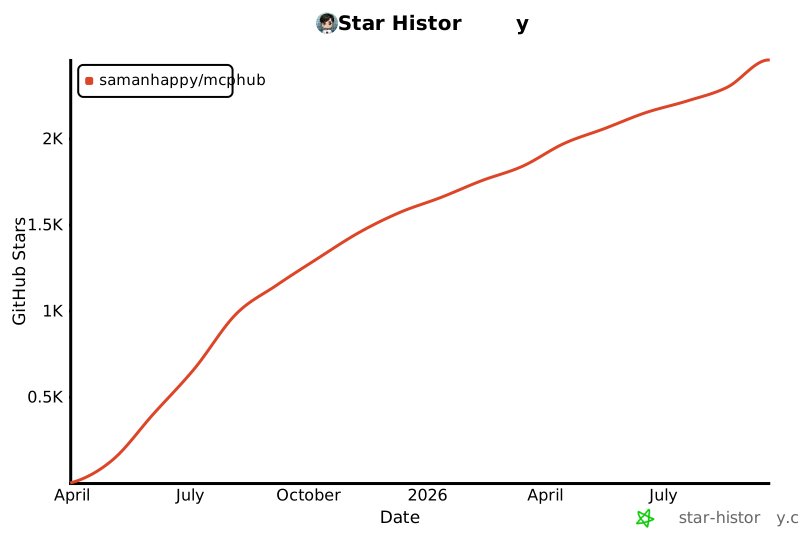](https://www.star-history.com/#samanhappy/mcphub&Date)
|
||||
|
||||
## 📄 Licence
|
||||
|
||||
Sous licence [Apache 2.0 License](LICENSE).
|
||||
@@ -1,11 +1,16 @@
|
||||
# MCPHub: The Unified Hub for Model Context Protocol (MCP) Servers
|
||||
|
||||
English | [中文版](README.zh.md)
|
||||
English | [Français](README.fr.md) | [中文版](README.zh.md)
|
||||
|
||||
MCPHub makes it easy to manage and scale multiple MCP (Model Context Protocol) servers by organizing them into flexible Streamable HTTP (SSE) endpoints—supporting access to all servers, individual servers, or logical server groups.
|
||||
|
||||

|
||||
|
||||
## 🌐 Live Demo & Docs
|
||||
|
||||
- **Documentation**: [docs.mcphubx.com](https://docs.mcphubx.com/)
|
||||
- **Demo Environment**: [demo.mcphubx.com](https://demo.mcphubx.com/)
|
||||
|
||||
## 🚀 Features
|
||||
|
||||
- **Broadened MCP Server Support**: Seamlessly integrate any MCP server with minimal configuration.
|
||||
|
||||
@@ -1,11 +1,16 @@
|
||||
# MCPHub:一站式 MCP 服务器聚合平台
|
||||
|
||||
[English Version](README.md) | 中文版
|
||||
[English](README.md) | [Français](README.fr.md) | 中文版
|
||||
|
||||
MCPHub 通过将多个 MCP(Model Context Protocol)服务器组织为灵活的流式 HTTP(SSE)端点,简化了管理与扩展工作。系统支持按需访问全部服务器、单个服务器或按场景分组的服务器集合。
|
||||
|
||||

|
||||
|
||||
## 🌐 在线文档与演示
|
||||
|
||||
- **文档地址**: [docs.mcphubx.com](https://docs.mcphubx.com/)
|
||||
- **演示环境**: [demo.mcphubx.com](https://demo.mcphubx.com/)
|
||||
|
||||
## 🚀 功能亮点
|
||||
|
||||
- **广泛的 MCP 服务器支持**:无缝集成任何 MCP 服务器,配置简单。
|
||||
|
||||
@@ -48,11 +48,11 @@ MCPHub 已内置多个常用 MCP 服务,如高德地图、GitHub、Slack、Fet
|
||||
|
||||

|
||||
|
||||
点击保存后,MCP Hub 将自动重启高德地图的 MCP 服务,使新配置生效。
|
||||
点击保存后,MCPHub 将自动重启高德地图的 MCP 服务,使新配置生效。
|
||||
|
||||
### 配置 MCP Hub SSE
|
||||
### 配置 MCPHub SSE
|
||||
|
||||
MCP Hub 提供了单一聚合的 MCP Server SSE 端点:`http://localhost:3000/sse`,可在任意支持 MCP 的客户端中配置使用。这里我们选择开源的 Cherry Studio 进行演示。
|
||||
MCPHub 提供了单一聚合的 MCP Server SSE 端点:`http://localhost:3000/sse`,可在任意支持 MCP 的客户端中配置使用。这里我们选择开源的 Cherry Studio 进行演示。
|
||||
|
||||

|
||||
|
||||
|
||||
147
docs/api-reference/auth.mdx
Normal file
147
docs/api-reference/auth.mdx
Normal file
@@ -0,0 +1,147 @@
|
||||
---
|
||||
title: "Authentication"
|
||||
description: "Manage users and authentication."
|
||||
---
|
||||
|
||||
import { Card, Cards } from 'mintlify';
|
||||
|
||||
<Card
|
||||
title="POST /api/auth/login"
|
||||
href="#login"
|
||||
>
|
||||
Log in to get a JWT token.
|
||||
</Card>
|
||||
|
||||
<Card
|
||||
title="POST /api/auth/register"
|
||||
href="#register"
|
||||
>
|
||||
Register a new user.
|
||||
</Card>
|
||||
|
||||
<Card
|
||||
title="GET /api/auth/user"
|
||||
href="#get-current-user"
|
||||
>
|
||||
Get the currently authenticated user.
|
||||
</Card>
|
||||
|
||||
<Card
|
||||
title="POST /api/auth/change-password"
|
||||
href="#change-password"
|
||||
>
|
||||
Change the password for the current user.
|
||||
</Card>
|
||||
|
||||
---
|
||||
|
||||
### Login
|
||||
|
||||
Authenticates a user and returns a JWT token along with user details.
|
||||
|
||||
- **Endpoint**: `/api/auth/login`
|
||||
- **Method**: `POST`
|
||||
- **Body**:
|
||||
- `username` (string, required): The user's username.
|
||||
- `password` (string, required): The user's password.
|
||||
- **Request Example**:
|
||||
```json
|
||||
{
|
||||
"username": "admin",
|
||||
"password": "admin123"
|
||||
}
|
||||
```
|
||||
- **Success Response**:
|
||||
```json
|
||||
{
|
||||
"success": true,
|
||||
"message": "Login successful",
|
||||
"token": "eyJhbGciOiJIUzI1NiIsInR5cCI6IkpXVCJ9...",
|
||||
"user": {
|
||||
"username": "admin",
|
||||
"isAdmin": true,
|
||||
"permissions": { ... }
|
||||
}
|
||||
}
|
||||
```
|
||||
|
||||
---
|
||||
|
||||
### Register
|
||||
|
||||
Registers a new user and returns a JWT token.
|
||||
|
||||
- **Endpoint**: `/api/auth/register`
|
||||
- **Method**: `POST`
|
||||
- **Body**:
|
||||
- `username` (string, required): The desired username.
|
||||
- `password` (string, required): The desired password (must be at least 6 characters).
|
||||
- `isAdmin` (boolean, optional): Whether the user should have admin privileges.
|
||||
- **Request Example**:
|
||||
```json
|
||||
{
|
||||
"username": "newuser",
|
||||
"password": "password123",
|
||||
"isAdmin": false
|
||||
}
|
||||
```
|
||||
- **Success Response**:
|
||||
```json
|
||||
{
|
||||
"success": true,
|
||||
"token": "eyJhbGciOiJIUzI1NiIsInR5cCI6IkpXVCJ9...",
|
||||
"user": {
|
||||
"username": "newuser",
|
||||
"isAdmin": false,
|
||||
"permissions": { ... }
|
||||
}
|
||||
}
|
||||
```
|
||||
|
||||
---
|
||||
|
||||
### Get Current User
|
||||
|
||||
Retrieves the profile of the currently authenticated user.
|
||||
|
||||
- **Endpoint**: `/api/auth/user`
|
||||
- **Method**: `GET`
|
||||
- **Authentication**: Bearer Token required.
|
||||
- **Success Response**:
|
||||
```json
|
||||
{
|
||||
"success": true,
|
||||
"user": {
|
||||
"username": "admin",
|
||||
"isAdmin": true,
|
||||
"permissions": { ... }
|
||||
}
|
||||
}
|
||||
```
|
||||
|
||||
---
|
||||
|
||||
### Change Password
|
||||
|
||||
Allows the authenticated user to change their password.
|
||||
|
||||
- **Endpoint**: `/api/auth/change-password`
|
||||
- **Method**: `POST`
|
||||
- **Authentication**: Bearer Token required.
|
||||
- **Body**:
|
||||
- `currentPassword` (string, required): The user's current password.
|
||||
- `newPassword` (string, required): The desired new password (must be at least 6 characters).
|
||||
- **Request Example**:
|
||||
```json
|
||||
{
|
||||
"currentPassword": "oldpassword",
|
||||
"newPassword": "newpassword123"
|
||||
}
|
||||
```
|
||||
- **Success Response**:
|
||||
```json
|
||||
{
|
||||
"success": true,
|
||||
"message": "Password updated successfully"
|
||||
}
|
||||
```
|
||||
111
docs/api-reference/config.mdx
Normal file
111
docs/api-reference/config.mdx
Normal file
@@ -0,0 +1,111 @@
|
||||
---
|
||||
title: "Config"
|
||||
description: "Manage and retrieve system-wide configurations."
|
||||
---
|
||||
|
||||
import { Card, Cards } from 'mintlify';
|
||||
|
||||
<Card title="PUT /api/system-config" href="#update-system-config">Update the main system configuration.</Card>
|
||||
<Card title="GET /api/settings" href="#get-all-settings">Get all system settings, including servers and groups.</Card>
|
||||
<Card title="GET /config" href="#get-runtime-config">Get public runtime configuration for the frontend.</Card>
|
||||
<Card title="GET /public-config" href="#get-public-config">Get public configuration to check for auth skip.</Card>
|
||||
|
||||
---
|
||||
|
||||
### Update System Config
|
||||
|
||||
Updates various parts of the system configuration. You only need to provide the keys for the sections you want to update.
|
||||
|
||||
- **Endpoint**: `/api/system-config`
|
||||
- **Method**: `PUT`
|
||||
- **Body**: A JSON object containing one or more of the following top-level keys: `routing`, `install`, `smartRouting`, `mcpRouter`.
|
||||
|
||||
#### Routing Configuration (`routing`)
|
||||
|
||||
- `enableGlobalRoute` (boolean): Enable or disable the global `/api/mcp` route.
|
||||
- `enableGroupNameRoute` (boolean): Enable or disable group-based routing (e.g., `/api/mcp/group/:groupName`).
|
||||
- `enableBearerAuth` (boolean): Enable bearer token authentication for MCP routes.
|
||||
- `bearerAuthKey` (string): The secret key to use for bearer authentication.
|
||||
- `skipAuth` (boolean): If true, skips all authentication, making the instance public.
|
||||
|
||||
#### Install Configuration (`install`)
|
||||
|
||||
- `pythonIndexUrl` (string): The base URL of the Python Package Index (PyPI) to use for installations.
|
||||
- `npmRegistry` (string): The URL of the npm registry to use for installations.
|
||||
- `baseUrl` (string): The public base URL of this MCPHub instance.
|
||||
|
||||
#### Smart Routing Configuration (`smartRouting`)
|
||||
|
||||
- `enabled` (boolean): Enable or disable the Smart Routing feature.
|
||||
- `dbUrl` (string): The database connection URL for storing embeddings.
|
||||
- `openaiApiBaseUrl` (string): The base URL for the OpenAI-compatible API for generating embeddings.
|
||||
- `openaiApiKey` (string): The API key for the embeddings service.
|
||||
- `openaiApiEmbeddingModel` (string): The name of the embedding model to use.
|
||||
|
||||
#### MCP Router Configuration (`mcpRouter`)
|
||||
|
||||
- `apiKey` (string): The API key for the MCP Router service.
|
||||
- `referer` (string): The referer header to use for MCP Router requests.
|
||||
- `title` (string): The title to display for this instance on MCP Router.
|
||||
- `baseUrl` (string): The base URL for the MCP Router API.
|
||||
|
||||
- **Request Example**:
|
||||
```json
|
||||
{
|
||||
"routing": {
|
||||
"skipAuth": true
|
||||
},
|
||||
"smartRouting": {
|
||||
"enabled": true,
|
||||
"dbUrl": "postgresql://user:pass@host:port/db"
|
||||
}
|
||||
}
|
||||
```
|
||||
|
||||
---
|
||||
|
||||
### Get All Settings
|
||||
|
||||
Retrieves the entire settings object for the instance, including all server configurations, groups, and system settings. This is a comprehensive dump of the `mcp_settings.json` file.
|
||||
|
||||
- **Endpoint**: `/api/settings`
|
||||
- **Method**: `GET`
|
||||
|
||||
---
|
||||
|
||||
### Get Runtime Config
|
||||
|
||||
Retrieves the essential runtime configuration required for the frontend application. This endpoint does not require authentication.
|
||||
|
||||
- **Endpoint**: `/config`
|
||||
- **Method**: `GET`
|
||||
- **Success Response**:
|
||||
```json
|
||||
{
|
||||
"success": true,
|
||||
"data": {
|
||||
"basePath": "",
|
||||
"version": "1.0.0",
|
||||
"name": "MCPHub"
|
||||
}
|
||||
}
|
||||
```
|
||||
|
||||
---
|
||||
|
||||
### Get Public Config
|
||||
|
||||
Retrieves public configuration, primarily to check if authentication is skipped. This allows the frontend to adjust its behavior accordingly before a user has logged in. This endpoint does not require authentication.
|
||||
|
||||
- **Endpoint**: `/public-config`
|
||||
- **Method**: `GET`
|
||||
- **Success Response**:
|
||||
```json
|
||||
{
|
||||
"success": true,
|
||||
"data": {
|
||||
"skipAuth": false,
|
||||
"permissions": {}
|
||||
}
|
||||
}
|
||||
```
|
||||
@@ -1,4 +0,0 @@
|
||||
---
|
||||
title: 'Create Plant'
|
||||
openapi: 'POST /plants'
|
||||
---
|
||||
@@ -1,4 +0,0 @@
|
||||
---
|
||||
title: 'Delete Plant'
|
||||
openapi: 'DELETE /plants/{id}'
|
||||
---
|
||||
@@ -1,4 +0,0 @@
|
||||
---
|
||||
title: 'Get Plants'
|
||||
openapi: 'GET /plants'
|
||||
---
|
||||
@@ -1,4 +0,0 @@
|
||||
---
|
||||
title: 'New Plant'
|
||||
openapi: 'WEBHOOK /plant/webhook'
|
||||
---
|
||||
212
docs/api-reference/groups.mdx
Normal file
212
docs/api-reference/groups.mdx
Normal file
@@ -0,0 +1,212 @@
|
||||
---
|
||||
title: "Groups"
|
||||
description: "Manage server groups to organize and route requests."
|
||||
---
|
||||
|
||||
import { Card, Cards } from 'mintlify';
|
||||
|
||||
<Card title="GET /api/groups" href="#get-all-groups">Get a list of all groups.</Card>
|
||||
<Card title="POST /api/groups" href="#create-a-new-group">Create a new group.</Card>
|
||||
<Card title="GET /api/groups/:id" href="#get-a-group">Get details of a specific group.</Card>
|
||||
<Card title="PUT /api/groups/:id" href="#update-a-group">Update an existing group.</Card>
|
||||
<Card title="DELETE /api/groups/:id" href="#delete-a-group">Delete a group.</Card>
|
||||
<Card title="POST /api/groups/:id/servers" href="#add-server-to-group">Add a server to a group.</Card>
|
||||
<Card title="DELETE /api/groups/:id/servers/:serverName" href="#remove-server-from-group">Remove a server from a group.</Card>
|
||||
<Card title="PUT /api/groups/:id/servers/batch" href="#batch-update-group-servers">Batch update servers in a group.</Card>
|
||||
<Card title="GET /api/groups/:id/server-configs" href="#get-group-server-configs">Get detailed server configurations in a group.</Card>
|
||||
<Card title="PUT /api/groups/:id/server-configs/:serverName/tools" href="#update-group-server-tools">Update tool selection for a server in a group.</Card>
|
||||
|
||||
---
|
||||
|
||||
### Get All Groups
|
||||
|
||||
Retrieves a list of all server groups.
|
||||
|
||||
- **Endpoint**: `/api/groups`
|
||||
- **Method**: `GET`
|
||||
- **Success Response**:
|
||||
```json
|
||||
{
|
||||
"success": true,
|
||||
"data": [
|
||||
{
|
||||
"id": "group-1",
|
||||
"name": "My Group",
|
||||
"description": "A collection of servers.",
|
||||
"servers": ["server1", "server2"],
|
||||
"owner": "admin"
|
||||
}
|
||||
]
|
||||
}
|
||||
```
|
||||
|
||||
---
|
||||
|
||||
### Create a New Group
|
||||
|
||||
Creates a new server group.
|
||||
|
||||
- **Endpoint**: `/api/groups`
|
||||
- **Method**: `POST`
|
||||
- **Body**:
|
||||
- `name` (string, required): The name of the group.
|
||||
- `description` (string, optional): A description for the group.
|
||||
- `servers` (array of strings, optional): A list of server names to include in the group.
|
||||
- **Request Example**:
|
||||
```json
|
||||
{
|
||||
"name": "My New Group",
|
||||
"description": "A description for the new group",
|
||||
"servers": ["server1", "server2"]
|
||||
}
|
||||
```
|
||||
|
||||
---
|
||||
|
||||
### Get a Group
|
||||
|
||||
Retrieves details for a specific group by its ID or name.
|
||||
|
||||
- **Endpoint**: `/api/groups/:id`
|
||||
- **Method**: `GET`
|
||||
- **Parameters**:
|
||||
- `:id` (string, required): The ID or name of the group.
|
||||
|
||||
---
|
||||
|
||||
### Update a Group
|
||||
|
||||
Updates an existing group's name, description, or server list.
|
||||
|
||||
- **Endpoint**: `/api/groups/:id`
|
||||
- **Method**: `PUT`
|
||||
- **Parameters**:
|
||||
- `:id` (string, required): The ID or name of the group to update.
|
||||
- **Body**:
|
||||
- `name` (string, optional): The new name for the group.
|
||||
- `description` (string, optional): The new description for the group.
|
||||
- `servers` (array, optional): The new list of servers for the group. See [Batch Update Group Servers](#batch-update-group-servers) for format.
|
||||
- **Request Example**:
|
||||
```json
|
||||
{
|
||||
"name": "Updated Group Name",
|
||||
"description": "Updated description"
|
||||
}
|
||||
```
|
||||
|
||||
---
|
||||
|
||||
### Delete a Group
|
||||
|
||||
Deletes a group by its ID or name.
|
||||
|
||||
- **Endpoint**: `/api/groups/:id`
|
||||
- **Method**: `DELETE`
|
||||
- **Parameters**:
|
||||
- `:id` (string, required): The ID or name of the group to delete.
|
||||
|
||||
---
|
||||
|
||||
### Add Server to Group
|
||||
|
||||
Adds a single server to a group.
|
||||
|
||||
- **Endpoint**: `/api/groups/:id/servers`
|
||||
- **Method**: `POST`
|
||||
- **Parameters**:
|
||||
- `:id` (string, required): The ID or name of the group.
|
||||
- **Body**:
|
||||
- `serverName` (string, required): The name of the server to add.
|
||||
- **Request Example**:
|
||||
```json
|
||||
{
|
||||
"serverName": "my-server"
|
||||
}
|
||||
```
|
||||
|
||||
---
|
||||
|
||||
### Remove Server from Group
|
||||
|
||||
Removes a single server from a group.
|
||||
|
||||
- **Endpoint**: `/api/groups/:id/servers/:serverName`
|
||||
- **Method**: `DELETE`
|
||||
- **Parameters**:
|
||||
- `:id` (string, required): The ID or name of the group.
|
||||
- `:serverName` (string, required): The name of the server to remove.
|
||||
|
||||
---
|
||||
|
||||
### Batch Update Group Servers
|
||||
|
||||
Replaces all servers in a group with a new list. The list can be simple strings or detailed configuration objects.
|
||||
|
||||
- **Endpoint**: `/api/groups/:id/servers/batch`
|
||||
- **Method**: `PUT`
|
||||
- **Parameters**:
|
||||
- `:id` (string, required): The ID or name of the group.
|
||||
- **Body**:
|
||||
- `servers` (array, required): An array of server names (strings) or server configuration objects.
|
||||
- **Request Example (Simple)**:
|
||||
```json
|
||||
{
|
||||
"servers": ["server1", "server2"]
|
||||
}
|
||||
```
|
||||
- **Request Example (Detailed)**:
|
||||
```json
|
||||
{
|
||||
"servers": [
|
||||
{ "name": "server1", "tools": "all" },
|
||||
{ "name": "server2", "tools": ["toolA", "toolB"] }
|
||||
]
|
||||
}
|
||||
```
|
||||
|
||||
---
|
||||
|
||||
### Get Group Server Configs
|
||||
|
||||
Retrieves the detailed configuration for all servers within a group, including which tools are enabled.
|
||||
|
||||
- **Endpoint**: `/api/groups/:id/server-configs`
|
||||
- **Method**: `GET`
|
||||
- **Parameters**:
|
||||
- `:id` (string, required): The ID or name of the group.
|
||||
- **Success Response**:
|
||||
```json
|
||||
{
|
||||
"success": true,
|
||||
"data": [
|
||||
{
|
||||
"name": "server1",
|
||||
"tools": "all"
|
||||
},
|
||||
{
|
||||
"name": "server2",
|
||||
"tools": ["toolA", "toolB"]
|
||||
}
|
||||
]
|
||||
}
|
||||
```
|
||||
|
||||
---
|
||||
|
||||
### Update Group Server Tools
|
||||
|
||||
Updates the tool selection for a specific server within a group.
|
||||
|
||||
- **Endpoint**: `/api/groups/:id/server-configs/:serverName/tools`
|
||||
- **Method**: `PUT`
|
||||
- **Parameters**:
|
||||
- `:id` (string, required): The ID or name of the group.
|
||||
- `:serverName` (string, required): The name of the server to update.
|
||||
- **Body**:
|
||||
- `tools` (string or array of strings, required): Either the string `"all"` to enable all tools, or an array of tool names to enable specifically.
|
||||
- **Request Example**:
|
||||
```json
|
||||
{
|
||||
"tools": ["toolA", "toolC"]
|
||||
}
|
||||
```
|
||||
@@ -1,33 +1,13 @@
|
||||
---
|
||||
title: 'Introduction'
|
||||
description: 'Example section for showcasing API endpoints'
|
||||
title: "Introduction"
|
||||
description: "Welcome to the MCPHub API documentation."
|
||||
---
|
||||
|
||||
<Note>
|
||||
If you're not looking to build API reference documentation, you can delete
|
||||
this section by removing the api-reference folder.
|
||||
</Note>
|
||||
The MCPHub API provides a comprehensive set of endpoints to manage your MCP servers, groups, users, and more. The API is divided into two main categories:
|
||||
|
||||
## Welcome
|
||||
- **MCP Endpoints**: These are the primary endpoints for interacting with your MCP servers. They provide a unified interface for sending requests to your servers and receiving responses in real-time.
|
||||
- **Management API**: These endpoints are used for managing the MCPHub instance itself. This includes managing servers, groups, users, and system settings.
|
||||
|
||||
There are two ways to build API documentation: [OpenAPI](https://mintlify.com/docs/api-playground/openapi/setup) and [MDX components](https://mintlify.com/docs/api-playground/mdx/configuration). For the starter kit, we are using the following OpenAPI specification.
|
||||
All API endpoints are available under the `/api` path. For example, the endpoint to get all servers is `/api/servers`.
|
||||
|
||||
<Card
|
||||
title="Plant Store Endpoints"
|
||||
icon="leaf"
|
||||
href="https://github.com/mintlify/starter/blob/main/api-reference/openapi.json"
|
||||
>
|
||||
View the OpenAPI specification file
|
||||
</Card>
|
||||
|
||||
## Authentication
|
||||
|
||||
All API endpoints are authenticated using Bearer tokens and picked up from the specification file.
|
||||
|
||||
```json
|
||||
"security": [
|
||||
{
|
||||
"bearerAuth": []
|
||||
}
|
||||
]
|
||||
```
|
||||
Authentication is required for most Management API endpoints. See the [Authentication](/api-reference/auth) section for more details.
|
||||
81
docs/api-reference/logs.mdx
Normal file
81
docs/api-reference/logs.mdx
Normal file
@@ -0,0 +1,81 @@
|
||||
---
|
||||
title: "Logs"
|
||||
description: "Access and manage server logs."
|
||||
---
|
||||
|
||||
import { Card, Cards } from 'mintlify';
|
||||
|
||||
<Card
|
||||
title="GET /api/logs"
|
||||
href="#get-all-logs"
|
||||
>
|
||||
Get all logs.
|
||||
</Card>
|
||||
|
||||
<Card
|
||||
title="DELETE /api/logs"
|
||||
href="#clear-logs"
|
||||
>
|
||||
Clear all logs.
|
||||
</Card>
|
||||
|
||||
<Card
|
||||
title="GET /api/logs/stream"
|
||||
href="#stream-logs"
|
||||
>
|
||||
Stream logs in real-time.
|
||||
</Card>
|
||||
|
||||
---
|
||||
|
||||
### Get All Logs
|
||||
|
||||
Retrieves all stored logs.
|
||||
|
||||
- **Endpoint**: `/api/logs`
|
||||
- **Method**: `GET`
|
||||
- **Success Response**:
|
||||
```json
|
||||
{
|
||||
"success": true,
|
||||
"data": [
|
||||
{
|
||||
"timestamp": "2023-10-27T10:00:00.000Z",
|
||||
"level": "info",
|
||||
"message": "Server started successfully.",
|
||||
"service": "system"
|
||||
}
|
||||
]
|
||||
}
|
||||
```
|
||||
|
||||
---
|
||||
|
||||
### Clear Logs
|
||||
|
||||
Deletes all stored logs.
|
||||
|
||||
- **Endpoint**: `/api/logs`
|
||||
- **Method**: `DELETE`
|
||||
- **Success Response**:
|
||||
```json
|
||||
{
|
||||
"success": true,
|
||||
"message": "Logs cleared successfully"
|
||||
}
|
||||
```
|
||||
|
||||
---
|
||||
|
||||
### Stream Logs
|
||||
|
||||
Streams logs in real-time using Server-Sent Events (SSE). The connection will remain open, and new log entries will be sent as they occur.
|
||||
|
||||
- **Endpoint**: `/api/logs/stream`
|
||||
- **Method**: `GET`
|
||||
- **Response Format**: The stream sends events with a `data` field containing a JSON object. The first event has `type: 'initial'` and contains all historical logs. Subsequent events have `type: 'log'` and contain a single new log entry.
|
||||
|
||||
- **Example Event**:
|
||||
```
|
||||
data: {"type":"log","log":{"timestamp":"2023-10-27T10:00:05.000Z","level":"debug","message":"Processing request for /api/some-endpoint","service":"mcp-server"}}
|
||||
```
|
||||
33
docs/api-reference/mcp-http.mdx
Normal file
33
docs/api-reference/mcp-http.mdx
Normal file
@@ -0,0 +1,33 @@
|
||||
---
|
||||
title: "MCP HTTP Endpoints"
|
||||
description: "Connect to your MCP servers using the unified HTTP endpoint."
|
||||
---
|
||||
|
||||
MCPHub provides a unified streamable HTTP interface for all your MCP servers. This allows you to send requests to any configured MCP server and receive responses in real-time.
|
||||
|
||||
### Unified Endpoint
|
||||
|
||||
This endpoint provides access to all enabled MCP servers.
|
||||
|
||||
- **Endpoint**: `http://localhost:3000/mcp`
|
||||
- **Method**: `POST`
|
||||
|
||||
### Group-Specific Endpoint
|
||||
|
||||
For targeted access to specific server groups, use the group-based HTTP endpoint.
|
||||
|
||||
- **Endpoint**: `http://localhost:3000/mcp/{group}`
|
||||
- **Method**: `POST`
|
||||
- **Parameters**:
|
||||
- `{group}`: The ID or name of the group.
|
||||
|
||||
### Server-Specific Endpoint
|
||||
|
||||
For direct access to individual servers, use the server-specific HTTP endpoint.
|
||||
|
||||
- **Endpoint**: `http://localhost:3000/mcp/{server}`
|
||||
- **Method**: `POST`
|
||||
- **Parameters**:
|
||||
- `{server}`: The name of the server.
|
||||
|
||||
> **Note**: If a server name and group name are the same, the group will take precedence.
|
||||
25
docs/api-reference/mcp-sse.mdx
Normal file
25
docs/api-reference/mcp-sse.mdx
Normal file
@@ -0,0 +1,25 @@
|
||||
---
|
||||
title: "MCP SSE Endpoints (Deprecated)"
|
||||
description: "Connect to your MCP servers using the SSE endpoint."
|
||||
---
|
||||
|
||||
The SSE endpoint is deprecated and will be removed in a future version. Please use the [MCP HTTP Endpoints](/api-reference/mcp-http) instead.
|
||||
|
||||
### Unified Endpoint
|
||||
|
||||
- **Endpoint**: `http://localhost:3000/sse`
|
||||
- **Method**: `GET`
|
||||
|
||||
### Group-Specific Endpoint
|
||||
|
||||
- **Endpoint**: `http://localhost:3000/sse/{group}`
|
||||
- **Method**: `GET`
|
||||
- **Parameters**:
|
||||
- `{group}`: The ID or name of the group.
|
||||
|
||||
### Server-Specific Endpoint
|
||||
|
||||
- **Endpoint**: `http://localhost:3000/sse/{server}`
|
||||
- **Method**: `GET`
|
||||
- **Parameters**:
|
||||
- `{server}`: The name of the server.
|
||||
250
docs/api-reference/openapi.mdx
Normal file
250
docs/api-reference/openapi.mdx
Normal file
@@ -0,0 +1,250 @@
|
||||
---
|
||||
title: "OpenAPI Integration"
|
||||
description: "Generate OpenAPI specifications from MCP tools for seamless integration with OpenWebUI and other systems"
|
||||
---
|
||||
|
||||
# OpenAPI Generation for OpenWebUI Integration
|
||||
|
||||
MCPHub now supports generating OpenAPI 3.0.3 specifications from MCP tools, enabling seamless integration with OpenWebUI and other OpenAPI-compatible systems without requiring MCPO as an intermediary proxy.
|
||||
|
||||
## Features
|
||||
|
||||
- ✅ **Automatic OpenAPI Generation**: Converts MCP tools to OpenAPI 3.0.3 specification
|
||||
- ✅ **OpenWebUI Compatible**: Direct integration without MCPO proxy
|
||||
- ✅ **Real-time Tool Discovery**: Dynamically includes tools from connected MCP servers
|
||||
- ✅ **Dual Parameter Support**: Supports both GET (query params) and POST (JSON body) for tool execution
|
||||
- ✅ **No Authentication Required**: OpenAPI endpoints are public for easy integration
|
||||
- ✅ **Comprehensive Metadata**: Full OpenAPI specification with proper schemas and documentation
|
||||
|
||||
## API Endpoints
|
||||
|
||||
### OpenAPI Specification
|
||||
|
||||
<CodeGroup>
|
||||
|
||||
```bash GET /api/openapi.json
|
||||
curl "http://localhost:3000/api/openapi.json"
|
||||
```
|
||||
|
||||
```bash With Parameters
|
||||
curl "http://localhost:3000/api/openapi.json?title=My MCP API&version=2.0.0"
|
||||
```
|
||||
|
||||
</CodeGroup>
|
||||
|
||||
Generates and returns the complete OpenAPI 3.0.3 specification for all connected MCP tools.
|
||||
|
||||
**Query Parameters:**
|
||||
|
||||
<ParamField query="title" type="string" optional>
|
||||
Custom API title
|
||||
</ParamField>
|
||||
|
||||
<ParamField query="description" type="string" optional>
|
||||
Custom API description
|
||||
</ParamField>
|
||||
|
||||
<ParamField query="version" type="string" optional>
|
||||
Custom API version
|
||||
</ParamField>
|
||||
|
||||
<ParamField query="serverUrl" type="string" optional>
|
||||
Custom server URL
|
||||
</ParamField>
|
||||
|
||||
<ParamField query="includeDisabled" type="boolean" optional default="false">
|
||||
Include disabled tools
|
||||
</ParamField>
|
||||
|
||||
<ParamField query="servers" type="string" optional>
|
||||
Comma-separated list of server names to include
|
||||
</ParamField>
|
||||
|
||||
### Available Servers
|
||||
|
||||
<CodeGroup>
|
||||
|
||||
```bash GET /api/openapi/servers
|
||||
curl "http://localhost:3000/api/openapi/servers"
|
||||
```
|
||||
|
||||
</CodeGroup>
|
||||
|
||||
Returns a list of connected MCP server names.
|
||||
|
||||
<ResponseExample>
|
||||
|
||||
```json Example Response
|
||||
{
|
||||
"success": true,
|
||||
"data": ["amap", "playwright", "slack"]
|
||||
}
|
||||
```
|
||||
|
||||
</ResponseExample>
|
||||
|
||||
### Tool Statistics
|
||||
|
||||
<CodeGroup>
|
||||
|
||||
```bash GET /api/openapi/stats
|
||||
curl "http://localhost:3000/api/openapi/stats"
|
||||
```
|
||||
|
||||
</CodeGroup>
|
||||
|
||||
Returns statistics about available tools and servers.
|
||||
|
||||
<ResponseExample>
|
||||
|
||||
```json Example Response
|
||||
{
|
||||
"success": true,
|
||||
"data": {
|
||||
"totalServers": 3,
|
||||
"totalTools": 41,
|
||||
"serverBreakdown": [
|
||||
{"name": "amap", "toolCount": 12, "status": "connected"},
|
||||
{"name": "playwright", "toolCount": 21, "status": "connected"},
|
||||
{"name": "slack", "toolCount": 8, "status": "connected"}
|
||||
]
|
||||
}
|
||||
}
|
||||
```
|
||||
|
||||
</ResponseExample>
|
||||
|
||||
### Tool Execution
|
||||
|
||||
<CodeGroup>
|
||||
|
||||
```bash GET /api/tools/{serverName}/{toolName}
|
||||
curl "http://localhost:3000/api/tools/amap/amap-maps_weather?city=Beijing"
|
||||
```
|
||||
|
||||
```bash POST /api/tools/{serverName}/{toolName}
|
||||
curl -X POST "http://localhost:3000/api/tools/playwright/playwright-browser_navigate" \
|
||||
-H "Content-Type: application/json" \
|
||||
-d '{"url": "https://example.com"}'
|
||||
```
|
||||
|
||||
</CodeGroup>
|
||||
|
||||
Execute MCP tools via OpenAPI-compatible endpoints.
|
||||
|
||||
**Path Parameters:**
|
||||
|
||||
<ParamField path="serverName" type="string" required>
|
||||
The name of the MCP server
|
||||
</ParamField>
|
||||
|
||||
<ParamField path="toolName" type="string" required>
|
||||
The name of the tool to execute
|
||||
</ParamField>
|
||||
|
||||
## OpenWebUI Integration
|
||||
|
||||
To integrate MCPHub with OpenWebUI:
|
||||
|
||||
<Steps>
|
||||
<Step title="Start MCPHub">
|
||||
Ensure MCPHub is running with your MCP servers configured
|
||||
</Step>
|
||||
<Step title="Get OpenAPI Specification">
|
||||
```bash
|
||||
curl http://localhost:3000/api/openapi.json > mcphub-api.json
|
||||
```
|
||||
</Step>
|
||||
<Step title="Add to OpenWebUI">
|
||||
Import the OpenAPI specification file or point to the URL directly in OpenWebUI
|
||||
</Step>
|
||||
</Steps>
|
||||
|
||||
### Configuration Example
|
||||
|
||||
In OpenWebUI, you can add MCPHub as an OpenAPI tool by using:
|
||||
|
||||
<CardGroup cols={2}>
|
||||
<Card title="OpenAPI URL" icon="link">
|
||||
`http://localhost:3000/api/openapi.json`
|
||||
</Card>
|
||||
<Card title="Base URL" icon="server">
|
||||
`http://localhost:3000/api`
|
||||
</Card>
|
||||
</CardGroup>
|
||||
|
||||
## Generated OpenAPI Structure
|
||||
|
||||
The generated OpenAPI specification includes:
|
||||
|
||||
### Tool Conversion Logic
|
||||
|
||||
- **Simple tools** (≤10 primitive parameters) → GET endpoints with query parameters
|
||||
- **Complex tools** (objects, arrays, or >10 parameters) → POST endpoints with JSON request body
|
||||
- **All tools** include comprehensive response schemas and error handling
|
||||
|
||||
### Example Generated Operation
|
||||
|
||||
```yaml
|
||||
/tools/amap/amap-maps_weather:
|
||||
get:
|
||||
summary: "根据城市名称或者标准adcode查询指定城市的天气"
|
||||
operationId: "amap_amap-maps_weather"
|
||||
tags: ["amap"]
|
||||
parameters:
|
||||
- name: city
|
||||
in: query
|
||||
required: true
|
||||
description: "城市名称或者adcode"
|
||||
schema:
|
||||
type: string
|
||||
responses:
|
||||
'200':
|
||||
description: "Successful tool execution"
|
||||
content:
|
||||
application/json:
|
||||
schema:
|
||||
$ref: '#/components/schemas/ToolResponse'
|
||||
```
|
||||
|
||||
### Security
|
||||
|
||||
- Bearer authentication is defined but not enforced for tool execution endpoints
|
||||
- Enables flexible integration with various OpenAPI-compatible systems
|
||||
|
||||
## Benefits over MCPO
|
||||
|
||||
<CardGroup cols={2}>
|
||||
<Card title="Direct Integration" icon="plug">
|
||||
No need for intermediate proxy
|
||||
</Card>
|
||||
<Card title="Real-time Updates" icon="refresh">
|
||||
OpenAPI spec updates automatically as MCP servers connect/disconnect
|
||||
</Card>
|
||||
<Card title="Better Performance" icon="bolt">
|
||||
Direct tool execution without proxy overhead
|
||||
</Card>
|
||||
<Card title="Simplified Architecture" icon="layer-group">
|
||||
One less component to manage
|
||||
</Card>
|
||||
</CardGroup>
|
||||
|
||||
## Troubleshooting
|
||||
|
||||
<AccordionGroup>
|
||||
<Accordion title="OpenAPI spec shows no tools">
|
||||
Ensure MCP servers are connected. Check `/api/openapi/stats` for server status.
|
||||
</Accordion>
|
||||
|
||||
<Accordion title="Tool execution fails">
|
||||
Verify the tool name and parameters match the OpenAPI specification. Check server logs for details.
|
||||
</Accordion>
|
||||
|
||||
<Accordion title="OpenWebUI can't connect">
|
||||
Ensure MCPHub is accessible from OpenWebUI and the OpenAPI URL is correct.
|
||||
</Accordion>
|
||||
|
||||
<Accordion title="Missing tools in specification">
|
||||
Check if tools are enabled in your MCP server configuration. Use `includeDisabled=true` to see all tools.
|
||||
</Accordion>
|
||||
</AccordionGroup>
|
||||
209
docs/api-reference/servers.mdx
Normal file
209
docs/api-reference/servers.mdx
Normal file
@@ -0,0 +1,209 @@
|
||||
---
|
||||
title: "Servers"
|
||||
description: "Manage your MCP servers."
|
||||
---
|
||||
|
||||
import { Card, Cards } from 'mintlify';
|
||||
|
||||
<Card
|
||||
title="GET /api/servers"
|
||||
href="#get-all-servers"
|
||||
>
|
||||
Get a list of all MCP servers.
|
||||
</Card>
|
||||
|
||||
<Card
|
||||
title="POST /api/servers"
|
||||
href="#create-a-new-server"
|
||||
>
|
||||
Create a new MCP server.
|
||||
</Card>
|
||||
|
||||
<Card
|
||||
title="PUT /api/servers/:name"
|
||||
href="#update-a-server"
|
||||
>
|
||||
Update an existing MCP server.
|
||||
</Card>
|
||||
|
||||
<Card
|
||||
title="DELETE /api/servers/:name"
|
||||
href="#delete-a-server"
|
||||
>
|
||||
Delete an MCP server.
|
||||
</Card>
|
||||
|
||||
<Card
|
||||
title="POST /api/servers/:name/toggle"
|
||||
href="#toggle-a-server"
|
||||
>
|
||||
Toggle the enabled state of a server.
|
||||
</Card>
|
||||
|
||||
<Card
|
||||
title="POST /api/servers/:serverName/tools/:toolName/toggle"
|
||||
href="#toggle-a-tool"
|
||||
>
|
||||
Toggle the enabled state of a tool.
|
||||
</Card>
|
||||
|
||||
<Card
|
||||
title="PUT /api/servers/:serverName/tools/:toolName/description"
|
||||
href="#update-tool-description"
|
||||
>
|
||||
Update the description of a tool.
|
||||
</Card>
|
||||
|
||||
---
|
||||
|
||||
### Get All Servers
|
||||
|
||||
Retrieves a list of all configured MCP servers, including their status and available tools.
|
||||
|
||||
- **Endpoint**: `/api/servers`
|
||||
- **Method**: `GET`
|
||||
- **Response**:
|
||||
```json
|
||||
{
|
||||
"success": true,
|
||||
"data": [
|
||||
{
|
||||
"name": "example-server",
|
||||
"status": "connected",
|
||||
"tools": [
|
||||
{
|
||||
"name": "tool1",
|
||||
"description": "Description of tool 1"
|
||||
}
|
||||
],
|
||||
"config": {
|
||||
"type": "stdio",
|
||||
"command": "node",
|
||||
"args": ["server.js"]
|
||||
}
|
||||
}
|
||||
]
|
||||
}
|
||||
```
|
||||
|
||||
---
|
||||
|
||||
### Create a New Server
|
||||
|
||||
Adds a new MCP server to the configuration.
|
||||
|
||||
- **Endpoint**: `/api/servers`
|
||||
- **Method**: `POST`
|
||||
- **Body**:
|
||||
```json
|
||||
{
|
||||
"name": "my-new-server",
|
||||
"config": {
|
||||
"type": "stdio",
|
||||
"command": "python",
|
||||
"args": ["-u", "my_script.py"],
|
||||
"owner": "admin"
|
||||
}
|
||||
}
|
||||
```
|
||||
- `name` (string, required): The unique name for the server.
|
||||
- `config` (object, required): The server configuration object.
|
||||
- `type` (string): `stdio`, `sse`, `streamable-http`, or `openapi`.
|
||||
- `command` (string): Command to execute for `stdio` type.
|
||||
- `args` (array of strings): Arguments for the command.
|
||||
- `url` (string): URL for `sse`, `streamable-http`, or `openapi` types.
|
||||
- `openapi` (object): OpenAPI configuration.
|
||||
- `url` (string): URL to the OpenAPI schema.
|
||||
- `schema` (object): The OpenAPI schema object itself.
|
||||
- `headers` (object): Headers to send with requests for `sse`, `streamable-http`, and `openapi` types.
|
||||
- `keepAliveInterval` (number): Keep-alive interval in milliseconds for `sse` type. Defaults to 60000.
|
||||
- `owner` (string): The owner of the server. Defaults to the current user or 'admin'.
|
||||
|
||||
---
|
||||
|
||||
### Update a Server
|
||||
|
||||
Updates the configuration of an existing MCP server.
|
||||
|
||||
- **Endpoint**: `/api/servers/:name`
|
||||
- **Method**: `PUT`
|
||||
- **Parameters**:
|
||||
- `:name` (string, required): The name of the server to update.
|
||||
- **Body**:
|
||||
```json
|
||||
{
|
||||
"config": {
|
||||
"type": "stdio",
|
||||
"command": "node",
|
||||
"args": ["new_server.js"]
|
||||
}
|
||||
}
|
||||
```
|
||||
- `config` (object, required): The updated server configuration object. See "Create a New Server" for details.
|
||||
|
||||
---
|
||||
|
||||
### Delete a Server
|
||||
|
||||
Removes an MCP server from the configuration.
|
||||
|
||||
- **Endpoint**: `/api/servers/:name`
|
||||
- **Method**: `DELETE`
|
||||
- **Parameters**:
|
||||
- `:name` (string, required): The name of the server to delete.
|
||||
|
||||
---
|
||||
|
||||
### Toggle a Server
|
||||
|
||||
Enables or disables an MCP server.
|
||||
|
||||
- **Endpoint**: `/api/servers/:name/toggle`
|
||||
- **Method**: `POST`
|
||||
- **Parameters**:
|
||||
- `:name` (string, required): The name of the server to toggle.
|
||||
- **Body**:
|
||||
```json
|
||||
{
|
||||
"enabled": true
|
||||
}
|
||||
```
|
||||
- `enabled` (boolean, required): `true` to enable the server, `false` to disable it.
|
||||
|
||||
---
|
||||
|
||||
### Toggle a Tool
|
||||
|
||||
Enables or disables a specific tool on a server.
|
||||
|
||||
- **Endpoint**: `/api/servers/:serverName/tools/:toolName/toggle`
|
||||
- **Method**: `POST`
|
||||
- **Parameters**:
|
||||
- `:serverName` (string, required): The name of the server.
|
||||
- `:toolName` (string, required): The name of the tool.
|
||||
- **Body**:
|
||||
```json
|
||||
{
|
||||
"enabled": true
|
||||
}
|
||||
```
|
||||
- `enabled` (boolean, required): `true` to enable the tool, `false` to disable it.
|
||||
|
||||
---
|
||||
|
||||
### Update Tool Description
|
||||
|
||||
Updates the description of a specific tool.
|
||||
|
||||
- **Endpoint**: `/api/servers/:serverName/tools/:toolName/description`
|
||||
- **Method**: `PUT`
|
||||
- **Parameters**:
|
||||
- `:serverName` (string, required): The name of the server.
|
||||
- `:toolName` (string, required): The name of the tool.
|
||||
- **Body**:
|
||||
```json
|
||||
{
|
||||
"description": "New tool description"
|
||||
}
|
||||
```
|
||||
- `description` (string, required): The new description for the tool.
|
||||
29
docs/api-reference/smart-routing.mdx
Normal file
29
docs/api-reference/smart-routing.mdx
Normal file
@@ -0,0 +1,29 @@
|
||||
---
|
||||
title: "Smart Routing"
|
||||
description: "Intelligent tool discovery using vector semantic search."
|
||||
---
|
||||
|
||||
Smart Routing is MCPHub's intelligent tool discovery system that uses vector semantic search to automatically find the most relevant tools for any given task.
|
||||
|
||||
### HTTP Endpoint
|
||||
|
||||
- **Endpoint**: `http://localhost:3000/mcp/$smart`
|
||||
- **Method**: `POST`
|
||||
|
||||
### SSE Endpoint (Deprecated)
|
||||
|
||||
- **Endpoint**: `http://localhost:3000/sse/$smart`
|
||||
- **Method**: `GET`
|
||||
|
||||
### How it Works
|
||||
|
||||
1. **Tool Indexing**: All MCP tools are automatically converted to vector embeddings and stored in PostgreSQL with pgvector.
|
||||
2. **Semantic Search**: User queries are converted to vectors and matched against tool embeddings using cosine similarity.
|
||||
3. **Intelligent Filtering**: Dynamic thresholds ensure relevant results without noise.
|
||||
4. **Precise Execution**: Found tools can be directly executed with proper parameter validation.
|
||||
|
||||
### Setup Requirements
|
||||
|
||||
- PostgreSQL with pgvector extension
|
||||
- OpenAI API key (or compatible embedding service)
|
||||
- Enable Smart Routing in MCPHub settings
|
||||
@@ -11,261 +11,34 @@ MCPHub uses environment variables for configuration. This guide covers all avail
|
||||
|
||||
### Server Configuration
|
||||
|
||||
| Variable | Default | Description |
|
||||
| ----------- | ------------- | ------------------------------------------------------------- |
|
||||
| `PORT` | `3000` | Port number for the HTTP server |
|
||||
| `HOST` | `0.0.0.0` | Host address to bind the server |
|
||||
| `NODE_ENV` | `development` | Application environment (`development`, `production`, `test`) |
|
||||
| `LOG_LEVEL` | `info` | Logging level (`error`, `warn`, `info`, `debug`) |
|
||||
| Variable | Default | Description |
|
||||
| --- | --- | --- |
|
||||
| `PORT` | `3000` | Port number for the HTTP server |
|
||||
| `INIT_TIMEOUT` | `300000` | Initial timeout for the application |
|
||||
| `BASE_PATH` | `''` | The base path of the application |
|
||||
| `READONLY` | `false` | Set to `true` to enable readonly mode |
|
||||
| `MCPHUB_SETTING_PATH` | | Path to the MCPHub settings |
|
||||
| `NODE_ENV` | `development` | Application environment (`development`, `production`, `test`) |
|
||||
|
||||
```env
|
||||
PORT=3000
|
||||
HOST=0.0.0.0
|
||||
INIT_TIMEOUT=300000
|
||||
BASE_PATH=/api
|
||||
READONLY=true
|
||||
MCPHUB_SETTING_PATH=/path/to/settings
|
||||
NODE_ENV=production
|
||||
LOG_LEVEL=info
|
||||
```
|
||||
|
||||
### Database Configuration
|
||||
|
||||
| Variable | Default | Description |
|
||||
| -------------- | ----------- | ---------------------------------- |
|
||||
| `DATABASE_URL` | - | PostgreSQL connection string |
|
||||
| `DB_HOST` | `localhost` | Database host |
|
||||
| `DB_PORT` | `5432` | Database port |
|
||||
| `DB_NAME` | `mcphub` | Database name |
|
||||
| `DB_USER` | `mcphub` | Database username |
|
||||
| `DB_PASSWORD` | - | Database password |
|
||||
| `DB_SSL` | `false` | Enable SSL for database connection |
|
||||
| `DB_POOL_MIN` | `2` | Minimum database pool size |
|
||||
| `DB_POOL_MAX` | `10` | Maximum database pool size |
|
||||
|
||||
```env
|
||||
# Option 1: Full connection string
|
||||
DATABASE_URL=postgresql://username:password@localhost:5432/mcphub
|
||||
|
||||
# Option 2: Individual components
|
||||
DB_HOST=localhost
|
||||
DB_PORT=5432
|
||||
DB_NAME=mcphub
|
||||
DB_USER=mcphub
|
||||
DB_PASSWORD=your-password
|
||||
DB_SSL=false
|
||||
```
|
||||
|
||||
## Authentication & Security
|
||||
|
||||
### JWT Configuration
|
||||
|
||||
| Variable | Default | Description |
|
||||
| ------------------------ | ------- | ------------------------------------------- |
|
||||
| `JWT_SECRET` | - | Secret key for JWT token signing (required) |
|
||||
| `JWT_EXPIRES_IN` | `24h` | JWT token expiration time |
|
||||
| `JWT_REFRESH_EXPIRES_IN` | `7d` | Refresh token expiration time |
|
||||
| `JWT_ALGORITHM` | `HS256` | JWT signing algorithm |
|
||||
| Variable | Default | Description |
|
||||
| --- | --- | --- |
|
||||
| `JWT_SECRET` | - | Secret key for JWT token signing (required) |
|
||||
|
||||
```env
|
||||
JWT_SECRET=your-super-secret-key-change-this-in-production
|
||||
JWT_EXPIRES_IN=24h
|
||||
JWT_REFRESH_EXPIRES_IN=7d
|
||||
```
|
||||
|
||||
### Session & Security
|
||||
|
||||
| Variable | Default | Description |
|
||||
| ------------------- | ------- | ------------------------------- |
|
||||
| `SESSION_SECRET` | - | Session encryption secret |
|
||||
| `BCRYPT_ROUNDS` | `12` | bcrypt hashing rounds |
|
||||
| `RATE_LIMIT_WINDOW` | `15` | Rate limiting window in minutes |
|
||||
| `RATE_LIMIT_MAX` | `100` | Maximum requests per window |
|
||||
| `CORS_ORIGIN` | `*` | Allowed CORS origins |
|
||||
|
||||
```env
|
||||
SESSION_SECRET=your-session-secret
|
||||
BCRYPT_ROUNDS=12
|
||||
RATE_LIMIT_WINDOW=15
|
||||
RATE_LIMIT_MAX=100
|
||||
CORS_ORIGIN=https://your-domain.com,https://admin.your-domain.com
|
||||
```
|
||||
|
||||
## External Services
|
||||
|
||||
### OpenAI Configuration
|
||||
|
||||
| Variable | Default | Description |
|
||||
| ------------------------ | ------------------------ | -------------------------------- |
|
||||
| `OPENAI_API_KEY` | - | OpenAI API key for smart routing |
|
||||
| `OPENAI_MODEL` | `gpt-3.5-turbo` | OpenAI model for embeddings |
|
||||
| `OPENAI_EMBEDDING_MODEL` | `text-embedding-ada-002` | Model for vector embeddings |
|
||||
| `OPENAI_MAX_TOKENS` | `1000` | Maximum tokens per request |
|
||||
| `OPENAI_TEMPERATURE` | `0.1` | Temperature for AI responses |
|
||||
|
||||
```env
|
||||
OPENAI_API_KEY=sk-your-openai-api-key
|
||||
OPENAI_MODEL=gpt-3.5-turbo
|
||||
OPENAI_EMBEDDING_MODEL=text-embedding-ada-002
|
||||
OPENAI_MAX_TOKENS=1000
|
||||
OPENAI_TEMPERATURE=0.1
|
||||
```
|
||||
|
||||
### Redis Configuration (Optional)
|
||||
|
||||
| Variable | Default | Description |
|
||||
| ---------------- | ----------- | ----------------------- |
|
||||
| `REDIS_URL` | - | Redis connection string |
|
||||
| `REDIS_HOST` | `localhost` | Redis host |
|
||||
| `REDIS_PORT` | `6379` | Redis port |
|
||||
| `REDIS_PASSWORD` | - | Redis password |
|
||||
| `REDIS_DB` | `0` | Redis database number |
|
||||
| `REDIS_PREFIX` | `mcphub:` | Key prefix for Redis |
|
||||
|
||||
```env
|
||||
# Option 1: Full connection string
|
||||
REDIS_URL=redis://username:password@localhost:6379/0
|
||||
|
||||
# Option 2: Individual components
|
||||
REDIS_HOST=localhost
|
||||
REDIS_PORT=6379
|
||||
REDIS_PASSWORD=your-redis-password
|
||||
REDIS_DB=0
|
||||
REDIS_PREFIX=mcphub:
|
||||
```
|
||||
|
||||
## MCP Server Configuration
|
||||
|
||||
### Default Settings
|
||||
|
||||
| Variable | Default | Description |
|
||||
| ------------------- | ------------------- | -------------------------------------------- |
|
||||
| `MCP_SETTINGS_FILE` | `mcp_settings.json` | Path to MCP settings file |
|
||||
| `MCP_SERVERS_FILE` | `servers.json` | Path to servers configuration |
|
||||
| `MCP_TIMEOUT` | `30000` | Default timeout for MCP operations (ms) |
|
||||
| `MCP_MAX_RETRIES` | `3` | Maximum retry attempts for failed operations |
|
||||
| `MCP_RESTART_DELAY` | `5000` | Delay before restarting failed servers (ms) |
|
||||
|
||||
```env
|
||||
MCP_SETTINGS_FILE=./config/mcp_settings.json
|
||||
MCP_SERVERS_FILE=./config/servers.json
|
||||
MCP_TIMEOUT=30000
|
||||
MCP_MAX_RETRIES=3
|
||||
MCP_RESTART_DELAY=5000
|
||||
```
|
||||
|
||||
### Smart Routing
|
||||
|
||||
| Variable | Default | Description |
|
||||
| --------------------------- | ------- | -------------------------------- |
|
||||
| `SMART_ROUTING_ENABLED` | `true` | Enable AI-powered smart routing |
|
||||
| `SMART_ROUTING_THRESHOLD` | `0.7` | Similarity threshold for routing |
|
||||
| `SMART_ROUTING_MAX_RESULTS` | `5` | Maximum tools to return |
|
||||
| `VECTOR_CACHE_TTL` | `3600` | Vector cache TTL in seconds |
|
||||
|
||||
```env
|
||||
SMART_ROUTING_ENABLED=true
|
||||
SMART_ROUTING_THRESHOLD=0.7
|
||||
SMART_ROUTING_MAX_RESULTS=5
|
||||
VECTOR_CACHE_TTL=3600
|
||||
```
|
||||
|
||||
## File Storage & Uploads
|
||||
|
||||
| Variable | Default | Description |
|
||||
| -------------------- | ---------------- | ----------------------------------- |
|
||||
| `UPLOAD_DIR` | `./uploads` | Directory for file uploads |
|
||||
| `MAX_FILE_SIZE` | `10485760` | Maximum file size in bytes (10MB) |
|
||||
| `ALLOWED_FILE_TYPES` | `image/*,text/*` | Allowed MIME types |
|
||||
| `STORAGE_TYPE` | `local` | Storage type (`local`, `s3`, `gcs`) |
|
||||
|
||||
```env
|
||||
UPLOAD_DIR=./data/uploads
|
||||
MAX_FILE_SIZE=10485760
|
||||
ALLOWED_FILE_TYPES=image/*,text/*,application/json
|
||||
STORAGE_TYPE=local
|
||||
```
|
||||
|
||||
### S3 Storage (Optional)
|
||||
|
||||
| Variable | Default | Description |
|
||||
| ---------------------- | ----------- | ------------------ |
|
||||
| `S3_BUCKET` | - | S3 bucket name |
|
||||
| `S3_REGION` | `us-east-1` | S3 region |
|
||||
| `S3_ACCESS_KEY_ID` | - | S3 access key |
|
||||
| `S3_SECRET_ACCESS_KEY` | - | S3 secret key |
|
||||
| `S3_ENDPOINT` | - | Custom S3 endpoint |
|
||||
|
||||
```env
|
||||
S3_BUCKET=mcphub-uploads
|
||||
S3_REGION=us-east-1
|
||||
S3_ACCESS_KEY_ID=your-access-key
|
||||
S3_SECRET_ACCESS_KEY=your-secret-key
|
||||
```
|
||||
|
||||
## Monitoring & Logging
|
||||
|
||||
### Application Monitoring
|
||||
|
||||
| Variable | Default | Description |
|
||||
| ------------------------ | ------- | ----------------------------- |
|
||||
| `METRICS_ENABLED` | `true` | Enable metrics collection |
|
||||
| `METRICS_PORT` | `9090` | Port for metrics endpoint |
|
||||
| `HEALTH_CHECK_INTERVAL` | `30000` | Health check interval (ms) |
|
||||
| `PERFORMANCE_MONITORING` | `false` | Enable performance monitoring |
|
||||
|
||||
```env
|
||||
METRICS_ENABLED=true
|
||||
METRICS_PORT=9090
|
||||
HEALTH_CHECK_INTERVAL=30000
|
||||
PERFORMANCE_MONITORING=true
|
||||
```
|
||||
|
||||
### Logging Configuration
|
||||
|
||||
| Variable | Default | Description |
|
||||
| ------------------ | ------------ | --------------------------------------- |
|
||||
| `LOG_FORMAT` | `json` | Log format (`json`, `text`) |
|
||||
| `LOG_FILE` | - | Log file path (if file logging enabled) |
|
||||
| `LOG_MAX_SIZE` | `10m` | Maximum log file size |
|
||||
| `LOG_MAX_FILES` | `5` | Maximum number of log files |
|
||||
| `LOG_DATE_PATTERN` | `YYYY-MM-DD` | Date pattern for log rotation |
|
||||
|
||||
```env
|
||||
LOG_FORMAT=json
|
||||
LOG_FILE=./logs/mcphub.log
|
||||
LOG_MAX_SIZE=10m
|
||||
LOG_MAX_FILES=5
|
||||
LOG_DATE_PATTERN=YYYY-MM-DD
|
||||
```
|
||||
|
||||
## Development & Debug
|
||||
|
||||
| Variable | Default | Description |
|
||||
| ------------------------ | ------- | ----------------------------------- |
|
||||
| `DEBUG` | - | Debug namespaces (e.g., `mcphub:*`) |
|
||||
| `DEV_TOOLS_ENABLED` | `false` | Enable development tools |
|
||||
| `HOT_RELOAD` | `true` | Enable hot reload in development |
|
||||
| `MOCK_EXTERNAL_SERVICES` | `false` | Mock external API calls |
|
||||
|
||||
```env
|
||||
DEBUG=mcphub:*
|
||||
DEV_TOOLS_ENABLED=true
|
||||
HOT_RELOAD=true
|
||||
MOCK_EXTERNAL_SERVICES=false
|
||||
```
|
||||
|
||||
## Production Optimization
|
||||
|
||||
| Variable | Default | Description |
|
||||
| ------------------ | ------- | -------------------------------------- |
|
||||
| `CLUSTER_MODE` | `false` | Enable cluster mode |
|
||||
| `WORKER_PROCESSES` | `0` | Number of worker processes (0 = auto) |
|
||||
| `MEMORY_LIMIT` | - | Memory limit per process |
|
||||
| `CPU_LIMIT` | - | CPU limit per process |
|
||||
| `GC_OPTIMIZE` | `false` | Enable garbage collection optimization |
|
||||
|
||||
```env
|
||||
CLUSTER_MODE=true
|
||||
WORKER_PROCESSES=4
|
||||
MEMORY_LIMIT=512M
|
||||
GC_OPTIMIZE=true
|
||||
```
|
||||
|
||||
## Configuration Examples
|
||||
@@ -276,22 +49,9 @@ GC_OPTIMIZE=true
|
||||
# .env.development
|
||||
NODE_ENV=development
|
||||
PORT=3000
|
||||
LOG_LEVEL=debug
|
||||
|
||||
# Database
|
||||
DATABASE_URL=postgresql://mcphub:password@localhost:5432/mcphub_dev
|
||||
|
||||
# Auth
|
||||
JWT_SECRET=dev-secret-key
|
||||
JWT_EXPIRES_IN=24h
|
||||
|
||||
# OpenAI (optional for development)
|
||||
# OPENAI_API_KEY=your-dev-key
|
||||
|
||||
# Debug
|
||||
DEBUG=mcphub:*
|
||||
DEV_TOOLS_ENABLED=true
|
||||
HOT_RELOAD=true
|
||||
```
|
||||
|
||||
### Production Environment
|
||||
@@ -300,30 +60,9 @@ HOT_RELOAD=true
|
||||
# .env.production
|
||||
NODE_ENV=production
|
||||
PORT=3000
|
||||
LOG_LEVEL=info
|
||||
LOG_FORMAT=json
|
||||
|
||||
# Database
|
||||
DATABASE_URL=postgresql://mcphub:secure-password@db.example.com:5432/mcphub
|
||||
DB_SSL=true
|
||||
DB_POOL_MAX=20
|
||||
|
||||
# Security
|
||||
JWT_SECRET=your-super-secure-production-secret
|
||||
SESSION_SECRET=your-session-secret
|
||||
BCRYPT_ROUNDS=14
|
||||
|
||||
# External Services
|
||||
OPENAI_API_KEY=your-production-openai-key
|
||||
REDIS_URL=redis://redis.example.com:6379
|
||||
|
||||
# Monitoring
|
||||
METRICS_ENABLED=true
|
||||
PERFORMANCE_MONITORING=true
|
||||
|
||||
# Optimization
|
||||
CLUSTER_MODE=true
|
||||
GC_OPTIMIZE=true
|
||||
```
|
||||
|
||||
### Docker Environment
|
||||
@@ -331,21 +70,10 @@ GC_OPTIMIZE=true
|
||||
```env
|
||||
# .env.docker
|
||||
NODE_ENV=production
|
||||
HOST=0.0.0.0
|
||||
PORT=3000
|
||||
|
||||
# Use service names for Docker networking
|
||||
DATABASE_URL=postgresql://mcphub:password@postgres:5432/mcphub
|
||||
REDIS_URL=redis://redis:6379
|
||||
|
||||
# Security
|
||||
JWT_SECRET_FILE=/run/secrets/jwt_secret
|
||||
DB_PASSWORD_FILE=/run/secrets/db_password
|
||||
|
||||
# File paths in container
|
||||
MCP_SETTINGS_FILE=/app/mcp_settings.json
|
||||
UPLOAD_DIR=/app/data/uploads
|
||||
LOG_FILE=/app/logs/mcphub.log
|
||||
```
|
||||
|
||||
## Environment Variable Loading
|
||||
@@ -364,7 +92,6 @@ MCPHub supports variable expansion:
|
||||
```env
|
||||
BASE_URL=https://api.example.com
|
||||
API_ENDPOINT=${BASE_URL}/v1
|
||||
DATABASE_URL=postgresql://${DB_USER}:${DB_PASSWORD}@${DB_HOST}:${DB_PORT}/${DB_NAME}
|
||||
```
|
||||
|
||||
## Security Best Practices
|
||||
@@ -375,15 +102,3 @@ DATABASE_URL=postgresql://${DB_USER}:${DB_PASSWORD}@${DB_HOST}:${DB_PORT}/${DB_N
|
||||
4. **Use environment-specific files**
|
||||
5. **Validate all environment variables** at startup
|
||||
6. **Use Docker secrets** for container deployments
|
||||
|
||||
## Validation
|
||||
|
||||
MCPHub validates environment variables at startup. Invalid configurations will prevent the application from starting with helpful error messages.
|
||||
|
||||
Required variables for production:
|
||||
|
||||
- `JWT_SECRET`
|
||||
- `DATABASE_URL` or individual DB components
|
||||
- `OPENAI_API_KEY` (if smart routing is enabled)
|
||||
|
||||
This comprehensive environment configuration ensures MCPHub can be properly configured for any deployment scenario.
|
||||
|
||||
210
docs/dao-implementation-summary.md
Normal file
210
docs/dao-implementation-summary.md
Normal file
@@ -0,0 +1,210 @@
|
||||
# MCPHub DAO Layer 实现总结
|
||||
|
||||
## 项目概述
|
||||
|
||||
本次开发为MCPHub项目引入了独立的数据访问对象(DAO)层,用于管理`mcp_settings.json`中的不同类型数据的增删改查操作。
|
||||
|
||||
## 已实现的功能
|
||||
|
||||
### 1. 核心DAO层架构
|
||||
|
||||
#### 基础架构
|
||||
- **BaseDao.ts**: 定义了通用的CRUD接口和抽象实现
|
||||
- **JsonFileBaseDao.ts**: 提供JSON文件操作的基础类,包含缓存机制
|
||||
- **DaoFactory.ts**: 工厂模式实现,提供DAO实例的创建和管理
|
||||
|
||||
#### 具体DAO实现
|
||||
1. **UserDao**: 用户数据管理
|
||||
- 用户创建(含密码哈希)
|
||||
- 密码验证
|
||||
- 权限管理
|
||||
- 管理员查询
|
||||
|
||||
2. **ServerDao**: 服务器配置管理
|
||||
- 服务器CRUD操作
|
||||
- 按所有者/类型/状态查询
|
||||
- 工具和提示配置管理
|
||||
- 启用/禁用控制
|
||||
|
||||
3. **GroupDao**: 群组管理
|
||||
- 群组CRUD操作
|
||||
- 服务器成员管理
|
||||
- 按所有者查询
|
||||
- 群组-服务器关系管理
|
||||
|
||||
4. **SystemConfigDao**: 系统配置管理
|
||||
- 系统级配置的读取和更新
|
||||
- 分段配置管理
|
||||
- 配置重置功能
|
||||
|
||||
5. **UserConfigDao**: 用户个人配置管理
|
||||
- 用户个人配置的CRUD操作
|
||||
- 分段配置管理
|
||||
- 批量配置查询
|
||||
|
||||
### 2. 配置服务集成
|
||||
|
||||
#### DaoConfigService
|
||||
- 使用DAO层重新实现配置加载和保存
|
||||
- 支持用户权限过滤
|
||||
- 提供配置合并和验证功能
|
||||
|
||||
#### ConfigManager
|
||||
- 双模式支持:传统文件方式 + 新DAO层
|
||||
- 运行时切换机制
|
||||
- 环境变量控制 (`USE_DAO_LAYER`)
|
||||
- 迁移工具集成
|
||||
|
||||
### 3. 迁移和验证工具
|
||||
|
||||
#### 迁移功能
|
||||
- 从传统JSON文件格式迁移到DAO层
|
||||
- 数据完整性验证
|
||||
- 性能对比分析
|
||||
- 迁移报告生成
|
||||
|
||||
#### 测试工具
|
||||
- DAO操作完整性测试
|
||||
- 示例数据生成和清理
|
||||
- 性能基准测试
|
||||
|
||||
## 文件结构
|
||||
|
||||
```
|
||||
src/
|
||||
├── dao/ # DAO层核心
|
||||
│ ├── base/
|
||||
│ │ ├── BaseDao.ts # 基础DAO接口
|
||||
│ │ └── JsonFileBaseDao.ts # JSON文件基础类
|
||||
│ ├── UserDao.ts # 用户数据访问
|
||||
│ ├── ServerDao.ts # 服务器配置访问
|
||||
│ ├── GroupDao.ts # 群组数据访问
|
||||
│ ├── SystemConfigDao.ts # 系统配置访问
|
||||
│ ├── UserConfigDao.ts # 用户配置访问
|
||||
│ ├── DaoFactory.ts # DAO工厂
|
||||
│ ├── examples.ts # 使用示例
|
||||
│ └── index.ts # 统一导出
|
||||
├── config/
|
||||
│ ├── DaoConfigService.ts # DAO配置服务
|
||||
│ ├── configManager.ts # 配置管理器
|
||||
│ └── migrationUtils.ts # 迁移工具
|
||||
├── scripts/
|
||||
│ └── dao-demo.ts # 演示脚本
|
||||
└── docs/
|
||||
└── dao-layer.md # 详细文档
|
||||
```
|
||||
|
||||
## 主要特性
|
||||
|
||||
### 1. 类型安全
|
||||
- 完整的TypeScript类型定义
|
||||
- 编译时类型检查
|
||||
- 接口约束和验证
|
||||
|
||||
### 2. 模块化设计
|
||||
- 每种数据类型独立的DAO
|
||||
- 清晰的关注点分离
|
||||
- 可插拔的实现方式
|
||||
|
||||
### 3. 缓存机制
|
||||
- JSON文件读取缓存
|
||||
- 文件修改时间检测
|
||||
- 缓存失效和刷新
|
||||
|
||||
### 4. 向后兼容
|
||||
- 保持现有API不变
|
||||
- 支持传统和DAO双模式
|
||||
- 平滑迁移路径
|
||||
|
||||
### 5. 未来扩展性
|
||||
- 数据库切换准备
|
||||
- 新数据类型支持
|
||||
- 复杂查询能力
|
||||
|
||||
## 使用方法
|
||||
|
||||
### 启用DAO层
|
||||
```bash
|
||||
# 环境变量配置
|
||||
export USE_DAO_LAYER=true
|
||||
```
|
||||
|
||||
### 基本操作示例
|
||||
```typescript
|
||||
import { getUserDao, getServerDao } from './dao/index.js';
|
||||
|
||||
// 用户操作
|
||||
const userDao = getUserDao();
|
||||
await userDao.createWithHashedPassword('admin', 'password', true);
|
||||
const user = await userDao.findByUsername('admin');
|
||||
|
||||
// 服务器操作
|
||||
const serverDao = getServerDao();
|
||||
await serverDao.create({
|
||||
name: 'my-server',
|
||||
command: 'node',
|
||||
args: ['server.js']
|
||||
});
|
||||
```
|
||||
|
||||
### 迁移操作
|
||||
```typescript
|
||||
import { migrateToDao, validateMigration } from './config/configManager.js';
|
||||
|
||||
// 执行迁移
|
||||
await migrateToDao();
|
||||
|
||||
// 验证迁移
|
||||
await validateMigration();
|
||||
```
|
||||
|
||||
## 依赖包
|
||||
|
||||
新增的依赖包:
|
||||
- `bcrypt`: 用户密码哈希
|
||||
- `@types/bcrypt`: bcrypt类型定义
|
||||
- `uuid`: UUID生成(群组ID)
|
||||
- `@types/uuid`: uuid类型定义
|
||||
|
||||
## 测试状态
|
||||
|
||||
✅ **编译测试**: 项目成功编译,无TypeScript错误
|
||||
✅ **类型检查**: 所有类型定义正确
|
||||
✅ **依赖安装**: 必要依赖包已安装
|
||||
⏳ **运行时测试**: 需要在实际环境中测试
|
||||
⏳ **迁移测试**: 需要使用真实数据测试迁移
|
||||
|
||||
## 下一步计划
|
||||
|
||||
### 短期目标
|
||||
1. 在开发环境中测试DAO层功能
|
||||
2. 完善错误处理和边界情况
|
||||
3. 添加更多单元测试
|
||||
4. 性能优化和监控
|
||||
|
||||
### 中期目标
|
||||
1. 集成到现有业务逻辑中
|
||||
2. 提供Web界面的DAO层管理
|
||||
3. 添加数据备份和恢复功能
|
||||
4. 实现配置版本控制
|
||||
|
||||
### 长期目标
|
||||
1. 实现数据库后端支持
|
||||
2. 添加分布式配置管理
|
||||
3. 实现实时配置同步
|
||||
4. 支持配置审计和日志
|
||||
|
||||
## 优势总结
|
||||
|
||||
通过引入DAO层,MCPHub获得了以下优势:
|
||||
|
||||
1. **🏗️ 架构清晰**: 数据访问逻辑与业务逻辑分离
|
||||
2. **🔄 易于扩展**: 为未来数据库支持做好准备
|
||||
3. **🧪 便于测试**: 接口可以轻松模拟和单元测试
|
||||
4. **🔒 类型安全**: 完整的TypeScript类型支持
|
||||
5. **⚡ 性能优化**: 内置缓存和批量操作
|
||||
6. **🛡️ 数据完整性**: 强制数据验证和约束
|
||||
7. **📦 模块化**: 每种数据类型独立管理
|
||||
8. **🔧 可维护性**: 代码结构清晰,易于维护
|
||||
|
||||
这个DAO层的实现为MCPHub项目提供了坚实的数据管理基础,支持项目的长期发展和扩展需求。
|
||||
254
docs/dao-layer.md
Normal file
254
docs/dao-layer.md
Normal file
@@ -0,0 +1,254 @@
|
||||
# MCPHub DAO Layer 设计文档
|
||||
|
||||
## 概述
|
||||
|
||||
MCPHub的数据访问对象(DAO)层为项目中`mcp_settings.json`文件中的不同数据类型提供了统一的增删改查操作接口。这个设计使得未来从JSON文件存储切换到数据库存储变得更加容易。
|
||||
|
||||
## 架构设计
|
||||
|
||||
### 核心组件
|
||||
|
||||
```
|
||||
src/dao/
|
||||
├── base/
|
||||
│ ├── BaseDao.ts # 基础DAO接口和抽象实现
|
||||
│ └── JsonFileBaseDao.ts # JSON文件操作的基础类
|
||||
├── UserDao.ts # 用户数据访问对象
|
||||
├── ServerDao.ts # 服务器配置数据访问对象
|
||||
├── GroupDao.ts # 群组数据访问对象
|
||||
├── SystemConfigDao.ts # 系统配置数据访问对象
|
||||
├── UserConfigDao.ts # 用户配置数据访问对象
|
||||
├── DaoFactory.ts # DAO工厂类
|
||||
├── examples.ts # 使用示例
|
||||
└── index.ts # 统一导出
|
||||
```
|
||||
|
||||
### 数据类型映射
|
||||
|
||||
| 数据类型 | 原始位置 | DAO类 | 主要功能 |
|
||||
|---------|---------|-------|---------|
|
||||
| IUser | `settings.users[]` | UserDao | 用户管理、密码验证、权限控制 |
|
||||
| ServerConfig | `settings.mcpServers{}` | ServerDao | 服务器配置、启用/禁用、工具管理 |
|
||||
| IGroup | `settings.groups[]` | GroupDao | 群组管理、服务器分组、成员管理 |
|
||||
| SystemConfig | `settings.systemConfig` | SystemConfigDao | 系统级配置、路由设置、安装配置 |
|
||||
| UserConfig | `settings.userConfigs{}` | UserConfigDao | 用户个人配置 |
|
||||
|
||||
## 主要特性
|
||||
|
||||
### 1. 统一的CRUD接口
|
||||
|
||||
所有DAO都实现了基础的CRUD操作:
|
||||
|
||||
```typescript
|
||||
interface BaseDao<T, K = string> {
|
||||
findAll(): Promise<T[]>;
|
||||
findById(id: K): Promise<T | null>;
|
||||
create(entity: Omit<T, 'id'>): Promise<T>;
|
||||
update(id: K, entity: Partial<T>): Promise<T | null>;
|
||||
delete(id: K): Promise<boolean>;
|
||||
exists(id: K): Promise<boolean>;
|
||||
count(): Promise<number>;
|
||||
}
|
||||
```
|
||||
|
||||
### 2. 特定业务操作
|
||||
|
||||
每个DAO还提供了针对其数据类型的特定操作:
|
||||
|
||||
#### UserDao 特殊功能
|
||||
- `createWithHashedPassword()` - 创建用户时自动哈希密码
|
||||
- `validateCredentials()` - 验证用户凭据
|
||||
- `updatePassword()` - 更新用户密码
|
||||
- `findAdmins()` - 查找管理员用户
|
||||
|
||||
#### ServerDao 特殊功能
|
||||
- `findByOwner()` - 按所有者查找服务器
|
||||
- `findEnabled()` - 查找启用的服务器
|
||||
- `findByType()` - 按类型查找服务器
|
||||
- `setEnabled()` - 启用/禁用服务器
|
||||
- `updateTools()` - 更新服务器工具配置
|
||||
|
||||
#### GroupDao 特殊功能
|
||||
- `findByOwner()` - 按所有者查找群组
|
||||
- `findByServer()` - 查找包含特定服务器的群组
|
||||
- `addServerToGroup()` - 向群组添加服务器
|
||||
- `removeServerFromGroup()` - 从群组移除服务器
|
||||
- `findByName()` - 按名称查找群组
|
||||
|
||||
### 3. 配置管理特殊功能
|
||||
|
||||
#### SystemConfigDao
|
||||
- `getSection()` - 获取特定配置段
|
||||
- `updateSection()` - 更新特定配置段
|
||||
- `reset()` - 重置为默认配置
|
||||
|
||||
#### UserConfigDao
|
||||
- `getSection()` - 获取用户特定配置段
|
||||
- `updateSection()` - 更新用户特定配置段
|
||||
- `getAll()` - 获取所有用户配置
|
||||
|
||||
## 使用方法
|
||||
|
||||
### 1. 基本使用
|
||||
|
||||
```typescript
|
||||
import { getUserDao, getServerDao, getGroupDao } from './dao/index.js';
|
||||
|
||||
// 用户操作
|
||||
const userDao = getUserDao();
|
||||
const newUser = await userDao.createWithHashedPassword('username', 'password', false);
|
||||
const user = await userDao.findByUsername('username');
|
||||
const isValid = await userDao.validateCredentials('username', 'password');
|
||||
|
||||
// 服务器操作
|
||||
const serverDao = getServerDao();
|
||||
const server = await serverDao.create({
|
||||
name: 'my-server',
|
||||
command: 'node',
|
||||
args: ['server.js'],
|
||||
enabled: true
|
||||
});
|
||||
|
||||
// 群组操作
|
||||
const groupDao = getGroupDao();
|
||||
const group = await groupDao.create({
|
||||
name: 'my-group',
|
||||
description: 'Test group',
|
||||
servers: ['my-server']
|
||||
});
|
||||
```
|
||||
|
||||
### 2. 配置服务集成
|
||||
|
||||
```typescript
|
||||
import { DaoConfigService, createDaoConfigService } from './config/DaoConfigService.js';
|
||||
|
||||
const daoService = createDaoConfigService();
|
||||
|
||||
// 加载完整配置
|
||||
const settings = await daoService.loadSettings();
|
||||
|
||||
// 保存配置
|
||||
await daoService.saveSettings(updatedSettings);
|
||||
```
|
||||
|
||||
### 3. 迁移管理
|
||||
|
||||
```typescript
|
||||
import { migrateToDao, switchToDao, switchToLegacy } from './config/configManager.js';
|
||||
|
||||
// 迁移到DAO层
|
||||
const success = await migrateToDao();
|
||||
|
||||
// 运行时切换
|
||||
switchToDao(); // 切换到DAO层
|
||||
switchToLegacy(); // 切换回传统方式
|
||||
```
|
||||
|
||||
## 配置选项
|
||||
|
||||
可以通过环境变量控制使用哪种数据访问方式:
|
||||
|
||||
```bash
|
||||
# 使用DAO层 (推荐)
|
||||
USE_DAO_LAYER=true
|
||||
|
||||
# 使用传统文件方式 (默认,向后兼容)
|
||||
USE_DAO_LAYER=false
|
||||
```
|
||||
|
||||
## 未来扩展
|
||||
|
||||
### 数据库支持
|
||||
|
||||
DAO层的设计使得切换到数据库变得容易,只需要:
|
||||
|
||||
1. 实现新的DAO实现类(如DatabaseUserDao)
|
||||
2. 创建新的DaoFactory
|
||||
3. 更新配置以使用新的工厂
|
||||
|
||||
```typescript
|
||||
// 未来的数据库实现示例
|
||||
class DatabaseUserDao implements UserDao {
|
||||
constructor(private db: Database) {}
|
||||
|
||||
async findAll(): Promise<IUser[]> {
|
||||
return this.db.query('SELECT * FROM users');
|
||||
}
|
||||
|
||||
// ... 其他方法
|
||||
}
|
||||
```
|
||||
|
||||
### 新数据类型
|
||||
|
||||
添加新数据类型只需要:
|
||||
|
||||
1. 定义数据接口
|
||||
2. 创建对应的DAO接口和实现
|
||||
3. 更新DaoFactory
|
||||
4. 更新配置服务
|
||||
|
||||
## 迁移指南
|
||||
|
||||
### 从传统方式迁移到DAO层
|
||||
|
||||
1. **备份数据**
|
||||
```bash
|
||||
cp mcp_settings.json mcp_settings.json.backup
|
||||
```
|
||||
|
||||
2. **运行迁移**
|
||||
```typescript
|
||||
import { performMigration } from './config/migrationUtils.js';
|
||||
await performMigration();
|
||||
```
|
||||
|
||||
3. **验证迁移**
|
||||
```typescript
|
||||
import { validateMigration } from './config/migrationUtils.js';
|
||||
const isValid = await validateMigration();
|
||||
```
|
||||
|
||||
4. **切换到DAO层**
|
||||
```bash
|
||||
export USE_DAO_LAYER=true
|
||||
```
|
||||
|
||||
### 性能对比
|
||||
|
||||
可以使用内置工具对比性能:
|
||||
|
||||
```typescript
|
||||
import { performanceComparison } from './config/migrationUtils.js';
|
||||
await performanceComparison();
|
||||
```
|
||||
|
||||
## 最佳实践
|
||||
|
||||
1. **类型安全**: 始终使用TypeScript接口确保类型安全
|
||||
2. **错误处理**: 在DAO操作周围实现适当的错误处理
|
||||
3. **事务**: 对于复杂操作,考虑使用事务(未来数据库实现)
|
||||
4. **缓存**: DAO层包含内置缓存机制
|
||||
5. **测试**: 使用DAO接口进行单元测试的模拟
|
||||
|
||||
## 示例代码
|
||||
|
||||
查看以下文件获取完整示例:
|
||||
|
||||
- `src/dao/examples.ts` - 基本DAO操作示例
|
||||
- `src/config/migrationUtils.ts` - 迁移和验证工具
|
||||
- `src/scripts/dao-demo.ts` - 交互式演示脚本
|
||||
|
||||
## 总结
|
||||
|
||||
DAO层为MCPHub提供了:
|
||||
|
||||
- 🏗️ **模块化设计**: 每种数据类型都有专门的访问层
|
||||
- 🔄 **易于迁移**: 为未来切换到数据库做好准备
|
||||
- 🧪 **可测试性**: 接口可以轻松模拟和测试
|
||||
- 🔒 **类型安全**: 完整的TypeScript类型支持
|
||||
- ⚡ **性能优化**: 内置缓存和批量操作支持
|
||||
- 🛡️ **数据完整性**: 强制数据验证和约束
|
||||
|
||||
通过引入DAO层,MCPHub的数据管理变得更加结构化、可维护和可扩展。
|
||||
@@ -34,6 +34,7 @@
|
||||
"group": "Configuration",
|
||||
"pages": [
|
||||
"configuration/mcp-settings",
|
||||
"configuration/environment-variables",
|
||||
"configuration/docker-setup",
|
||||
"configuration/nginx"
|
||||
]
|
||||
@@ -63,31 +64,76 @@
|
||||
"group": "配置指南",
|
||||
"pages": [
|
||||
"zh/configuration/mcp-settings",
|
||||
"zh/configuration/environment-variables",
|
||||
"zh/configuration/docker-setup",
|
||||
"zh/configuration/nginx"
|
||||
]
|
||||
}
|
||||
]
|
||||
},
|
||||
{
|
||||
"tab": "API",
|
||||
"groups": [
|
||||
{
|
||||
"group": "MCP Endpoints",
|
||||
"pages": [
|
||||
"api-reference/introduction",
|
||||
"api-reference/mcp-http",
|
||||
"api-reference/mcp-sse",
|
||||
"api-reference/smart-routing"
|
||||
]
|
||||
},
|
||||
{
|
||||
"group": "OpenAPI Endpoints",
|
||||
"pages": [
|
||||
"api-reference/openapi"
|
||||
]
|
||||
},
|
||||
{
|
||||
"group": "Management Endpoints",
|
||||
"pages": [
|
||||
"api-reference/servers",
|
||||
"api-reference/groups",
|
||||
"api-reference/auth",
|
||||
"api-reference/logs",
|
||||
"api-reference/config"
|
||||
]
|
||||
}
|
||||
]
|
||||
},
|
||||
{
|
||||
"tab": "接口",
|
||||
"groups": [
|
||||
{
|
||||
"group": "MCP 端点",
|
||||
"pages": [
|
||||
"zh/api-reference/introduction",
|
||||
"zh/api-reference/mcp-http",
|
||||
"zh/api-reference/mcp-sse",
|
||||
"zh/api-reference/smart-routing"
|
||||
]
|
||||
},
|
||||
{
|
||||
"group": "OpenAPI 端点",
|
||||
"pages": [
|
||||
"zh/api-reference/openapi"
|
||||
]
|
||||
},
|
||||
{
|
||||
"group": "管理端点",
|
||||
"pages": [
|
||||
"zh/api-reference/servers",
|
||||
"zh/api-reference/groups",
|
||||
"zh/api-reference/auth",
|
||||
"zh/api-reference/logs",
|
||||
"zh/api-reference/config"
|
||||
]
|
||||
}
|
||||
]
|
||||
}
|
||||
],
|
||||
"global": {
|
||||
"anchors": [
|
||||
{
|
||||
"anchor": "GitHub",
|
||||
"href": "https://github.com/samanhappy/mcphub",
|
||||
"icon": "github"
|
||||
},
|
||||
{
|
||||
"anchor": "Discord",
|
||||
"href": "https://discord.gg/qMKNsn5Q",
|
||||
"icon": "discord"
|
||||
},
|
||||
{
|
||||
"anchor": "Sponsor",
|
||||
"href": "https://ko-fi.com/samanhappy",
|
||||
"icon": "heart"
|
||||
}
|
||||
]
|
||||
"anchors": []
|
||||
}
|
||||
},
|
||||
"logo": {
|
||||
|
||||
@@ -121,6 +121,66 @@ See the `examples/openapi-schema-config.json` file for complete configuration ex
|
||||
- **Validation**: Enhanced validation logic in server controllers
|
||||
- **Type Safety**: Updated TypeScript interfaces for both input modes
|
||||
|
||||
## Header Passthrough Support
|
||||
|
||||
MCPHub supports passing through specific headers from tool call requests to upstream OpenAPI endpoints. This is useful for authentication tokens, API keys, and other request-specific headers.
|
||||
|
||||
### Configuration
|
||||
|
||||
Add `passthroughHeaders` to your OpenAPI configuration:
|
||||
|
||||
```json
|
||||
{
|
||||
"type": "openapi",
|
||||
"openapi": {
|
||||
"url": "https://api.example.com/openapi.json",
|
||||
"version": "3.1.0",
|
||||
"passthroughHeaders": ["Authorization", "X-API-Key", "X-Custom-Header"],
|
||||
"security": {
|
||||
"type": "apiKey",
|
||||
"apiKey": {
|
||||
"name": "X-API-Key",
|
||||
"in": "header",
|
||||
"value": "your-api-key"
|
||||
}
|
||||
}
|
||||
}
|
||||
}
|
||||
```
|
||||
|
||||
### How It Works
|
||||
|
||||
1. **Configuration**: List header names in the `passthroughHeaders` array
|
||||
2. **Tool Calls**: When calling tools via HTTP API, include headers in the request
|
||||
3. **Passthrough**: Only configured headers are forwarded to the upstream API
|
||||
4. **Case Insensitive**: Header matching is case-insensitive for flexibility
|
||||
|
||||
### Example Usage
|
||||
|
||||
```bash
|
||||
# Call an OpenAPI tool with passthrough headers
|
||||
curl -X POST "http://localhost:3000/api/tools/myapi/createUser" \
|
||||
-H "Content-Type: application/json" \
|
||||
-H "Authorization: Bearer your-token" \
|
||||
-H "X-API-Key: your-api-key" \
|
||||
-H "X-Custom-Header: custom-value" \
|
||||
-d '{"name": "John Doe", "email": "john@example.com"}'
|
||||
```
|
||||
|
||||
In this example:
|
||||
|
||||
- If `passthroughHeaders` includes `["Authorization", "X-API-Key"]`
|
||||
- Only `Authorization` and `X-API-Key` headers will be forwarded
|
||||
- `X-Custom-Header` will be ignored (not in passthrough list)
|
||||
- `Content-Type` is handled by the OpenAPI operation definition
|
||||
|
||||
### Security Considerations
|
||||
|
||||
- **Whitelist Only**: Only explicitly configured headers are passed through
|
||||
- **Sensitive Data**: Be careful with headers containing sensitive information
|
||||
- **Validation**: Upstream APIs should validate all received headers
|
||||
- **Logging**: Headers may appear in logs - consider this for sensitive data
|
||||
|
||||
## Security Considerations
|
||||
|
||||
When using JSON schemas:
|
||||
|
||||
147
docs/zh/api-reference/auth.mdx
Normal file
147
docs/zh/api-reference/auth.mdx
Normal file
@@ -0,0 +1,147 @@
|
||||
---
|
||||
title: "身份验证"
|
||||
description: "管理用户和身份验证。"
|
||||
---
|
||||
|
||||
import { Card, Cards } from 'mintlify';
|
||||
|
||||
<Card
|
||||
title="POST /api/auth/login"
|
||||
href="#login"
|
||||
>
|
||||
登录以获取 JWT 令牌。
|
||||
</Card>
|
||||
|
||||
<Card
|
||||
title="POST /api/auth/register"
|
||||
href="#register"
|
||||
>
|
||||
注册一个新用户。
|
||||
</Card>
|
||||
|
||||
<Card
|
||||
title="GET /api/auth/user"
|
||||
href="#get-current-user"
|
||||
>
|
||||
获取当前已验证的用户。
|
||||
</Card>
|
||||
|
||||
<Card
|
||||
title="POST /api/auth/change-password"
|
||||
href="#change-password"
|
||||
>
|
||||
更改当前用户的密码。
|
||||
</Card>
|
||||
|
||||
---
|
||||
|
||||
### 登录
|
||||
|
||||
验证用户身份并返回 JWT 令牌及用户详细信息。
|
||||
|
||||
- **端点**: `/api/auth/login`
|
||||
- **方法**: `POST`
|
||||
- **正文**:
|
||||
- `username` (string, 必填): 用户名。
|
||||
- `password` (string, 必填): 用户密码。
|
||||
- **请求示例**:
|
||||
```json
|
||||
{
|
||||
"username": "admin",
|
||||
"password": "admin123"
|
||||
}
|
||||
```
|
||||
- **成功响应**:
|
||||
```json
|
||||
{
|
||||
"success": true,
|
||||
"message": "登录成功",
|
||||
"token": "eyJhbGciOiJIUzI1NiIsInR5cCI6IkpXVCJ9...",
|
||||
"user": {
|
||||
"username": "admin",
|
||||
"isAdmin": true,
|
||||
"permissions": { ... }
|
||||
}
|
||||
}
|
||||
```
|
||||
|
||||
---
|
||||
|
||||
### 注册
|
||||
|
||||
注册一个新用户并返回 JWT 令牌。
|
||||
|
||||
- **端点**: `/api/auth/register`
|
||||
- **方法**: `POST`
|
||||
- **正文**:
|
||||
- `username` (string, 必填): 新的用户名。
|
||||
- `password` (string, 必填): 新的用户密码 (至少6个字符)。
|
||||
- `isAdmin` (boolean, 可选): 用户是否应有管理员权限。
|
||||
- **请求示例**:
|
||||
```json
|
||||
{
|
||||
"username": "newuser",
|
||||
"password": "password123",
|
||||
"isAdmin": false
|
||||
}
|
||||
```
|
||||
- **成功响应**:
|
||||
```json
|
||||
{
|
||||
"success": true,
|
||||
"token": "eyJhbGciOiJIUzI1NiIsInR5cCI6IkpXVCJ9...",
|
||||
"user": {
|
||||
"username": "newuser",
|
||||
"isAdmin": false,
|
||||
"permissions": { ... }
|
||||
}
|
||||
}
|
||||
```
|
||||
|
||||
---
|
||||
|
||||
### 获取当前用户
|
||||
|
||||
检索当前通过身份验证的用户的个人资料。
|
||||
|
||||
- **端点**: `/api/auth/user`
|
||||
- **方法**: `GET`
|
||||
- **身份验证**: 需要承载令牌 (Bearer Token)。
|
||||
- **成功响应**:
|
||||
```json
|
||||
{
|
||||
"success": true,
|
||||
"user": {
|
||||
"username": "admin",
|
||||
"isAdmin": true,
|
||||
"permissions": { ... }
|
||||
}
|
||||
}
|
||||
```
|
||||
|
||||
---
|
||||
|
||||
### 更改密码
|
||||
|
||||
允许通过身份验证的用户更改其密码。
|
||||
|
||||
- **端点**: `/api/auth/change-password`
|
||||
- **方法**: `POST`
|
||||
- **身份验证**: 需要承载令牌 (Bearer Token)。
|
||||
- **正文**:
|
||||
- `currentPassword` (string, 必填): 用户的当前密码。
|
||||
- `newPassword` (string, 必填): 新的密码 (至少6个字符)。
|
||||
- **请求示例**:
|
||||
```json
|
||||
{
|
||||
"currentPassword": "oldpassword",
|
||||
"newPassword": "newpassword123"
|
||||
}
|
||||
```
|
||||
- **成功响应**:
|
||||
```json
|
||||
{
|
||||
"success": true,
|
||||
"message": "密码更新成功"
|
||||
}
|
||||
```
|
||||
111
docs/zh/api-reference/config.mdx
Normal file
111
docs/zh/api-reference/config.mdx
Normal file
@@ -0,0 +1,111 @@
|
||||
---
|
||||
title: "配置"
|
||||
description: "管理和检索系统级配置。"
|
||||
---
|
||||
|
||||
import { Card, Cards } from 'mintlify';
|
||||
|
||||
<Card title="PUT /api/system-config" href="#update-system-config">更新主系统配置。</Card>
|
||||
<Card title="GET /api/settings" href="#get-all-settings">获取所有系统设置,包括服务器和群组。</Card>
|
||||
<Card title="GET /config" href="#get-runtime-config">获取前端的公共运行时配置。</Card>
|
||||
<Card title="GET /public-config" href="#get-public-config">获取公共配置以检查是否跳过身份验证。</Card>
|
||||
|
||||
---
|
||||
|
||||
### 更新系统配置
|
||||
|
||||
更新系统配置的各个部分。您只需提供要更新部分的键。
|
||||
|
||||
- **端点**: `/api/system-config`
|
||||
- **方法**: `PUT`
|
||||
- **正文**: 一个 JSON 对象,包含以下一个或多个顶级键:`routing`、`install`、`smartRouting`、`mcpRouter`。
|
||||
|
||||
#### 路由配置 (`routing`)
|
||||
|
||||
- `enableGlobalRoute` (boolean): 启用或禁用全局 `/api/mcp` 路由。
|
||||
- `enableGroupNameRoute` (boolean): 启用或禁用基于群组的路由 (例如 `/api/mcp/group/:groupName`)。
|
||||
- `enableBearerAuth` (boolean): 为 MCP 路由启用承载令牌身份验证。
|
||||
- `bearerAuthKey` (string): 用于承载身份验证的密钥。
|
||||
- `skipAuth` (boolean): 如果为 true,则跳过所有身份验证,使实例公开。
|
||||
|
||||
#### 安装配置 (`install`)
|
||||
|
||||
- `pythonIndexUrl` (string): 用于安装的 Python 包索引 (PyPI) 的基础 URL。
|
||||
- `npmRegistry` (string): 用于安装的 npm 注册表 URL。
|
||||
- `baseUrl` (string): 此 MCPHub 实例的公共基础 URL。
|
||||
|
||||
#### 智能路由配置 (`smartRouting`)
|
||||
|
||||
- `enabled` (boolean): 启用或禁用智能路由功能。
|
||||
- `dbUrl` (string): 用于存储嵌入的数据库连接 URL。
|
||||
- `openaiApiBaseUrl` (string): 用于生成嵌入的 OpenAI 兼容 API 的基础 URL。
|
||||
- `openaiApiKey` (string): 嵌入服务的 API 密钥。
|
||||
- `openaiApiEmbeddingModel` (string): 要使用的嵌入模型的名称。
|
||||
|
||||
#### MCP 路由器配置 (`mcpRouter`)
|
||||
|
||||
- `apiKey` (string): MCP 路由器服务的 API 密钥。
|
||||
- `referer` (string): 用于 MCP 路由器请求的 referer 头。
|
||||
- `title` (string): 在 MCP 路由器上显示的此实例的标题。
|
||||
- `baseUrl` (string): MCP 路由器 API 的基础 URL。
|
||||
|
||||
- **请求示例**:
|
||||
```json
|
||||
{
|
||||
"routing": {
|
||||
"skipAuth": true
|
||||
},
|
||||
"smartRouting": {
|
||||
"enabled": true,
|
||||
"dbUrl": "postgresql://user:pass@host:port/db"
|
||||
}
|
||||
}
|
||||
```
|
||||
|
||||
---
|
||||
|
||||
### 获取所有设置
|
||||
|
||||
检索实例的整个设置对象,包括所有服务器配置、群组和系统设置。这是 `mcp_settings.json` 文件的完整转储。
|
||||
|
||||
- **端点**: `/api/settings`
|
||||
- **方法**: `GET`
|
||||
|
||||
---
|
||||
|
||||
### 获取运行时配置
|
||||
|
||||
检索前端应用程序所需的基本运行时配置。此端点不需要身份验证。
|
||||
|
||||
- **端点**: `/config`
|
||||
- **方法**: `GET`
|
||||
- **成功响应**:
|
||||
```json
|
||||
{
|
||||
"success": true,
|
||||
"data": {
|
||||
"basePath": "",
|
||||
"version": "1.0.0",
|
||||
"name": "MCPHub"
|
||||
}
|
||||
}
|
||||
```
|
||||
|
||||
---
|
||||
|
||||
### 获取公共配置
|
||||
|
||||
检索公共配置,主要用于检查是否跳过身份验证。这允许前端在用户登录前相应地调整其行为。此端点不需要身份验证。
|
||||
|
||||
- **端点**: `/public-config`
|
||||
- **方法**: `GET`
|
||||
- **成功响应**:
|
||||
```json
|
||||
{
|
||||
"success": true,
|
||||
"data": {
|
||||
"skipAuth": false,
|
||||
"permissions": {}
|
||||
}
|
||||
}
|
||||
```
|
||||
@@ -1,572 +0,0 @@
|
||||
---
|
||||
title: '创建资源'
|
||||
description: '创建新的 MCP 服务器、用户和组'
|
||||
---
|
||||
|
||||
## 创建服务器
|
||||
|
||||
### 端点
|
||||
|
||||
```http
|
||||
POST /api/servers
|
||||
```
|
||||
|
||||
### 请求
|
||||
|
||||
#### 请求头
|
||||
|
||||
```http
|
||||
Content-Type: application/json
|
||||
Authorization: Bearer YOUR_JWT_TOKEN
|
||||
```
|
||||
|
||||
#### 请求体
|
||||
|
||||
```json
|
||||
{
|
||||
"name": "文件系统服务器",
|
||||
"command": "npx",
|
||||
"args": ["-y", "@modelcontextprotocol/server-filesystem", "/allowed/path"],
|
||||
"env": {
|
||||
"NODE_ENV": "production",
|
||||
"DEBUG": "mcp:*",
|
||||
"MAX_FILES": "1000"
|
||||
},
|
||||
"cwd": "/app/workspace",
|
||||
"timeout": 30000,
|
||||
"retries": 3,
|
||||
"enabled": true,
|
||||
"description": "提供文件系统访问的 MCP 服务器",
|
||||
"tags": ["filesystem", "production"],
|
||||
"healthCheck": {
|
||||
"enabled": true,
|
||||
"interval": 30000,
|
||||
"timeout": 5000,
|
||||
"retries": 3,
|
||||
"endpoint": "/health"
|
||||
},
|
||||
"resources": {
|
||||
"memory": {
|
||||
"limit": "512MB",
|
||||
"warning": "400MB"
|
||||
},
|
||||
"cpu": {
|
||||
"limit": "50%"
|
||||
}
|
||||
},
|
||||
"logging": {
|
||||
"level": "info",
|
||||
"file": "/var/log/mcphub/server.log",
|
||||
"maxSize": "100MB",
|
||||
"maxFiles": 5
|
||||
}
|
||||
}
|
||||
```
|
||||
|
||||
#### 必填字段
|
||||
|
||||
- `name` (string): 服务器唯一名称
|
||||
- `command` (string): 执行命令
|
||||
- `args` (array): 命令参数数组
|
||||
|
||||
#### 可选字段
|
||||
|
||||
- `env` (object): 环境变量键值对
|
||||
- `cwd` (string): 工作目录
|
||||
- `timeout` (number): 超时时间(毫秒)
|
||||
- `retries` (number): 重试次数
|
||||
- `enabled` (boolean): 是否启用(默认 true)
|
||||
- `description` (string): 服务器描述
|
||||
- `tags` (array): 标签数组
|
||||
- `healthCheck` (object): 健康检查配置
|
||||
- `resources` (object): 资源限制配置
|
||||
- `logging` (object): 日志配置
|
||||
|
||||
### 响应
|
||||
|
||||
#### 成功响应 (201 Created)
|
||||
|
||||
```json
|
||||
{
|
||||
"success": true,
|
||||
"data": {
|
||||
"id": "server-abc123",
|
||||
"name": "文件系统服务器",
|
||||
"status": "stopped",
|
||||
"command": "npx",
|
||||
"args": ["-y", "@modelcontextprotocol/server-filesystem", "/allowed/path"],
|
||||
"env": {
|
||||
"NODE_ENV": "production",
|
||||
"DEBUG": "mcp:*",
|
||||
"MAX_FILES": "1000"
|
||||
},
|
||||
"cwd": "/app/workspace",
|
||||
"timeout": 30000,
|
||||
"retries": 3,
|
||||
"enabled": true,
|
||||
"description": "提供文件系统访问的 MCP 服务器",
|
||||
"tags": ["filesystem", "production"],
|
||||
"healthCheck": {
|
||||
"enabled": true,
|
||||
"interval": 30000,
|
||||
"timeout": 5000,
|
||||
"retries": 3,
|
||||
"endpoint": "/health",
|
||||
"status": "unknown"
|
||||
},
|
||||
"resources": {
|
||||
"memory": {
|
||||
"limit": "512MB",
|
||||
"warning": "400MB",
|
||||
"current": "0MB"
|
||||
},
|
||||
"cpu": {
|
||||
"limit": "50%",
|
||||
"current": "0%"
|
||||
}
|
||||
},
|
||||
"logging": {
|
||||
"level": "info",
|
||||
"file": "/var/log/mcphub/server.log",
|
||||
"maxSize": "100MB",
|
||||
"maxFiles": 5,
|
||||
"currentSize": "0MB"
|
||||
},
|
||||
"createdAt": "2024-01-01T12:00:00Z",
|
||||
"updatedAt": "2024-01-01T12:00:00Z",
|
||||
"createdBy": "user123"
|
||||
},
|
||||
"message": "服务器创建成功"
|
||||
}
|
||||
```
|
||||
|
||||
#### 错误响应
|
||||
|
||||
**400 Bad Request - 参数错误**
|
||||
|
||||
```json
|
||||
{
|
||||
"success": false,
|
||||
"error": {
|
||||
"code": "VALIDATION_ERROR",
|
||||
"message": "请求数据验证失败",
|
||||
"details": [
|
||||
{
|
||||
"field": "name",
|
||||
"message": "服务器名称不能为空"
|
||||
},
|
||||
{
|
||||
"field": "command",
|
||||
"message": "执行命令不能为空"
|
||||
}
|
||||
]
|
||||
}
|
||||
}
|
||||
```
|
||||
|
||||
**409 Conflict - 名称冲突**
|
||||
|
||||
```json
|
||||
{
|
||||
"success": false,
|
||||
"error": {
|
||||
"code": "RESOURCE_CONFLICT",
|
||||
"message": "服务器名称已存在",
|
||||
"details": {
|
||||
"field": "name",
|
||||
"value": "文件系统服务器",
|
||||
"conflictingResourceId": "server-xyz789"
|
||||
}
|
||||
}
|
||||
}
|
||||
```
|
||||
|
||||
### 示例
|
||||
|
||||
#### cURL
|
||||
|
||||
```bash
|
||||
curl -X POST http://localhost:3000/api/servers \
|
||||
-H "Content-Type: application/json" \
|
||||
-H "Authorization: Bearer YOUR_JWT_TOKEN" \
|
||||
-d '{
|
||||
"name": "文件系统服务器",
|
||||
"command": "npx",
|
||||
"args": ["-y", "@modelcontextprotocol/server-filesystem", "/data"],
|
||||
"env": {
|
||||
"NODE_ENV": "production"
|
||||
},
|
||||
"description": "生产环境文件系统服务器"
|
||||
}'
|
||||
```
|
||||
|
||||
#### JavaScript
|
||||
|
||||
```javascript
|
||||
const response = await fetch('/api/servers', {
|
||||
method: 'POST',
|
||||
headers: {
|
||||
'Content-Type': 'application/json',
|
||||
Authorization: `Bearer ${token}`,
|
||||
},
|
||||
body: JSON.stringify({
|
||||
name: '文件系统服务器',
|
||||
command: 'npx',
|
||||
args: ['-y', '@modelcontextprotocol/server-filesystem', '/data'],
|
||||
env: {
|
||||
NODE_ENV: 'production',
|
||||
},
|
||||
description: '生产环境文件系统服务器',
|
||||
}),
|
||||
});
|
||||
|
||||
const result = await response.json();
|
||||
if (result.success) {
|
||||
console.log('服务器创建成功:', result.data);
|
||||
} else {
|
||||
console.error('创建失败:', result.error);
|
||||
}
|
||||
```
|
||||
|
||||
#### Python
|
||||
|
||||
```python
|
||||
import requests
|
||||
|
||||
response = requests.post(
|
||||
'http://localhost:3000/api/servers',
|
||||
headers={
|
||||
'Content-Type': 'application/json',
|
||||
'Authorization': f'Bearer {token}'
|
||||
},
|
||||
json={
|
||||
'name': '文件系统服务器',
|
||||
'command': 'npx',
|
||||
'args': ['-y', '@modelcontextprotocol/server-filesystem', '/data'],
|
||||
'env': {
|
||||
'NODE_ENV': 'production'
|
||||
},
|
||||
'description': '生产环境文件系统服务器'
|
||||
}
|
||||
)
|
||||
|
||||
if response.status_code == 201:
|
||||
result = response.json()
|
||||
print('服务器创建成功:', result['data'])
|
||||
else:
|
||||
error = response.json()
|
||||
print('创建失败:', error['error'])
|
||||
```
|
||||
|
||||
## 创建用户
|
||||
|
||||
### 端点
|
||||
|
||||
```http
|
||||
POST /api/users
|
||||
```
|
||||
|
||||
### 请求体
|
||||
|
||||
```json
|
||||
{
|
||||
"username": "newuser",
|
||||
"email": "user@example.com",
|
||||
"password": "SecurePassword123!",
|
||||
"role": "user",
|
||||
"groups": ["dev-team", "qa-team"],
|
||||
"profile": {
|
||||
"firstName": "张",
|
||||
"lastName": "三",
|
||||
"department": "开发部",
|
||||
"title": "软件工程师",
|
||||
"phone": "+86-138-0013-8000",
|
||||
"location": "北京"
|
||||
},
|
||||
"preferences": {
|
||||
"language": "zh-CN",
|
||||
"timezone": "Asia/Shanghai",
|
||||
"notifications": {
|
||||
"email": true,
|
||||
"slack": false,
|
||||
"browser": true
|
||||
}
|
||||
},
|
||||
"enabled": true
|
||||
}
|
||||
```
|
||||
|
||||
### 响应 (201 Created)
|
||||
|
||||
```json
|
||||
{
|
||||
"success": true,
|
||||
"data": {
|
||||
"id": "user-abc123",
|
||||
"username": "newuser",
|
||||
"email": "user@example.com",
|
||||
"role": "user",
|
||||
"groups": [
|
||||
{
|
||||
"id": "dev-team",
|
||||
"name": "开发团队",
|
||||
"role": "member"
|
||||
}
|
||||
],
|
||||
"profile": {
|
||||
"firstName": "张",
|
||||
"lastName": "三",
|
||||
"fullName": "张三",
|
||||
"department": "开发部",
|
||||
"title": "软件工程师",
|
||||
"phone": "+86-138-0013-8000",
|
||||
"location": "北京",
|
||||
"avatar": null
|
||||
},
|
||||
"preferences": {
|
||||
"language": "zh-CN",
|
||||
"timezone": "Asia/Shanghai",
|
||||
"notifications": {
|
||||
"email": true,
|
||||
"slack": false,
|
||||
"browser": true
|
||||
}
|
||||
},
|
||||
"enabled": true,
|
||||
"lastLoginAt": null,
|
||||
"createdAt": "2024-01-01T12:00:00Z",
|
||||
"updatedAt": "2024-01-01T12:00:00Z"
|
||||
},
|
||||
"message": "用户创建成功"
|
||||
}
|
||||
```
|
||||
|
||||
## 创建组
|
||||
|
||||
### 端点
|
||||
|
||||
```http
|
||||
POST /api/groups
|
||||
```
|
||||
|
||||
### 请求体
|
||||
|
||||
```json
|
||||
{
|
||||
"name": "dev-team",
|
||||
"displayName": "开发团队",
|
||||
"description": "前端和后端开发人员",
|
||||
"parentGroup": null,
|
||||
"permissions": {
|
||||
"servers": {
|
||||
"create": false,
|
||||
"read": true,
|
||||
"update": true,
|
||||
"delete": false,
|
||||
"execute": true
|
||||
},
|
||||
"tools": {
|
||||
"filesystem": {
|
||||
"read": true,
|
||||
"write": true,
|
||||
"paths": ["/app/data", "/tmp"]
|
||||
},
|
||||
"web-search": {
|
||||
"enabled": true,
|
||||
"maxQueries": 100
|
||||
}
|
||||
},
|
||||
"monitoring": {
|
||||
"viewLogs": true,
|
||||
"viewMetrics": true,
|
||||
"exportData": false
|
||||
}
|
||||
},
|
||||
"settings": {
|
||||
"autoAssign": false,
|
||||
"maxMembers": 50,
|
||||
"requireApproval": true,
|
||||
"sessionTimeout": "8h"
|
||||
},
|
||||
"quotas": {
|
||||
"requests": {
|
||||
"daily": 1000,
|
||||
"monthly": 30000
|
||||
},
|
||||
"storage": {
|
||||
"maxSize": "10GB"
|
||||
}
|
||||
}
|
||||
}
|
||||
```
|
||||
|
||||
### 响应 (201 Created)
|
||||
|
||||
```json
|
||||
{
|
||||
"success": true,
|
||||
"data": {
|
||||
"id": "group-abc123",
|
||||
"name": "dev-team",
|
||||
"displayName": "开发团队",
|
||||
"description": "前端和后端开发人员",
|
||||
"parentGroup": null,
|
||||
"permissions": {
|
||||
"servers": {
|
||||
"create": false,
|
||||
"read": true,
|
||||
"update": true,
|
||||
"delete": false,
|
||||
"execute": true
|
||||
},
|
||||
"tools": {
|
||||
"filesystem": {
|
||||
"read": true,
|
||||
"write": true,
|
||||
"paths": ["/app/data", "/tmp"]
|
||||
},
|
||||
"web-search": {
|
||||
"enabled": true,
|
||||
"maxQueries": 100
|
||||
}
|
||||
},
|
||||
"monitoring": {
|
||||
"viewLogs": true,
|
||||
"viewMetrics": true,
|
||||
"exportData": false
|
||||
}
|
||||
},
|
||||
"settings": {
|
||||
"autoAssign": false,
|
||||
"maxMembers": 50,
|
||||
"requireApproval": true,
|
||||
"sessionTimeout": "8h"
|
||||
},
|
||||
"quotas": {
|
||||
"requests": {
|
||||
"daily": 1000,
|
||||
"monthly": 30000
|
||||
},
|
||||
"storage": {
|
||||
"maxSize": "10GB"
|
||||
}
|
||||
},
|
||||
"memberCount": 0,
|
||||
"serverCount": 0,
|
||||
"createdAt": "2024-01-01T12:00:00Z",
|
||||
"updatedAt": "2024-01-01T12:00:00Z",
|
||||
"createdBy": "admin"
|
||||
},
|
||||
"message": "组创建成功"
|
||||
}
|
||||
```
|
||||
|
||||
## 批量创建
|
||||
|
||||
### 批量创建服务器
|
||||
|
||||
```http
|
||||
POST /api/servers/bulk
|
||||
```
|
||||
|
||||
#### 请求体
|
||||
|
||||
```json
|
||||
{
|
||||
"servers": [
|
||||
{
|
||||
"name": "dev-server-1",
|
||||
"command": "python",
|
||||
"args": ["-m", "mcp_server"],
|
||||
"env": { "ENV": "development" }
|
||||
},
|
||||
{
|
||||
"name": "dev-server-2",
|
||||
"command": "node",
|
||||
"args": ["server.js"],
|
||||
"env": { "ENV": "development" }
|
||||
}
|
||||
],
|
||||
"options": {
|
||||
"skipExisting": true,
|
||||
"validateAll": true,
|
||||
"startAfterCreate": false
|
||||
}
|
||||
}
|
||||
```
|
||||
|
||||
#### 响应 (201 Created)
|
||||
|
||||
```json
|
||||
{
|
||||
"success": true,
|
||||
"data": {
|
||||
"created": [
|
||||
{
|
||||
"id": "server-1",
|
||||
"name": "dev-server-1",
|
||||
"status": "created"
|
||||
},
|
||||
{
|
||||
"id": "server-2",
|
||||
"name": "dev-server-2",
|
||||
"status": "created"
|
||||
}
|
||||
],
|
||||
"skipped": [],
|
||||
"failed": [],
|
||||
"summary": {
|
||||
"total": 2,
|
||||
"created": 2,
|
||||
"skipped": 0,
|
||||
"failed": 0
|
||||
}
|
||||
},
|
||||
"message": "批量创建完成,成功创建 2 个服务器"
|
||||
}
|
||||
```
|
||||
|
||||
## 验证
|
||||
|
||||
### 预验证创建请求
|
||||
|
||||
在实际创建资源之前验证请求:
|
||||
|
||||
```http
|
||||
POST /api/servers/validate
|
||||
```
|
||||
|
||||
#### 请求体
|
||||
|
||||
```json
|
||||
{
|
||||
"name": "test-server",
|
||||
"command": "invalid-command",
|
||||
"args": []
|
||||
}
|
||||
```
|
||||
|
||||
#### 响应
|
||||
|
||||
```json
|
||||
{
|
||||
"success": false,
|
||||
"data": {
|
||||
"valid": false,
|
||||
"errors": [
|
||||
{
|
||||
"field": "command",
|
||||
"message": "命令 'invalid-command' 不存在或无法执行"
|
||||
}
|
||||
],
|
||||
"warnings": [
|
||||
{
|
||||
"field": "args",
|
||||
"message": "参数数组为空,服务器可能无法正常启动"
|
||||
}
|
||||
]
|
||||
}
|
||||
}
|
||||
```
|
||||
|
||||
有关更多 API 端点信息,请参阅 [获取资源](/zh/api-reference/endpoint/get)、[删除资源](/zh/api-reference/endpoint/delete) 和 [WebHooks](/zh/api-reference/endpoint/webhook) 文档。
|
||||
@@ -1,303 +0,0 @@
|
||||
---
|
||||
title: 删除资源 API
|
||||
description: 删除各种资源的 API 端点,包括服务器、组和配置等
|
||||
---
|
||||
|
||||
# 删除资源 API
|
||||
|
||||
本文档描述了用于删除各种资源的 API 端点。
|
||||
|
||||
## 删除 MCP 服务器
|
||||
|
||||
删除指定的 MCP 服务器配置。
|
||||
|
||||
### 端点
|
||||
|
||||
```http
|
||||
DELETE /api/servers/{id}
|
||||
```
|
||||
|
||||
### 参数
|
||||
|
||||
| 参数名 | 类型 | 位置 | 必需 | 描述 |
|
||||
| ------ | ------ | ---- | ---- | ------------------ |
|
||||
| id | string | path | 是 | 服务器的唯一标识符 |
|
||||
|
||||
### 请求示例
|
||||
|
||||
```bash
|
||||
curl -X DELETE \
|
||||
'https://api.mcphub.io/api/servers/mcp-server-123' \
|
||||
-H 'Authorization: Bearer YOUR_API_TOKEN' \
|
||||
-H 'Content-Type: application/json'
|
||||
```
|
||||
|
||||
### 响应
|
||||
|
||||
#### 成功响应 (204 No Content)
|
||||
|
||||
```json
|
||||
{
|
||||
"success": true,
|
||||
"message": "服务器已成功删除",
|
||||
"data": {
|
||||
"id": "mcp-server-123",
|
||||
"deletedAt": "2024-01-15T10:30:00Z"
|
||||
}
|
||||
}
|
||||
```
|
||||
|
||||
#### 错误响应
|
||||
|
||||
**404 Not Found**
|
||||
|
||||
```json
|
||||
{
|
||||
"error": {
|
||||
"code": "SERVER_NOT_FOUND",
|
||||
"message": "指定的服务器不存在",
|
||||
"details": {
|
||||
"serverId": "mcp-server-123"
|
||||
}
|
||||
}
|
||||
}
|
||||
```
|
||||
|
||||
**409 Conflict**
|
||||
|
||||
```json
|
||||
{
|
||||
"error": {
|
||||
"code": "SERVER_IN_USE",
|
||||
"message": "服务器正在使用中,无法删除",
|
||||
"details": {
|
||||
"activeConnections": 5,
|
||||
"associatedGroups": ["group-1", "group-2"]
|
||||
}
|
||||
}
|
||||
}
|
||||
```
|
||||
|
||||
## 删除服务器组
|
||||
|
||||
删除指定的服务器组。
|
||||
|
||||
### 端点
|
||||
|
||||
```http
|
||||
DELETE /api/groups/{id}
|
||||
```
|
||||
|
||||
### 参数
|
||||
|
||||
| 参数名 | 类型 | 位置 | 必需 | 描述 |
|
||||
| ------ | ------- | ----- | ---- | ------------------------------ |
|
||||
| id | string | path | 是 | 组的唯一标识符 |
|
||||
| force | boolean | query | 否 | 是否强制删除(包含服务器的组) |
|
||||
|
||||
### 请求示例
|
||||
|
||||
```bash
|
||||
curl -X DELETE \
|
||||
'https://api.mcphub.io/api/groups/production-group?force=true' \
|
||||
-H 'Authorization: Bearer YOUR_API_TOKEN' \
|
||||
-H 'Content-Type: application/json'
|
||||
```
|
||||
|
||||
### 响应
|
||||
|
||||
#### 成功响应 (204 No Content)
|
||||
|
||||
```json
|
||||
{
|
||||
"success": true,
|
||||
"message": "服务器组已成功删除",
|
||||
"data": {
|
||||
"id": "production-group",
|
||||
"deletedServers": ["server-1", "server-2"],
|
||||
"deletedAt": "2024-01-15T10:30:00Z"
|
||||
}
|
||||
}
|
||||
```
|
||||
|
||||
## 删除配置项
|
||||
|
||||
删除指定的配置项。
|
||||
|
||||
### 端点
|
||||
|
||||
```http
|
||||
DELETE /api/config/{key}
|
||||
```
|
||||
|
||||
### 参数
|
||||
|
||||
| 参数名 | 类型 | 位置 | 必需 | 描述 |
|
||||
| ------ | ------ | ---- | ---- | -------- |
|
||||
| key | string | path | 是 | 配置键名 |
|
||||
|
||||
### 请求示例
|
||||
|
||||
```bash
|
||||
curl -X DELETE \
|
||||
'https://api.mcphub.io/api/config/custom-setting' \
|
||||
-H 'Authorization: Bearer YOUR_API_TOKEN'
|
||||
```
|
||||
|
||||
### 响应
|
||||
|
||||
#### 成功响应 (200 OK)
|
||||
|
||||
```json
|
||||
{
|
||||
"success": true,
|
||||
"message": "配置项已删除",
|
||||
"data": {
|
||||
"key": "custom-setting",
|
||||
"previousValue": "old-value",
|
||||
"deletedAt": "2024-01-15T10:30:00Z"
|
||||
}
|
||||
}
|
||||
```
|
||||
|
||||
## 批量删除
|
||||
|
||||
### 批量删除服务器
|
||||
|
||||
删除多个 MCP 服务器。
|
||||
|
||||
#### 端点
|
||||
|
||||
```http
|
||||
DELETE /api/servers/batch
|
||||
```
|
||||
|
||||
#### 请求体
|
||||
|
||||
```json
|
||||
{
|
||||
"serverIds": ["server-1", "server-2", "server-3"],
|
||||
"force": false
|
||||
}
|
||||
```
|
||||
|
||||
#### 响应
|
||||
|
||||
```json
|
||||
{
|
||||
"success": true,
|
||||
"message": "批量删除完成",
|
||||
"data": {
|
||||
"deleted": ["server-1", "server-3"],
|
||||
"failed": [
|
||||
{
|
||||
"id": "server-2",
|
||||
"reason": "服务器正在使用中"
|
||||
}
|
||||
],
|
||||
"summary": {
|
||||
"total": 3,
|
||||
"deleted": 2,
|
||||
"failed": 1
|
||||
}
|
||||
}
|
||||
}
|
||||
```
|
||||
|
||||
## 软删除 vs 硬删除
|
||||
|
||||
### 软删除
|
||||
|
||||
默认情况下,MCPHub 使用软删除机制:
|
||||
|
||||
- 资源被标记为已删除但保留在数据库中
|
||||
- 可以通过恢复 API 恢复删除的资源
|
||||
- 删除的资源在列表 API 中默认不显示
|
||||
|
||||
### 硬删除
|
||||
|
||||
使用 `permanent=true` 参数执行硬删除:
|
||||
|
||||
```bash
|
||||
curl -X DELETE \
|
||||
'https://api.mcphub.io/api/servers/mcp-server-123?permanent=true' \
|
||||
-H 'Authorization: Bearer YOUR_API_TOKEN'
|
||||
```
|
||||
|
||||
<Warning>硬删除操作不可逆,请谨慎使用。</Warning>
|
||||
|
||||
## 权限要求
|
||||
|
||||
| 操作 | 所需权限 |
|
||||
| ---------- | ------------------------ |
|
||||
| 删除服务器 | `servers:delete` |
|
||||
| 删除组 | `groups:delete` |
|
||||
| 删除配置 | `config:delete` |
|
||||
| 硬删除 | `admin:permanent_delete` |
|
||||
|
||||
## 错误代码
|
||||
|
||||
| 错误代码 | HTTP 状态码 | 描述 |
|
||||
| -------------------------- | ----------- | ---------------- |
|
||||
| `RESOURCE_NOT_FOUND` | 404 | 资源不存在 |
|
||||
| `RESOURCE_IN_USE` | 409 | 资源正在使用中 |
|
||||
| `INSUFFICIENT_PERMISSIONS` | 403 | 权限不足 |
|
||||
| `VALIDATION_ERROR` | 400 | 请求参数验证失败 |
|
||||
| `INTERNAL_ERROR` | 500 | 服务器内部错误 |
|
||||
|
||||
## 最佳实践
|
||||
|
||||
### 1. 删除前检查
|
||||
|
||||
在删除资源前,建议先检查资源的使用情况:
|
||||
|
||||
```bash
|
||||
# 检查服务器使用情况
|
||||
curl -X GET \
|
||||
'https://api.mcphub.io/api/servers/mcp-server-123/usage' \
|
||||
-H 'Authorization: Bearer YOUR_API_TOKEN'
|
||||
```
|
||||
|
||||
### 2. 备份重要数据
|
||||
|
||||
对于重要资源,建议在删除前进行备份:
|
||||
|
||||
```bash
|
||||
# 导出服务器配置
|
||||
curl -X GET \
|
||||
'https://api.mcphub.io/api/servers/mcp-server-123/export' \
|
||||
-H 'Authorization: Bearer YOUR_API_TOKEN' \
|
||||
> server-backup.json
|
||||
```
|
||||
|
||||
### 3. 使用事务删除
|
||||
|
||||
对于复杂的删除操作,使用事务确保数据一致性:
|
||||
|
||||
```json
|
||||
{
|
||||
"transaction": true,
|
||||
"operations": [
|
||||
{
|
||||
"type": "delete",
|
||||
"resource": "server",
|
||||
"id": "server-1"
|
||||
},
|
||||
{
|
||||
"type": "delete",
|
||||
"resource": "group",
|
||||
"id": "group-1"
|
||||
}
|
||||
]
|
||||
}
|
||||
```
|
||||
|
||||
## 恢复删除的资源
|
||||
|
||||
软删除的资源可以通过恢复 API 恢复:
|
||||
|
||||
```bash
|
||||
curl -X POST \
|
||||
'https://api.mcphub.io/api/servers/mcp-server-123/restore' \
|
||||
-H 'Authorization: Bearer YOUR_API_TOKEN'
|
||||
```
|
||||
@@ -1,607 +0,0 @@
|
||||
---
|
||||
title: '获取资源'
|
||||
description: '查询和检索 MCP 服务器、用户和组信息'
|
||||
---
|
||||
|
||||
## 获取服务器列表
|
||||
|
||||
### 端点
|
||||
|
||||
```http
|
||||
GET /api/servers
|
||||
```
|
||||
|
||||
### 查询参数
|
||||
|
||||
| 参数 | 类型 | 描述 | 示例 |
|
||||
| ---------------- | ------- | ------------------------------- | ---------------------------- |
|
||||
| `page` | integer | 页码(从 1 开始) | `?page=2` |
|
||||
| `limit` | integer | 每页记录数(默认 20,最大 100) | `?limit=50` |
|
||||
| `sort` | string | 排序字段 | `?sort=name` |
|
||||
| `order` | string | 排序顺序(asc/desc) | `?order=desc` |
|
||||
| `status` | string | 过滤服务器状态 | `?status=running` |
|
||||
| `search` | string | 搜索服务器名称或描述 | `?search=python` |
|
||||
| `group` | string | 过滤所属组 | `?group=dev-team` |
|
||||
| `tags` | string | 过滤标签(逗号分隔) | `?tags=python,production` |
|
||||
| `enabled` | boolean | 过滤启用状态 | `?enabled=true` |
|
||||
| `created_after` | string | 创建时间起始 | `?created_after=2024-01-01` |
|
||||
| `created_before` | string | 创建时间结束 | `?created_before=2024-01-31` |
|
||||
|
||||
### 响应
|
||||
|
||||
```json
|
||||
{
|
||||
"success": true,
|
||||
"data": {
|
||||
"items": [
|
||||
{
|
||||
"id": "server-abc123",
|
||||
"name": "文件系统服务器",
|
||||
"status": "running",
|
||||
"command": "npx",
|
||||
"args": ["-y", "@modelcontextprotocol/server-filesystem", "/data"],
|
||||
"env": {
|
||||
"NODE_ENV": "production"
|
||||
},
|
||||
"cwd": "/app",
|
||||
"pid": 12345,
|
||||
"uptime": 3600000,
|
||||
"enabled": true,
|
||||
"description": "提供文件系统访问的 MCP 服务器",
|
||||
"tags": ["filesystem", "production"],
|
||||
"health": {
|
||||
"status": "healthy",
|
||||
"lastCheck": "2024-01-01T12:00:00Z",
|
||||
"responseTime": "45ms"
|
||||
},
|
||||
"resources": {
|
||||
"memory": {
|
||||
"used": "128MB",
|
||||
"limit": "512MB",
|
||||
"percentage": 25
|
||||
},
|
||||
"cpu": {
|
||||
"used": "15%",
|
||||
"limit": "50%"
|
||||
}
|
||||
},
|
||||
"stats": {
|
||||
"totalRequests": 1523,
|
||||
"errorCount": 2,
|
||||
"avgResponseTime": "234ms"
|
||||
},
|
||||
"lastRestart": "2024-01-01T08:00:00Z",
|
||||
"createdAt": "2024-01-01T00:00:00Z",
|
||||
"updatedAt": "2024-01-01T12:00:00Z"
|
||||
}
|
||||
],
|
||||
"pagination": {
|
||||
"page": 1,
|
||||
"limit": 20,
|
||||
"total": 45,
|
||||
"pages": 3,
|
||||
"hasNext": true,
|
||||
"hasPrev": false
|
||||
},
|
||||
"filters": {
|
||||
"status": "running",
|
||||
"totalFiltered": 12
|
||||
}
|
||||
}
|
||||
}
|
||||
```
|
||||
|
||||
### 示例
|
||||
|
||||
```bash
|
||||
# 获取运行中的服务器,按名称排序
|
||||
curl -X GET "http://localhost:3000/api/servers?status=running&sort=name&order=asc" \
|
||||
-H "Authorization: Bearer $TOKEN"
|
||||
|
||||
# 搜索包含 "python" 的服务器
|
||||
curl -X GET "http://localhost:3000/api/servers?search=python&limit=10" \
|
||||
-H "Authorization: Bearer $TOKEN"
|
||||
|
||||
# 获取开发团队的服务器
|
||||
curl -X GET "http://localhost:3000/api/servers?group=dev-team" \
|
||||
-H "Authorization: Bearer $TOKEN"
|
||||
```
|
||||
|
||||
## 获取服务器详情
|
||||
|
||||
### 端点
|
||||
|
||||
```http
|
||||
GET /api/servers/{serverId}
|
||||
```
|
||||
|
||||
### 路径参数
|
||||
|
||||
- `serverId` (string): 服务器唯一标识符
|
||||
|
||||
### 查询参数
|
||||
|
||||
| 参数 | 类型 | 描述 |
|
||||
| --------------- | ------ | ----------------------------------------------- |
|
||||
| `include` | string | 包含额外信息(逗号分隔):`logs,metrics,events` |
|
||||
| `metrics_range` | string | 指标时间范围:`1h`, `24h`, `7d` |
|
||||
|
||||
### 响应
|
||||
|
||||
```json
|
||||
{
|
||||
"success": true,
|
||||
"data": {
|
||||
"id": "server-abc123",
|
||||
"name": "文件系统服务器",
|
||||
"status": "running",
|
||||
"command": "npx",
|
||||
"args": ["-y", "@modelcontextprotocol/server-filesystem", "/data"],
|
||||
"env": {
|
||||
"NODE_ENV": "production",
|
||||
"DEBUG": "mcp:*"
|
||||
},
|
||||
"cwd": "/app",
|
||||
"pid": 12345,
|
||||
"uptime": 3600000,
|
||||
"enabled": true,
|
||||
"description": "提供文件系统访问的 MCP 服务器",
|
||||
"tags": ["filesystem", "production"],
|
||||
"healthCheck": {
|
||||
"enabled": true,
|
||||
"interval": 30000,
|
||||
"timeout": 5000,
|
||||
"retries": 3,
|
||||
"endpoint": "/health",
|
||||
"status": "healthy",
|
||||
"lastCheck": "2024-01-01T12:00:00Z",
|
||||
"responseTime": "45ms",
|
||||
"consecutiveFailures": 0
|
||||
},
|
||||
"resources": {
|
||||
"memory": {
|
||||
"used": "128MB",
|
||||
"limit": "512MB",
|
||||
"warning": "400MB",
|
||||
"percentage": 25
|
||||
},
|
||||
"cpu": {
|
||||
"used": "15%",
|
||||
"limit": "50%",
|
||||
"cores": 4
|
||||
},
|
||||
"network": {
|
||||
"bytesIn": "1.2GB",
|
||||
"bytesOut": "890MB"
|
||||
}
|
||||
},
|
||||
"stats": {
|
||||
"totalRequests": 1523,
|
||||
"successfulRequests": 1521,
|
||||
"errorCount": 2,
|
||||
"avgResponseTime": "234ms",
|
||||
"p95ResponseTime": "450ms",
|
||||
"requestsPerMinute": 25,
|
||||
"lastError": {
|
||||
"timestamp": "2024-01-01T11:30:00Z",
|
||||
"message": "Temporary connection timeout",
|
||||
"count": 1
|
||||
}
|
||||
},
|
||||
"capabilities": [
|
||||
{
|
||||
"type": "tool",
|
||||
"name": "read_file",
|
||||
"description": "读取文件内容",
|
||||
"schema": {
|
||||
"type": "object",
|
||||
"properties": {
|
||||
"path": { "type": "string" }
|
||||
}
|
||||
}
|
||||
},
|
||||
{
|
||||
"type": "tool",
|
||||
"name": "write_file",
|
||||
"description": "写入文件内容",
|
||||
"schema": {
|
||||
"type": "object",
|
||||
"properties": {
|
||||
"path": { "type": "string" },
|
||||
"content": { "type": "string" }
|
||||
}
|
||||
}
|
||||
}
|
||||
],
|
||||
"groups": [
|
||||
{
|
||||
"id": "dev-team",
|
||||
"name": "开发团队",
|
||||
"permissions": ["read", "write", "execute"]
|
||||
}
|
||||
],
|
||||
"events": [
|
||||
{
|
||||
"id": "event-123",
|
||||
"type": "started",
|
||||
"timestamp": "2024-01-01T08:00:00Z",
|
||||
"message": "服务器启动成功",
|
||||
"metadata": {
|
||||
"pid": 12345,
|
||||
"startupTime": "2.3s"
|
||||
}
|
||||
}
|
||||
],
|
||||
"lastRestart": "2024-01-01T08:00:00Z",
|
||||
"createdAt": "2024-01-01T00:00:00Z",
|
||||
"updatedAt": "2024-01-01T12:00:00Z",
|
||||
"createdBy": "admin"
|
||||
}
|
||||
}
|
||||
```
|
||||
|
||||
### 示例
|
||||
|
||||
```bash
|
||||
# 获取服务器基本信息
|
||||
curl -X GET "http://localhost:3000/api/servers/server-abc123" \
|
||||
-H "Authorization: Bearer $TOKEN"
|
||||
|
||||
# 获取服务器详情包含日志和指标
|
||||
curl -X GET "http://localhost:3000/api/servers/server-abc123?include=logs,metrics&metrics_range=24h" \
|
||||
-H "Authorization: Bearer $TOKEN"
|
||||
```
|
||||
|
||||
## 获取服务器状态
|
||||
|
||||
### 端点
|
||||
|
||||
```http
|
||||
GET /api/servers/{serverId}/status
|
||||
```
|
||||
|
||||
### 响应
|
||||
|
||||
```json
|
||||
{
|
||||
"success": true,
|
||||
"data": {
|
||||
"serverId": "server-abc123",
|
||||
"status": "running",
|
||||
"health": "healthy",
|
||||
"pid": 12345,
|
||||
"uptime": 3600000,
|
||||
"startedAt": "2024-01-01T08:00:00Z",
|
||||
"lastHealthCheck": "2024-01-01T12:00:00Z",
|
||||
"resources": {
|
||||
"memory": {
|
||||
"rss": 134217728,
|
||||
"heapTotal": 67108864,
|
||||
"heapUsed": 45088768,
|
||||
"external": 8388608
|
||||
},
|
||||
"cpu": {
|
||||
"user": 1000000,
|
||||
"system": 500000,
|
||||
"percentage": 15.5
|
||||
}
|
||||
},
|
||||
"connections": {
|
||||
"active": 5,
|
||||
"total": 127
|
||||
},
|
||||
"performance": {
|
||||
"requestsPerSecond": 12.5,
|
||||
"avgResponseTime": "234ms",
|
||||
"errorRate": "0.1%"
|
||||
}
|
||||
}
|
||||
}
|
||||
```
|
||||
|
||||
## 获取服务器日志
|
||||
|
||||
### 端点
|
||||
|
||||
```http
|
||||
GET /api/servers/{serverId}/logs
|
||||
```
|
||||
|
||||
### 查询参数
|
||||
|
||||
| 参数 | 类型 | 描述 |
|
||||
| -------- | ------- | ---------------------------------------------- |
|
||||
| `level` | string | 日志级别过滤:`error`, `warn`, `info`, `debug` |
|
||||
| `limit` | integer | 返回日志条数(默认 100,最大 1000) |
|
||||
| `since` | string | 开始时间(ISO 8601 格式) |
|
||||
| `until` | string | 结束时间(ISO 8601 格式) |
|
||||
| `follow` | boolean | 实时跟踪日志流 |
|
||||
| `search` | string | 搜索日志内容 |
|
||||
|
||||
### 响应
|
||||
|
||||
```json
|
||||
{
|
||||
"success": true,
|
||||
"data": {
|
||||
"logs": [
|
||||
{
|
||||
"id": "log-123",
|
||||
"timestamp": "2024-01-01T12:00:00Z",
|
||||
"level": "info",
|
||||
"message": "处理请求: read_file",
|
||||
"source": "mcp-server",
|
||||
"metadata": {
|
||||
"requestId": "req-456",
|
||||
"userId": "user-789",
|
||||
"duration": "45ms"
|
||||
}
|
||||
},
|
||||
{
|
||||
"id": "log-124",
|
||||
"timestamp": "2024-01-01T12:00:05Z",
|
||||
"level": "error",
|
||||
"message": "文件不存在: /nonexistent/file.txt",
|
||||
"source": "filesystem",
|
||||
"metadata": {
|
||||
"requestId": "req-457",
|
||||
"path": "/nonexistent/file.txt",
|
||||
"error": "ENOENT"
|
||||
}
|
||||
}
|
||||
],
|
||||
"pagination": {
|
||||
"limit": 100,
|
||||
"total": 1523,
|
||||
"hasMore": true,
|
||||
"nextCursor": "cursor-abc123"
|
||||
}
|
||||
}
|
||||
}
|
||||
```
|
||||
|
||||
### 实时日志流
|
||||
|
||||
```bash
|
||||
# 实时跟踪日志
|
||||
curl -X GET "http://localhost:3000/api/servers/server-abc123/logs?follow=true" \
|
||||
-H "Authorization: Bearer $TOKEN" \
|
||||
-H "Accept: text/event-stream"
|
||||
```
|
||||
|
||||
## 获取服务器指标
|
||||
|
||||
### 端点
|
||||
|
||||
```http
|
||||
GET /api/servers/{serverId}/metrics
|
||||
```
|
||||
|
||||
### 查询参数
|
||||
|
||||
| 参数 | 类型 | 描述 |
|
||||
| ------------- | ------ | ------------------------------------------- |
|
||||
| `timeRange` | string | 时间范围:`1h`, `24h`, `7d`, `30d` |
|
||||
| `granularity` | string | 数据粒度:`1m`, `5m`, `1h`, `1d` |
|
||||
| `metrics` | string | 指定指标(逗号分隔):`cpu,memory,requests` |
|
||||
|
||||
### 响应
|
||||
|
||||
```json
|
||||
{
|
||||
"success": true,
|
||||
"data": {
|
||||
"timeRange": "1h",
|
||||
"granularity": "5m",
|
||||
"metrics": {
|
||||
"cpu": {
|
||||
"data": [
|
||||
{ "timestamp": "2024-01-01T11:00:00Z", "value": 12.5 },
|
||||
{ "timestamp": "2024-01-01T11:05:00Z", "value": 15.2 }
|
||||
],
|
||||
"summary": {
|
||||
"avg": 13.8,
|
||||
"min": 8.1,
|
||||
"max": 18.5,
|
||||
"current": 15.2
|
||||
}
|
||||
},
|
||||
"memory": {
|
||||
"data": [
|
||||
{ "timestamp": "2024-01-01T11:00:00Z", "value": 125 },
|
||||
{ "timestamp": "2024-01-01T11:05:00Z", "value": 128 }
|
||||
],
|
||||
"summary": {
|
||||
"avg": 126.5,
|
||||
"min": 120,
|
||||
"max": 135,
|
||||
"current": 128
|
||||
}
|
||||
},
|
||||
"requests": {
|
||||
"data": [
|
||||
{ "timestamp": "2024-01-01T11:00:00Z", "value": 45 },
|
||||
{ "timestamp": "2024-01-01T11:05:00Z", "value": 52 }
|
||||
],
|
||||
"summary": {
|
||||
"total": 2847,
|
||||
"avg": 48.5,
|
||||
"peak": 67
|
||||
}
|
||||
},
|
||||
"responseTime": {
|
||||
"data": [
|
||||
{ "timestamp": "2024-01-01T11:00:00Z", "avg": 230, "p95": 450 },
|
||||
{ "timestamp": "2024-01-01T11:05:00Z", "avg": 245, "p95": 480 }
|
||||
],
|
||||
"summary": {
|
||||
"avgResponseTime": "237ms",
|
||||
"p95ResponseTime": "465ms"
|
||||
}
|
||||
}
|
||||
}
|
||||
}
|
||||
}
|
||||
```
|
||||
|
||||
## 获取用户列表
|
||||
|
||||
### 端点
|
||||
|
||||
```http
|
||||
GET /api/users
|
||||
```
|
||||
|
||||
### 查询参数
|
||||
|
||||
| 参数 | 类型 | 描述 |
|
||||
| ------------------ | ------- | ---------------- |
|
||||
| `role` | string | 过滤用户角色 |
|
||||
| `group` | string | 过滤所属组 |
|
||||
| `enabled` | boolean | 过滤启用状态 |
|
||||
| `search` | string | 搜索用户名或邮箱 |
|
||||
| `last_login_after` | string | 最后登录时间起始 |
|
||||
|
||||
### 响应
|
||||
|
||||
```json
|
||||
{
|
||||
"success": true,
|
||||
"data": {
|
||||
"items": [
|
||||
{
|
||||
"id": "user-abc123",
|
||||
"username": "zhangsan",
|
||||
"email": "zhangsan@example.com",
|
||||
"role": "user",
|
||||
"enabled": true,
|
||||
"profile": {
|
||||
"firstName": "张",
|
||||
"lastName": "三",
|
||||
"fullName": "张三",
|
||||
"department": "开发部",
|
||||
"title": "软件工程师"
|
||||
},
|
||||
"groups": [
|
||||
{
|
||||
"id": "dev-team",
|
||||
"name": "开发团队",
|
||||
"role": "member"
|
||||
}
|
||||
],
|
||||
"stats": {
|
||||
"totalSessions": 45,
|
||||
"totalRequests": 1234,
|
||||
"lastRequestAt": "2024-01-01T11:30:00Z"
|
||||
},
|
||||
"lastLoginAt": "2024-01-01T08:00:00Z",
|
||||
"createdAt": "2023-12-01T00:00:00Z"
|
||||
}
|
||||
],
|
||||
"pagination": {
|
||||
"page": 1,
|
||||
"limit": 20,
|
||||
"total": 89,
|
||||
"pages": 5
|
||||
}
|
||||
}
|
||||
}
|
||||
```
|
||||
|
||||
## 获取组列表
|
||||
|
||||
### 端点
|
||||
|
||||
```http
|
||||
GET /api/groups
|
||||
```
|
||||
|
||||
### 响应
|
||||
|
||||
```json
|
||||
{
|
||||
"success": true,
|
||||
"data": {
|
||||
"items": [
|
||||
{
|
||||
"id": "group-abc123",
|
||||
"name": "dev-team",
|
||||
"displayName": "开发团队",
|
||||
"description": "前端和后端开发人员",
|
||||
"memberCount": 12,
|
||||
"serverCount": 8,
|
||||
"parentGroup": null,
|
||||
"children": [],
|
||||
"permissions": {
|
||||
"servers": ["read", "write", "execute"],
|
||||
"tools": ["read", "execute"]
|
||||
},
|
||||
"quotas": {
|
||||
"requests": {
|
||||
"used": 750,
|
||||
"limit": 1000
|
||||
}
|
||||
},
|
||||
"createdAt": "2023-12-01T00:00:00Z"
|
||||
}
|
||||
]
|
||||
}
|
||||
}
|
||||
```
|
||||
|
||||
## 搜索
|
||||
|
||||
### 全局搜索
|
||||
|
||||
```http
|
||||
GET /api/search
|
||||
```
|
||||
|
||||
### 查询参数
|
||||
|
||||
| 参数 | 类型 | 描述 |
|
||||
| ------- | ------- | ---------------------------------------------- |
|
||||
| `q` | string | 搜索关键词 |
|
||||
| `type` | string | 资源类型:`servers`, `users`, `groups`, `logs` |
|
||||
| `limit` | integer | 每种类型的最大结果数 |
|
||||
|
||||
### 响应
|
||||
|
||||
```json
|
||||
{
|
||||
"success": true,
|
||||
"data": {
|
||||
"query": "python",
|
||||
"results": {
|
||||
"servers": [
|
||||
{
|
||||
"id": "server-1",
|
||||
"name": "Python MCP Server",
|
||||
"type": "server",
|
||||
"relevance": 0.95
|
||||
}
|
||||
],
|
||||
"users": [],
|
||||
"groups": [
|
||||
{
|
||||
"id": "python-devs",
|
||||
"name": "Python 开发者",
|
||||
"type": "group",
|
||||
"relevance": 0.8
|
||||
}
|
||||
],
|
||||
"logs": [
|
||||
{
|
||||
"id": "log-123",
|
||||
"message": "Starting Python server...",
|
||||
"type": "log",
|
||||
"relevance": 0.7
|
||||
}
|
||||
]
|
||||
},
|
||||
"total": 3
|
||||
}
|
||||
}
|
||||
```
|
||||
|
||||
有关更多信息,请参阅 [创建资源](/zh/api-reference/endpoint/create)、[删除资源](/zh/api-reference/endpoint/delete) 和 [WebHooks](/zh/api-reference/endpoint/webhook) 文档。
|
||||
@@ -1,615 +0,0 @@
|
||||
---
|
||||
title: WebHooks API
|
||||
description: 配置和管理 WebHook 事件通知的完整指南
|
||||
---
|
||||
|
||||
# WebHooks API
|
||||
|
||||
WebHooks 允许 MCPHub 在特定事件发生时向您的应用程序发送实时通知。
|
||||
|
||||
## 概述
|
||||
|
||||
MCPHub WebHooks 系统支持以下功能:
|
||||
|
||||
- 实时事件通知
|
||||
- 自定义过滤器
|
||||
- 重试机制
|
||||
- 签名验证
|
||||
- 批量事件处理
|
||||
|
||||
## 支持的事件类型
|
||||
|
||||
| 事件类型 | 描述 |
|
||||
| ----------------------- | -------------- |
|
||||
| `server.created` | MCP 服务器创建 |
|
||||
| `server.updated` | MCP 服务器更新 |
|
||||
| `server.deleted` | MCP 服务器删除 |
|
||||
| `server.status_changed` | 服务器状态变更 |
|
||||
| `group.created` | 服务器组创建 |
|
||||
| `group.updated` | 服务器组更新 |
|
||||
| `group.deleted` | 服务器组删除 |
|
||||
| `user.login` | 用户登录 |
|
||||
| `user.logout` | 用户登出 |
|
||||
| `config.changed` | 配置变更 |
|
||||
| `system.error` | 系统错误 |
|
||||
|
||||
## 创建 WebHook
|
||||
|
||||
### 端点
|
||||
|
||||
```http
|
||||
POST /api/webhooks
|
||||
```
|
||||
|
||||
### 请求体
|
||||
|
||||
```json
|
||||
{
|
||||
"url": "https://your-app.com/webhook",
|
||||
"events": ["server.created", "server.status_changed"],
|
||||
"secret": "your-webhook-secret",
|
||||
"active": true,
|
||||
"config": {
|
||||
"contentType": "application/json",
|
||||
"insecureSsl": false,
|
||||
"retryCount": 3,
|
||||
"timeout": 30
|
||||
},
|
||||
"filters": {
|
||||
"serverGroups": ["production", "staging"],
|
||||
"serverTypes": ["ai-assistant", "data-processor"]
|
||||
}
|
||||
}
|
||||
```
|
||||
|
||||
### 响应
|
||||
|
||||
```json
|
||||
{
|
||||
"success": true,
|
||||
"data": {
|
||||
"id": "webhook-123",
|
||||
"url": "https://your-app.com/webhook",
|
||||
"events": ["server.created", "server.status_changed"],
|
||||
"active": true,
|
||||
"secret": "your-webhook-secret",
|
||||
"config": {
|
||||
"contentType": "application/json",
|
||||
"insecureSsl": false,
|
||||
"retryCount": 3,
|
||||
"timeout": 30
|
||||
},
|
||||
"filters": {
|
||||
"serverGroups": ["production", "staging"],
|
||||
"serverTypes": ["ai-assistant", "data-processor"]
|
||||
},
|
||||
"createdAt": "2024-01-15T10:30:00Z",
|
||||
"updatedAt": "2024-01-15T10:30:00Z"
|
||||
}
|
||||
}
|
||||
```
|
||||
|
||||
## 获取 WebHook 列表
|
||||
|
||||
### 端点
|
||||
|
||||
```http
|
||||
GET /api/webhooks
|
||||
```
|
||||
|
||||
### 查询参数
|
||||
|
||||
| 参数名 | 类型 | 描述 |
|
||||
| ------ | ------- | -------------------- |
|
||||
| page | integer | 页码(默认:1) |
|
||||
| limit | integer | 每页数量(默认:20) |
|
||||
| active | boolean | 过滤活跃状态 |
|
||||
| event | string | 过滤事件类型 |
|
||||
|
||||
### 请求示例
|
||||
|
||||
```bash
|
||||
curl -X GET \
|
||||
'https://api.mcphub.io/api/webhooks?active=true&limit=10' \
|
||||
-H 'Authorization: Bearer YOUR_API_TOKEN'
|
||||
```
|
||||
|
||||
### 响应
|
||||
|
||||
```json
|
||||
{
|
||||
"success": true,
|
||||
"data": {
|
||||
"webhooks": [
|
||||
{
|
||||
"id": "webhook-123",
|
||||
"url": "https://your-app.com/webhook",
|
||||
"events": ["server.created", "server.status_changed"],
|
||||
"active": true,
|
||||
"lastDelivery": "2024-01-15T09:30:00Z",
|
||||
"deliveryCount": 145,
|
||||
"failureCount": 2,
|
||||
"createdAt": "2024-01-10T10:30:00Z"
|
||||
}
|
||||
],
|
||||
"pagination": {
|
||||
"page": 1,
|
||||
"limit": 10,
|
||||
"total": 25,
|
||||
"pages": 3
|
||||
}
|
||||
}
|
||||
}
|
||||
```
|
||||
|
||||
## 获取单个 WebHook
|
||||
|
||||
### 端点
|
||||
|
||||
```http
|
||||
GET /api/webhooks/{id}
|
||||
```
|
||||
|
||||
### 响应
|
||||
|
||||
```json
|
||||
{
|
||||
"success": true,
|
||||
"data": {
|
||||
"id": "webhook-123",
|
||||
"url": "https://your-app.com/webhook",
|
||||
"events": ["server.created", "server.status_changed"],
|
||||
"active": true,
|
||||
"secret": "your-webhook-secret",
|
||||
"config": {
|
||||
"contentType": "application/json",
|
||||
"insecureSsl": false,
|
||||
"retryCount": 3,
|
||||
"timeout": 30
|
||||
},
|
||||
"filters": {
|
||||
"serverGroups": ["production", "staging"],
|
||||
"serverTypes": ["ai-assistant", "data-processor"]
|
||||
},
|
||||
"stats": {
|
||||
"totalDeliveries": 145,
|
||||
"successfulDeliveries": 143,
|
||||
"failedDeliveries": 2,
|
||||
"lastDelivery": "2024-01-15T09:30:00Z",
|
||||
"lastSuccess": "2024-01-15T09:30:00Z",
|
||||
"lastFailure": "2024-01-14T15:20:00Z"
|
||||
},
|
||||
"createdAt": "2024-01-10T10:30:00Z",
|
||||
"updatedAt": "2024-01-15T10:30:00Z"
|
||||
}
|
||||
}
|
||||
```
|
||||
|
||||
## 更新 WebHook
|
||||
|
||||
### 端点
|
||||
|
||||
```http
|
||||
PUT /api/webhooks/{id}
|
||||
```
|
||||
|
||||
### 请求体
|
||||
|
||||
```json
|
||||
{
|
||||
"url": "https://your-app.com/new-webhook",
|
||||
"events": ["server.created", "server.updated", "server.deleted"],
|
||||
"active": true,
|
||||
"config": {
|
||||
"retryCount": 5,
|
||||
"timeout": 45
|
||||
}
|
||||
}
|
||||
```
|
||||
|
||||
## 删除 WebHook
|
||||
|
||||
### 端点
|
||||
|
||||
```http
|
||||
DELETE /api/webhooks/{id}
|
||||
```
|
||||
|
||||
### 响应
|
||||
|
||||
```json
|
||||
{
|
||||
"success": true,
|
||||
"message": "WebHook 已成功删除"
|
||||
}
|
||||
```
|
||||
|
||||
## WebHook 事件格式
|
||||
|
||||
### 基本结构
|
||||
|
||||
所有 WebHook 事件都遵循以下基本结构:
|
||||
|
||||
```json
|
||||
{
|
||||
"id": "event-123",
|
||||
"type": "server.created",
|
||||
"timestamp": "2024-01-15T10:30:00Z",
|
||||
"version": "1.0",
|
||||
"data": {
|
||||
// 事件特定数据
|
||||
},
|
||||
"metadata": {
|
||||
"source": "mcphub",
|
||||
"environment": "production",
|
||||
"triggeredBy": "user-456"
|
||||
}
|
||||
}
|
||||
```
|
||||
|
||||
### 服务器事件示例
|
||||
|
||||
#### server.created
|
||||
|
||||
```json
|
||||
{
|
||||
"id": "event-123",
|
||||
"type": "server.created",
|
||||
"timestamp": "2024-01-15T10:30:00Z",
|
||||
"version": "1.0",
|
||||
"data": {
|
||||
"server": {
|
||||
"id": "mcp-server-123",
|
||||
"name": "AI Assistant Server",
|
||||
"type": "ai-assistant",
|
||||
"endpoint": "https://ai-assistant.example.com",
|
||||
"group": "production",
|
||||
"status": "active",
|
||||
"capabilities": ["chat", "completion"],
|
||||
"createdAt": "2024-01-15T10:30:00Z"
|
||||
}
|
||||
},
|
||||
"metadata": {
|
||||
"source": "mcphub",
|
||||
"environment": "production",
|
||||
"triggeredBy": "user-456"
|
||||
}
|
||||
}
|
||||
```
|
||||
|
||||
#### server.status_changed
|
||||
|
||||
```json
|
||||
{
|
||||
"id": "event-124",
|
||||
"type": "server.status_changed",
|
||||
"timestamp": "2024-01-15T11:30:00Z",
|
||||
"version": "1.0",
|
||||
"data": {
|
||||
"server": {
|
||||
"id": "mcp-server-123",
|
||||
"name": "AI Assistant Server",
|
||||
"previousStatus": "active",
|
||||
"currentStatus": "inactive",
|
||||
"reason": "Health check failed",
|
||||
"lastHealthCheck": "2024-01-15T11:25:00Z"
|
||||
}
|
||||
},
|
||||
"metadata": {
|
||||
"source": "mcphub",
|
||||
"environment": "production",
|
||||
"triggeredBy": "system"
|
||||
}
|
||||
}
|
||||
```
|
||||
|
||||
## 签名验证
|
||||
|
||||
MCPHub 使用 HMAC-SHA256 签名来验证 WebHook 的真实性。
|
||||
|
||||
### 签名生成
|
||||
|
||||
签名在 `X-MCPHub-Signature-256` 头中发送:
|
||||
|
||||
```
|
||||
X-MCPHub-Signature-256: sha256=5757107ea39eca8e35d1e8...
|
||||
```
|
||||
|
||||
### 验证示例
|
||||
|
||||
#### Node.js
|
||||
|
||||
```javascript
|
||||
const crypto = require('crypto');
|
||||
|
||||
function verifySignature(payload, signature, secret) {
|
||||
const expectedSignature = crypto
|
||||
.createHmac('sha256', secret)
|
||||
.update(payload, 'utf8')
|
||||
.digest('hex');
|
||||
|
||||
const actualSignature = signature.replace('sha256=', '');
|
||||
|
||||
return crypto.timingSafeEqual(
|
||||
Buffer.from(expectedSignature, 'hex'),
|
||||
Buffer.from(actualSignature, 'hex'),
|
||||
);
|
||||
}
|
||||
|
||||
// Express.js 中间件示例
|
||||
app.use('/webhook', express.raw({ type: 'application/json' }), (req, res) => {
|
||||
const signature = req.headers['x-mcphub-signature-256'];
|
||||
const payload = req.body;
|
||||
|
||||
if (!verifySignature(payload, signature, process.env.WEBHOOK_SECRET)) {
|
||||
return res.status(401).send('Unauthorized');
|
||||
}
|
||||
|
||||
// 处理 WebHook 事件
|
||||
const event = JSON.parse(payload);
|
||||
console.log('收到事件:', event.type);
|
||||
|
||||
res.status(200).send('OK');
|
||||
});
|
||||
```
|
||||
|
||||
#### Python
|
||||
|
||||
```python
|
||||
import hmac
|
||||
import hashlib
|
||||
|
||||
def verify_signature(payload, signature, secret):
|
||||
expected_signature = hmac.new(
|
||||
secret.encode('utf-8'),
|
||||
payload,
|
||||
hashlib.sha256
|
||||
).hexdigest()
|
||||
|
||||
actual_signature = signature.replace('sha256=', '')
|
||||
|
||||
return hmac.compare_digest(expected_signature, actual_signature)
|
||||
|
||||
# Flask 示例
|
||||
from flask import Flask, request, jsonify
|
||||
import json
|
||||
|
||||
app = Flask(__name__)
|
||||
|
||||
@app.route('/webhook', methods=['POST'])
|
||||
def webhook():
|
||||
signature = request.headers.get('X-MCPHub-Signature-256')
|
||||
payload = request.get_data()
|
||||
|
||||
if not verify_signature(payload, signature, 'your-webhook-secret'):
|
||||
return jsonify({'error': 'Unauthorized'}), 401
|
||||
|
||||
event = json.loads(payload)
|
||||
print(f'收到事件: {event["type"]}')
|
||||
|
||||
return jsonify({'status': 'success'}), 200
|
||||
```
|
||||
|
||||
## 重试机制
|
||||
|
||||
MCPHub 对失败的 WebHook 交付实施指数退避重试:
|
||||
|
||||
- **重试次数**: 可配置(默认 3 次)
|
||||
- **重试间隔**: 2^n 秒(n 为重试次数)
|
||||
- **最大间隔**: 300 秒(5 分钟)
|
||||
- **超时设置**: 可配置(默认 30 秒)
|
||||
|
||||
### 重试时间表
|
||||
|
||||
| 尝试次数 | 延迟时间 |
|
||||
| -------- | -------- |
|
||||
| 1 | 立即 |
|
||||
| 2 | 2 秒 |
|
||||
| 3 | 4 秒 |
|
||||
| 4 | 8 秒 |
|
||||
| 5 | 16 秒 |
|
||||
|
||||
## 获取交付历史
|
||||
|
||||
### 端点
|
||||
|
||||
```http
|
||||
GET /api/webhooks/{id}/deliveries
|
||||
```
|
||||
|
||||
### 查询参数
|
||||
|
||||
| 参数名 | 类型 | 描述 |
|
||||
| ---------- | ------- | ------------------------------------ |
|
||||
| page | integer | 页码 |
|
||||
| limit | integer | 每页数量 |
|
||||
| status | string | 过滤状态(success, failed, pending) |
|
||||
| event_type | string | 过滤事件类型 |
|
||||
|
||||
### 响应
|
||||
|
||||
```json
|
||||
{
|
||||
"success": true,
|
||||
"data": {
|
||||
"deliveries": [
|
||||
{
|
||||
"id": "delivery-123",
|
||||
"eventId": "event-123",
|
||||
"eventType": "server.created",
|
||||
"url": "https://your-app.com/webhook",
|
||||
"status": "success",
|
||||
"responseCode": 200,
|
||||
"responseTime": 145,
|
||||
"attempts": 1,
|
||||
"deliveredAt": "2024-01-15T10:30:15Z",
|
||||
"nextRetry": null
|
||||
},
|
||||
{
|
||||
"id": "delivery-124",
|
||||
"eventId": "event-124",
|
||||
"eventType": "server.status_changed",
|
||||
"url": "https://your-app.com/webhook",
|
||||
"status": "failed",
|
||||
"responseCode": 500,
|
||||
"responseTime": 30000,
|
||||
"attempts": 3,
|
||||
"error": "Connection timeout",
|
||||
"deliveredAt": null,
|
||||
"nextRetry": "2024-01-15T11:45:00Z"
|
||||
}
|
||||
],
|
||||
"pagination": {
|
||||
"page": 1,
|
||||
"limit": 20,
|
||||
"total": 145,
|
||||
"pages": 8
|
||||
}
|
||||
}
|
||||
}
|
||||
```
|
||||
|
||||
## 测试 WebHook
|
||||
|
||||
### 端点
|
||||
|
||||
```http
|
||||
POST /api/webhooks/{id}/test
|
||||
```
|
||||
|
||||
### 请求体
|
||||
|
||||
```json
|
||||
{
|
||||
"eventType": "server.created",
|
||||
"customData": {
|
||||
"test": true,
|
||||
"message": "这是一个测试事件"
|
||||
}
|
||||
}
|
||||
```
|
||||
|
||||
### 响应
|
||||
|
||||
```json
|
||||
{
|
||||
"success": true,
|
||||
"data": {
|
||||
"deliveryId": "delivery-test-123",
|
||||
"status": "delivered",
|
||||
"responseCode": 200,
|
||||
"responseTime": 124,
|
||||
"sentAt": "2024-01-15T10:30:00Z"
|
||||
}
|
||||
}
|
||||
```
|
||||
|
||||
## 最佳实践
|
||||
|
||||
### 1. 幂等性处理
|
||||
|
||||
确保您的 WebHook 端点能够处理重复事件:
|
||||
|
||||
```javascript
|
||||
const processedEvents = new Set();
|
||||
|
||||
app.post('/webhook', (req, res) => {
|
||||
const event = req.body;
|
||||
|
||||
// 检查事件是否已处理
|
||||
if (processedEvents.has(event.id)) {
|
||||
return res.status(200).send('Already processed');
|
||||
}
|
||||
|
||||
// 处理事件
|
||||
processEvent(event);
|
||||
|
||||
// 记录已处理的事件
|
||||
processedEvents.add(event.id);
|
||||
|
||||
res.status(200).send('OK');
|
||||
});
|
||||
```
|
||||
|
||||
### 2. 异步处理
|
||||
|
||||
对于复杂的处理逻辑,使用异步处理避免阻塞:
|
||||
|
||||
```javascript
|
||||
app.post('/webhook', async (req, res) => {
|
||||
const event = req.body;
|
||||
|
||||
// 立即响应
|
||||
res.status(200).send('OK');
|
||||
|
||||
// 异步处理事件
|
||||
setImmediate(() => {
|
||||
processEventAsync(event);
|
||||
});
|
||||
});
|
||||
```
|
||||
|
||||
### 3. 错误处理
|
||||
|
||||
实施适当的错误处理和日志记录:
|
||||
|
||||
```javascript
|
||||
app.post('/webhook', (req, res) => {
|
||||
try {
|
||||
const event = req.body;
|
||||
processEvent(event);
|
||||
res.status(200).send('OK');
|
||||
} catch (error) {
|
||||
console.error('WebHook 处理错误:', error);
|
||||
res.status(500).send('Internal Server Error');
|
||||
}
|
||||
});
|
||||
```
|
||||
|
||||
### 4. 监控和告警
|
||||
|
||||
监控 WebHook 的交付状态:
|
||||
|
||||
```bash
|
||||
# 检查失败的交付
|
||||
curl -X GET \
|
||||
'https://api.mcphub.io/api/webhooks/webhook-123/deliveries?status=failed' \
|
||||
-H 'Authorization: Bearer YOUR_API_TOKEN'
|
||||
```
|
||||
|
||||
## 故障排除
|
||||
|
||||
### 常见问题
|
||||
|
||||
1. **签名验证失败**
|
||||
|
||||
- 检查密钥是否正确
|
||||
- 确保使用原始请求体进行验证
|
||||
- 验证 HMAC 计算实现
|
||||
|
||||
2. **超时错误**
|
||||
|
||||
- 增加 WebHook 超时设置
|
||||
- 优化端点响应时间
|
||||
- 使用异步处理
|
||||
|
||||
3. **重复事件**
|
||||
- 实施幂等性检查
|
||||
- 使用事件 ID 去重
|
||||
- 记录处理状态
|
||||
|
||||
### 调试工具
|
||||
|
||||
使用 MCPHub 提供的调试工具:
|
||||
|
||||
```bash
|
||||
# 查看最近的交付日志
|
||||
curl -X GET \
|
||||
'https://api.mcphub.io/api/webhooks/webhook-123/deliveries?limit=5' \
|
||||
-H 'Authorization: Bearer YOUR_API_TOKEN'
|
||||
|
||||
# 重新发送失败的事件
|
||||
curl -X POST \
|
||||
'https://api.mcphub.io/api/webhooks/delivery-124/redeliver' \
|
||||
-H 'Authorization: Bearer YOUR_API_TOKEN'
|
||||
```
|
||||
212
docs/zh/api-reference/groups.mdx
Normal file
212
docs/zh/api-reference/groups.mdx
Normal file
@@ -0,0 +1,212 @@
|
||||
---
|
||||
title: "群组"
|
||||
description: "管理服务器群组以组织和路由请求。"
|
||||
---
|
||||
|
||||
import { Card, Cards } from 'mintlify';
|
||||
|
||||
<Card title="GET /api/groups" href="#get-all-groups">获取所有群组的列表。</Card>
|
||||
<Card title="POST /api/groups" href="#create-a-new-group">创建一个新群组。</Card>
|
||||
<Card title="GET /api/groups/:id" href="#get-a-group">获取特定群组的详细信息。</Card>
|
||||
<Card title="PUT /api/groups/:id" href="#update-a-group">更新现有群组。</Card>
|
||||
<Card title="DELETE /api/groups/:id" href="#delete-a-group">删除一个群组。</Card>
|
||||
<Card title="POST /api/groups/:id/servers" href="#add-server-to-group">将服务器添加到群组。</Card>
|
||||
<Card title="DELETE /api/groups/:id/servers/:serverName" href="#remove-server-from-group">从群组中删除服务器。</Card>
|
||||
<Card title="PUT /api/groups/:id/servers/batch" href="#batch-update-group-servers">批量更新群组中的服务器。</Card>
|
||||
<Card title="GET /api/groups/:id/server-configs" href="#get-group-server-configs">获取群组中详细的服务器配置。</Card>
|
||||
<Card title="PUT /api/groups/:id/server-configs/:serverName/tools" href="#update-group-server-tools">更新群组中服务器的工具选择。</Card>
|
||||
|
||||
---
|
||||
|
||||
### 获取所有群组
|
||||
|
||||
检索所有服务器群组的列表。
|
||||
|
||||
- **端点**: `/api/groups`
|
||||
- **方法**: `GET`
|
||||
- **成功响应**:
|
||||
```json
|
||||
{
|
||||
"success": true,
|
||||
"data": [
|
||||
{
|
||||
"id": "group-1",
|
||||
"name": "我的群组",
|
||||
"description": "服务器的集合。",
|
||||
"servers": ["server1", "server2"],
|
||||
"owner": "admin"
|
||||
}
|
||||
]
|
||||
}
|
||||
```
|
||||
|
||||
---
|
||||
|
||||
### 创建一个新群组
|
||||
|
||||
创建一个新的服务器群组。
|
||||
|
||||
- **端点**: `/api/groups`
|
||||
- **方法**: `POST`
|
||||
- **正文**:
|
||||
- `name` (string, 必填): 群组的名称。
|
||||
- `description` (string, 可选): 群组的描述。
|
||||
- `servers` (array of strings, 可选): 要包含在群组中的服务器名称列表。
|
||||
- **请求示例**:
|
||||
```json
|
||||
{
|
||||
"name": "我的新群组",
|
||||
"description": "新群组的描述",
|
||||
"servers": ["server1", "server2"]
|
||||
}
|
||||
```
|
||||
|
||||
---
|
||||
|
||||
### 获取一个群组
|
||||
|
||||
通过 ID 或名称检索特定群组的详细信息。
|
||||
|
||||
- **端点**: `/api/groups/:id`
|
||||
- **方法**: `GET`
|
||||
- **参数**:
|
||||
- `:id` (string, 必填): 群组的 ID 或名称。
|
||||
|
||||
---
|
||||
|
||||
### 更新一个群组
|
||||
|
||||
更新现有群组的名称、描述或服务器列表。
|
||||
|
||||
- **端点**: `/api/groups/:id`
|
||||
- **方法**: `PUT`
|
||||
- **参数**:
|
||||
- `:id` (string, 必填): 要更新的群组的 ID 或名称。
|
||||
- **正文**:
|
||||
- `name` (string, 可选): 群组的新名称。
|
||||
- `description` (string, 可选): 群组的新描述。
|
||||
- `servers` (array, 可选): 群组的新服务器列表。格式请参阅 [批量更新群组服务器](#batch-update-group-servers)。
|
||||
- **请求示例**:
|
||||
```json
|
||||
{
|
||||
"name": "更新后的群组名称",
|
||||
"description": "更新后的描述"
|
||||
}
|
||||
```
|
||||
|
||||
---
|
||||
|
||||
### 删除一个群组
|
||||
|
||||
通过 ID 或名称删除一个群组。
|
||||
|
||||
- **端点**: `/api/groups/:id`
|
||||
- **方法**: `DELETE`
|
||||
- **参数**:
|
||||
- `:id` (string, 必填): 要删除的群组的 ID 或名称。
|
||||
|
||||
---
|
||||
|
||||
### 将服务器添加到群组
|
||||
|
||||
将单个服务器添加到群组。
|
||||
|
||||
- **端点**: `/api/groups/:id/servers`
|
||||
- **方法**: `POST`
|
||||
- **参数**:
|
||||
- `:id` (string, 必填): 群组的 ID 或名称。
|
||||
- **正文**:
|
||||
- `serverName` (string, 必填): 要添加的服务器的名称。
|
||||
- **请求示例**:
|
||||
```json
|
||||
{
|
||||
"serverName": "my-server"
|
||||
}
|
||||
```
|
||||
|
||||
---
|
||||
|
||||
### 从群组中删除服务器
|
||||
|
||||
从群组中删除单个服务器。
|
||||
|
||||
- **端点**: `/api/groups/:id/servers/:serverName`
|
||||
- **方法**: `DELETE`
|
||||
- **参数**:
|
||||
- `:id` (string, 必填): 群组的 ID 或名称。
|
||||
- `:serverName` (string, 必填): 要删除的服务器的名称。
|
||||
|
||||
---
|
||||
|
||||
### 批量更新群组服务器
|
||||
|
||||
用新的列表替换群组中的所有服务器。该列表可以是简单的字符串或详细的配置对象。
|
||||
|
||||
- **端点**: `/api/groups/:id/servers/batch`
|
||||
- **方法**: `PUT`
|
||||
- **参数**:
|
||||
- `:id` (string, 必填): 群组的 ID 或名称。
|
||||
- **正文**:
|
||||
- `servers` (array, 必填): 服务器名称(字符串)或服务器配置对象的数组。
|
||||
- **请求示例 (简单)**:
|
||||
```json
|
||||
{
|
||||
"servers": ["server1", "server2"]
|
||||
}
|
||||
```
|
||||
- **请求示例 (详细)**:
|
||||
```json
|
||||
{
|
||||
"servers": [
|
||||
{ "name": "server1", "tools": "all" },
|
||||
{ "name": "server2", "tools": ["toolA", "toolB"] }
|
||||
]
|
||||
}
|
||||
```
|
||||
|
||||
---
|
||||
|
||||
### 获取群组服务器配置
|
||||
|
||||
检索群组内所有服务器的详细配置,包括启用了哪些工具。
|
||||
|
||||
- **端点**: `/api/groups/:id/server-configs`
|
||||
- **方法**: `GET`
|
||||
- **参数**:
|
||||
- `:id` (string, 必填): 群组的 ID 或名称。
|
||||
- **成功响应**:
|
||||
```json
|
||||
{
|
||||
"success": true,
|
||||
"data": [
|
||||
{
|
||||
"name": "server1",
|
||||
"tools": "all"
|
||||
},
|
||||
{
|
||||
"name": "server2",
|
||||
"tools": ["toolA", "toolB"]
|
||||
}
|
||||
]
|
||||
}
|
||||
```
|
||||
|
||||
---
|
||||
|
||||
### 更新群组服务器工具
|
||||
|
||||
更新群组内特定服务器的工具选择。
|
||||
|
||||
- **端点**: `/api/groups/:id/server-configs/:serverName/tools`
|
||||
- **方法**: `PUT`
|
||||
- **参数**:
|
||||
- `:id` (string, 必填): 群组的 ID 或名称。
|
||||
- `:serverName` (string, 必填): 要更新的服务器的名称。
|
||||
- **正文**:
|
||||
- `tools` (string or array of strings, 必填): 字符串 `"all"` 表示启用所有工具,或一个工具名称数组以指定启用哪些工具。
|
||||
- **请求示例**:
|
||||
```json
|
||||
{
|
||||
"tools": ["toolA", "toolC"]
|
||||
}
|
||||
```
|
||||
@@ -1,717 +1,13 @@
|
||||
---
|
||||
title: 'API 参考'
|
||||
description: 'MCPHub REST API 完整参考文档'
|
||||
title: "介绍"
|
||||
description: "欢迎来到 MCPHub API 文档。"
|
||||
---
|
||||
|
||||
## 概述
|
||||
MCPHub API 提供了一整套端点来管理您的 MCP 服务器、群组、用户等。该 API 分为两个主要类别:
|
||||
|
||||
MCPHub 提供全面的 REST API,用于管理 MCP 服务器、用户、组和监控。所有 API 端点都需要身份验证,并支持 JSON 格式的请求和响应。
|
||||
- **MCP 端点**: 这些是与您的 MCP 服务器交互的主要端点。它们提供了一个统一的界面,用于向您的服务器发送请求并实时接收响应。
|
||||
- **管理 API**: 这些端点用于管理 MCPHub 实例本身。这包括管理服务器、群组、用户和系统设置。
|
||||
|
||||
## 基础信息
|
||||
所有 API 端点都在 `/api` 路径下可用。例如,获取所有服务器的端点是 `/api/servers`。
|
||||
|
||||
### 基础 URL
|
||||
|
||||
```
|
||||
https://your-mcphub-instance.com/api
|
||||
```
|
||||
|
||||
### 身份验证
|
||||
|
||||
所有 API 请求都需要身份验证。支持以下方法:
|
||||
|
||||
#### JWT 令牌认证
|
||||
|
||||
```bash
|
||||
curl -X GET https://api.mcphub.com/servers \
|
||||
-H "Authorization: Bearer YOUR_JWT_TOKEN"
|
||||
```
|
||||
|
||||
#### API 密钥认证
|
||||
|
||||
```bash
|
||||
curl -X GET https://api.mcphub.com/servers \
|
||||
-H "X-API-Key: YOUR_API_KEY"
|
||||
```
|
||||
|
||||
### 请求格式
|
||||
|
||||
- **Content-Type**: `application/json`
|
||||
- **Accept**: `application/json`
|
||||
- **User-Agent**: 建议包含您的应用程序名称和版本
|
||||
|
||||
### 响应格式
|
||||
|
||||
所有响应都采用 JSON 格式:
|
||||
|
||||
```json
|
||||
{
|
||||
"success": true,
|
||||
"data": {
|
||||
// 响应数据
|
||||
},
|
||||
"message": "操作成功",
|
||||
"timestamp": "2024-01-01T12:00:00Z"
|
||||
}
|
||||
```
|
||||
|
||||
错误响应格式:
|
||||
|
||||
```json
|
||||
{
|
||||
"success": false,
|
||||
"error": {
|
||||
"code": "VALIDATION_ERROR",
|
||||
"message": "请求数据无效",
|
||||
"details": {
|
||||
"field": "name",
|
||||
"reason": "名称不能为空"
|
||||
}
|
||||
},
|
||||
"timestamp": "2024-01-01T12:00:00Z"
|
||||
}
|
||||
```
|
||||
|
||||
## 状态码
|
||||
|
||||
| 状态码 | 说明 |
|
||||
| ------ | -------------------- |
|
||||
| 200 | 请求成功 |
|
||||
| 201 | 资源创建成功 |
|
||||
| 204 | 请求成功,无返回内容 |
|
||||
| 400 | 请求参数错误 |
|
||||
| 401 | 未授权访问 |
|
||||
| 403 | 权限不足 |
|
||||
| 404 | 资源不存在 |
|
||||
| 409 | 资源冲突 |
|
||||
| 422 | 请求数据验证失败 |
|
||||
| 429 | 请求频率超限 |
|
||||
| 500 | 服务器内部错误 |
|
||||
|
||||
## 分页
|
||||
|
||||
支持分页的端点使用以下参数:
|
||||
|
||||
- `page`: 页码(从 1 开始)
|
||||
- `limit`: 每页记录数(默认 20,最大 100)
|
||||
- `sort`: 排序字段
|
||||
- `order`: 排序顺序(`asc` 或 `desc`)
|
||||
|
||||
```bash
|
||||
curl -X GET "https://api.mcphub.com/servers?page=2&limit=50&sort=name&order=asc" \
|
||||
-H "Authorization: Bearer $TOKEN"
|
||||
```
|
||||
|
||||
分页响应格式:
|
||||
|
||||
```json
|
||||
{
|
||||
"success": true,
|
||||
"data": {
|
||||
"items": [...],
|
||||
"pagination": {
|
||||
"page": 2,
|
||||
"limit": 50,
|
||||
"total": 234,
|
||||
"pages": 5,
|
||||
"hasNext": true,
|
||||
"hasPrev": true
|
||||
}
|
||||
}
|
||||
}
|
||||
```
|
||||
|
||||
## 过滤和搜索
|
||||
|
||||
支持过滤的端点可以使用以下参数:
|
||||
|
||||
- `search`: 全文搜索
|
||||
- `filter[field]`: 字段过滤
|
||||
- `status`: 状态过滤
|
||||
- `created_after`: 创建时间筛选
|
||||
- `created_before`: 创建时间筛选
|
||||
|
||||
```bash
|
||||
curl -X GET "https://api.mcphub.com/servers?search=python&filter[status]=running&created_after=2024-01-01" \
|
||||
-H "Authorization: Bearer $TOKEN"
|
||||
```
|
||||
|
||||
## API 端点
|
||||
|
||||
### 服务器管理
|
||||
|
||||
#### 获取服务器列表
|
||||
|
||||
```http
|
||||
GET /api/servers
|
||||
```
|
||||
|
||||
参数:
|
||||
|
||||
- `status` (可选): 过滤服务器状态 (`running`, `stopped`, `error`)
|
||||
- `group` (可选): 过滤所属组
|
||||
- `search` (可选): 搜索服务器名称或描述
|
||||
|
||||
示例响应:
|
||||
|
||||
```json
|
||||
{
|
||||
"success": true,
|
||||
"data": {
|
||||
"items": [
|
||||
{
|
||||
"id": "server-1",
|
||||
"name": "文件系统服务器",
|
||||
"status": "running",
|
||||
"command": "npx",
|
||||
"args": ["-y", "@modelcontextprotocol/server-filesystem", "/data"],
|
||||
"env": {
|
||||
"NODE_ENV": "production"
|
||||
},
|
||||
"cwd": "/app",
|
||||
"pid": 12345,
|
||||
"uptime": 3600000,
|
||||
"lastRestart": "2024-01-01T12:00:00Z",
|
||||
"createdAt": "2024-01-01T10:00:00Z",
|
||||
"updatedAt": "2024-01-01T12:00:00Z"
|
||||
}
|
||||
]
|
||||
}
|
||||
}
|
||||
```
|
||||
|
||||
#### 创建服务器
|
||||
|
||||
```http
|
||||
POST /api/servers
|
||||
```
|
||||
|
||||
请求体:
|
||||
|
||||
```json
|
||||
{
|
||||
"name": "新服务器",
|
||||
"command": "python",
|
||||
"args": ["-m", "mcp_server"],
|
||||
"env": {
|
||||
"API_KEY": "your-api-key",
|
||||
"LOG_LEVEL": "INFO"
|
||||
},
|
||||
"cwd": "/app/python-server",
|
||||
"enabled": true,
|
||||
"description": "Python MCP 服务器",
|
||||
"tags": ["python", "production"]
|
||||
}
|
||||
```
|
||||
|
||||
#### 获取服务器详情
|
||||
|
||||
```http
|
||||
GET /api/servers/{serverId}
|
||||
```
|
||||
|
||||
#### 更新服务器
|
||||
|
||||
```http
|
||||
PUT /api/servers/{serverId}
|
||||
```
|
||||
|
||||
#### 删除服务器
|
||||
|
||||
```http
|
||||
DELETE /api/servers/{serverId}
|
||||
```
|
||||
|
||||
#### 启动服务器
|
||||
|
||||
```http
|
||||
POST /api/servers/{serverId}/start
|
||||
```
|
||||
|
||||
#### 停止服务器
|
||||
|
||||
```http
|
||||
POST /api/servers/{serverId}/stop
|
||||
```
|
||||
|
||||
请求体(可选):
|
||||
|
||||
```json
|
||||
{
|
||||
"graceful": true,
|
||||
"timeout": 30000
|
||||
}
|
||||
```
|
||||
|
||||
#### 重启服务器
|
||||
|
||||
```http
|
||||
POST /api/servers/{serverId}/restart
|
||||
```
|
||||
|
||||
#### 获取服务器日志
|
||||
|
||||
```http
|
||||
GET /api/servers/{serverId}/logs
|
||||
```
|
||||
|
||||
参数:
|
||||
|
||||
- `level` (可选): 日志级别过滤
|
||||
- `limit` (可选): 返回日志条数
|
||||
- `since` (可选): 开始时间
|
||||
- `follow` (可选): 实时跟踪日志
|
||||
|
||||
### 用户管理
|
||||
|
||||
#### 获取用户列表
|
||||
|
||||
```http
|
||||
GET /api/users
|
||||
```
|
||||
|
||||
#### 创建用户
|
||||
|
||||
```http
|
||||
POST /api/users
|
||||
```
|
||||
|
||||
请求体:
|
||||
|
||||
```json
|
||||
{
|
||||
"username": "newuser",
|
||||
"email": "user@example.com",
|
||||
"password": "securepassword",
|
||||
"role": "user",
|
||||
"groups": ["dev-team"],
|
||||
"profile": {
|
||||
"firstName": "张",
|
||||
"lastName": "三",
|
||||
"department": "开发部"
|
||||
}
|
||||
}
|
||||
```
|
||||
|
||||
#### 获取用户详情
|
||||
|
||||
```http
|
||||
GET /api/users/{userId}
|
||||
```
|
||||
|
||||
#### 更新用户
|
||||
|
||||
```http
|
||||
PUT /api/users/{userId}
|
||||
```
|
||||
|
||||
#### 删除用户
|
||||
|
||||
```http
|
||||
DELETE /api/users/{userId}
|
||||
```
|
||||
|
||||
### 组管理
|
||||
|
||||
#### 获取组列表
|
||||
|
||||
```http
|
||||
GET /api/groups
|
||||
```
|
||||
|
||||
#### 创建组
|
||||
|
||||
```http
|
||||
POST /api/groups
|
||||
```
|
||||
|
||||
请求体:
|
||||
|
||||
```json
|
||||
{
|
||||
"name": "dev-team",
|
||||
"displayName": "开发团队",
|
||||
"description": "前端和后端开发人员",
|
||||
"parentGroup": null,
|
||||
"permissions": {
|
||||
"servers": ["read", "write", "execute"],
|
||||
"tools": ["read", "execute"]
|
||||
},
|
||||
"settings": {
|
||||
"autoAssign": false,
|
||||
"maxMembers": 50,
|
||||
"requireApproval": true
|
||||
}
|
||||
}
|
||||
```
|
||||
|
||||
#### 添加用户到组
|
||||
|
||||
```http
|
||||
POST /api/groups/{groupId}/members
|
||||
```
|
||||
|
||||
请求体:
|
||||
|
||||
```json
|
||||
{
|
||||
"userId": "user123",
|
||||
"role": "member"
|
||||
}
|
||||
```
|
||||
|
||||
#### 从组中移除用户
|
||||
|
||||
```http
|
||||
DELETE /api/groups/{groupId}/members/{userId}
|
||||
```
|
||||
|
||||
#### 分配服务器到组
|
||||
|
||||
```http
|
||||
POST /api/groups/{groupId}/servers
|
||||
```
|
||||
|
||||
请求体:
|
||||
|
||||
```json
|
||||
{
|
||||
"serverId": "server-1",
|
||||
"permissions": ["read", "write", "execute"]
|
||||
}
|
||||
```
|
||||
|
||||
### 身份验证
|
||||
|
||||
#### 登录
|
||||
|
||||
```http
|
||||
POST /api/auth/login
|
||||
```
|
||||
|
||||
请求体:
|
||||
|
||||
```json
|
||||
{
|
||||
"username": "admin",
|
||||
"password": "password",
|
||||
"mfaCode": "123456"
|
||||
}
|
||||
```
|
||||
|
||||
响应:
|
||||
|
||||
```json
|
||||
{
|
||||
"success": true,
|
||||
"data": {
|
||||
"token": "eyJhbGciOiJIUzI1NiIsInR5cCI6IkpXVCJ9...",
|
||||
"refreshToken": "refresh_token_here",
|
||||
"expiresIn": 86400,
|
||||
"user": {
|
||||
"id": "user123",
|
||||
"username": "admin",
|
||||
"role": "admin",
|
||||
"permissions": ["*"]
|
||||
}
|
||||
}
|
||||
}
|
||||
```
|
||||
|
||||
#### 刷新令牌
|
||||
|
||||
```http
|
||||
POST /api/auth/refresh
|
||||
```
|
||||
|
||||
#### 注销
|
||||
|
||||
```http
|
||||
POST /api/auth/logout
|
||||
```
|
||||
|
||||
#### 验证令牌
|
||||
|
||||
```http
|
||||
GET /api/auth/verify
|
||||
```
|
||||
|
||||
### 监控
|
||||
|
||||
#### 获取系统状态
|
||||
|
||||
```http
|
||||
GET /api/monitoring/status
|
||||
```
|
||||
|
||||
响应:
|
||||
|
||||
```json
|
||||
{
|
||||
"success": true,
|
||||
"data": {
|
||||
"system": {
|
||||
"uptime": 86400,
|
||||
"version": "2.1.0",
|
||||
"nodeVersion": "18.17.0"
|
||||
},
|
||||
"servers": {
|
||||
"total": 12,
|
||||
"running": 10,
|
||||
"stopped": 1,
|
||||
"error": 1
|
||||
},
|
||||
"performance": {
|
||||
"requestsPerMinute": 85,
|
||||
"avgResponseTime": "245ms",
|
||||
"errorRate": "0.3%"
|
||||
}
|
||||
}
|
||||
}
|
||||
```
|
||||
|
||||
#### 获取性能指标
|
||||
|
||||
```http
|
||||
GET /api/monitoring/metrics
|
||||
```
|
||||
|
||||
参数:
|
||||
|
||||
- `timeRange`: 时间范围 (`1h`, `24h`, `7d`, `30d`)
|
||||
- `granularity`: 数据粒度 (`1m`, `5m`, `1h`, `1d`)
|
||||
- `metrics`: 指定指标名称(逗号分隔)
|
||||
|
||||
#### 获取日志
|
||||
|
||||
```http
|
||||
GET /api/monitoring/logs
|
||||
```
|
||||
|
||||
参数:
|
||||
|
||||
- `level`: 日志级别
|
||||
- `source`: 日志源
|
||||
- `limit`: 返回条数
|
||||
- `since`: 开始时间
|
||||
- `until`: 结束时间
|
||||
|
||||
### 配置管理
|
||||
|
||||
#### 获取系统配置
|
||||
|
||||
```http
|
||||
GET /api/config
|
||||
```
|
||||
|
||||
#### 更新系统配置
|
||||
|
||||
```http
|
||||
PUT /api/config
|
||||
```
|
||||
|
||||
请求体:
|
||||
|
||||
```json
|
||||
{
|
||||
"smtp": {
|
||||
"host": "smtp.example.com",
|
||||
"port": 587,
|
||||
"secure": false,
|
||||
"auth": {
|
||||
"user": "noreply@example.com",
|
||||
"pass": "password"
|
||||
}
|
||||
},
|
||||
"notifications": {
|
||||
"email": true,
|
||||
"slack": true,
|
||||
"webhook": "https://hooks.example.com/notifications"
|
||||
}
|
||||
}
|
||||
```
|
||||
|
||||
## WebSocket API
|
||||
|
||||
MCPHub 支持 WebSocket 连接以获取实时更新。
|
||||
|
||||
### 连接
|
||||
|
||||
```javascript
|
||||
const ws = new WebSocket('wss://api.mcphub.com/ws');
|
||||
ws.onopen = function () {
|
||||
// 发送认证消息
|
||||
ws.send(
|
||||
JSON.stringify({
|
||||
type: 'auth',
|
||||
token: 'YOUR_JWT_TOKEN',
|
||||
}),
|
||||
);
|
||||
};
|
||||
```
|
||||
|
||||
### 订阅事件
|
||||
|
||||
```javascript
|
||||
// 订阅服务器状态更新
|
||||
ws.send(
|
||||
JSON.stringify({
|
||||
type: 'subscribe',
|
||||
channel: 'server-status',
|
||||
filters: {
|
||||
serverId: 'server-1',
|
||||
},
|
||||
}),
|
||||
);
|
||||
|
||||
// 订阅系统监控
|
||||
ws.send(
|
||||
JSON.stringify({
|
||||
type: 'subscribe',
|
||||
channel: 'monitoring',
|
||||
metrics: ['cpu', 'memory', 'requests'],
|
||||
}),
|
||||
);
|
||||
```
|
||||
|
||||
### 事件类型
|
||||
|
||||
- `server-status`: 服务器状态变化
|
||||
- `server-logs`: 实时日志流
|
||||
- `monitoring`: 系统监控指标
|
||||
- `alerts`: 系统警报
|
||||
- `user-activity`: 用户活动事件
|
||||
|
||||
## 错误处理
|
||||
|
||||
### 错误代码
|
||||
|
||||
| 错误代码 | 描述 |
|
||||
| ----------------------- | -------------- |
|
||||
| `INVALID_REQUEST` | 请求格式无效 |
|
||||
| `AUTHENTICATION_FAILED` | 身份验证失败 |
|
||||
| `AUTHORIZATION_FAILED` | 权限不足 |
|
||||
| `RESOURCE_NOT_FOUND` | 资源不存在 |
|
||||
| `RESOURCE_CONFLICT` | 资源冲突 |
|
||||
| `VALIDATION_ERROR` | 数据验证失败 |
|
||||
| `RATE_LIMIT_EXCEEDED` | 请求频率超限 |
|
||||
| `SERVER_ERROR` | 服务器内部错误 |
|
||||
|
||||
### 错误处理示例
|
||||
|
||||
```javascript
|
||||
async function handleApiRequest() {
|
||||
try {
|
||||
const response = await fetch('/api/servers', {
|
||||
headers: {
|
||||
Authorization: `Bearer ${token}`,
|
||||
'Content-Type': 'application/json',
|
||||
},
|
||||
});
|
||||
|
||||
const data = await response.json();
|
||||
|
||||
if (!data.success) {
|
||||
switch (data.error.code) {
|
||||
case 'AUTHENTICATION_FAILED':
|
||||
// 重新登录
|
||||
redirectToLogin();
|
||||
break;
|
||||
case 'RATE_LIMIT_EXCEEDED':
|
||||
// 延迟重试
|
||||
setTimeout(() => handleApiRequest(), 5000);
|
||||
break;
|
||||
default:
|
||||
// 显示错误消息
|
||||
showError(data.error.message);
|
||||
}
|
||||
return;
|
||||
}
|
||||
|
||||
// 处理成功响应
|
||||
handleSuccessResponse(data.data);
|
||||
} catch (error) {
|
||||
// 处理网络错误
|
||||
console.error('网络请求失败:', error);
|
||||
}
|
||||
}
|
||||
```
|
||||
|
||||
## 速率限制
|
||||
|
||||
API 实施速率限制以防止滥用:
|
||||
|
||||
- **默认限制**: 每分钟 100 请求
|
||||
- **认证用户**: 每分钟 1000 请求
|
||||
- **管理员**: 每分钟 5000 请求
|
||||
|
||||
响应头包含速率限制信息:
|
||||
|
||||
```
|
||||
X-RateLimit-Limit: 1000
|
||||
X-RateLimit-Remaining: 999
|
||||
X-RateLimit-Reset: 1609459200
|
||||
```
|
||||
|
||||
## SDK 和客户端库
|
||||
|
||||
### JavaScript/Node.js
|
||||
|
||||
```bash
|
||||
npm install @mcphub/sdk
|
||||
```
|
||||
|
||||
```javascript
|
||||
import { MCPHubClient } from '@mcphub/sdk';
|
||||
|
||||
const client = new MCPHubClient({
|
||||
baseURL: 'https://api.mcphub.com',
|
||||
token: 'YOUR_JWT_TOKEN',
|
||||
});
|
||||
|
||||
// 获取服务器列表
|
||||
const servers = await client.servers.list();
|
||||
|
||||
// 创建服务器
|
||||
const newServer = await client.servers.create({
|
||||
name: '新服务器',
|
||||
command: 'python',
|
||||
args: ['-m', 'mcp_server'],
|
||||
});
|
||||
```
|
||||
|
||||
### Python
|
||||
|
||||
```bash
|
||||
pip install mcphub-sdk
|
||||
```
|
||||
|
||||
```python
|
||||
from mcphub_sdk import MCPHubClient
|
||||
|
||||
client = MCPHubClient(
|
||||
base_url='https://api.mcphub.com',
|
||||
token='YOUR_JWT_TOKEN'
|
||||
)
|
||||
|
||||
# 获取服务器列表
|
||||
servers = client.servers.list()
|
||||
|
||||
# 创建服务器
|
||||
new_server = client.servers.create(
|
||||
name='新服务器',
|
||||
command='python',
|
||||
args=['-m', 'mcp_server']
|
||||
)
|
||||
```
|
||||
|
||||
## 最佳实践
|
||||
|
||||
1. **使用 HTTPS**: 始终通过 HTTPS 访问 API
|
||||
2. **安全存储令牌**: 不要在客户端代码中硬编码令牌
|
||||
3. **处理错误**: 实施适当的错误处理和重试逻辑
|
||||
4. **遵守速率限制**: 监控速率限制并实施退避策略
|
||||
5. **使用分页**: 对于大数据集使用分页参数
|
||||
6. **缓存响应**: 适当缓存 API 响应以减少请求
|
||||
7. **版本控制**: 使用 API 版本号以确保兼容性
|
||||
|
||||
有关更多信息,请参阅我们的 [SDK 文档](https://docs.mcphub.com/sdk) 和 [示例代码](https://github.com/mcphub/examples)。
|
||||
大多数管理 API 端点都需要身份验证。有关更多详细信息,请参阅[身份验证](/api-reference/auth)部分。
|
||||
81
docs/zh/api-reference/logs.mdx
Normal file
81
docs/zh/api-reference/logs.mdx
Normal file
@@ -0,0 +1,81 @@
|
||||
---
|
||||
title: "日志"
|
||||
description: "访问和管理服务器日志。"
|
||||
---
|
||||
|
||||
import { Card, Cards } from 'mintlify';
|
||||
|
||||
<Card
|
||||
title="GET /api/logs"
|
||||
href="#get-all-logs"
|
||||
>
|
||||
获取所有日志。
|
||||
</Card>
|
||||
|
||||
<Card
|
||||
title="DELETE /api/logs"
|
||||
href="#clear-logs"
|
||||
>
|
||||
清除所有日志。
|
||||
</Card>
|
||||
|
||||
<Card
|
||||
title="GET /api/logs/stream"
|
||||
href="#stream-logs"
|
||||
>
|
||||
实时流式传输日志。
|
||||
</Card>
|
||||
|
||||
---
|
||||
|
||||
### 获取所有日志
|
||||
|
||||
检索所有存储的日志。
|
||||
|
||||
- **端点**: `/api/logs`
|
||||
- **方法**: `GET`
|
||||
- **成功响应**:
|
||||
```json
|
||||
{
|
||||
"success": true,
|
||||
"data": [
|
||||
{
|
||||
"timestamp": "2023-10-27T10:00:00.000Z",
|
||||
"level": "info",
|
||||
"message": "服务器成功启动。",
|
||||
"service": "system"
|
||||
}
|
||||
]
|
||||
}
|
||||
```
|
||||
|
||||
---
|
||||
|
||||
### 清除日志
|
||||
|
||||
删除所有存储的日志。
|
||||
|
||||
- **端点**: `/api/logs`
|
||||
- **方法**: `DELETE`
|
||||
- **成功响应**:
|
||||
```json
|
||||
{
|
||||
"success": true,
|
||||
"message": "日志清除成功"
|
||||
}
|
||||
```
|
||||
|
||||
---
|
||||
|
||||
### 流式传输日志
|
||||
|
||||
使用服务器发送事件 (SSE) 实时流式传输日志。连接将保持打开状态,新的日志条目将在发生时发送。
|
||||
|
||||
- **端点**: `/api/logs/stream`
|
||||
- **方法**: `GET`
|
||||
- **响应格式**: 该流发送带有包含 JSON 对象的 `data` 字段的事件。第一个事件的 `type` 为 `initial`,包含所有历史日志。后续事件的 `type` 为 `log`,包含单个新日志条目。
|
||||
|
||||
- **事件示例**:
|
||||
```
|
||||
data: {"type":"log","log":{"timestamp":"2023-10-27T10:00:05.000Z","level":"debug","message":"正在处理 /api/some-endpoint 的请求","service":"mcp-server"}}
|
||||
```
|
||||
33
docs/zh/api-reference/mcp-http.mdx
Normal file
33
docs/zh/api-reference/mcp-http.mdx
Normal file
@@ -0,0 +1,33 @@
|
||||
---
|
||||
title: "MCP HTTP 端点"
|
||||
description: "使用统一的 HTTP 端点连接到您的 MCP 服务器。"
|
||||
---
|
||||
|
||||
MCPHub 为您的所有 MCP 服务器提供统一的可流式 HTTP 接口。这使您可以向任何配置的 MCP 服务器发送请求并实时接收响应。
|
||||
|
||||
### 统一端点
|
||||
|
||||
此端点提供对所有已启用的 MCP 服务器的访问。
|
||||
|
||||
- **端点**: `http://localhost:3000/mcp`
|
||||
- **方法**: `POST`
|
||||
|
||||
### 特定群组的端点
|
||||
|
||||
要定向访问特定的服务器群组,请使用基于群组的 HTTP 端点。
|
||||
|
||||
- **端点**: `http://localhost:3000/mcp/{group}`
|
||||
- **方法**: `POST`
|
||||
- **参数**:
|
||||
- `{group}`: 群组的 ID 或名称。
|
||||
|
||||
### 特定服务器的端点
|
||||
|
||||
要直接访问单个服务器,请使用特定于服务器的 HTTP 端点。
|
||||
|
||||
- **端点**: `http://localhost:3000/mcp/{server}`
|
||||
- **方法**: `POST`
|
||||
- **参数**:
|
||||
- `{server}`: 服务器的名称。
|
||||
|
||||
> **注意**: 如果服务器名称和群组名称相同,则群组将优先。
|
||||
25
docs/zh/api-reference/mcp-sse.mdx
Normal file
25
docs/zh/api-reference/mcp-sse.mdx
Normal file
@@ -0,0 +1,25 @@
|
||||
---
|
||||
title: "MCP SSE 端点 (已弃用)"
|
||||
description: "使用 SSE 端点连接到您的 MCP 服务器。"
|
||||
---
|
||||
|
||||
SSE 端点已弃用,并将在未来版本中删除。请改用 [MCP HTTP 端点](/api-reference/mcp-http)。
|
||||
|
||||
### 统一端点
|
||||
|
||||
- **端点**: `http://localhost:3000/sse`
|
||||
- **方法**: `GET`
|
||||
|
||||
### 特定群组的端点
|
||||
|
||||
- **端点**: `http://localhost:3000/sse/{group}`
|
||||
- **方法**: `GET`
|
||||
- **参数**:
|
||||
- `{group}`: 群组的 ID 或名称。
|
||||
|
||||
### 特定服务器的端点
|
||||
|
||||
- **端点**: `http://localhost:3000/sse/{server}`
|
||||
- **方法**: `GET`
|
||||
- **参数**:
|
||||
- `{server}`: 服务器的名称。
|
||||
250
docs/zh/api-reference/openapi.mdx
Normal file
250
docs/zh/api-reference/openapi.mdx
Normal file
@@ -0,0 +1,250 @@
|
||||
---
|
||||
title: "OpenAPI 集成"
|
||||
description: "从 MCP 工具生成 OpenAPI 规范,与 OpenWebUI 和其他系统无缝集成"
|
||||
---
|
||||
|
||||
# OpenWebUI 集成的 OpenAPI 生成
|
||||
|
||||
MCPHub 现在支持从 MCP 工具生成 OpenAPI 3.0.3 规范,实现与 OpenWebUI 和其他 OpenAPI 兼容系统的无缝集成,无需 MCPO 作为中间代理。
|
||||
|
||||
## 功能特性
|
||||
|
||||
- ✅ **自动 OpenAPI 生成**:将 MCP 工具转换为 OpenAPI 3.0.3 规范
|
||||
- ✅ **OpenWebUI 兼容**:无需 MCPO 代理的直接集成
|
||||
- ✅ **实时工具发现**:动态包含已连接 MCP 服务器的工具
|
||||
- ✅ **双参数支持**:支持 GET(查询参数)和 POST(JSON 正文)进行工具执行
|
||||
- ✅ **无需身份验证**:OpenAPI 端点公开,便于集成
|
||||
- ✅ **完整元数据**:具有适当模式和文档的完整 OpenAPI 规范
|
||||
|
||||
## API 端点
|
||||
|
||||
### OpenAPI 规范
|
||||
|
||||
<CodeGroup>
|
||||
|
||||
```bash GET /api/openapi.json
|
||||
curl "http://localhost:3000/api/openapi.json"
|
||||
```
|
||||
|
||||
```bash 带参数
|
||||
curl "http://localhost:3000/api/openapi.json?title=我的 MCP API&version=2.0.0"
|
||||
```
|
||||
|
||||
</CodeGroup>
|
||||
|
||||
生成并返回所有已连接 MCP 工具的完整 OpenAPI 3.0.3 规范。
|
||||
|
||||
**查询参数:**
|
||||
|
||||
<ParamField query="title" type="string" optional>
|
||||
自定义 API 标题
|
||||
</ParamField>
|
||||
|
||||
<ParamField query="description" type="string" optional>
|
||||
自定义 API 描述
|
||||
</ParamField>
|
||||
|
||||
<ParamField query="version" type="string" optional>
|
||||
自定义 API 版本
|
||||
</ParamField>
|
||||
|
||||
<ParamField query="serverUrl" type="string" optional>
|
||||
自定义服务器 URL
|
||||
</ParamField>
|
||||
|
||||
<ParamField query="includeDisabled" type="boolean" optional default="false">
|
||||
包含禁用的工具
|
||||
</ParamField>
|
||||
|
||||
<ParamField query="servers" type="string" optional>
|
||||
要包含的服务器名称列表(逗号分隔)
|
||||
</ParamField>
|
||||
|
||||
### 可用服务器
|
||||
|
||||
<CodeGroup>
|
||||
|
||||
```bash GET /api/openapi/servers
|
||||
curl "http://localhost:3000/api/openapi/servers"
|
||||
```
|
||||
|
||||
</CodeGroup>
|
||||
|
||||
返回已连接的 MCP 服务器名称列表。
|
||||
|
||||
<ResponseExample>
|
||||
|
||||
```json 示例响应
|
||||
{
|
||||
"success": true,
|
||||
"data": ["amap", "playwright", "slack"]
|
||||
}
|
||||
```
|
||||
|
||||
</ResponseExample>
|
||||
|
||||
### 工具统计
|
||||
|
||||
<CodeGroup>
|
||||
|
||||
```bash GET /api/openapi/stats
|
||||
curl "http://localhost:3000/api/openapi/stats"
|
||||
```
|
||||
|
||||
</CodeGroup>
|
||||
|
||||
返回有关可用工具和服务器的统计信息。
|
||||
|
||||
<ResponseExample>
|
||||
|
||||
```json 示例响应
|
||||
{
|
||||
"success": true,
|
||||
"data": {
|
||||
"totalServers": 3,
|
||||
"totalTools": 41,
|
||||
"serverBreakdown": [
|
||||
{"name": "amap", "toolCount": 12, "status": "connected"},
|
||||
{"name": "playwright", "toolCount": 21, "status": "connected"},
|
||||
{"name": "slack", "toolCount": 8, "status": "connected"}
|
||||
]
|
||||
}
|
||||
}
|
||||
```
|
||||
|
||||
</ResponseExample>
|
||||
|
||||
### 工具执行
|
||||
|
||||
<CodeGroup>
|
||||
|
||||
```bash GET /api/tools/{serverName}/{toolName}
|
||||
curl "http://localhost:3000/api/tools/amap/amap-maps_weather?city=Beijing"
|
||||
```
|
||||
|
||||
```bash POST /api/tools/{serverName}/{toolName}
|
||||
curl -X POST "http://localhost:3000/api/tools/playwright/playwright-browser_navigate" \
|
||||
-H "Content-Type: application/json" \
|
||||
-d '{"url": "https://example.com"}'
|
||||
```
|
||||
|
||||
</CodeGroup>
|
||||
|
||||
通过 OpenAPI 兼容端点执行 MCP 工具。
|
||||
|
||||
**路径参数:**
|
||||
|
||||
<ParamField path="serverName" type="string" required>
|
||||
MCP 服务器的名称
|
||||
</ParamField>
|
||||
|
||||
<ParamField path="toolName" type="string" required>
|
||||
要执行的工具名称
|
||||
</ParamField>
|
||||
|
||||
## OpenWebUI 集成
|
||||
|
||||
要将 MCPHub 与 OpenWebUI 集成:
|
||||
|
||||
<Steps>
|
||||
<Step title="启动 MCPHub">
|
||||
确保 MCPHub 正在运行,并且已配置 MCP 服务器
|
||||
</Step>
|
||||
<Step title="获取 OpenAPI 规范">
|
||||
```bash
|
||||
curl http://localhost:3000/api/openapi.json > mcphub-api.json
|
||||
```
|
||||
</Step>
|
||||
<Step title="添加到 OpenWebUI">
|
||||
在 OpenWebUI 中导入 OpenAPI 规范文件或直接指向 URL
|
||||
</Step>
|
||||
</Steps>
|
||||
|
||||
### 配置示例
|
||||
|
||||
在 OpenWebUI 中,您可以通过以下方式将 MCPHub 添加为 OpenAPI 工具:
|
||||
|
||||
<CardGroup cols={2}>
|
||||
<Card title="OpenAPI URL" icon="link">
|
||||
`http://localhost:3000/api/openapi.json`
|
||||
</Card>
|
||||
<Card title="基础 URL" icon="server">
|
||||
`http://localhost:3000/api`
|
||||
</Card>
|
||||
</CardGroup>
|
||||
|
||||
## 生成的 OpenAPI 结构
|
||||
|
||||
生成的 OpenAPI 规范包括:
|
||||
|
||||
### 工具转换逻辑
|
||||
|
||||
- **简单工具**(≤10 个原始参数)→ 带查询参数的 GET 端点
|
||||
- **复杂工具**(对象、数组或 >10 个参数)→ 带 JSON 请求正文的 POST 端点
|
||||
- **所有工具**都包含完整的响应模式和错误处理
|
||||
|
||||
### 生成操作示例
|
||||
|
||||
```yaml
|
||||
/tools/amap/amap-maps_weather:
|
||||
get:
|
||||
summary: "根据城市名称或者标准adcode查询指定城市的天气"
|
||||
operationId: "amap_amap-maps_weather"
|
||||
tags: ["amap"]
|
||||
parameters:
|
||||
- name: city
|
||||
in: query
|
||||
required: true
|
||||
description: "城市名称或者adcode"
|
||||
schema:
|
||||
type: string
|
||||
responses:
|
||||
'200':
|
||||
description: "Successful tool execution"
|
||||
content:
|
||||
application/json:
|
||||
schema:
|
||||
$ref: '#/components/schemas/ToolResponse'
|
||||
```
|
||||
|
||||
### 安全性
|
||||
|
||||
- 定义了 Bearer 身份验证但不对工具执行端点强制执行
|
||||
- 支持与各种 OpenAPI 兼容系统的灵活集成
|
||||
|
||||
## 相比 MCPO 的优势
|
||||
|
||||
<CardGroup cols={2}>
|
||||
<Card title="直接集成" icon="plug">
|
||||
无需中间代理
|
||||
</Card>
|
||||
<Card title="实时更新" icon="refresh">
|
||||
OpenAPI 规范随着 MCP 服务器连接/断开自动更新
|
||||
</Card>
|
||||
<Card title="更好的性能" icon="bolt">
|
||||
直接工具执行,无代理开销
|
||||
</Card>
|
||||
<Card title="简化架构" icon="layer-group">
|
||||
减少一个需要管理的组件
|
||||
</Card>
|
||||
</CardGroup>
|
||||
|
||||
## 故障排除
|
||||
|
||||
<AccordionGroup>
|
||||
<Accordion title="OpenAPI 规范显示没有工具">
|
||||
确保 MCP 服务器已连接。检查 `/api/openapi/stats` 查看服务器状态。
|
||||
</Accordion>
|
||||
|
||||
<Accordion title="工具执行失败">
|
||||
验证工具名称和参数是否与 OpenAPI 规范匹配。检查服务器日志以获取详细信息。
|
||||
</Accordion>
|
||||
|
||||
<Accordion title="OpenWebUI 无法连接">
|
||||
确保 MCPHub 可从 OpenWebUI 访问,并且 OpenAPI URL 正确。
|
||||
</Accordion>
|
||||
|
||||
<Accordion title="规范中缺少工具">
|
||||
检查您的 MCP 服务器配置中是否启用了工具。使用 `includeDisabled=true` 查看所有工具。
|
||||
</Accordion>
|
||||
</AccordionGroup>
|
||||
209
docs/zh/api-reference/servers.mdx
Normal file
209
docs/zh/api-reference/servers.mdx
Normal file
@@ -0,0 +1,209 @@
|
||||
---
|
||||
title: "服务器"
|
||||
description: "管理您的 MCP 服务器。"
|
||||
---
|
||||
|
||||
import { Card, Cards } from 'mintlify';
|
||||
|
||||
<Card
|
||||
title="GET /api/servers"
|
||||
href="#get-all-servers"
|
||||
>
|
||||
获取所有 MCP 服务器的列表。
|
||||
</Card>
|
||||
|
||||
<Card
|
||||
title="POST /api/servers"
|
||||
href="#create-a-new-server"
|
||||
>
|
||||
创建一个新的 MCP 服务器。
|
||||
</Card>
|
||||
|
||||
<Card
|
||||
title="PUT /api/servers/:name"
|
||||
href="#update-a-server"
|
||||
>
|
||||
更新现有的 MCP 服务器。
|
||||
</Card>
|
||||
|
||||
<Card
|
||||
title="DELETE /api/servers/:name"
|
||||
href="#delete-a-server"
|
||||
>
|
||||
删除一个 MCP 服务器。
|
||||
</Card>
|
||||
|
||||
<Card
|
||||
title="POST /api/servers/:name/toggle"
|
||||
href="#toggle-a-server"
|
||||
>
|
||||
切换服务器的启用状态。
|
||||
</Card>
|
||||
|
||||
<Card
|
||||
title="POST /api/servers/:serverName/tools/:toolName/toggle"
|
||||
href="#toggle-a-tool"
|
||||
>
|
||||
切换工具的启用状态。
|
||||
</Card>
|
||||
|
||||
<Card
|
||||
title="PUT /api/servers/:serverName/tools/:toolName/description"
|
||||
href="#update-tool-description"
|
||||
>
|
||||
更新工具的描述。
|
||||
</Card>
|
||||
|
||||
---
|
||||
|
||||
### 获取所有服务器
|
||||
|
||||
检索所有已配置的 MCP 服务器的列表,包括其状态和可用工具。
|
||||
|
||||
- **端点**: `/api/servers`
|
||||
- **方法**: `GET`
|
||||
- **响应**:
|
||||
```json
|
||||
{
|
||||
"success": true,
|
||||
"data": [
|
||||
{
|
||||
"name": "example-server",
|
||||
"status": "connected",
|
||||
"tools": [
|
||||
{
|
||||
"name": "tool1",
|
||||
"description": "工具1的描述"
|
||||
}
|
||||
],
|
||||
"config": {
|
||||
"type": "stdio",
|
||||
"command": "node",
|
||||
"args": ["server.js"]
|
||||
}
|
||||
}
|
||||
]
|
||||
}
|
||||
```
|
||||
|
||||
---
|
||||
|
||||
### 创建一个新服务器
|
||||
|
||||
将一个新的 MCP 服务器添加到配置中。
|
||||
|
||||
- **端点**: `/api/servers`
|
||||
- **方法**: `POST`
|
||||
- **正文**:
|
||||
```json
|
||||
{
|
||||
"name": "my-new-server",
|
||||
"config": {
|
||||
"type": "stdio",
|
||||
"command": "python",
|
||||
"args": ["-u", "my_script.py"],
|
||||
"owner": "admin"
|
||||
}
|
||||
}
|
||||
```
|
||||
- `name` (string, 必填): 服务器的唯一名称。
|
||||
- `config` (object, 必填): 服务器配置对象。
|
||||
- `type` (string): `stdio`、`sse`、`streamable-http` 或 `openapi`。
|
||||
- `command` (string): `stdio` 类型要执行的命令。
|
||||
- `args` (array of strings): 命令的参数。
|
||||
- `url` (string): `sse`、`streamable-http` 或 `openapi` 类型的 URL。
|
||||
- `openapi` (object): OpenAPI 配置。
|
||||
- `url` (string): OpenAPI 模式的 URL。
|
||||
- `schema` (object): OpenAPI 模式对象本身。
|
||||
- `headers` (object): `sse`、`streamable-http` 和 `openapi` 类型请求要发送的标头。
|
||||
- `keepAliveInterval` (number): `sse` 类型的保持活动间隔(毫秒)。默认为 60000。
|
||||
- `owner` (string): 服务器的所有者。默认为当前用户或“admin”。
|
||||
|
||||
---
|
||||
|
||||
### 更新一个服务器
|
||||
|
||||
更新现有 MCP 服务器的配置。
|
||||
|
||||
- **端点**: `/api/servers/:name`
|
||||
- **方法**: `PUT`
|
||||
- **参数**:
|
||||
- `:name` (string, 必填): 要更新的服务器的名称。
|
||||
- **正文**:
|
||||
```json
|
||||
{
|
||||
"config": {
|
||||
"type": "stdio",
|
||||
"command": "node",
|
||||
"args": ["new_server.js"]
|
||||
}
|
||||
}
|
||||
```
|
||||
- `config` (object, 必填): 更新后的服务器配置对象。详情请参阅“创建一个新服务器”。
|
||||
|
||||
---
|
||||
|
||||
### 删除一个服务器
|
||||
|
||||
从配置中删除一个 MCP 服务器。
|
||||
|
||||
- **端点**: `/api/servers/:name`
|
||||
- **方法**: `DELETE`
|
||||
- **参数**:
|
||||
- `:name` (string, 必填): 要删除的服务器的名称。
|
||||
|
||||
---
|
||||
|
||||
### 切换一个服务器
|
||||
|
||||
启用或禁用一个 MCP 服务器。
|
||||
|
||||
- **端点**: `/api/servers/:name/toggle`
|
||||
- **方法**: `POST`
|
||||
- **参数**:
|
||||
- `:name` (string, 必填): 要切换的服务器的名称。
|
||||
- **正文**:
|
||||
```json
|
||||
{
|
||||
"enabled": true
|
||||
}
|
||||
```
|
||||
- `enabled` (boolean, 必填): `true` 启用服务器,`false` 禁用服务器。
|
||||
|
||||
---
|
||||
|
||||
### 切换一个工具
|
||||
|
||||
启用或禁用服务器上的特定工具。
|
||||
|
||||
- **端点**: `/api/servers/:serverName/tools/:toolName/toggle`
|
||||
- **方法**: `POST`
|
||||
- **参数**:
|
||||
- `:serverName` (string, 必填): 服务器的名称。
|
||||
- `:toolName` (string, 必填): 工具的名称。
|
||||
- **正文**:
|
||||
```json
|
||||
{
|
||||
"enabled": true
|
||||
}
|
||||
```
|
||||
- `enabled` (boolean, 必填): `true` 启用工具,`false` 禁用工具。
|
||||
|
||||
---
|
||||
|
||||
### 更新工具描述
|
||||
|
||||
更新特定工具的描述。
|
||||
|
||||
- **端点**: `/api/servers/:serverName/tools/:toolName/description`
|
||||
- **方法**: `PUT`
|
||||
- **参数**:
|
||||
- `:serverName` (string, 必填): 服务器的名称。
|
||||
- `:toolName` (string, 必填): 工具的名称。
|
||||
- **正文**:
|
||||
```json
|
||||
{
|
||||
"description": "新的工具描述"
|
||||
}
|
||||
```
|
||||
- `description` (string, 必填): 工具的新描述。
|
||||
29
docs/zh/api-reference/smart-routing.mdx
Normal file
29
docs/zh/api-reference/smart-routing.mdx
Normal file
@@ -0,0 +1,29 @@
|
||||
---
|
||||
title: "智能路由"
|
||||
description: "使用向量语义搜索进行智能工具发现。"
|
||||
---
|
||||
|
||||
智能路由是 MCPHub 的智能工具发现系统,它使用向量语义搜索来自动为任何给定任务找到最相关的工具。
|
||||
|
||||
### HTTP 端点
|
||||
|
||||
- **端点**: `http://localhost:3000/mcp/$smart`
|
||||
- **方法**: `POST`
|
||||
|
||||
### SSE 端点 (已弃用)
|
||||
|
||||
- **端点**: `http://localhost:3000/sse/$smart`
|
||||
- **方法**: `GET`
|
||||
|
||||
### 工作原理
|
||||
|
||||
1. **工具索引**: 所有 MCP 工具都会自动转换为向量嵌入并存储在带有 pgvector 的 PostgreSQL 中。
|
||||
2. **语义搜索**: 用户查询被转换为向量,并使用余弦相似度与工具嵌入进行匹配。
|
||||
3. **智能过滤**: 动态阈值可确保相关结果而无噪音。
|
||||
4. **精确执行**: 找到的工具可以通过适当的参数验证直接执行。
|
||||
|
||||
### 设置要求
|
||||
|
||||
- 带有 pgvector 扩展的 PostgreSQL
|
||||
- OpenAI API 密钥(或兼容的嵌入服务)
|
||||
- 在 MCPHub 设置中启用智能路由
|
||||
@@ -1,271 +1,44 @@
|
||||
---
|
||||
title: '环境变量配置'
|
||||
title: '环境变量'
|
||||
description: '使用环境变量配置 MCPHub'
|
||||
---
|
||||
|
||||
# 环境变量配置
|
||||
# 环境变量
|
||||
|
||||
MCPHub 使用环境变量进行配置。本指南涵盖所有可用变量及其用法。
|
||||
MCPHub 使用环境变量进行配置。本指南涵盖了所有可用的变量及其用法。
|
||||
|
||||
## 核心应用设置
|
||||
|
||||
### 服务器配置
|
||||
|
||||
| 变量 | 默认值 | 描述 |
|
||||
| ----------- | ------------- | ----------------------------------------------- |
|
||||
| `PORT` | `3000` | HTTP 服务器端口号 |
|
||||
| `HOST` | `0.0.0.0` | 服务器绑定的主机地址 |
|
||||
| `NODE_ENV` | `development` | 应用环境(`development`、`production`、`test`) |
|
||||
| `LOG_LEVEL` | `info` | 日志级别(`error`、`warn`、`info`、`debug`) |
|
||||
| 变量 | 默认值 | 描述 |
|
||||
| --- | --- | --- |
|
||||
| `PORT` | `3000` | HTTP 服务器的端口号 |
|
||||
| `INIT_TIMEOUT` | `300000` | 应用程序的初始超时时间 |
|
||||
| `BASE_PATH` | `''` | 应用程序的基本路径 |
|
||||
| `READONLY` | `false` | 设置为 `true` 以启用只读模式 |
|
||||
| `MCPHUB_SETTING_PATH` | | MCPHub 设置文件的路径 |
|
||||
| `NODE_ENV` | `development` | 应用程序环境 (`development`, `production`, `test`) |
|
||||
|
||||
```env
|
||||
PORT=3000
|
||||
HOST=0.0.0.0
|
||||
INIT_TIMEOUT=300000
|
||||
BASE_PATH=/api
|
||||
READONLY=true
|
||||
MCPHUB_SETTING_PATH=/path/to/settings
|
||||
NODE_ENV=production
|
||||
LOG_LEVEL=info
|
||||
```
|
||||
|
||||
### 数据库配置
|
||||
|
||||
| 变量 | 默认值 | 描述 |
|
||||
| -------------- | ----------- | --------------------- |
|
||||
| `DATABASE_URL` | - | PostgreSQL 连接字符串 |
|
||||
| `DB_HOST` | `localhost` | 数据库主机 |
|
||||
| `DB_PORT` | `5432` | 数据库端口 |
|
||||
| `DB_NAME` | `mcphub` | 数据库名称 |
|
||||
| `DB_USER` | `mcphub` | 数据库用户名 |
|
||||
| `DB_PASSWORD` | - | 数据库密码 |
|
||||
| `DB_SSL` | `false` | 启用数据库 SSL 连接 |
|
||||
| `DB_POOL_MIN` | `2` | 最小数据库连接池大小 |
|
||||
| `DB_POOL_MAX` | `10` | 最大数据库连接池大小 |
|
||||
|
||||
```env
|
||||
# 选项 1:完整连接字符串
|
||||
DATABASE_URL=postgresql://username:password@localhost:5432/mcphub
|
||||
|
||||
# 选项 2:单独组件
|
||||
DB_HOST=localhost
|
||||
DB_PORT=5432
|
||||
DB_NAME=mcphub
|
||||
DB_USER=mcphub
|
||||
DB_PASSWORD=your-password
|
||||
DB_SSL=false
|
||||
```
|
||||
|
||||
## 认证与安全
|
||||
|
||||
### JWT 配置
|
||||
|
||||
| 变量 | 默认值 | 描述 |
|
||||
| ------------------------ | ------- | ------------------------ |
|
||||
| `JWT_SECRET` | - | JWT 令牌签名密钥(必需) |
|
||||
| `JWT_EXPIRES_IN` | `24h` | JWT 令牌过期时间 |
|
||||
| `JWT_REFRESH_EXPIRES_IN` | `7d` | 刷新令牌过期时间 |
|
||||
| `JWT_ALGORITHM` | `HS256` | JWT 签名算法 |
|
||||
| 变量 | 默认值 | 描述 |
|
||||
| --- | --- | --- |
|
||||
| `JWT_SECRET` | - | 用于 JWT 令牌签名的密钥 (必需) |
|
||||
|
||||
```env
|
||||
JWT_SECRET=your-super-secret-key-change-this-in-production
|
||||
JWT_EXPIRES_IN=24h
|
||||
JWT_REFRESH_EXPIRES_IN=7d
|
||||
```
|
||||
|
||||
### 会话与安全
|
||||
|
||||
| 变量 | 默认值 | 描述 |
|
||||
| ------------------- | ------ | -------------------- |
|
||||
| `SESSION_SECRET` | - | 会话加密密钥 |
|
||||
| `BCRYPT_ROUNDS` | `12` | bcrypt 哈希轮数 |
|
||||
| `RATE_LIMIT_WINDOW` | `15` | 速率限制窗口(分钟) |
|
||||
| `RATE_LIMIT_MAX` | `100` | 每个窗口最大请求数 |
|
||||
| `CORS_ORIGIN` | `*` | 允许的 CORS 来源 |
|
||||
|
||||
```env
|
||||
SESSION_SECRET=your-session-secret
|
||||
BCRYPT_ROUNDS=12
|
||||
RATE_LIMIT_WINDOW=15
|
||||
RATE_LIMIT_MAX=100
|
||||
CORS_ORIGIN=https://your-domain.com,https://admin.your-domain.com
|
||||
```
|
||||
|
||||
## 外部服务
|
||||
|
||||
### OpenAI 配置
|
||||
|
||||
| 变量 | 默认值 | 描述 |
|
||||
| ------------------------ | ------------------------ | ------------------------------- |
|
||||
| `OPENAI_API_KEY` | - | OpenAI API 密钥(用于智能路由) |
|
||||
| `OPENAI_MODEL` | `gpt-3.5-turbo` | OpenAI 嵌入模型 |
|
||||
| `OPENAI_EMBEDDING_MODEL` | `text-embedding-ada-002` | 向量嵌入模型 |
|
||||
| `OPENAI_MAX_TOKENS` | `1000` | 每个请求最大令牌数 |
|
||||
| `OPENAI_TEMPERATURE` | `0.1` | AI 响应温度 |
|
||||
|
||||
```env
|
||||
OPENAI_API_KEY=sk-your-openai-api-key
|
||||
OPENAI_MODEL=gpt-3.5-turbo
|
||||
OPENAI_EMBEDDING_MODEL=text-embedding-ada-002
|
||||
OPENAI_MAX_TOKENS=1000
|
||||
OPENAI_TEMPERATURE=0.1
|
||||
```
|
||||
|
||||
### Redis 配置(可选)
|
||||
|
||||
| 变量 | 默认值 | 描述 |
|
||||
| ---------------- | ----------- | ---------------- |
|
||||
| `REDIS_URL` | - | Redis 连接字符串 |
|
||||
| `REDIS_HOST` | `localhost` | Redis 主机 |
|
||||
| `REDIS_PORT` | `6379` | Redis 端口 |
|
||||
| `REDIS_PASSWORD` | - | Redis 密码 |
|
||||
| `REDIS_DB` | `0` | Redis 数据库编号 |
|
||||
| `REDIS_PREFIX` | `mcphub:` | Redis 键前缀 |
|
||||
|
||||
```env
|
||||
# 选项 1:完整连接字符串
|
||||
REDIS_URL=redis://username:password@localhost:6379/0
|
||||
|
||||
# 选项 2:单独组件
|
||||
REDIS_HOST=localhost
|
||||
REDIS_PORT=6379
|
||||
REDIS_PASSWORD=your-redis-password
|
||||
REDIS_DB=0
|
||||
REDIS_PREFIX=mcphub:
|
||||
```
|
||||
|
||||
## MCP 服务器配置
|
||||
|
||||
### 默认设置
|
||||
|
||||
| 变量 | 默认值 | 描述 |
|
||||
| ------------------- | ------------------- | ---------------------------- |
|
||||
| `MCP_SETTINGS_FILE` | `mcp_settings.json` | MCP 设置文件路径 |
|
||||
| `MCP_SERVERS_FILE` | `servers.json` | 服务器配置文件路径 |
|
||||
| `MCP_TIMEOUT` | `30000` | MCP 操作默认超时(毫秒) |
|
||||
| `MCP_MAX_RETRIES` | `3` | 失败操作最大重试次数 |
|
||||
| `MCP_RESTART_DELAY` | `5000` | 重启失败服务器的延迟(毫秒) |
|
||||
|
||||
```env
|
||||
MCP_SETTINGS_FILE=./config/mcp_settings.json
|
||||
MCP_SERVERS_FILE=./config/servers.json
|
||||
MCP_TIMEOUT=30000
|
||||
MCP_MAX_RETRIES=3
|
||||
MCP_RESTART_DELAY=5000
|
||||
```
|
||||
|
||||
### 智能路由
|
||||
|
||||
| 变量 | 默认值 | 描述 |
|
||||
| --------------------------- | ------ | ---------------------- |
|
||||
| `SMART_ROUTING_ENABLED` | `true` | 启用 AI 驱动的智能路由 |
|
||||
| `SMART_ROUTING_THRESHOLD` | `0.7` | 路由相似度阈值 |
|
||||
| `SMART_ROUTING_MAX_RESULTS` | `5` | 返回的最大工具数 |
|
||||
| `VECTOR_CACHE_TTL` | `3600` | 向量缓存 TTL(秒) |
|
||||
|
||||
```env
|
||||
SMART_ROUTING_ENABLED=true
|
||||
SMART_ROUTING_THRESHOLD=0.7
|
||||
SMART_ROUTING_MAX_RESULTS=5
|
||||
VECTOR_CACHE_TTL=3600
|
||||
```
|
||||
|
||||
## 文件存储与上传
|
||||
|
||||
| 变量 | 默认值 | 描述 |
|
||||
| -------------------- | ---------------- | -------------------------------- |
|
||||
| `UPLOAD_DIR` | `./uploads` | 文件上传目录 |
|
||||
| `MAX_FILE_SIZE` | `10485760` | 最大文件大小(字节,10MB) |
|
||||
| `ALLOWED_FILE_TYPES` | `image/*,text/*` | 允许的 MIME 类型 |
|
||||
| `STORAGE_TYPE` | `local` | 存储类型(`local`、`s3`、`gcs`) |
|
||||
|
||||
```env
|
||||
UPLOAD_DIR=./data/uploads
|
||||
MAX_FILE_SIZE=10485760
|
||||
ALLOWED_FILE_TYPES=image/*,text/*,application/json
|
||||
STORAGE_TYPE=local
|
||||
```
|
||||
|
||||
### S3 存储(可选)
|
||||
|
||||
| 变量 | 默认值 | 描述 |
|
||||
| ---------------------- | ----------- | -------------- |
|
||||
| `S3_BUCKET` | - | S3 存储桶名称 |
|
||||
| `S3_REGION` | `us-east-1` | S3 区域 |
|
||||
| `S3_ACCESS_KEY_ID` | - | S3 访问密钥 |
|
||||
| `S3_SECRET_ACCESS_KEY` | - | S3 密钥 |
|
||||
| `S3_ENDPOINT` | - | 自定义 S3 端点 |
|
||||
|
||||
```env
|
||||
S3_BUCKET=mcphub-uploads
|
||||
S3_REGION=us-east-1
|
||||
S3_ACCESS_KEY_ID=your-access-key
|
||||
S3_SECRET_ACCESS_KEY=your-secret-key
|
||||
```
|
||||
|
||||
## 监控与日志
|
||||
|
||||
### 应用监控
|
||||
|
||||
| 变量 | 默认值 | 描述 |
|
||||
| ------------------------ | ------- | -------------------- |
|
||||
| `METRICS_ENABLED` | `true` | 启用指标收集 |
|
||||
| `METRICS_PORT` | `9090` | 指标端点端口 |
|
||||
| `HEALTH_CHECK_INTERVAL` | `30000` | 健康检查间隔(毫秒) |
|
||||
| `PERFORMANCE_MONITORING` | `false` | 启用性能监控 |
|
||||
|
||||
```env
|
||||
METRICS_ENABLED=true
|
||||
METRICS_PORT=9090
|
||||
HEALTH_CHECK_INTERVAL=30000
|
||||
PERFORMANCE_MONITORING=true
|
||||
```
|
||||
|
||||
### 日志配置
|
||||
|
||||
| 变量 | 默认值 | 描述 |
|
||||
| ------------------ | ------------ | -------------------------------- |
|
||||
| `LOG_FORMAT` | `json` | 日志格式(`json`、`text`) |
|
||||
| `LOG_FILE` | - | 日志文件路径(如果启用文件日志) |
|
||||
| `LOG_MAX_SIZE` | `10m` | 最大日志文件大小 |
|
||||
| `LOG_MAX_FILES` | `5` | 最大日志文件数 |
|
||||
| `LOG_DATE_PATTERN` | `YYYY-MM-DD` | 日志轮换日期模式 |
|
||||
|
||||
```env
|
||||
LOG_FORMAT=json
|
||||
LOG_FILE=./logs/mcphub.log
|
||||
LOG_MAX_SIZE=10m
|
||||
LOG_MAX_FILES=5
|
||||
LOG_DATE_PATTERN=YYYY-MM-DD
|
||||
```
|
||||
|
||||
## 开发与调试
|
||||
|
||||
| 变量 | 默认值 | 描述 |
|
||||
| ------------------------ | ------- | ------------------------------- |
|
||||
| `DEBUG` | - | 调试命名空间(例如 `mcphub:*`) |
|
||||
| `DEV_TOOLS_ENABLED` | `false` | 启用开发工具 |
|
||||
| `HOT_RELOAD` | `true` | 在开发中启用热重载 |
|
||||
| `MOCK_EXTERNAL_SERVICES` | `false` | 模拟外部 API 调用 |
|
||||
|
||||
```env
|
||||
DEBUG=mcphub:*
|
||||
DEV_TOOLS_ENABLED=true
|
||||
HOT_RELOAD=true
|
||||
MOCK_EXTERNAL_SERVICES=false
|
||||
```
|
||||
|
||||
## 生产优化
|
||||
|
||||
| 变量 | 默认值 | 描述 |
|
||||
| ------------------ | ------- | ---------------------- |
|
||||
| `CLUSTER_MODE` | `false` | 启用集群模式 |
|
||||
| `WORKER_PROCESSES` | `0` | 工作进程数(0 = 自动) |
|
||||
| `MEMORY_LIMIT` | - | 每个进程内存限制 |
|
||||
| `CPU_LIMIT` | - | 每个进程 CPU 限制 |
|
||||
| `GC_OPTIMIZE` | `false` | 启用垃圾回收优化 |
|
||||
|
||||
```env
|
||||
CLUSTER_MODE=true
|
||||
WORKER_PROCESSES=4
|
||||
MEMORY_LIMIT=512M
|
||||
GC_OPTIMIZE=true
|
||||
```
|
||||
|
||||
## 配置示例
|
||||
@@ -276,22 +49,9 @@ GC_OPTIMIZE=true
|
||||
# .env.development
|
||||
NODE_ENV=development
|
||||
PORT=3000
|
||||
LOG_LEVEL=debug
|
||||
|
||||
# 数据库
|
||||
DATABASE_URL=postgresql://mcphub:password@localhost:5432/mcphub_dev
|
||||
|
||||
# 认证
|
||||
JWT_SECRET=dev-secret-key
|
||||
JWT_EXPIRES_IN=24h
|
||||
|
||||
# OpenAI(开发时可选)
|
||||
# OPENAI_API_KEY=your-dev-key
|
||||
|
||||
# 调试
|
||||
DEBUG=mcphub:*
|
||||
DEV_TOOLS_ENABLED=true
|
||||
HOT_RELOAD=true
|
||||
```
|
||||
|
||||
### 生产环境
|
||||
@@ -300,30 +60,9 @@ HOT_RELOAD=true
|
||||
# .env.production
|
||||
NODE_ENV=production
|
||||
PORT=3000
|
||||
LOG_LEVEL=info
|
||||
LOG_FORMAT=json
|
||||
|
||||
# 数据库
|
||||
DATABASE_URL=postgresql://mcphub:secure-password@db.example.com:5432/mcphub
|
||||
DB_SSL=true
|
||||
DB_POOL_MAX=20
|
||||
|
||||
# 安全
|
||||
JWT_SECRET=your-super-secure-production-secret
|
||||
SESSION_SECRET=your-session-secret
|
||||
BCRYPT_ROUNDS=14
|
||||
|
||||
# 外部服务
|
||||
OPENAI_API_KEY=your-production-openai-key
|
||||
REDIS_URL=redis://redis.example.com:6379
|
||||
|
||||
# 监控
|
||||
METRICS_ENABLED=true
|
||||
PERFORMANCE_MONITORING=true
|
||||
|
||||
# 优化
|
||||
CLUSTER_MODE=true
|
||||
GC_OPTIMIZE=true
|
||||
```
|
||||
|
||||
### Docker 环境
|
||||
@@ -331,21 +70,10 @@ GC_OPTIMIZE=true
|
||||
```env
|
||||
# .env.docker
|
||||
NODE_ENV=production
|
||||
HOST=0.0.0.0
|
||||
PORT=3000
|
||||
|
||||
# 使用 Docker 网络的服务名
|
||||
DATABASE_URL=postgresql://mcphub:password@postgres:5432/mcphub
|
||||
REDIS_URL=redis://redis:6379
|
||||
|
||||
# 安全
|
||||
JWT_SECRET_FILE=/run/secrets/jwt_secret
|
||||
DB_PASSWORD_FILE=/run/secrets/db_password
|
||||
|
||||
# 容器中的文件路径
|
||||
MCP_SETTINGS_FILE=/app/mcp_settings.json
|
||||
UPLOAD_DIR=/app/data/uploads
|
||||
LOG_FILE=/app/logs/mcphub.log
|
||||
```
|
||||
|
||||
## 环境变量加载
|
||||
@@ -353,8 +81,8 @@ LOG_FILE=/app/logs/mcphub.log
|
||||
MCPHub 按以下顺序加载环境变量:
|
||||
|
||||
1. 系统环境变量
|
||||
2. `.env.local`(被 git 忽略)
|
||||
3. `.env.{NODE_ENV}`(例如 `.env.production`)
|
||||
2. `.env.local` (被 git 忽略)
|
||||
3. `.env.{NODE_ENV}` (例如, `.env.production`)
|
||||
4. `.env`
|
||||
|
||||
### 使用 dotenv-expand
|
||||
@@ -364,26 +92,13 @@ MCPHub 支持变量扩展:
|
||||
```env
|
||||
BASE_URL=https://api.example.com
|
||||
API_ENDPOINT=${BASE_URL}/v1
|
||||
DATABASE_URL=postgresql://${DB_USER}:${DB_PASSWORD}@${DB_HOST}:${DB_PORT}/${DB_NAME}
|
||||
```
|
||||
|
||||
## 安全最佳实践
|
||||
|
||||
1. **永远不要提交密钥**到版本控制
|
||||
2. **为生产使用强唯一密钥**
|
||||
1. **永远不要将密钥提交**到版本控制
|
||||
2. **为生产环境使用强大、独特的密钥**
|
||||
3. **定期轮换密钥**
|
||||
4. **使用特定于环境的文件**
|
||||
5. **在启动时验证所有环境变量**
|
||||
6. **为容器部署使用 Docker 密钥**
|
||||
|
||||
## 验证
|
||||
|
||||
MCPHub 在启动时验证环境变量。无效配置将阻止应用程序启动并提供有用的错误消息。
|
||||
|
||||
生产环境必需变量:
|
||||
|
||||
- `JWT_SECRET`
|
||||
- `DATABASE_URL` 或单独的数据库组件
|
||||
- `OPENAI_API_KEY`(如果启用智能路由)
|
||||
|
||||
这个全面的环境配置确保 MCPHub 可以为任何部署场景正确配置。
|
||||
|
||||
@@ -4,7 +4,7 @@
|
||||
<head>
|
||||
<meta charset="UTF-8">
|
||||
<meta name="viewport" content="width=device-width, initial-scale=1.0">
|
||||
<title>MCP Hub Dashboard</title>
|
||||
<title>MCPHub Dashboard</title>
|
||||
<link rel="icon" type="image/x-icon" href="/favicon.ico">
|
||||
<link rel="preconnect" href="https://fonts.googleapis.com">
|
||||
<link rel="preconnect" href="https://fonts.gstatic.com" crossorigin>
|
||||
|
||||
@@ -3,6 +3,7 @@ import { BrowserRouter as Router, Route, Routes, Navigate, useParams } from 'rea
|
||||
import { AuthProvider } from './contexts/AuthContext';
|
||||
import { ToastProvider } from './contexts/ToastContext';
|
||||
import { ThemeProvider } from './contexts/ThemeContext';
|
||||
import { ServerProvider } from './contexts/ServerContext';
|
||||
import MainLayout from './layouts/MainLayout';
|
||||
import ProtectedRoute from './components/ProtectedRoute';
|
||||
import LoginPage from './pages/LoginPage';
|
||||
@@ -26,6 +27,7 @@ function App() {
|
||||
return (
|
||||
<ThemeProvider>
|
||||
<AuthProvider>
|
||||
<ServerProvider>
|
||||
<ToastProvider>
|
||||
<Router basename={basename}>
|
||||
<Routes>
|
||||
@@ -57,6 +59,7 @@ function App() {
|
||||
</Routes>
|
||||
</Router>
|
||||
</ToastProvider>
|
||||
</ServerProvider>
|
||||
</AuthProvider>
|
||||
</ThemeProvider>
|
||||
);
|
||||
|
||||
153
frontend/src/components/AddUserForm.tsx
Normal file
153
frontend/src/components/AddUserForm.tsx
Normal file
@@ -0,0 +1,153 @@
|
||||
import { useState } from 'react';
|
||||
import { useTranslation } from 'react-i18next';
|
||||
import { useUserData } from '@/hooks/useUserData';
|
||||
import { UserFormData } from '@/types';
|
||||
|
||||
interface AddUserFormProps {
|
||||
onAdd: () => void;
|
||||
onCancel: () => void;
|
||||
}
|
||||
|
||||
const AddUserForm = ({ onAdd, onCancel }: AddUserFormProps) => {
|
||||
const { t } = useTranslation();
|
||||
const { createUser } = useUserData();
|
||||
const [error, setError] = useState<string | null>(null);
|
||||
const [isSubmitting, setIsSubmitting] = useState(false);
|
||||
|
||||
const [formData, setFormData] = useState<UserFormData>({
|
||||
username: '',
|
||||
password: '',
|
||||
isAdmin: false,
|
||||
});
|
||||
|
||||
const handleSubmit = async (e: React.FormEvent) => {
|
||||
e.preventDefault();
|
||||
setError(null);
|
||||
|
||||
if (!formData.username.trim()) {
|
||||
setError(t('users.usernameRequired'));
|
||||
return;
|
||||
}
|
||||
|
||||
if (!formData.password.trim()) {
|
||||
setError(t('users.passwordRequired'));
|
||||
return;
|
||||
}
|
||||
|
||||
if (formData.password.length < 6) {
|
||||
setError(t('users.passwordTooShort'));
|
||||
return;
|
||||
}
|
||||
|
||||
setIsSubmitting(true);
|
||||
|
||||
try {
|
||||
const result = await createUser(formData);
|
||||
if (result?.success) {
|
||||
onAdd();
|
||||
} else {
|
||||
setError(result?.message || t('users.createError'));
|
||||
}
|
||||
} catch (err) {
|
||||
setError(err instanceof Error ? err.message : t('users.createError'));
|
||||
} finally {
|
||||
setIsSubmitting(false);
|
||||
}
|
||||
};
|
||||
|
||||
const handleInputChange = (e: React.ChangeEvent<HTMLInputElement>) => {
|
||||
const { name, value, type, checked } = e.target;
|
||||
setFormData(prev => ({
|
||||
...prev,
|
||||
[name]: type === 'checkbox' ? checked : value
|
||||
}));
|
||||
};
|
||||
|
||||
return (
|
||||
<div className="fixed inset-0 bg-gray-600 bg-opacity-50 overflow-y-auto h-full w-full flex items-center justify-center z-50">
|
||||
<div className="bg-white p-8 rounded-lg shadow-xl max-w-md w-full mx-4">
|
||||
<form onSubmit={handleSubmit}>
|
||||
<h2 className="text-xl font-semibold text-gray-800 mb-4">{t('users.addNew')}</h2>
|
||||
|
||||
{error && (
|
||||
<div className="bg-red-100 border-l-4 border-red-500 text-red-700 p-3 mb-4">
|
||||
<p className="text-sm">{error}</p>
|
||||
</div>
|
||||
)}
|
||||
|
||||
<div className="space-y-4">
|
||||
<div>
|
||||
<label htmlFor="username" className="block text-sm font-medium text-gray-700 mb-1">
|
||||
{t('users.username')} *
|
||||
</label>
|
||||
<input
|
||||
type="text"
|
||||
id="username"
|
||||
name="username"
|
||||
value={formData.username}
|
||||
onChange={handleInputChange}
|
||||
placeholder={t('users.usernamePlaceholder')}
|
||||
className="w-full px-3 py-2 border border-gray-300 rounded-md focus:outline-none focus:ring-2 focus:ring-blue-500"
|
||||
required
|
||||
disabled={isSubmitting}
|
||||
/>
|
||||
</div>
|
||||
|
||||
<div>
|
||||
<label htmlFor="password" className="block text-sm font-medium text-gray-700 mb-1">
|
||||
{t('users.password')} *
|
||||
</label>
|
||||
<input
|
||||
type="password"
|
||||
id="password"
|
||||
name="password"
|
||||
value={formData.password}
|
||||
onChange={handleInputChange}
|
||||
placeholder={t('users.passwordPlaceholder')}
|
||||
className="w-full px-3 py-2 border border-gray-300 rounded-md focus:outline-none focus:ring-2 focus:ring-blue-500"
|
||||
required
|
||||
disabled={isSubmitting}
|
||||
minLength={6}
|
||||
/>
|
||||
</div>
|
||||
|
||||
<div className="flex items-center">
|
||||
<input
|
||||
type="checkbox"
|
||||
id="isAdmin"
|
||||
name="isAdmin"
|
||||
checked={formData.isAdmin}
|
||||
onChange={handleInputChange}
|
||||
className="h-4 w-4 text-blue-600 focus:ring-blue-500 border-gray-300 rounded"
|
||||
disabled={isSubmitting}
|
||||
/>
|
||||
<label htmlFor="isAdmin" className="ml-2 block text-sm text-gray-700">
|
||||
{t('users.adminRole')}
|
||||
</label>
|
||||
</div>
|
||||
</div>
|
||||
|
||||
<div className="flex justify-end space-x-3 mt-6">
|
||||
<button
|
||||
type="button"
|
||||
onClick={onCancel}
|
||||
className="px-4 py-2 text-gray-700 bg-gray-200 rounded hover:bg-gray-300 transition-colors duration-200"
|
||||
disabled={isSubmitting}
|
||||
>
|
||||
{t('common.cancel')}
|
||||
</button>
|
||||
<button
|
||||
type="submit"
|
||||
className="px-4 py-2 bg-blue-600 text-white rounded hover:bg-blue-700 transition-colors duration-200 disabled:opacity-50 disabled:cursor-not-allowed"
|
||||
disabled={isSubmitting}
|
||||
>
|
||||
{isSubmitting ? t('common.creating') : t('users.create')}
|
||||
</button>
|
||||
</div>
|
||||
</form>
|
||||
</div>
|
||||
</div>
|
||||
);
|
||||
};
|
||||
|
||||
export default AddUserForm;
|
||||
@@ -231,8 +231,8 @@ const CloudServerDetail: React.FC<CloudServerDetailProps> = ({
|
||||
className="w-full border rounded-md px-3 py-2 border-gray-300 focus:outline-none focus:ring-2 focus:ring-blue-500 form-input"
|
||||
>
|
||||
<option value=""></option>
|
||||
<option value="true">True</option>
|
||||
<option value="false">False</option>
|
||||
<option value="true">{t('common.true')}</option>
|
||||
<option value="false">{t('common.false')}</option>
|
||||
</select>
|
||||
);
|
||||
} else if (propSchema.type === 'number' || propSchema.type === 'integer') {
|
||||
|
||||
161
frontend/src/components/EditUserForm.tsx
Normal file
161
frontend/src/components/EditUserForm.tsx
Normal file
@@ -0,0 +1,161 @@
|
||||
import { useState } from 'react';
|
||||
import { useTranslation } from 'react-i18next';
|
||||
import { useUserData } from '@/hooks/useUserData';
|
||||
import { User, UserUpdateData } from '@/types';
|
||||
|
||||
interface EditUserFormProps {
|
||||
user: User;
|
||||
onEdit: () => void;
|
||||
onCancel: () => void;
|
||||
}
|
||||
|
||||
const EditUserForm = ({ user, onEdit, onCancel }: EditUserFormProps) => {
|
||||
const { t } = useTranslation();
|
||||
const { updateUser } = useUserData();
|
||||
const [error, setError] = useState<string | null>(null);
|
||||
const [isSubmitting, setIsSubmitting] = useState(false);
|
||||
|
||||
const [formData, setFormData] = useState({
|
||||
isAdmin: user.isAdmin,
|
||||
newPassword: '',
|
||||
confirmPassword: '',
|
||||
});
|
||||
|
||||
const handleSubmit = async (e: React.FormEvent) => {
|
||||
e.preventDefault();
|
||||
setError(null);
|
||||
|
||||
// Validate passwords match if changing password
|
||||
if (formData.newPassword && formData.newPassword !== formData.confirmPassword) {
|
||||
setError(t('users.passwordMismatch'));
|
||||
return;
|
||||
}
|
||||
|
||||
if (formData.newPassword && formData.newPassword.length < 6) {
|
||||
setError(t('users.passwordTooShort'));
|
||||
return;
|
||||
}
|
||||
|
||||
setIsSubmitting(true);
|
||||
|
||||
try {
|
||||
const updateData: UserUpdateData = {
|
||||
isAdmin: formData.isAdmin,
|
||||
};
|
||||
|
||||
if (formData.newPassword) {
|
||||
updateData.newPassword = formData.newPassword;
|
||||
}
|
||||
|
||||
const result = await updateUser(user.username, updateData);
|
||||
if (result?.success) {
|
||||
onEdit();
|
||||
} else {
|
||||
setError(result?.message || t('users.updateError'));
|
||||
}
|
||||
} catch (err) {
|
||||
setError(err instanceof Error ? err.message : t('users.updateError'));
|
||||
} finally {
|
||||
setIsSubmitting(false);
|
||||
}
|
||||
};
|
||||
|
||||
const handleInputChange = (e: React.ChangeEvent<HTMLInputElement>) => {
|
||||
const { name, value, type, checked } = e.target;
|
||||
setFormData(prev => ({
|
||||
...prev,
|
||||
[name]: type === 'checkbox' ? checked : value
|
||||
}));
|
||||
};
|
||||
|
||||
return (
|
||||
<div className="fixed inset-0 bg-gray-600 bg-opacity-50 overflow-y-auto h-full w-full flex items-center justify-center z-50">
|
||||
<div className="bg-white p-8 rounded-lg shadow-xl max-w-md w-full mx-4">
|
||||
<form onSubmit={handleSubmit}>
|
||||
<h2 className="text-xl font-semibold text-gray-800 mb-4">
|
||||
{t('users.edit')} - {user.username}
|
||||
</h2>
|
||||
|
||||
{error && (
|
||||
<div className="bg-red-100 border-l-4 border-red-500 text-red-700 p-3 mb-4">
|
||||
<p className="text-sm">{error}</p>
|
||||
</div>
|
||||
)}
|
||||
|
||||
<div className="space-y-4">
|
||||
<div className="flex items-center">
|
||||
<input
|
||||
type="checkbox"
|
||||
id="isAdmin"
|
||||
name="isAdmin"
|
||||
checked={formData.isAdmin}
|
||||
onChange={handleInputChange}
|
||||
className="h-4 w-4 text-blue-600 focus:ring-blue-500 border-gray-300 rounded"
|
||||
disabled={isSubmitting}
|
||||
/>
|
||||
<label htmlFor="isAdmin" className="ml-2 block text-sm text-gray-700">
|
||||
{t('users.adminRole')}
|
||||
</label>
|
||||
</div>
|
||||
|
||||
<div>
|
||||
<label htmlFor="newPassword" className="block text-sm font-medium text-gray-700 mb-1">
|
||||
{t('users.newPassword')}
|
||||
</label>
|
||||
<input
|
||||
type="password"
|
||||
id="newPassword"
|
||||
name="newPassword"
|
||||
value={formData.newPassword}
|
||||
onChange={handleInputChange}
|
||||
placeholder={t('users.newPasswordPlaceholder')}
|
||||
className="w-full px-3 py-2 border border-gray-300 rounded-md focus:outline-none focus:ring-2 focus:ring-blue-500"
|
||||
disabled={isSubmitting}
|
||||
minLength={6}
|
||||
/>
|
||||
</div>
|
||||
|
||||
{formData.newPassword && (
|
||||
<div>
|
||||
<label htmlFor="confirmPassword" className="block text-sm font-medium text-gray-700 mb-1">
|
||||
{t('users.confirmPassword')}
|
||||
</label>
|
||||
<input
|
||||
type="password"
|
||||
id="confirmPassword"
|
||||
name="confirmPassword"
|
||||
value={formData.confirmPassword}
|
||||
onChange={handleInputChange}
|
||||
placeholder={t('users.confirmPasswordPlaceholder')}
|
||||
className="w-full px-3 py-2 border border-gray-300 rounded-md focus:outline-none focus:ring-2 focus:ring-blue-500"
|
||||
disabled={isSubmitting}
|
||||
minLength={6}
|
||||
/>
|
||||
</div>
|
||||
)}
|
||||
</div>
|
||||
|
||||
<div className="flex justify-end space-x-3 mt-6">
|
||||
<button
|
||||
type="button"
|
||||
onClick={onCancel}
|
||||
className="px-4 py-2 text-gray-700 bg-gray-200 rounded hover:bg-gray-300 transition-colors duration-200"
|
||||
disabled={isSubmitting}
|
||||
>
|
||||
{t('common.cancel')}
|
||||
</button>
|
||||
<button
|
||||
type="submit"
|
||||
className="px-4 py-2 bg-blue-600 text-white rounded hover:bg-blue-700 transition-colors duration-200 disabled:opacity-50 disabled:cursor-not-allowed"
|
||||
disabled={isSubmitting}
|
||||
>
|
||||
{isSubmitting ? t('common.updating') : t('users.update')}
|
||||
</button>
|
||||
</div>
|
||||
</form>
|
||||
</div>
|
||||
</div>
|
||||
);
|
||||
};
|
||||
|
||||
export default EditUserForm;
|
||||
@@ -4,6 +4,7 @@ import { Server } from '@/types'
|
||||
import { ChevronDown, ChevronRight, AlertCircle, Copy, Check } from 'lucide-react'
|
||||
import { StatusBadge } from '@/components/ui/Badge'
|
||||
import ToolCard from '@/components/ui/ToolCard'
|
||||
import PromptCard from '@/components/ui/PromptCard'
|
||||
import DeleteDialog from '@/components/ui/DeleteDialog'
|
||||
import { useToast } from '@/contexts/ToastContext'
|
||||
|
||||
@@ -107,7 +108,6 @@ const ServerCard = ({ server, onRemove, onEdit, onToggle, onRefresh }: ServerCar
|
||||
try {
|
||||
const { toggleTool } = await import('@/services/toolService')
|
||||
const result = await toggleTool(server.name, toolName, enabled)
|
||||
|
||||
if (result.success) {
|
||||
showToast(
|
||||
t(enabled ? 'tool.enableSuccess' : 'tool.disableSuccess', { name: toolName }),
|
||||
@@ -126,6 +126,28 @@ const ServerCard = ({ server, onRemove, onEdit, onToggle, onRefresh }: ServerCar
|
||||
}
|
||||
}
|
||||
|
||||
const handlePromptToggle = async (promptName: string, enabled: boolean) => {
|
||||
try {
|
||||
const { togglePrompt } = await import('@/services/promptService')
|
||||
const result = await togglePrompt(server.name, promptName, enabled)
|
||||
if (result.success) {
|
||||
showToast(
|
||||
t(enabled ? 'tool.enableSuccess' : 'tool.disableSuccess', { name: promptName }),
|
||||
'success'
|
||||
)
|
||||
// Trigger refresh to update the prompt's state in the UI
|
||||
if (onRefresh) {
|
||||
onRefresh()
|
||||
}
|
||||
} else {
|
||||
showToast(result.error || t('tool.toggleFailed'), 'error')
|
||||
}
|
||||
} catch (error) {
|
||||
console.error('Error toggling prompt:', error)
|
||||
showToast(t('tool.toggleFailed'), 'error')
|
||||
}
|
||||
}
|
||||
|
||||
return (
|
||||
<>
|
||||
<div className={`bg-white shadow rounded-lg p-6 mb-6 page-card transition-all duration-200 ${server.enabled === false ? 'opacity-60' : ''}`}>
|
||||
@@ -145,6 +167,15 @@ const ServerCard = ({ server, onRemove, onEdit, onToggle, onRefresh }: ServerCar
|
||||
<span>{server.tools?.length || 0} {t('server.tools')}</span>
|
||||
</div>
|
||||
|
||||
{/* Prompt count display */}
|
||||
<div className="flex items-center px-2 py-1 bg-purple-50 text-purple-700 rounded-full text-sm btn-primary">
|
||||
<svg className="w-4 h-4 mr-1" fill="currentColor" viewBox="0 0 20 20">
|
||||
<path d="M2 5a2 2 0 012-2h7a2 2 0 012 2v4a2 2 0 01-2 2H9l-3 3v-3H4a2 2 0 01-2-2V5z" />
|
||||
<path d="M15 7v2a4 4 0 01-4 4H9.828l-1.766 1.767c.28.149.599.233.938.233h2l3 3v-3h2a2 2 0 002-2V9a2 2 0 00-2-2h-1z" />
|
||||
</svg>
|
||||
<span>{server.prompts?.length || 0} {t('server.prompts')}</span>
|
||||
</div>
|
||||
|
||||
{server.error && (
|
||||
<div className="relative">
|
||||
<div
|
||||
@@ -236,15 +267,35 @@ const ServerCard = ({ server, onRemove, onEdit, onToggle, onRefresh }: ServerCar
|
||||
</div>
|
||||
</div>
|
||||
|
||||
{isExpanded && server.tools && (
|
||||
<div className="mt-6">
|
||||
<h6 className={`font-medium ${server.enabled === false ? 'text-gray-600' : 'text-gray-900'} mb-4`}>{t('server.tools')}</h6>
|
||||
<div className="space-y-4">
|
||||
{server.tools.map((tool, index) => (
|
||||
<ToolCard key={index} server={server.name} tool={tool} onToggle={handleToolToggle} />
|
||||
))}
|
||||
</div>
|
||||
</div>
|
||||
{isExpanded && (
|
||||
<>
|
||||
{server.tools && (
|
||||
<div className="mt-6">
|
||||
<h6 className={`font-medium ${server.enabled === false ? 'text-gray-600' : 'text-gray-900'} mb-4`}>{t('server.tools')}</h6>
|
||||
<div className="space-y-4">
|
||||
{server.tools.map((tool, index) => (
|
||||
<ToolCard key={index} server={server.name} tool={tool} onToggle={handleToolToggle} />
|
||||
))}
|
||||
</div>
|
||||
</div>
|
||||
)}
|
||||
|
||||
{server.prompts && (
|
||||
<div className="mt-6">
|
||||
<h6 className={`font-medium ${server.enabled === false ? 'text-gray-600' : 'text-gray-900'} mb-4`}>{t('server.prompts')}</h6>
|
||||
<div className="space-y-4">
|
||||
{server.prompts.map((prompt, index) => (
|
||||
<PromptCard
|
||||
key={index}
|
||||
server={server.name}
|
||||
prompt={prompt}
|
||||
onToggle={handlePromptToggle}
|
||||
/>
|
||||
))}
|
||||
</div>
|
||||
</div>
|
||||
)}
|
||||
</>
|
||||
)}
|
||||
</div>
|
||||
|
||||
|
||||
@@ -65,13 +65,16 @@ const ServerForm = ({ onSubmit, onCancel, initialData = null, modalTitle, formEr
|
||||
oauth2Token: initialData.config.openapi.security?.oauth2?.token || '',
|
||||
// OpenID Connect initialization
|
||||
openIdConnectUrl: initialData.config.openapi.security?.openIdConnect?.url || '',
|
||||
openIdConnectToken: initialData.config.openapi.security?.openIdConnect?.token || ''
|
||||
openIdConnectToken: initialData.config.openapi.security?.openIdConnect?.token || '',
|
||||
// Passthrough headers initialization
|
||||
passthroughHeaders: initialData.config.openapi.passthroughHeaders ? initialData.config.openapi.passthroughHeaders.join(', ') : '',
|
||||
} : {
|
||||
inputMode: 'url',
|
||||
url: '',
|
||||
schema: '',
|
||||
version: '3.1.0',
|
||||
securityType: 'none'
|
||||
securityType: 'none',
|
||||
passthroughHeaders: '',
|
||||
}
|
||||
})
|
||||
|
||||
@@ -235,6 +238,14 @@ const ServerForm = ({ onSubmit, onCancel, initialData = null, modalTitle, formEr
|
||||
};
|
||||
}
|
||||
|
||||
// Add passthrough headers if provided
|
||||
if (formData.openapi?.passthroughHeaders && formData.openapi.passthroughHeaders.trim()) {
|
||||
openapi.passthroughHeaders = formData.openapi.passthroughHeaders
|
||||
.split(',')
|
||||
.map(header => header.trim())
|
||||
.filter(header => header.length > 0);
|
||||
}
|
||||
|
||||
return openapi;
|
||||
})(),
|
||||
...(Object.keys(headers).length > 0 ? { headers } : {})
|
||||
@@ -306,7 +317,7 @@ const ServerForm = ({ onSubmit, onCancel, initialData = null, modalTitle, formEr
|
||||
onChange={() => updateServerType('stdio')}
|
||||
className="mr-1"
|
||||
/>
|
||||
<label htmlFor="command">STDIO</label>
|
||||
<label htmlFor="command">{t('server.typeStdio')}</label>
|
||||
</div>
|
||||
<div>
|
||||
<input
|
||||
@@ -318,7 +329,7 @@ const ServerForm = ({ onSubmit, onCancel, initialData = null, modalTitle, formEr
|
||||
onChange={() => updateServerType('sse')}
|
||||
className="mr-1"
|
||||
/>
|
||||
<label htmlFor="url">SSE</label>
|
||||
<label htmlFor="url">{t('server.typeSse')}</label>
|
||||
</div>
|
||||
<div>
|
||||
<input
|
||||
@@ -330,7 +341,7 @@ const ServerForm = ({ onSubmit, onCancel, initialData = null, modalTitle, formEr
|
||||
onChange={() => updateServerType('streamable-http')}
|
||||
className="mr-1"
|
||||
/>
|
||||
<label htmlFor="streamable-http">Streamable HTTP</label>
|
||||
<label htmlFor="streamable-http">{t('server.typeStreamableHttp')}</label>
|
||||
</div>
|
||||
<div>
|
||||
<input
|
||||
@@ -342,7 +353,7 @@ const ServerForm = ({ onSubmit, onCancel, initialData = null, modalTitle, formEr
|
||||
onChange={() => updateServerType('openapi')}
|
||||
className="mr-1"
|
||||
/>
|
||||
<label htmlFor="openapi">OpenAPI</label>
|
||||
<label htmlFor="openapi">{t('server.typeOpenapi')}</label>
|
||||
</div>
|
||||
</div>
|
||||
</div>
|
||||
@@ -500,9 +511,9 @@ const ServerForm = ({ onSubmit, onCancel, initialData = null, modalTitle, formEr
|
||||
}))}
|
||||
className="w-full border rounded px-2 py-1 text-sm focus:outline-none form-input"
|
||||
>
|
||||
<option value="header">Header</option>
|
||||
<option value="query">Query</option>
|
||||
<option value="cookie">Cookie</option>
|
||||
<option value="header">{t('server.openapi.apiKeyInHeader')}</option>
|
||||
<option value="query">{t('server.openapi.apiKeyInQuery')}</option>
|
||||
<option value="cookie">{t('server.openapi.apiKeyInCookie')}</option>
|
||||
</select>
|
||||
</div>
|
||||
<div>
|
||||
@@ -537,9 +548,9 @@ const ServerForm = ({ onSubmit, onCancel, initialData = null, modalTitle, formEr
|
||||
}))}
|
||||
className="w-full border rounded px-2 py-1 text-sm focus:outline-none form-input"
|
||||
>
|
||||
<option value="basic">Basic</option>
|
||||
<option value="bearer">Bearer</option>
|
||||
<option value="digest">Digest</option>
|
||||
<option value="basic">{t('server.openapi.httpSchemeBasic')}</option>
|
||||
<option value="bearer">{t('server.openapi.httpSchemeBearer')}</option>
|
||||
<option value="digest">{t('server.openapi.httpSchemeDigest')}</option>
|
||||
</select>
|
||||
</div>
|
||||
<div>
|
||||
@@ -616,6 +627,24 @@ const ServerForm = ({ onSubmit, onCancel, initialData = null, modalTitle, formEr
|
||||
</div>
|
||||
)}
|
||||
|
||||
{/* Passthrough Headers Configuration */}
|
||||
<div className="mb-4">
|
||||
<label className="block text-gray-700 text-sm font-bold mb-2">
|
||||
{t('server.openapi.passthroughHeaders')}
|
||||
</label>
|
||||
<input
|
||||
type="text"
|
||||
value={formData.openapi?.passthroughHeaders || ''}
|
||||
onChange={(e) => setFormData(prev => ({
|
||||
...prev,
|
||||
openapi: { ...prev.openapi, passthroughHeaders: e.target.value, url: prev.openapi?.url || '' }
|
||||
}))}
|
||||
className="shadow appearance-none border rounded w-full py-2 px-3 text-gray-700 leading-tight focus:outline-none focus:shadow-outline form-input"
|
||||
placeholder="Authorization, X-API-Key, X-Custom-Header"
|
||||
/>
|
||||
<p className="text-xs text-gray-500 mt-1">{t('server.openapi.passthroughHeadersHelp')}</p>
|
||||
</div>
|
||||
|
||||
<div className="mb-4">
|
||||
<div className="flex justify-between items-center mb-2">
|
||||
<label className="block text-gray-700 text-sm font-bold">
|
||||
|
||||
@@ -2,6 +2,7 @@ import React, { useState } from 'react';
|
||||
import { useTranslation } from 'react-i18next';
|
||||
import { IGroupServerConfig, Server, Tool } from '@/types';
|
||||
import { cn } from '@/utils/cn';
|
||||
import { useSettingsData } from '@/hooks/useSettingsData';
|
||||
|
||||
interface ServerToolConfigProps {
|
||||
servers: Server[];
|
||||
@@ -17,6 +18,7 @@ export const ServerToolConfig: React.FC<ServerToolConfigProps> = ({
|
||||
className
|
||||
}) => {
|
||||
const { t } = useTranslation();
|
||||
const { nameSeparator } = useSettingsData();
|
||||
const [expandedServers, setExpandedServers] = useState<Set<string>>(new Set());
|
||||
|
||||
// Normalize current value to IGroupServerConfig[] format
|
||||
@@ -116,7 +118,7 @@ export const ServerToolConfig: React.FC<ServerToolConfigProps> = ({
|
||||
const server = availableServers.find(s => s.name === serverName);
|
||||
if (!server) return;
|
||||
|
||||
const allToolNames = server.tools?.map(tool => tool.name.replace(`${serverName}-`, '')) || [];
|
||||
const allToolNames = server.tools?.map(tool => tool.name.replace(`${serverName}${nameSeparator}`, '')) || [];
|
||||
const serverConfig = normalizedValue.find(config => config.name === serverName);
|
||||
|
||||
if (!serverConfig) {
|
||||
@@ -279,7 +281,7 @@ export const ServerToolConfig: React.FC<ServerToolConfigProps> = ({
|
||||
|
||||
<div className="grid grid-cols-1 gap-2 max-h-32 overflow-y-auto">
|
||||
{serverTools.map(tool => {
|
||||
const toolName = tool.name.replace(`${server.name}-`, '');
|
||||
const toolName = tool.name.replace(`${server.name}${nameSeparator}`, '');
|
||||
const isToolChecked = isToolSelected(server.name, toolName);
|
||||
|
||||
return (
|
||||
|
||||
96
frontend/src/components/UserCard.tsx
Normal file
96
frontend/src/components/UserCard.tsx
Normal file
@@ -0,0 +1,96 @@
|
||||
import React, { useState } from 'react';
|
||||
import { useTranslation } from 'react-i18next';
|
||||
import { User, IUser } from '@/types';
|
||||
import { Edit, Trash } from '@/components/icons/LucideIcons';
|
||||
import DeleteDialog from '@/components/ui/DeleteDialog';
|
||||
|
||||
interface UserCardProps {
|
||||
user: User;
|
||||
currentUser: IUser | null;
|
||||
onEdit: (user: User) => void;
|
||||
onDelete: (username: string) => void;
|
||||
}
|
||||
|
||||
const UserCard: React.FC<UserCardProps> = ({ user, currentUser, onEdit, onDelete }) => {
|
||||
const { t } = useTranslation();
|
||||
const [showDeleteDialog, setShowDeleteDialog] = useState(false);
|
||||
|
||||
const handleDeleteClick = () => {
|
||||
setShowDeleteDialog(true);
|
||||
};
|
||||
|
||||
const handleConfirmDelete = () => {
|
||||
onDelete(user.username);
|
||||
setShowDeleteDialog(false);
|
||||
};
|
||||
|
||||
const isCurrentUser = currentUser?.username === user.username;
|
||||
const canDelete = !isCurrentUser; // Can't delete own account
|
||||
|
||||
return (
|
||||
<div className="bg-white shadow rounded-lg p-6">
|
||||
<div className="flex justify-between items-start">
|
||||
<div className="flex-1">
|
||||
<div className="flex items-center space-x-3 mb-2">
|
||||
<div className="w-10 h-10 bg-blue-500 rounded-full flex items-center justify-center">
|
||||
<span className="text-white font-medium text-sm">
|
||||
{user.username.charAt(0).toUpperCase()}
|
||||
</span>
|
||||
</div>
|
||||
<div>
|
||||
<h3 className="text-lg font-semibold text-gray-900">
|
||||
{user.username}
|
||||
{isCurrentUser && (
|
||||
<span className="ml-2 px-2 py-1 text-xs bg-blue-100 text-blue-800 rounded">
|
||||
{t('users.currentUser')}
|
||||
</span>
|
||||
)}
|
||||
</h3>
|
||||
<div className="flex items-center space-x-2">
|
||||
<span
|
||||
className={`px-2 py-1 text-xs font-medium rounded ${user.isAdmin
|
||||
? 'bg-red-100 text-red-800'
|
||||
: 'bg-gray-100 text-gray-800'
|
||||
}`}
|
||||
>
|
||||
{user.isAdmin ? t('users.admin') : t('users.user')}
|
||||
</span>
|
||||
</div>
|
||||
</div>
|
||||
</div>
|
||||
</div>
|
||||
|
||||
<div className="flex space-x-2">
|
||||
<button
|
||||
onClick={() => onEdit(user)}
|
||||
className="text-gray-500 hover:text-gray-700"
|
||||
title={t('users.edit')}
|
||||
>
|
||||
<Edit size={18} />
|
||||
</button>
|
||||
|
||||
{canDelete && (
|
||||
<button
|
||||
onClick={handleDeleteClick}
|
||||
className="text-gray-500 hover:text-red-600"
|
||||
title={t('users.delete')}
|
||||
>
|
||||
<Trash size={18} />
|
||||
</button>
|
||||
)}
|
||||
</div>
|
||||
</div>
|
||||
|
||||
<DeleteDialog
|
||||
isOpen={showDeleteDialog}
|
||||
onClose={() => setShowDeleteDialog(false)}
|
||||
onConfirm={handleConfirmDelete}
|
||||
serverName={user.username}
|
||||
isGroup={false}
|
||||
isUser={true}
|
||||
/>
|
||||
</div>
|
||||
);
|
||||
};
|
||||
|
||||
export default UserCard;
|
||||
@@ -1,6 +1,8 @@
|
||||
import React from 'react';
|
||||
import { useTranslation } from 'react-i18next';
|
||||
|
||||
export const DiscordIcon: React.FC<React.SVGProps<SVGSVGElement>> = (props) => {
|
||||
const { t } = useTranslation();
|
||||
return (
|
||||
<svg
|
||||
role="img"
|
||||
@@ -11,7 +13,7 @@ export const DiscordIcon: React.FC<React.SVGProps<SVGSVGElement>> = (props) => {
|
||||
fill="currentColor"
|
||||
{...props}
|
||||
>
|
||||
<title>Discord</title>
|
||||
<title>{t('common.discord')}</title>
|
||||
<path d="M20.317 4.3698a19.7913 19.7913 0 00-4.8851-1.5152.0741.0741 0 00-.0785.0371c-.211.3753-.4447.8648-.6083 1.2495-1.8447-.2762-3.68-.2762-5.4868 0-.1636-.3933-.4058-.8742-.6177-1.2495a.077.077 0 00-.0785-.037 19.7363 19.7363 0 00-4.8852 1.515.0699.0699 0 00-.0321.0277C.5334 9.0458-.319 13.5799.0992 18.0578a.0824.0824 0 00.0312.0561c2.0528 1.5076 4.0413 2.4228 5.9929 3.0294a.0777.0777 0 00.0842-.0276c.4616-.6304.8731-1.2952 1.226-1.9942a.076.076 0 00-.0416-.1057c-.6528-.2476-1.2743-.5495-1.8722-.8923a.077.077 0 01-.0076-.1277c.1258-.0943.2517-.1923.3718-.2914a.0743.0743 0 01.0776-.0105c3.9278 1.7933 8.18 1.7933 12.0614 0a.0739.0739 0 01.0785.0095c.1202.099.246.1981.3728.2924a.077.077 0 01-.0066.1276 12.2986 12.2986 0 01-1.873.8914.0766.0766 0 00-.0407.1067c.3604.698.7719 1.3628 1.225 1.9932a.076.076 0 00.0842.0286c1.961-.6067 3.9495-1.5219 6.0023-3.0294a.077.077 0 00.0313-.0552c.5004-5.177-.8382-9.6739-3.5485-13.6604a.061.061 0 00-.0312-.0286zM8.02 15.3312c-1.1825 0-2.1569-1.0857-2.1569-2.419 0-1.3332.9555-2.4189 2.157-2.4189 1.2108 0 2.1757 1.0952 2.1568 2.419 0 1.3332-.9555 2.4189-2.1569 2.4189zm7.9748 0c-1.1825 0-2.1569-1.0857-2.1569-2.419 0-1.3332.9554-2.4189 2.1569-2.4189 1.2108 0 2.1757 1.0952 2.1568 2.419 0 1.3332-.946 2.4189-2.1568 2.4189Z" />
|
||||
</svg>
|
||||
);
|
||||
|
||||
@@ -1,6 +1,8 @@
|
||||
import React from 'react';
|
||||
import { useTranslation } from 'react-i18next';
|
||||
|
||||
export const GitHubIcon: React.FC<React.SVGProps<SVGSVGElement>> = (props) => {
|
||||
const { t } = useTranslation();
|
||||
return (
|
||||
<svg
|
||||
role="img"
|
||||
@@ -11,7 +13,7 @@ export const GitHubIcon: React.FC<React.SVGProps<SVGSVGElement>> = (props) => {
|
||||
fill="currentColor"
|
||||
{...props}
|
||||
>
|
||||
<title>GitHub</title>
|
||||
<title>{t('common.github')}</title>
|
||||
<path d="M12 .297c-6.63 0-12 5.373-12 12 0 5.303 3.438 9.8 8.205 11.385.6.113.82-.258.82-.577 0-.285-.01-1.04-.015-2.04-3.338.724-4.042-1.61-4.042-1.61C4.422 18.07 3.633 17.7 3.633 17.7c-1.087-.744.084-.729.084-.729 1.205.084 1.838 1.236 1.838 1.236 1.07 1.835 2.809 1.305 3.495.998.108-.776.417-1.305.76-1.605-2.665-.3-5.466-1.332-5.466-5.93 0-1.31.465-2.38 1.235-3.22-.135-.303-.54-1.523.105-3.176 0 0 1.005-.322 3.3 1.23.96-.267 1.98-.399 3-.405 1.02.006 2.04.138 3 .405 2.28-1.552 3.285-1.23 3.285-1.23.645 1.653.24 2.873.12 3.176.765.84 1.23 1.91 1.23 3.22 0 4.61-2.805 5.625-5.475 5.92.42.36.81 1.096.81 2.22 0 1.606-.015 2.896-.015 3.286 0 .315.21.69.825.57C20.565 22.092 24 17.592 24 12.297c0-6.627-5.373-12-12-12" />
|
||||
</svg>
|
||||
);
|
||||
|
||||
@@ -1,6 +1,8 @@
|
||||
import React from 'react';
|
||||
import { useTranslation } from 'react-i18next';
|
||||
|
||||
export const SponsorIcon: React.FC<React.SVGProps<SVGSVGElement>> = (props) => {
|
||||
const { t } = useTranslation();
|
||||
return (
|
||||
<svg
|
||||
role="img"
|
||||
@@ -11,7 +13,7 @@ export const SponsorIcon: React.FC<React.SVGProps<SVGSVGElement>> = (props) => {
|
||||
fill="currentColor"
|
||||
{...props}
|
||||
>
|
||||
<title>Sponsor</title>
|
||||
<title>{t('sponsor.label')}</title>
|
||||
<path d="M17.625 1.499c-2.32 0-4.354 1.203-5.625 3.03-1.271-1.827-3.305-3.03-5.625-3.03C3.129 1.499 0 4.253 0 8.249c0 4.275 3.068 7.847 5.828 10.227a33.14 33.14 0 0 0 5.616 3.876l.028.017.008.003-.001.003c.163.085.342.126.521.125.179.001.358-.041.521-.125l-.001-.003.008-.003.028-.017a33.14 33.14 0 0 0 5.616-3.876C20.932 16.096 24 12.524 24 8.249c0-3.996-3.129-6.75-6.375-6.75zm-.919 15.275a30.766 30.766 0 0 1-4.703 3.316l-.004-.002-.004.002a30.955 30.955 0 0 1-4.703-3.316c-2.677-2.307-5.047-5.298-5.047-8.523 0-2.754 2.121-4.5 4.125-4.5 2.06 0 3.914 1.479 4.544 3.684.143.495.596.797 1.086.796.49.001.943-.302 1.085-.796.63-2.205 2.484-3.684 4.544-3.684 2.004 0 4.125 1.746 4.125 4.5 0 3.225-2.37 6.216-5.048 8.523z" />
|
||||
</svg>
|
||||
);
|
||||
|
||||
@@ -1,6 +1,8 @@
|
||||
import React from 'react';
|
||||
import { useTranslation } from 'react-i18next';
|
||||
|
||||
export const WeChatIcon: React.FC<React.SVGProps<SVGSVGElement>> = (props) => {
|
||||
const { t } = useTranslation();
|
||||
return (
|
||||
<svg
|
||||
role="img"
|
||||
@@ -11,7 +13,7 @@ export const WeChatIcon: React.FC<React.SVGProps<SVGSVGElement>> = (props) => {
|
||||
fill="currentColor"
|
||||
{...props}
|
||||
>
|
||||
<title>WeChat</title>
|
||||
<title>{t('common.wechat')}</title>
|
||||
<path d="M8.691 2.188C3.891 2.188 0 5.476 0 9.53c0 2.212 1.17 4.203 3.002 5.55a.59.59 0 0 1 .213.665l-.39 1.48c-.019.07-.048.141-.048.213 0 .163.13.295.29.295a.326.326 0 0 0 .167-.054l1.903-1.114a.864.864 0 0 1 .717-.098 10.16 10.16 0 0 0 2.837.403c.276 0 .543-.027.811-.05-.857-2.578.157-4.972 1.932-6.446 1.703-1.415 3.882-1.98 5.853-1.838-.576-3.583-4.196-6.348-8.596-6.348zM5.785 5.991c.642 0 1.162.529 1.162 1.18a1.17 1.17 0 0 1-1.162 1.178A1.17 1.17 0 0 1 4.623 7.17c0-.651.52-1.18 1.162-1.18zm5.813 0c.642 0 1.162.529 1.162 1.18a1.17 1.17 0 0 1-1.162 1.178 1.17 1.17 0 0 1-1.162-1.178c0-.651.52-1.18 1.162-1.18zm5.34 2.867c-1.797-.052-3.746.512-5.28 1.786-1.72 1.428-2.687 3.72-1.78 6.22.942 2.453 3.666 4.229 6.884 4.229.826 0 1.622-.12 2.361-.336a.722.722 0 0 1 .598.082l1.584.926a.272.272 0 0 0 .14.047c.134 0 .24-.111.24-.247 0-.06-.023-.12-.038-.177l-.327-1.233a.582.582 0 0 1-.023-.156.49.49 0 0 1 .201-.398C23.024 18.48 24 16.82 24 14.98c0-3.21-2.931-5.837-6.656-6.088V8.89c-.135-.01-.27-.027-.407-.03zm-2.53 3.274c.535 0 .969.44.969.982a.976.976 0 0 1-.969.983.976.976 0 0 1-.969-.983c0-.542.434-.982.97-.982zm4.844 0c.535 0 .969.44.969.982a.976.976 0 0 1-.969.983.976.976 0 0 1-.969-.983c0-.542.434-.982.969-.982z" />
|
||||
</svg>
|
||||
);
|
||||
|
||||
@@ -10,7 +10,8 @@ const LanguageSwitch: React.FC = () => {
|
||||
// Available languages
|
||||
const availableLanguages = [
|
||||
{ code: 'en', label: 'English' },
|
||||
{ code: 'zh', label: '中文' }
|
||||
{ code: 'zh', label: '中文' },
|
||||
{ code: 'fr', label: 'Français' }
|
||||
];
|
||||
|
||||
// Update current language when it changes
|
||||
|
||||
302
frontend/src/components/ui/PromptCard.tsx
Normal file
302
frontend/src/components/ui/PromptCard.tsx
Normal file
@@ -0,0 +1,302 @@
|
||||
import { useState, useCallback, useRef, useEffect } from 'react'
|
||||
import { useTranslation } from 'react-i18next'
|
||||
import { Prompt } from '@/types'
|
||||
import { ChevronDown, ChevronRight, Play, Loader, Edit, Check } from '@/components/icons/LucideIcons'
|
||||
import { Switch } from './ToggleGroup'
|
||||
import { getPrompt, PromptCallResult } from '@/services/promptService'
|
||||
import { useSettingsData } from '@/hooks/useSettingsData'
|
||||
import DynamicForm from './DynamicForm'
|
||||
import PromptResult from './PromptResult'
|
||||
|
||||
interface PromptCardProps {
|
||||
server: string
|
||||
prompt: Prompt
|
||||
onToggle?: (promptName: string, enabled: boolean) => void
|
||||
onDescriptionUpdate?: (promptName: string, description: string) => void
|
||||
}
|
||||
|
||||
const PromptCard = ({ prompt, server, onToggle, onDescriptionUpdate }: PromptCardProps) => {
|
||||
const { t } = useTranslation()
|
||||
const { nameSeparator } = useSettingsData()
|
||||
const [isExpanded, setIsExpanded] = useState(false)
|
||||
const [showRunForm, setShowRunForm] = useState(false)
|
||||
const [isRunning, setIsRunning] = useState(false)
|
||||
const [result, setResult] = useState<PromptCallResult | null>(null)
|
||||
const [isEditingDescription, setIsEditingDescription] = useState(false)
|
||||
const [customDescription, setCustomDescription] = useState(prompt.description || '')
|
||||
const descriptionInputRef = useRef<HTMLInputElement>(null)
|
||||
const descriptionTextRef = useRef<HTMLSpanElement>(null)
|
||||
const [textWidth, setTextWidth] = useState<number>(0)
|
||||
|
||||
// Focus the input when editing mode is activated
|
||||
useEffect(() => {
|
||||
if (isEditingDescription && descriptionInputRef.current) {
|
||||
descriptionInputRef.current.focus()
|
||||
// Set input width to match text width
|
||||
if (textWidth > 0) {
|
||||
descriptionInputRef.current.style.width = `${textWidth + 20}px` // Add some padding
|
||||
}
|
||||
}
|
||||
}, [isEditingDescription, textWidth])
|
||||
|
||||
// Measure text width when not editing
|
||||
useEffect(() => {
|
||||
if (!isEditingDescription && descriptionTextRef.current) {
|
||||
setTextWidth(descriptionTextRef.current.offsetWidth)
|
||||
}
|
||||
}, [isEditingDescription, customDescription])
|
||||
|
||||
// Generate a unique key for localStorage based on prompt name and server
|
||||
const getStorageKey = useCallback(() => {
|
||||
return `mcphub_prompt_form_${server ? `${server}_` : ''}${prompt.name}`
|
||||
}, [prompt.name, server])
|
||||
|
||||
// Clear form data from localStorage
|
||||
const clearStoredFormData = useCallback(() => {
|
||||
localStorage.removeItem(getStorageKey())
|
||||
}, [getStorageKey])
|
||||
|
||||
const handleToggle = (enabled: boolean) => {
|
||||
if (onToggle) {
|
||||
onToggle(prompt.name, enabled)
|
||||
}
|
||||
}
|
||||
|
||||
const handleDescriptionEdit = () => {
|
||||
setIsEditingDescription(true)
|
||||
}
|
||||
|
||||
const handleDescriptionSave = async () => {
|
||||
// For now, we'll just update the local state
|
||||
// In a real implementation, you would call an API to update the description
|
||||
setIsEditingDescription(false)
|
||||
if (onDescriptionUpdate) {
|
||||
onDescriptionUpdate(prompt.name, customDescription)
|
||||
}
|
||||
}
|
||||
|
||||
const handleDescriptionChange = (e: React.ChangeEvent<HTMLInputElement>) => {
|
||||
setCustomDescription(e.target.value)
|
||||
}
|
||||
|
||||
const handleDescriptionKeyDown = (e: React.KeyboardEvent<HTMLInputElement>) => {
|
||||
if (e.key === 'Enter') {
|
||||
handleDescriptionSave()
|
||||
} else if (e.key === 'Escape') {
|
||||
setCustomDescription(prompt.description || '')
|
||||
setIsEditingDescription(false)
|
||||
}
|
||||
}
|
||||
|
||||
const handleGetPrompt = async (arguments_: Record<string, any>) => {
|
||||
setIsRunning(true)
|
||||
try {
|
||||
const result = await getPrompt({ promptName: prompt.name, arguments: arguments_ }, server)
|
||||
console.log('GetPrompt result:', result)
|
||||
setResult({
|
||||
success: result.success,
|
||||
data: result.data,
|
||||
error: result.error
|
||||
})
|
||||
// Clear form data on successful submission
|
||||
// clearStoredFormData()
|
||||
} catch (error) {
|
||||
setResult({
|
||||
success: false,
|
||||
error: error instanceof Error ? error.message : 'Unknown error occurred',
|
||||
})
|
||||
} finally {
|
||||
setIsRunning(false)
|
||||
}
|
||||
}
|
||||
|
||||
const handleCancelRun = () => {
|
||||
setShowRunForm(false)
|
||||
// Clear form data when cancelled
|
||||
clearStoredFormData()
|
||||
setResult(null)
|
||||
}
|
||||
|
||||
const handleCloseResult = () => {
|
||||
setResult(null)
|
||||
}
|
||||
|
||||
// Convert prompt arguments to ToolInputSchema format for DynamicForm
|
||||
const convertToSchema = () => {
|
||||
if (!prompt.arguments || prompt.arguments.length === 0) {
|
||||
return { type: 'object', properties: {}, required: [] }
|
||||
}
|
||||
|
||||
const properties: Record<string, any> = {}
|
||||
const required: string[] = []
|
||||
|
||||
prompt.arguments.forEach(arg => {
|
||||
properties[arg.name] = {
|
||||
type: 'string', // Default to string for prompts
|
||||
description: arg.description || ''
|
||||
}
|
||||
|
||||
if (arg.required) {
|
||||
required.push(arg.name)
|
||||
}
|
||||
})
|
||||
|
||||
return {
|
||||
type: 'object',
|
||||
properties,
|
||||
required
|
||||
}
|
||||
}
|
||||
|
||||
return (
|
||||
<div className="bg-white border border-gray-200 shadow rounded-lg p-4 mb-4">
|
||||
<div
|
||||
className="flex justify-between items-center cursor-pointer"
|
||||
onClick={() => setIsExpanded(!isExpanded)}
|
||||
>
|
||||
<div className="flex-1">
|
||||
<h3 className="text-lg font-medium text-gray-900">
|
||||
{prompt.name.replace(server + nameSeparator, '')}
|
||||
{prompt.title && (
|
||||
<span className="ml-2 text-sm font-normal text-gray-600">
|
||||
{prompt.title}
|
||||
</span>
|
||||
)}
|
||||
<span className="ml-2 text-sm font-normal text-gray-500 inline-flex items-center">
|
||||
{isEditingDescription ? (
|
||||
<>
|
||||
<input
|
||||
ref={descriptionInputRef}
|
||||
type="text"
|
||||
className="px-2 py-1 border border-blue-300 rounded bg-white text-sm focus:outline-none form-input"
|
||||
value={customDescription}
|
||||
onChange={handleDescriptionChange}
|
||||
onKeyDown={handleDescriptionKeyDown}
|
||||
onClick={(e) => e.stopPropagation()}
|
||||
style={{
|
||||
minWidth: '100px',
|
||||
width: textWidth > 0 ? `${textWidth + 20}px` : 'auto'
|
||||
}}
|
||||
/>
|
||||
<button
|
||||
className="ml-2 p-1 text-green-600 hover:text-green-800 cursor-pointer transition-colors"
|
||||
onClick={(e) => {
|
||||
e.stopPropagation()
|
||||
handleDescriptionSave()
|
||||
}}
|
||||
>
|
||||
<Check size={16} />
|
||||
</button>
|
||||
</>
|
||||
) : (
|
||||
<>
|
||||
<span ref={descriptionTextRef}>{customDescription || t('tool.noDescription')}</span>
|
||||
<button
|
||||
className="ml-2 p-1 text-gray-500 hover:text-blue-600 cursor-pointer transition-colors"
|
||||
onClick={(e) => {
|
||||
e.stopPropagation()
|
||||
handleDescriptionEdit()
|
||||
}}
|
||||
>
|
||||
<Edit size={14} />
|
||||
</button>
|
||||
</>
|
||||
)}
|
||||
</span>
|
||||
</h3>
|
||||
</div>
|
||||
<div className="flex items-center space-x-2">
|
||||
<div
|
||||
className="flex items-center space-x-2"
|
||||
onClick={(e) => e.stopPropagation()}
|
||||
>
|
||||
{prompt.enabled !== undefined && (
|
||||
<Switch
|
||||
checked={prompt.enabled}
|
||||
onCheckedChange={handleToggle}
|
||||
disabled={isRunning}
|
||||
/>
|
||||
)}
|
||||
</div>
|
||||
<button
|
||||
onClick={(e) => {
|
||||
e.stopPropagation()
|
||||
setIsExpanded(true) // Ensure card is expanded when showing run form
|
||||
setShowRunForm(true)
|
||||
}}
|
||||
className="flex items-center space-x-1 px-3 py-1 text-sm text-blue-600 bg-blue-50 hover:bg-blue-100 rounded-md transition-colors btn-primary"
|
||||
disabled={isRunning || !prompt.enabled}
|
||||
>
|
||||
{isRunning ? (
|
||||
<Loader size={14} className="animate-spin" />
|
||||
) : (
|
||||
<Play size={14} />
|
||||
)}
|
||||
<span>{isRunning ? t('tool.running') : t('tool.run')}</span>
|
||||
</button>
|
||||
<button className="text-gray-400 hover:text-gray-600">
|
||||
{isExpanded ? <ChevronDown size={18} /> : <ChevronRight size={18} />}
|
||||
</button>
|
||||
</div>
|
||||
</div>
|
||||
|
||||
{isExpanded && (
|
||||
<div className="mt-4 space-y-4">
|
||||
{/* Run Form */}
|
||||
{showRunForm && (
|
||||
<div className="border border-gray-300 rounded-lg p-4">
|
||||
<DynamicForm
|
||||
schema={convertToSchema()}
|
||||
onSubmit={handleGetPrompt}
|
||||
onCancel={handleCancelRun}
|
||||
loading={isRunning}
|
||||
storageKey={getStorageKey()}
|
||||
title={t('prompt.runPromptWithName', { name: prompt.name.replace(server + nameSeparator, '') })}
|
||||
/>
|
||||
{/* Prompt Result */}
|
||||
{result && (
|
||||
<div className="mt-4">
|
||||
<PromptResult result={result} onClose={handleCloseResult} />
|
||||
</div>
|
||||
)}
|
||||
</div>
|
||||
)}
|
||||
|
||||
{/* Arguments Display (when not showing form) */}
|
||||
{!showRunForm && prompt.arguments && prompt.arguments.length > 0 && (
|
||||
<div className="bg-gray-50 rounded p-3 border border-gray-300">
|
||||
<h4 className="text-sm font-medium text-gray-900 mb-2">{t('tool.parameters')}</h4>
|
||||
<div className="space-y-2">
|
||||
{prompt.arguments.map((arg, index) => (
|
||||
<div key={index} className="flex items-start">
|
||||
<div className="flex-1">
|
||||
<div className="flex items-center">
|
||||
<span className="font-medium text-gray-700">{arg.name}</span>
|
||||
{arg.required && <span className="text-red-500 ml-1">*</span>}
|
||||
</div>
|
||||
{arg.description && (
|
||||
<p className="text-sm text-gray-600 mt-1">{arg.description}</p>
|
||||
)}
|
||||
</div>
|
||||
<div className="text-xs text-gray-500 ml-2">
|
||||
{arg.title || ''}
|
||||
</div>
|
||||
</div>
|
||||
))}
|
||||
</div>
|
||||
</div>
|
||||
)}
|
||||
|
||||
{/* Result Display (when not showing form) */}
|
||||
{!showRunForm && result && (
|
||||
<div className="mt-4">
|
||||
<PromptResult result={result} onClose={handleCloseResult} />
|
||||
</div>
|
||||
)}
|
||||
</div>
|
||||
)}
|
||||
</div>
|
||||
)
|
||||
}
|
||||
|
||||
export default PromptCard
|
||||
158
frontend/src/components/ui/PromptResult.tsx
Normal file
158
frontend/src/components/ui/PromptResult.tsx
Normal file
@@ -0,0 +1,158 @@
|
||||
import React from 'react';
|
||||
import { useTranslation } from 'react-i18next';
|
||||
import { CheckCircle, XCircle, AlertCircle } from '@/components/icons/LucideIcons';
|
||||
|
||||
interface PromptResultProps {
|
||||
result: {
|
||||
success: boolean;
|
||||
data?: any;
|
||||
error?: string;
|
||||
message?: string;
|
||||
};
|
||||
onClose: () => void;
|
||||
}
|
||||
|
||||
const PromptResult: React.FC<PromptResultProps> = ({ result, onClose }) => {
|
||||
const { t } = useTranslation();
|
||||
|
||||
const renderContent = (content: any): React.ReactNode => {
|
||||
if (typeof content === 'string') {
|
||||
return (
|
||||
<div className="bg-gray-50 rounded-md p-3">
|
||||
<pre className="whitespace-pre-wrap text-sm text-gray-800 font-mono">{content}</pre>
|
||||
</div>
|
||||
);
|
||||
}
|
||||
|
||||
if (typeof content === 'object' && content !== null) {
|
||||
// Handle the specific prompt data structure
|
||||
if (content.description || content.messages) {
|
||||
return (
|
||||
<div className="space-y-4">
|
||||
{content.description && (
|
||||
<div>
|
||||
<h4 className="text-sm font-medium text-gray-900 mb-2">{t('prompt.description')}</h4>
|
||||
<div className="bg-gray-50 rounded-md p-3">
|
||||
<p className="text-sm text-gray-800">{content.description}</p>
|
||||
</div>
|
||||
</div>
|
||||
)}
|
||||
|
||||
{content.messages && (
|
||||
<div>
|
||||
<h4 className="text-sm font-medium text-gray-900 mb-2">{t('prompt.messages')}</h4>
|
||||
<div className="space-y-3">
|
||||
{content.messages.map((message: any, index: number) => (
|
||||
<div key={index} className="bg-gray-50 rounded-md p-3">
|
||||
<div className="flex items-center mb-2">
|
||||
<span className="inline-block w-16 text-xs font-medium text-gray-500">
|
||||
{message.role}:
|
||||
</span>
|
||||
</div>
|
||||
{typeof message.content === 'string' ? (
|
||||
<pre className="whitespace-pre-wrap text-sm text-gray-800 font-mono">
|
||||
{message.content}
|
||||
</pre>
|
||||
) : typeof message.content === 'object' && message.content.type === 'text' ? (
|
||||
<pre className="whitespace-pre-wrap text-sm text-gray-800 font-mono">
|
||||
{message.content.text}
|
||||
</pre>
|
||||
) : (
|
||||
<pre className="text-sm text-gray-800 overflow-auto">
|
||||
{JSON.stringify(message.content, null, 2)}
|
||||
</pre>
|
||||
)}
|
||||
</div>
|
||||
))}
|
||||
</div>
|
||||
</div>
|
||||
)}
|
||||
</div>
|
||||
);
|
||||
}
|
||||
|
||||
// For other structured content, try to parse as JSON
|
||||
try {
|
||||
const parsed = typeof content === 'string' ? JSON.parse(content) : content;
|
||||
|
||||
return (
|
||||
<div className="bg-gray-50 rounded-md p-3">
|
||||
<div className="text-xs text-gray-500 mb-2">{t('prompt.jsonResponse')}</div>
|
||||
<pre className="text-sm text-gray-800 overflow-auto">{JSON.stringify(parsed, null, 2)}</pre>
|
||||
</div>
|
||||
);
|
||||
} catch {
|
||||
// If not valid JSON, show as string
|
||||
return (
|
||||
<div className="bg-gray-50 rounded-md p-3">
|
||||
<pre className="whitespace-pre-wrap text-sm text-gray-800 font-mono">{String(content)}</pre>
|
||||
</div>
|
||||
);
|
||||
}
|
||||
}
|
||||
|
||||
return (
|
||||
<div className="bg-gray-50 rounded-md p-3">
|
||||
<pre className="whitespace-pre-wrap text-sm text-gray-800 font-mono">{String(content)}</pre>
|
||||
</div>
|
||||
);
|
||||
};
|
||||
|
||||
return (
|
||||
<div className="border border-gray-300 rounded-lg bg-white shadow-sm">
|
||||
<div className="border-b border-gray-300 px-4 py-3 bg-gray-50 rounded-t-lg">
|
||||
<div className="flex items-center justify-between">
|
||||
<div className="flex items-center space-x-2">
|
||||
{result.success ? (
|
||||
<CheckCircle size={20} className="text-status-green" />
|
||||
) : (
|
||||
<XCircle size={20} className="text-status-red" />
|
||||
)}
|
||||
<div>
|
||||
<h4 className="text-sm font-medium text-gray-900">
|
||||
{t('prompt.execution')} {result.success ? t('prompt.successful') : t('prompt.failed')}
|
||||
</h4>
|
||||
</div>
|
||||
</div>
|
||||
<button
|
||||
onClick={onClose}
|
||||
className="text-gray-400 hover:text-gray-600 text-sm"
|
||||
>
|
||||
✕
|
||||
</button>
|
||||
</div>
|
||||
</div>
|
||||
|
||||
<div className="p-4">
|
||||
{result.success ? (
|
||||
<div>
|
||||
{result.data ? (
|
||||
<div>
|
||||
<div className="text-sm text-gray-600 mb-3">{t('prompt.result')}</div>
|
||||
{renderContent(result.data)}
|
||||
</div>
|
||||
) : (
|
||||
<div className="text-sm text-gray-500 italic">
|
||||
{t('prompt.noContent')}
|
||||
</div>
|
||||
)}
|
||||
</div>
|
||||
) : (
|
||||
<div>
|
||||
<div className="flex items-center space-x-2 mb-3">
|
||||
<AlertCircle size={16} className="text-red-500" />
|
||||
<span className="text-sm font-medium text-red-700">{t('prompt.error')}</span>
|
||||
</div>
|
||||
<div className="bg-red-50 border border-red-300 rounded-md p-3">
|
||||
<pre className="text-sm text-red-800 whitespace-pre-wrap">
|
||||
{result.error || result.message || t('prompt.unknownError')}
|
||||
</pre>
|
||||
</div>
|
||||
</div>
|
||||
)}
|
||||
</div>
|
||||
</div>
|
||||
);
|
||||
};
|
||||
|
||||
export default PromptResult;
|
||||
@@ -1,4 +1,5 @@
|
||||
import React, { useEffect, useState } from 'react';
|
||||
import { useTranslation } from 'react-i18next';
|
||||
import { Check, X } from 'lucide-react';
|
||||
import { cn } from '@/utils/cn';
|
||||
|
||||
@@ -19,6 +20,8 @@ const Toast: React.FC<ToastProps> = ({
|
||||
onClose,
|
||||
visible
|
||||
}) => {
|
||||
const { t } = useTranslation();
|
||||
|
||||
useEffect(() => {
|
||||
if (visible) {
|
||||
const timer = setTimeout(() => {
|
||||
@@ -83,7 +86,7 @@ const Toast: React.FC<ToastProps> = ({
|
||||
`hover:bg-${type}-100 focus:outline-none focus:ring-2 focus:ring-offset-2 focus:ring-${type}-500`
|
||||
)}
|
||||
>
|
||||
<span className="sr-only">Dismiss</span>
|
||||
<span className="sr-only">{t('common.dismiss')}</span>
|
||||
<X className="h-5 w-5" />
|
||||
</button>
|
||||
</div>
|
||||
|
||||
@@ -3,6 +3,7 @@ import { useTranslation } from 'react-i18next'
|
||||
import { Tool } from '@/types'
|
||||
import { ChevronDown, ChevronRight, Play, Loader, Edit, Check } from '@/components/icons/LucideIcons'
|
||||
import { callTool, ToolCallResult, updateToolDescription } from '@/services/toolService'
|
||||
import { useSettingsData } from '@/hooks/useSettingsData'
|
||||
import { Switch } from './ToggleGroup'
|
||||
import DynamicForm from './DynamicForm'
|
||||
import ToolResult from './ToolResult'
|
||||
@@ -14,8 +15,18 @@ interface ToolCardProps {
|
||||
onDescriptionUpdate?: (toolName: string, description: string) => void
|
||||
}
|
||||
|
||||
// Helper to check for "empty" values
|
||||
function isEmptyValue(value: any): boolean {
|
||||
if (value == null) return true; // null or undefined
|
||||
if (typeof value === 'string') return value.trim() === '';
|
||||
if (Array.isArray(value)) return value.length === 0;
|
||||
if (typeof value === 'object') return Object.keys(value).length === 0;
|
||||
return false;
|
||||
}
|
||||
|
||||
const ToolCard = ({ tool, server, onToggle, onDescriptionUpdate }: ToolCardProps) => {
|
||||
const { t } = useTranslation()
|
||||
const { nameSeparator } = useSettingsData()
|
||||
const [isExpanded, setIsExpanded] = useState(false)
|
||||
const [showRunForm, setShowRunForm] = useState(false)
|
||||
const [isRunning, setIsRunning] = useState(false)
|
||||
@@ -100,6 +111,8 @@ const ToolCard = ({ tool, server, onToggle, onDescriptionUpdate }: ToolCardProps
|
||||
const handleRunTool = async (arguments_: Record<string, any>) => {
|
||||
setIsRunning(true)
|
||||
try {
|
||||
// filter empty values
|
||||
arguments_ = Object.fromEntries(Object.entries(arguments_).filter(([_, v]) => !isEmptyValue(v)))
|
||||
const result = await callTool({
|
||||
toolName: tool.name,
|
||||
arguments: arguments_,
|
||||
@@ -137,7 +150,7 @@ const ToolCard = ({ tool, server, onToggle, onDescriptionUpdate }: ToolCardProps
|
||||
>
|
||||
<div className="flex-1">
|
||||
<h3 className="text-lg font-medium text-gray-900">
|
||||
{tool.name.replace(server + '-', '')}
|
||||
{tool.name.replace(server + nameSeparator, '')}
|
||||
<span className="ml-2 text-sm font-normal text-gray-600 inline-flex items-center">
|
||||
{isEditingDescription ? (
|
||||
<>
|
||||
@@ -235,7 +248,7 @@ const ToolCard = ({ tool, server, onToggle, onDescriptionUpdate }: ToolCardProps
|
||||
onCancel={handleCancelRun}
|
||||
loading={isRunning}
|
||||
storageKey={getStorageKey()}
|
||||
title={t('tool.runToolWithName', { name: tool.name.replace(server + '-', '') })}
|
||||
title={t('tool.runToolWithName', { name: tool.name.replace(server + nameSeparator, '') })}
|
||||
/>
|
||||
{/* Tool Result */}
|
||||
{result && (
|
||||
|
||||
359
frontend/src/contexts/ServerContext.tsx
Normal file
359
frontend/src/contexts/ServerContext.tsx
Normal file
@@ -0,0 +1,359 @@
|
||||
import React, { createContext, useState, useEffect, useRef, useCallback, useContext } from 'react';
|
||||
import { useTranslation } from 'react-i18next';
|
||||
import { Server, ApiResponse } from '@/types';
|
||||
import { apiGet, apiPost, apiDelete } from '../utils/fetchInterceptor';
|
||||
import { useAuth } from './AuthContext';
|
||||
|
||||
// Configuration options
|
||||
const CONFIG = {
|
||||
// Initialization phase configuration
|
||||
startup: {
|
||||
maxAttempts: 60, // Maximum number of attempts during initialization
|
||||
pollingInterval: 3000, // Polling interval during initialization (3 seconds)
|
||||
},
|
||||
// Normal operation phase configuration
|
||||
normal: {
|
||||
pollingInterval: 10000, // Polling interval during normal operation (10 seconds)
|
||||
},
|
||||
};
|
||||
|
||||
// Context type definition
|
||||
interface ServerContextType {
|
||||
servers: Server[];
|
||||
error: string | null;
|
||||
setError: (error: string | null) => void;
|
||||
isLoading: boolean;
|
||||
fetchAttempts: number;
|
||||
triggerRefresh: () => void;
|
||||
refreshIfNeeded: () => void; // Smart refresh with debounce
|
||||
handleServerAdd: () => void;
|
||||
handleServerEdit: (server: Server) => Promise<any>;
|
||||
handleServerRemove: (serverName: string) => Promise<boolean>;
|
||||
handleServerToggle: (server: Server, enabled: boolean) => Promise<boolean>;
|
||||
}
|
||||
|
||||
// Create Context
|
||||
const ServerContext = createContext<ServerContextType | undefined>(undefined);
|
||||
|
||||
// Provider component
|
||||
export const ServerProvider: React.FC<{ children: React.ReactNode }> = ({ children }) => {
|
||||
const { t } = useTranslation();
|
||||
const { auth } = useAuth();
|
||||
const [servers, setServers] = useState<Server[]>([]);
|
||||
const [error, setError] = useState<string | null>(null);
|
||||
const [refreshKey, setRefreshKey] = useState(0);
|
||||
const [isInitialLoading, setIsInitialLoading] = useState(true);
|
||||
const [fetchAttempts, setFetchAttempts] = useState(0);
|
||||
|
||||
// Timer reference for polling
|
||||
const intervalRef = useRef<NodeJS.Timeout | null>(null);
|
||||
// Track current attempt count to avoid dependency cycles
|
||||
const attemptsRef = useRef<number>(0);
|
||||
// Track last fetch time to implement smart refresh
|
||||
const lastFetchTimeRef = useRef<number>(0);
|
||||
// Minimum interval between manual refreshes (5 seconds in dev, 3 seconds in prod)
|
||||
const MIN_REFRESH_INTERVAL = process.env.NODE_ENV === 'development' ? 5000 : 3000;
|
||||
|
||||
// Clear the timer
|
||||
const clearTimer = () => {
|
||||
if (intervalRef.current) {
|
||||
clearInterval(intervalRef.current);
|
||||
intervalRef.current = null;
|
||||
}
|
||||
};
|
||||
|
||||
// Start normal polling
|
||||
const startNormalPolling = useCallback((options?: { immediate?: boolean }) => {
|
||||
const immediate = options?.immediate ?? true;
|
||||
// Ensure no other timers are running
|
||||
clearTimer();
|
||||
|
||||
const fetchServers = async () => {
|
||||
try {
|
||||
console.log('[ServerContext] Fetching servers from API...');
|
||||
const data = await apiGet('/servers');
|
||||
|
||||
// Update last fetch time
|
||||
lastFetchTimeRef.current = Date.now();
|
||||
|
||||
if (data && data.success && Array.isArray(data.data)) {
|
||||
setServers(data.data);
|
||||
} else if (data && Array.isArray(data)) {
|
||||
setServers(data);
|
||||
} else {
|
||||
console.error('Invalid server data format:', data);
|
||||
setServers([]);
|
||||
}
|
||||
|
||||
// Reset error state
|
||||
setError(null);
|
||||
} catch (err) {
|
||||
console.error('Error fetching servers during normal polling:', err);
|
||||
|
||||
// Use friendly error message
|
||||
if (!navigator.onLine) {
|
||||
setError(t('errors.network'));
|
||||
} else if (
|
||||
err instanceof TypeError &&
|
||||
(err.message.includes('NetworkError') || err.message.includes('Failed to fetch'))
|
||||
) {
|
||||
setError(t('errors.serverConnection'));
|
||||
} else {
|
||||
setError(t('errors.serverFetch'));
|
||||
}
|
||||
}
|
||||
};
|
||||
|
||||
// Execute immediately unless explicitly skipped
|
||||
if (immediate) {
|
||||
fetchServers();
|
||||
}
|
||||
|
||||
// Set up regular polling
|
||||
intervalRef.current = setInterval(fetchServers, CONFIG.normal.pollingInterval);
|
||||
}, [t]);
|
||||
|
||||
// Watch for authentication status changes
|
||||
useEffect(() => {
|
||||
if (auth.isAuthenticated) {
|
||||
console.log('[ServerContext] User authenticated, triggering refresh');
|
||||
// When user logs in, trigger a refresh to load servers
|
||||
setRefreshKey((prevKey) => prevKey + 1);
|
||||
} else {
|
||||
console.log('[ServerContext] User not authenticated, clearing data and stopping polling');
|
||||
// When user logs out, clear data and stop polling
|
||||
clearTimer();
|
||||
setServers([]);
|
||||
setIsInitialLoading(false);
|
||||
setError(null);
|
||||
}
|
||||
}, [auth.isAuthenticated]);
|
||||
|
||||
useEffect(() => {
|
||||
// If not authenticated, don't poll
|
||||
if (!auth.isAuthenticated) {
|
||||
console.log('[ServerContext] User not authenticated, skipping polling setup');
|
||||
return;
|
||||
}
|
||||
|
||||
// Reset attempt count
|
||||
if (refreshKey > 0) {
|
||||
attemptsRef.current = 0;
|
||||
setFetchAttempts(0);
|
||||
}
|
||||
|
||||
// Initialization phase request function
|
||||
const fetchInitialData = async () => {
|
||||
try {
|
||||
console.log('[ServerContext] Initial fetch - attempt', attemptsRef.current + 1);
|
||||
const data = await apiGet('/servers');
|
||||
|
||||
// Update last fetch time
|
||||
lastFetchTimeRef.current = Date.now();
|
||||
|
||||
// Handle API response wrapper object, extract data field
|
||||
if (data && data.success && Array.isArray(data.data)) {
|
||||
setServers(data.data);
|
||||
setIsInitialLoading(false);
|
||||
// Initialization successful, start normal polling (skip immediate to avoid duplicate fetch)
|
||||
startNormalPolling({ immediate: false });
|
||||
return true;
|
||||
} else if (data && Array.isArray(data)) {
|
||||
// Compatibility handling, if API directly returns array
|
||||
setServers(data);
|
||||
setIsInitialLoading(false);
|
||||
// Initialization successful, start normal polling (skip immediate to avoid duplicate fetch)
|
||||
startNormalPolling({ immediate: false });
|
||||
return true;
|
||||
} else {
|
||||
// If data format is not as expected, set to empty array
|
||||
console.error('Invalid server data format:', data);
|
||||
setServers([]);
|
||||
setIsInitialLoading(false);
|
||||
// Initialization successful but data is empty, start normal polling (skip immediate)
|
||||
startNormalPolling({ immediate: false });
|
||||
return true;
|
||||
}
|
||||
} catch (err) {
|
||||
// Increment attempt count, use ref to avoid triggering effect rerun
|
||||
attemptsRef.current += 1;
|
||||
console.error(`Initial loading attempt ${attemptsRef.current} failed:`, err);
|
||||
|
||||
// Update state for display
|
||||
setFetchAttempts(attemptsRef.current);
|
||||
|
||||
// Set appropriate error message
|
||||
if (!navigator.onLine) {
|
||||
setError(t('errors.network'));
|
||||
} else {
|
||||
setError(t('errors.initialStartup'));
|
||||
}
|
||||
|
||||
// If maximum attempt count is exceeded, give up initialization and switch to normal polling
|
||||
if (attemptsRef.current >= CONFIG.startup.maxAttempts) {
|
||||
console.log('Maximum startup attempts reached, switching to normal polling');
|
||||
setIsInitialLoading(false);
|
||||
// Clear initialization polling
|
||||
clearTimer();
|
||||
// Switch to normal polling mode
|
||||
startNormalPolling();
|
||||
}
|
||||
|
||||
return false;
|
||||
}
|
||||
};
|
||||
|
||||
// On component mount, set appropriate polling based on current state
|
||||
if (isInitialLoading) {
|
||||
// Ensure no other timers are running
|
||||
clearTimer();
|
||||
|
||||
// Execute initial request immediately
|
||||
fetchInitialData();
|
||||
|
||||
// Set polling interval for initialization phase
|
||||
intervalRef.current = setInterval(fetchInitialData, CONFIG.startup.pollingInterval);
|
||||
console.log(`Started initial polling with interval: ${CONFIG.startup.pollingInterval}ms`);
|
||||
} else {
|
||||
// Initialization completed, start normal polling
|
||||
startNormalPolling();
|
||||
}
|
||||
|
||||
// Cleanup function
|
||||
return () => {
|
||||
clearTimer();
|
||||
};
|
||||
}, [refreshKey, t, isInitialLoading, startNormalPolling]);
|
||||
|
||||
// Manually trigger refresh (always refreshes)
|
||||
const triggerRefresh = useCallback(() => {
|
||||
// Clear current timer
|
||||
clearTimer();
|
||||
|
||||
// If in initialization phase, reset initialization state
|
||||
if (isInitialLoading) {
|
||||
setIsInitialLoading(true);
|
||||
attemptsRef.current = 0;
|
||||
setFetchAttempts(0);
|
||||
}
|
||||
|
||||
// Change in refreshKey will trigger useEffect to run again
|
||||
setRefreshKey((prevKey) => prevKey + 1);
|
||||
}, [isInitialLoading]);
|
||||
|
||||
// Smart refresh with debounce (only refresh if enough time has passed)
|
||||
const refreshIfNeeded = useCallback(() => {
|
||||
const now = Date.now();
|
||||
const timeSinceLastFetch = now - lastFetchTimeRef.current;
|
||||
|
||||
// Log who is calling this
|
||||
console.log('[ServerContext] refreshIfNeeded called, time since last fetch:', timeSinceLastFetch, 'ms');
|
||||
|
||||
// Only refresh if enough time has passed since last fetch
|
||||
if (timeSinceLastFetch >= MIN_REFRESH_INTERVAL) {
|
||||
console.log('[ServerContext] Triggering refresh (exceeded MIN_REFRESH_INTERVAL:', MIN_REFRESH_INTERVAL, 'ms)');
|
||||
triggerRefresh();
|
||||
} else {
|
||||
console.log('[ServerContext] Skipping refresh (MIN_REFRESH_INTERVAL:', MIN_REFRESH_INTERVAL, 'ms, time since last:', timeSinceLastFetch, 'ms)');
|
||||
}
|
||||
}, [triggerRefresh]);
|
||||
|
||||
// Server related operations
|
||||
const handleServerAdd = useCallback(() => {
|
||||
setRefreshKey((prevKey) => prevKey + 1);
|
||||
}, []);
|
||||
|
||||
const handleServerEdit = useCallback(async (server: Server) => {
|
||||
try {
|
||||
// Fetch settings to get the full server config before editing
|
||||
const settingsData: ApiResponse<{ mcpServers: Record<string, any> }> =
|
||||
await apiGet('/settings');
|
||||
|
||||
if (
|
||||
settingsData &&
|
||||
settingsData.success &&
|
||||
settingsData.data &&
|
||||
settingsData.data.mcpServers &&
|
||||
settingsData.data.mcpServers[server.name]
|
||||
) {
|
||||
const serverConfig = settingsData.data.mcpServers[server.name];
|
||||
return {
|
||||
name: server.name,
|
||||
status: server.status,
|
||||
tools: server.tools || [],
|
||||
config: serverConfig,
|
||||
};
|
||||
} else {
|
||||
console.error('Failed to get server config from settings:', settingsData);
|
||||
setError(t('server.invalidConfig', { serverName: server.name }));
|
||||
return null;
|
||||
}
|
||||
} catch (err) {
|
||||
console.error('Error fetching server settings:', err);
|
||||
setError(err instanceof Error ? err.message : String(err));
|
||||
return null;
|
||||
}
|
||||
}, [t]);
|
||||
|
||||
const handleServerRemove = useCallback(async (serverName: string) => {
|
||||
try {
|
||||
const result = await apiDelete(`/servers/${serverName}`);
|
||||
|
||||
if (!result || !result.success) {
|
||||
setError(result?.message || t('server.deleteError', { serverName }));
|
||||
return false;
|
||||
}
|
||||
|
||||
setRefreshKey((prevKey) => prevKey + 1);
|
||||
return true;
|
||||
} catch (err) {
|
||||
setError(t('errors.general') + ': ' + (err instanceof Error ? err.message : String(err)));
|
||||
return false;
|
||||
}
|
||||
}, [t]);
|
||||
|
||||
const handleServerToggle = useCallback(async (server: Server, enabled: boolean) => {
|
||||
try {
|
||||
const result = await apiPost(`/servers/${server.name}/toggle`, { enabled });
|
||||
|
||||
if (!result || !result.success) {
|
||||
console.error('Failed to toggle server:', result);
|
||||
setError(result?.message || t('server.toggleError', { serverName: server.name }));
|
||||
return false;
|
||||
}
|
||||
|
||||
// Update the UI immediately to reflect the change
|
||||
setRefreshKey((prevKey) => prevKey + 1);
|
||||
return true;
|
||||
} catch (err) {
|
||||
console.error('Error toggling server:', err);
|
||||
setError(err instanceof Error ? err.message : String(err));
|
||||
return false;
|
||||
}
|
||||
}, [t]);
|
||||
|
||||
const value: ServerContextType = {
|
||||
servers,
|
||||
error,
|
||||
setError,
|
||||
isLoading: isInitialLoading,
|
||||
fetchAttempts,
|
||||
triggerRefresh,
|
||||
refreshIfNeeded,
|
||||
handleServerAdd,
|
||||
handleServerEdit,
|
||||
handleServerRemove,
|
||||
handleServerToggle,
|
||||
};
|
||||
|
||||
return <ServerContext.Provider value={value}>{children}</ServerContext.Provider>;
|
||||
};
|
||||
|
||||
// Custom hook to use the Server context
|
||||
export const useServerContext = () => {
|
||||
const context = useContext(ServerContext);
|
||||
if (context === undefined) {
|
||||
throw new Error('useServerContext must be used within a ServerProvider');
|
||||
}
|
||||
return context;
|
||||
};
|
||||
@@ -1,272 +1,19 @@
|
||||
import { useState, useEffect, useRef, useCallback } from 'react';
|
||||
import { useTranslation } from 'react-i18next';
|
||||
import { Server, ApiResponse } from '@/types';
|
||||
import { apiGet, apiPost, apiDelete } from '../utils/fetchInterceptor';
|
||||
// This hook now delegates to the ServerContext to avoid duplicate requests
|
||||
// All components will share the same server data and polling mechanism
|
||||
import { useServerContext } from '@/contexts/ServerContext';
|
||||
import { useEffect } from 'react';
|
||||
|
||||
// Configuration options
|
||||
const CONFIG = {
|
||||
// Initialization phase configuration
|
||||
startup: {
|
||||
maxAttempts: 60, // Maximum number of attempts during initialization
|
||||
pollingInterval: 3000, // Polling interval during initialization (3 seconds)
|
||||
},
|
||||
// Normal operation phase configuration
|
||||
normal: {
|
||||
pollingInterval: 10000, // Polling interval during normal operation (10 seconds)
|
||||
},
|
||||
};
|
||||
|
||||
export const useServerData = () => {
|
||||
const { t } = useTranslation();
|
||||
const [servers, setServers] = useState<Server[]>([]);
|
||||
const [error, setError] = useState<string | null>(null);
|
||||
const [refreshKey, setRefreshKey] = useState(0);
|
||||
const [isInitialLoading, setIsInitialLoading] = useState(true);
|
||||
const [fetchAttempts, setFetchAttempts] = useState(0);
|
||||
|
||||
// Timer reference for polling
|
||||
const intervalRef = useRef<NodeJS.Timeout | null>(null);
|
||||
// Track current attempt count to avoid dependency cycles
|
||||
const attemptsRef = useRef<number>(0);
|
||||
|
||||
// Clear the timer
|
||||
const clearTimer = () => {
|
||||
if (intervalRef.current) {
|
||||
clearInterval(intervalRef.current);
|
||||
intervalRef.current = null;
|
||||
}
|
||||
};
|
||||
|
||||
// Start normal polling
|
||||
const startNormalPolling = useCallback(() => {
|
||||
// Ensure no other timers are running
|
||||
clearTimer();
|
||||
|
||||
const fetchServers = async () => {
|
||||
try {
|
||||
const data = await apiGet('/servers');
|
||||
|
||||
if (data && data.success && Array.isArray(data.data)) {
|
||||
setServers(data.data);
|
||||
} else if (data && Array.isArray(data)) {
|
||||
setServers(data);
|
||||
} else {
|
||||
console.error('Invalid server data format:', data);
|
||||
setServers([]);
|
||||
}
|
||||
|
||||
// Reset error state
|
||||
setError(null);
|
||||
} catch (err) {
|
||||
console.error('Error fetching servers during normal polling:', err);
|
||||
|
||||
// Use friendly error message
|
||||
if (!navigator.onLine) {
|
||||
setError(t('errors.network'));
|
||||
} else if (
|
||||
err instanceof TypeError &&
|
||||
(err.message.includes('NetworkError') || err.message.includes('Failed to fetch'))
|
||||
) {
|
||||
setError(t('errors.serverConnection'));
|
||||
} else {
|
||||
setError(t('errors.serverFetch'));
|
||||
}
|
||||
}
|
||||
};
|
||||
|
||||
// Execute immediately
|
||||
fetchServers();
|
||||
|
||||
// Set up regular polling
|
||||
intervalRef.current = setInterval(fetchServers, CONFIG.normal.pollingInterval);
|
||||
}, [t]);
|
||||
export const useServerData = (options?: { refreshOnMount?: boolean }) => {
|
||||
const context = useServerContext();
|
||||
const { refreshIfNeeded } = context;
|
||||
|
||||
// Optionally refresh on mount for pages that need fresh data
|
||||
useEffect(() => {
|
||||
// Reset attempt count
|
||||
if (refreshKey > 0) {
|
||||
attemptsRef.current = 0;
|
||||
setFetchAttempts(0);
|
||||
if (options?.refreshOnMount) {
|
||||
refreshIfNeeded();
|
||||
}
|
||||
}, [options?.refreshOnMount, refreshIfNeeded]);
|
||||
|
||||
// Initialization phase request function
|
||||
const fetchInitialData = async () => {
|
||||
try {
|
||||
const data = await apiGet('/servers');
|
||||
|
||||
// Handle API response wrapper object, extract data field
|
||||
if (data && data.success && Array.isArray(data.data)) {
|
||||
setServers(data.data);
|
||||
setIsInitialLoading(false);
|
||||
// Initialization successful, start normal polling
|
||||
startNormalPolling();
|
||||
return true;
|
||||
} else if (data && Array.isArray(data)) {
|
||||
// Compatibility handling, if API directly returns array
|
||||
setServers(data);
|
||||
setIsInitialLoading(false);
|
||||
// Initialization successful, start normal polling
|
||||
startNormalPolling();
|
||||
return true;
|
||||
} else {
|
||||
// If data format is not as expected, set to empty array
|
||||
console.error('Invalid server data format:', data);
|
||||
setServers([]);
|
||||
setIsInitialLoading(false);
|
||||
// Initialization successful but data is empty, start normal polling
|
||||
startNormalPolling();
|
||||
return true;
|
||||
}
|
||||
} catch (err) {
|
||||
// Increment attempt count, use ref to avoid triggering effect rerun
|
||||
attemptsRef.current += 1;
|
||||
console.error(`Initial loading attempt ${attemptsRef.current} failed:`, err);
|
||||
|
||||
// Update state for display
|
||||
setFetchAttempts(attemptsRef.current);
|
||||
|
||||
// Set appropriate error message
|
||||
if (!navigator.onLine) {
|
||||
setError(t('errors.network'));
|
||||
} else {
|
||||
setError(t('errors.initialStartup'));
|
||||
}
|
||||
|
||||
// If maximum attempt count is exceeded, give up initialization and switch to normal polling
|
||||
if (attemptsRef.current >= CONFIG.startup.maxAttempts) {
|
||||
console.log('Maximum startup attempts reached, switching to normal polling');
|
||||
setIsInitialLoading(false);
|
||||
// Clear initialization polling
|
||||
clearTimer();
|
||||
// Switch to normal polling mode
|
||||
startNormalPolling();
|
||||
}
|
||||
|
||||
return false;
|
||||
}
|
||||
};
|
||||
|
||||
// On component mount, set appropriate polling based on current state
|
||||
if (isInitialLoading) {
|
||||
// Ensure no other timers are running
|
||||
clearTimer();
|
||||
|
||||
// Execute initial request immediately
|
||||
fetchInitialData();
|
||||
|
||||
// Set polling interval for initialization phase
|
||||
intervalRef.current = setInterval(fetchInitialData, CONFIG.startup.pollingInterval);
|
||||
console.log(`Started initial polling with interval: ${CONFIG.startup.pollingInterval}ms`);
|
||||
} else {
|
||||
// Initialization completed, start normal polling
|
||||
startNormalPolling();
|
||||
}
|
||||
|
||||
// Cleanup function
|
||||
return () => {
|
||||
clearTimer();
|
||||
};
|
||||
}, [refreshKey, t, isInitialLoading, startNormalPolling]);
|
||||
|
||||
// Manually trigger refresh
|
||||
const triggerRefresh = () => {
|
||||
// Clear current timer
|
||||
clearTimer();
|
||||
|
||||
// If in initialization phase, reset initialization state
|
||||
if (isInitialLoading) {
|
||||
setIsInitialLoading(true);
|
||||
attemptsRef.current = 0;
|
||||
setFetchAttempts(0);
|
||||
}
|
||||
|
||||
// Change in refreshKey will trigger useEffect to run again
|
||||
setRefreshKey((prevKey) => prevKey + 1);
|
||||
};
|
||||
|
||||
// Server related operations
|
||||
const handleServerAdd = () => {
|
||||
setRefreshKey((prevKey) => prevKey + 1);
|
||||
};
|
||||
|
||||
const handleServerEdit = async (server: Server) => {
|
||||
try {
|
||||
// Fetch settings to get the full server config before editing
|
||||
const settingsData: ApiResponse<{ mcpServers: Record<string, any> }> =
|
||||
await apiGet('/settings');
|
||||
|
||||
if (
|
||||
settingsData &&
|
||||
settingsData.success &&
|
||||
settingsData.data &&
|
||||
settingsData.data.mcpServers &&
|
||||
settingsData.data.mcpServers[server.name]
|
||||
) {
|
||||
const serverConfig = settingsData.data.mcpServers[server.name];
|
||||
return {
|
||||
name: server.name,
|
||||
status: server.status,
|
||||
tools: server.tools || [],
|
||||
config: serverConfig,
|
||||
};
|
||||
} else {
|
||||
console.error('Failed to get server config from settings:', settingsData);
|
||||
setError(t('server.invalidConfig', { serverName: server.name }));
|
||||
return null;
|
||||
}
|
||||
} catch (err) {
|
||||
console.error('Error fetching server settings:', err);
|
||||
setError(err instanceof Error ? err.message : String(err));
|
||||
return null;
|
||||
}
|
||||
};
|
||||
|
||||
const handleServerRemove = async (serverName: string) => {
|
||||
try {
|
||||
const result = await apiDelete(`/servers/${serverName}`);
|
||||
|
||||
if (!result || !result.success) {
|
||||
setError(result?.message || t('server.deleteError', { serverName }));
|
||||
return false;
|
||||
}
|
||||
|
||||
setRefreshKey((prevKey) => prevKey + 1);
|
||||
return true;
|
||||
} catch (err) {
|
||||
setError(t('errors.general') + ': ' + (err instanceof Error ? err.message : String(err)));
|
||||
return false;
|
||||
}
|
||||
};
|
||||
|
||||
const handleServerToggle = async (server: Server, enabled: boolean) => {
|
||||
try {
|
||||
const result = await apiPost(`/servers/${server.name}/toggle`, { enabled });
|
||||
|
||||
if (!result || !result.success) {
|
||||
console.error('Failed to toggle server:', result);
|
||||
setError(result?.message || t('server.toggleError', { serverName: server.name }));
|
||||
return false;
|
||||
}
|
||||
|
||||
// Update the UI immediately to reflect the change
|
||||
setRefreshKey((prevKey) => prevKey + 1);
|
||||
return true;
|
||||
} catch (err) {
|
||||
console.error('Error toggling server:', err);
|
||||
setError(err instanceof Error ? err.message : String(err));
|
||||
return false;
|
||||
}
|
||||
};
|
||||
|
||||
return {
|
||||
servers,
|
||||
error,
|
||||
setError,
|
||||
isLoading: isInitialLoading,
|
||||
fetchAttempts,
|
||||
triggerRefresh,
|
||||
handleServerAdd,
|
||||
handleServerEdit,
|
||||
handleServerRemove,
|
||||
handleServerToggle,
|
||||
};
|
||||
return context;
|
||||
};
|
||||
|
||||
|
||||
@@ -40,6 +40,7 @@ interface SystemSettings {
|
||||
install?: InstallConfig;
|
||||
smartRouting?: SmartRoutingConfig;
|
||||
mcpRouter?: MCPRouterConfig;
|
||||
nameSeparator?: string;
|
||||
};
|
||||
}
|
||||
|
||||
@@ -79,11 +80,13 @@ export const useSettingsData = () => {
|
||||
|
||||
const [mcpRouterConfig, setMCPRouterConfig] = useState<MCPRouterConfig>({
|
||||
apiKey: '',
|
||||
referer: 'https://mcphub.app',
|
||||
referer: 'https://www.mcphubx.com',
|
||||
title: 'MCPHub',
|
||||
baseUrl: 'https://api.mcprouter.to/v1',
|
||||
});
|
||||
|
||||
const [nameSeparator, setNameSeparator] = useState<string>('-');
|
||||
|
||||
const [loading, setLoading] = useState(false);
|
||||
const [error, setError] = useState<string | null>(null);
|
||||
const [refreshKey, setRefreshKey] = useState(0);
|
||||
@@ -130,11 +133,14 @@ export const useSettingsData = () => {
|
||||
if (data.success && data.data?.systemConfig?.mcpRouter) {
|
||||
setMCPRouterConfig({
|
||||
apiKey: data.data.systemConfig.mcpRouter.apiKey || '',
|
||||
referer: data.data.systemConfig.mcpRouter.referer || 'https://mcphub.app',
|
||||
referer: data.data.systemConfig.mcpRouter.referer || 'https://www.mcphubx.com',
|
||||
title: data.data.systemConfig.mcpRouter.title || 'MCPHub',
|
||||
baseUrl: data.data.systemConfig.mcpRouter.baseUrl || 'https://api.mcprouter.to/v1',
|
||||
});
|
||||
}
|
||||
if (data.success && data.data?.systemConfig?.nameSeparator !== undefined) {
|
||||
setNameSeparator(data.data.systemConfig.nameSeparator);
|
||||
}
|
||||
} catch (error) {
|
||||
console.error('Failed to fetch settings:', error);
|
||||
setError(error instanceof Error ? error.message : 'Failed to fetch settings');
|
||||
@@ -384,6 +390,36 @@ export const useSettingsData = () => {
|
||||
}
|
||||
};
|
||||
|
||||
// Update name separator
|
||||
const updateNameSeparator = async (value: string) => {
|
||||
setLoading(true);
|
||||
setError(null);
|
||||
|
||||
try {
|
||||
const data = await apiPut('/system-config', {
|
||||
nameSeparator: value,
|
||||
});
|
||||
|
||||
if (data.success) {
|
||||
setNameSeparator(value);
|
||||
showToast(t('settings.restartRequired'), 'info');
|
||||
return true;
|
||||
} else {
|
||||
showToast(data.message || t('errors.failedToUpdateSystemConfig'));
|
||||
return false;
|
||||
}
|
||||
} catch (error) {
|
||||
console.error('Failed to update name separator:', error);
|
||||
const errorMessage =
|
||||
error instanceof Error ? error.message : 'Failed to update name separator';
|
||||
setError(errorMessage);
|
||||
showToast(errorMessage);
|
||||
return false;
|
||||
} finally {
|
||||
setLoading(false);
|
||||
}
|
||||
};
|
||||
|
||||
// Fetch settings when the component mounts or refreshKey changes
|
||||
useEffect(() => {
|
||||
fetchSettings();
|
||||
@@ -404,6 +440,7 @@ export const useSettingsData = () => {
|
||||
installConfig,
|
||||
smartRoutingConfig,
|
||||
mcpRouterConfig,
|
||||
nameSeparator,
|
||||
loading,
|
||||
error,
|
||||
setError,
|
||||
@@ -416,5 +453,6 @@ export const useSettingsData = () => {
|
||||
updateRoutingConfigBatch,
|
||||
updateMCPRouterConfig,
|
||||
updateMCPRouterConfigBatch,
|
||||
updateNameSeparator,
|
||||
};
|
||||
};
|
||||
|
||||
100
frontend/src/hooks/useUserData.ts
Normal file
100
frontend/src/hooks/useUserData.ts
Normal file
@@ -0,0 +1,100 @@
|
||||
import { useState, useEffect, useCallback } from 'react';
|
||||
import { useTranslation } from 'react-i18next';
|
||||
import { User, ApiResponse, UserFormData, UserUpdateData } from '@/types';
|
||||
import { apiDelete, apiGet, apiPost, apiPut } from '../utils/fetchInterceptor';
|
||||
|
||||
export const useUserData = () => {
|
||||
const { t } = useTranslation();
|
||||
const [users, setUsers] = useState<User[]>([]);
|
||||
const [loading, setLoading] = useState(true);
|
||||
const [error, setError] = useState<string | null>(null);
|
||||
const [refreshKey, setRefreshKey] = useState(0);
|
||||
|
||||
const fetchUsers = useCallback(async () => {
|
||||
try {
|
||||
setLoading(true);
|
||||
const data: ApiResponse<User[]> = await apiGet('/users');
|
||||
if (!data.success) {
|
||||
setError(data.message || t('users.fetchError'));
|
||||
return;
|
||||
}
|
||||
|
||||
if (data && data.success && Array.isArray(data.data)) {
|
||||
setUsers(data.data);
|
||||
} else {
|
||||
console.error('Invalid user data format:', data);
|
||||
setUsers([]);
|
||||
}
|
||||
|
||||
setError(null);
|
||||
} catch (err) {
|
||||
console.error('Error fetching users:', err);
|
||||
setError(err instanceof Error ? err.message : 'Failed to fetch users');
|
||||
setUsers([]);
|
||||
} finally {
|
||||
setLoading(false);
|
||||
}
|
||||
}, []);
|
||||
|
||||
// Trigger a refresh of the users data
|
||||
const triggerRefresh = useCallback(() => {
|
||||
setRefreshKey((prev) => prev + 1);
|
||||
}, []);
|
||||
|
||||
// Create a new user
|
||||
const createUser = async (userData: UserFormData) => {
|
||||
try {
|
||||
const result: ApiResponse<User> = await apiPost('/users', userData);
|
||||
triggerRefresh();
|
||||
return result;
|
||||
} catch (err) {
|
||||
setError(err instanceof Error ? err.message : 'Failed to create user');
|
||||
return null;
|
||||
}
|
||||
};
|
||||
|
||||
// Update an existing user
|
||||
const updateUser = async (username: string, data: UserUpdateData) => {
|
||||
try {
|
||||
const result: ApiResponse<User> = await apiPut(`/users/${username}`, data);
|
||||
triggerRefresh();
|
||||
return result || null;
|
||||
} catch (err) {
|
||||
setError(err instanceof Error ? err.message : 'Failed to update user');
|
||||
return null;
|
||||
}
|
||||
};
|
||||
|
||||
// Delete a user
|
||||
const deleteUser = async (username: string) => {
|
||||
try {
|
||||
const result = await apiDelete(`/users/${username}`);
|
||||
if (!result?.success) {
|
||||
setError(result?.message || t('users.deleteError'));
|
||||
return result;
|
||||
}
|
||||
|
||||
triggerRefresh();
|
||||
return result;
|
||||
} catch (err) {
|
||||
setError(err instanceof Error ? err.message : 'Failed to delete user');
|
||||
return false;
|
||||
}
|
||||
};
|
||||
|
||||
// Fetch users when the component mounts or refreshKey changes
|
||||
useEffect(() => {
|
||||
fetchUsers();
|
||||
}, [fetchUsers, refreshKey]);
|
||||
|
||||
return {
|
||||
users,
|
||||
loading,
|
||||
error,
|
||||
setError,
|
||||
triggerRefresh,
|
||||
createUser,
|
||||
updateUser,
|
||||
deleteUser,
|
||||
};
|
||||
};
|
||||
@@ -5,6 +5,7 @@ import LanguageDetector from 'i18next-browser-languagedetector';
|
||||
// Import shared translations from root locales directory
|
||||
import enTranslation from '../../locales/en.json';
|
||||
import zhTranslation from '../../locales/zh.json';
|
||||
import frTranslation from '../../locales/fr.json';
|
||||
|
||||
i18n
|
||||
// Detect user language
|
||||
@@ -20,6 +21,9 @@ i18n
|
||||
zh: {
|
||||
translation: zhTranslation,
|
||||
},
|
||||
fr: {
|
||||
translation: frTranslation,
|
||||
},
|
||||
},
|
||||
fallbackLng: 'en',
|
||||
debug: process.env.NODE_ENV === 'development',
|
||||
|
||||
@@ -1,25 +1,26 @@
|
||||
import React from 'react';
|
||||
import { useTranslation } from 'react-i18next';
|
||||
import { useServerData } from '@/hooks/useServerData';
|
||||
import { Server } from '@/types';
|
||||
|
||||
const DashboardPage: React.FC = () => {
|
||||
const { t } = useTranslation();
|
||||
const { servers, error, setError, isLoading } = useServerData();
|
||||
const { servers, error, setError, isLoading } = useServerData({ refreshOnMount: true });
|
||||
|
||||
// Calculate server statistics
|
||||
const serverStats = {
|
||||
total: servers.length,
|
||||
online: servers.filter(server => server.status === 'connected').length,
|
||||
offline: servers.filter(server => server.status === 'disconnected').length,
|
||||
connecting: servers.filter(server => server.status === 'connecting').length
|
||||
online: servers.filter((server: Server) => server.status === 'connected').length,
|
||||
offline: servers.filter((server: Server) => server.status === 'disconnected').length,
|
||||
connecting: servers.filter((server: Server) => server.status === 'connecting').length
|
||||
};
|
||||
|
||||
// Map status to translation keys
|
||||
const statusTranslations = {
|
||||
const statusTranslations: Record<string, string> = {
|
||||
connected: 'status.online',
|
||||
disconnected: 'status.offline',
|
||||
connecting: 'status.connecting'
|
||||
}
|
||||
};
|
||||
|
||||
return (
|
||||
<div>
|
||||
@@ -139,6 +140,9 @@ const DashboardPage: React.FC = () => {
|
||||
<th scope="col" className="px-6 py-5 text-left text-xs font-medium text-gray-500 uppercase tracking-wider">
|
||||
{t('server.tools')}
|
||||
</th>
|
||||
<th scope="col" className="px-6 py-5 text-left text-xs font-medium text-gray-500 uppercase tracking-wider">
|
||||
{t('server.prompts')}
|
||||
</th>
|
||||
<th scope="col" className="px-6 py-5 text-left text-xs font-medium text-gray-500 uppercase tracking-wider">
|
||||
{t('server.enabled')}
|
||||
</th>
|
||||
@@ -163,6 +167,9 @@ const DashboardPage: React.FC = () => {
|
||||
<td className="px-6 py-4 whitespace-nowrap text-sm text-gray-500">
|
||||
{server.tools?.length || 0}
|
||||
</td>
|
||||
<td className="px-6 py-4 whitespace-nowrap text-sm text-gray-500">
|
||||
{server.prompts?.length || 0}
|
||||
</td>
|
||||
<td className="px-6 py-4 whitespace-nowrap text-sm text-gray-500">
|
||||
{server.enabled !== false ? (
|
||||
<span className="text-green-600">✓</span>
|
||||
|
||||
@@ -17,7 +17,7 @@ const GroupsPage: React.FC = () => {
|
||||
deleteGroup,
|
||||
triggerRefresh
|
||||
} = useGroupData();
|
||||
const { servers } = useServerData();
|
||||
const { servers } = useServerData({ refreshOnMount: true });
|
||||
|
||||
const [editingGroup, setEditingGroup] = useState<Group | null>(null);
|
||||
const [showAddForm, setShowAddForm] = useState(false);
|
||||
|
||||
@@ -41,67 +41,102 @@ const LoginPage: React.FC = () => {
|
||||
};
|
||||
|
||||
return (
|
||||
<div className="min-h-screen flex items-center justify-center bg-gray-50 dark:bg-gray-900 py-12 px-4 sm:px-6 lg:px-8 login-container">
|
||||
<div className="absolute top-4 right-4 w-full max-w-xs flex justify-end">
|
||||
<div className="relative min-h-screen w-full overflow-hidden bg-gray-50 dark:bg-gray-950">
|
||||
{/* Top-right controls */}
|
||||
<div className="absolute top-4 right-4 z-20 flex items-center gap-2">
|
||||
<ThemeSwitch />
|
||||
<LanguageSwitch />
|
||||
</div>
|
||||
<div className="max-w-md w-full space-y-8 login-card p-8">
|
||||
<div>
|
||||
<h2 className="mt-6 text-center text-3xl font-extrabold text-gray-900 dark:text-white">
|
||||
{t('auth.loginTitle')}
|
||||
</h2>
|
||||
|
||||
{/* Tech background layer */}
|
||||
<div
|
||||
className="pointer-events-none absolute inset-0 -z-10 opacity-60 dark:opacity-70"
|
||||
style={{
|
||||
backgroundImage:
|
||||
'radial-gradient(60rem 60rem at 20% -10%, rgba(99,102,241,0.25), transparent), radial-gradient(50rem 50rem at 120% 10%, rgba(168,85,247,0.15), transparent)',
|
||||
}}
|
||||
/>
|
||||
<div className="pointer-events-none absolute inset-0 -z-10">
|
||||
<svg className="h-full w-full opacity-[0.08] dark:opacity-[0.12]" xmlns="http://www.w3.org/2000/svg">
|
||||
<defs>
|
||||
<pattern id="grid" width="32" height="32" patternUnits="userSpaceOnUse">
|
||||
<path d="M 32 0 L 0 0 0 32" fill="none" stroke="currentColor" strokeWidth="0.5" />
|
||||
</pattern>
|
||||
</defs>
|
||||
<rect width="100%" height="100%" fill="url(#grid)" className="text-gray-400 dark:text-gray-300" />
|
||||
</svg>
|
||||
</div>
|
||||
|
||||
{/* Main content */}
|
||||
<div className="relative mx-auto flex min-h-screen w-full max-w-md items-center justify-center px-6 py-16">
|
||||
<div className="w-full space-y-16">
|
||||
{/* Centered slogan */}
|
||||
<div className="flex justify-center w-full">
|
||||
<h1 className="text-5xl sm:text-5xl font-extrabold leading-tight tracking-tight text-gray-900 dark:text-white whitespace-nowrap">
|
||||
<span className="bg-gradient-to-r from-indigo-400 via-cyan-400 to-emerald-400 bg-clip-text text-transparent">
|
||||
{t('auth.slogan')}
|
||||
</span>
|
||||
</h1>
|
||||
</div>
|
||||
|
||||
{/* Centered login card */}
|
||||
<div className="login-card relative w-full rounded-2xl border border-white/10 bg-white/60 p-8 shadow-xl backdrop-blur-md transition dark:border-white/10 dark:bg-gray-900/60">
|
||||
<div className="absolute -top-24 right-12 h-40 w-40 -translate-y-6 rounded-full bg-indigo-500/30 blur-3xl" />
|
||||
<div className="absolute -bottom-24 -left-12 h-40 w-40 translate-y-6 rounded-full bg-cyan-500/20 blur-3xl" />
|
||||
<form className="mt-4 space-y-4" onSubmit={handleSubmit}>
|
||||
<div className="space-y-4">
|
||||
<div>
|
||||
<label htmlFor="username" className="sr-only">
|
||||
{t('auth.username')}
|
||||
</label>
|
||||
<input
|
||||
id="username"
|
||||
name="username"
|
||||
type="text"
|
||||
autoComplete="username"
|
||||
required
|
||||
className="login-input appearance-none relative block w-full rounded-md border border-gray-300/60 bg-white/70 px-3 py-3 text-gray-900 shadow-sm outline-none ring-0 transition-all placeholder:text-gray-500 focus:border-indigo-500 focus:ring-2 focus:ring-indigo-500 dark:border-gray-700/60 dark:bg-gray-800/70 dark:text-white dark:placeholder:text-gray-400"
|
||||
placeholder={t('auth.username')}
|
||||
value={username}
|
||||
onChange={(e) => setUsername(e.target.value)}
|
||||
/>
|
||||
</div>
|
||||
<div>
|
||||
<label htmlFor="password" className="sr-only">
|
||||
{t('auth.password')}
|
||||
</label>
|
||||
<input
|
||||
id="password"
|
||||
name="password"
|
||||
type="password"
|
||||
autoComplete="current-password"
|
||||
required
|
||||
className="login-input appearance-none relative block w-full rounded-md border border-gray-300/60 bg-white/70 px-3 py-3 text-gray-900 shadow-sm outline-none ring-0 transition-all placeholder:text-gray-500 focus:border-indigo-500 focus:ring-2 focus:ring-indigo-500 dark:border-gray-700/60 dark:bg-gray-800/70 dark:text-white dark:placeholder:text-gray-400"
|
||||
placeholder={t('auth.password')}
|
||||
value={password}
|
||||
onChange={(e) => setPassword(e.target.value)}
|
||||
/>
|
||||
</div>
|
||||
</div>
|
||||
|
||||
{error && (
|
||||
<div className="error-box rounded border border-red-500/20 bg-red-500/10 p-2 text-center text-sm text-red-600 dark:text-red-400">
|
||||
{error}
|
||||
</div>
|
||||
)}
|
||||
|
||||
<div>
|
||||
<button
|
||||
type="submit"
|
||||
disabled={loading}
|
||||
className="login-button btn-primary group relative flex w-full items-center justify-center rounded-md border border-transparent bg-indigo-600 px-4 py-2 text-sm font-medium text-white transition-all hover:bg-indigo-700 focus:outline-none focus:ring-2 focus:ring-indigo-500 focus:ring-offset-2 disabled:cursor-not-allowed disabled:opacity-70"
|
||||
>
|
||||
{loading ? t('auth.loggingIn') : t('auth.login')}
|
||||
</button>
|
||||
</div>
|
||||
</form>
|
||||
</div>
|
||||
</div>
|
||||
<form className="mt-8 space-y-6" onSubmit={handleSubmit}>
|
||||
<div className="space-y-4">
|
||||
<div>
|
||||
<label htmlFor="username" className="sr-only">
|
||||
{t('auth.username')}
|
||||
</label>
|
||||
<input
|
||||
id="username"
|
||||
name="username"
|
||||
type="text"
|
||||
autoComplete="username"
|
||||
required
|
||||
className="appearance-none relative block w-full px-3 py-3 border border-gray-300 dark:border-gray-600 placeholder-gray-500 dark:placeholder-gray-400 text-gray-900 dark:text-white dark:bg-gray-800 rounded-md focus:outline-none focus:ring-2 focus:ring-indigo-500 focus:border-indigo-500 focus:z-10 sm:text-sm transition-all duration-200 form-input shadow-sm"
|
||||
placeholder={t('auth.username')}
|
||||
value={username}
|
||||
onChange={(e) => setUsername(e.target.value)}
|
||||
/>
|
||||
</div>
|
||||
<div>
|
||||
<label htmlFor="password" className="sr-only">
|
||||
{t('auth.password')}
|
||||
</label>
|
||||
<input
|
||||
id="password"
|
||||
name="password"
|
||||
type="password"
|
||||
autoComplete="current-password"
|
||||
required
|
||||
className="appearance-none relative block w-full px-3 py-3 border border-gray-300 dark:border-gray-600 placeholder-gray-500 dark:placeholder-gray-400 text-gray-900 dark:text-white dark:bg-gray-800 rounded-md focus:outline-none focus:ring-2 focus:ring-indigo-500 focus:border-indigo-500 focus:z-10 sm:text-sm login-input transition-all duration-200 form-input shadow-sm"
|
||||
placeholder={t('auth.password')}
|
||||
value={password}
|
||||
onChange={(e) => setPassword(e.target.value)}
|
||||
/>
|
||||
</div>
|
||||
</div>
|
||||
|
||||
{error && (
|
||||
<div className="text-red-500 dark:text-red-400 text-sm text-center error-box p-2 rounded">{error}</div>
|
||||
)}
|
||||
|
||||
<div>
|
||||
<button
|
||||
type="submit"
|
||||
disabled={loading}
|
||||
className="group relative w-full flex justify-center py-2 px-4 border border-transparent text-sm font-medium rounded-md text-white bg-indigo-600 hover:bg-indigo-700 focus:outline-none focus:ring-2 focus:ring-offset-2 focus:ring-indigo-500 login-button transition-all duration-200 btn-primary"
|
||||
>
|
||||
{loading ? t('auth.loggingIn') : t('auth.login')}
|
||||
</button>
|
||||
</div>
|
||||
</form>
|
||||
</div>
|
||||
</div>
|
||||
);
|
||||
|
||||
@@ -21,7 +21,7 @@ const ServersPage: React.FC = () => {
|
||||
handleServerRemove,
|
||||
handleServerToggle,
|
||||
triggerRefresh
|
||||
} = useServerData();
|
||||
} = useServerData({ refreshOnMount: true });
|
||||
const [editingServer, setEditingServer] = useState<Server | null>(null);
|
||||
const [isRefreshing, setIsRefreshing] = useState(false);
|
||||
const [showDxtUpload, setShowDxtUpload] = useState(false);
|
||||
|
||||
@@ -43,11 +43,13 @@ const SettingsPage: React.FC = () => {
|
||||
baseUrl: string;
|
||||
}>({
|
||||
apiKey: '',
|
||||
referer: 'https://mcphub.app',
|
||||
referer: 'https://www.mcphubx.com',
|
||||
title: 'MCPHub',
|
||||
baseUrl: 'https://api.mcprouter.to/v1',
|
||||
});
|
||||
|
||||
const [tempNameSeparator, setTempNameSeparator] = useState<string>('-');
|
||||
|
||||
const {
|
||||
routingConfig,
|
||||
tempRoutingConfig,
|
||||
@@ -55,13 +57,15 @@ const SettingsPage: React.FC = () => {
|
||||
installConfig: savedInstallConfig,
|
||||
smartRoutingConfig,
|
||||
mcpRouterConfig,
|
||||
nameSeparator,
|
||||
loading,
|
||||
updateRoutingConfig,
|
||||
updateRoutingConfigBatch,
|
||||
updateInstallConfig,
|
||||
updateSmartRoutingConfig,
|
||||
updateSmartRoutingConfigBatch,
|
||||
updateMCPRouterConfig
|
||||
updateMCPRouterConfig,
|
||||
updateNameSeparator,
|
||||
} = useSettingsData();
|
||||
|
||||
// Update local installConfig when savedInstallConfig changes
|
||||
@@ -88,22 +92,28 @@ const SettingsPage: React.FC = () => {
|
||||
if (mcpRouterConfig) {
|
||||
setTempMCPRouterConfig({
|
||||
apiKey: mcpRouterConfig.apiKey || '',
|
||||
referer: mcpRouterConfig.referer || 'https://mcphub.app',
|
||||
referer: mcpRouterConfig.referer || 'https://www.mcphubx.com',
|
||||
title: mcpRouterConfig.title || 'MCPHub',
|
||||
baseUrl: mcpRouterConfig.baseUrl || 'https://api.mcprouter.to/v1',
|
||||
});
|
||||
}
|
||||
}, [mcpRouterConfig]);
|
||||
|
||||
// Update local tempNameSeparator when nameSeparator changes
|
||||
useEffect(() => {
|
||||
setTempNameSeparator(nameSeparator);
|
||||
}, [nameSeparator]);
|
||||
|
||||
const [sectionsVisible, setSectionsVisible] = useState({
|
||||
routingConfig: false,
|
||||
installConfig: false,
|
||||
smartRoutingConfig: false,
|
||||
mcpRouterConfig: false,
|
||||
nameSeparator: false,
|
||||
password: false
|
||||
});
|
||||
|
||||
const toggleSection = (section: 'routingConfig' | 'installConfig' | 'smartRoutingConfig' | 'mcpRouterConfig' | 'password') => {
|
||||
const toggleSection = (section: 'routingConfig' | 'installConfig' | 'smartRoutingConfig' | 'mcpRouterConfig' | 'nameSeparator' | 'password') => {
|
||||
setSectionsVisible(prev => ({
|
||||
...prev,
|
||||
[section]: !prev[section]
|
||||
@@ -181,6 +191,10 @@ const SettingsPage: React.FC = () => {
|
||||
await updateMCPRouterConfig(key, tempMCPRouterConfig[key]);
|
||||
};
|
||||
|
||||
const saveNameSeparator = async () => {
|
||||
await updateNameSeparator(tempNameSeparator);
|
||||
};
|
||||
|
||||
const handleSmartRoutingEnabledChange = async (value: boolean) => {
|
||||
// If enabling Smart Routing, validate required fields and save any unsaved changes
|
||||
if (value) {
|
||||
@@ -399,54 +413,6 @@ const SettingsPage: React.FC = () => {
|
||||
</div>
|
||||
</div>
|
||||
|
||||
<div className="p-3 bg-gray-50 rounded-md">
|
||||
<div className="mb-2">
|
||||
<h3 className="font-medium text-gray-700">{t('settings.mcpRouterReferer')}</h3>
|
||||
<p className="text-sm text-gray-500">{t('settings.mcpRouterRefererDescription')}</p>
|
||||
</div>
|
||||
<div className="flex items-center gap-3">
|
||||
<input
|
||||
type="text"
|
||||
value={tempMCPRouterConfig.referer}
|
||||
onChange={(e) => handleMCPRouterConfigChange('referer', e.target.value)}
|
||||
placeholder={t('settings.mcpRouterRefererPlaceholder')}
|
||||
className="flex-1 mt-1 block w-full py-2 px-3 border border-gray-300 rounded-md shadow-sm focus:outline-none focus:ring-blue-500 focus:border-blue-500 sm:text-sm form-input"
|
||||
disabled={loading}
|
||||
/>
|
||||
<button
|
||||
onClick={() => saveMCPRouterConfig('referer')}
|
||||
disabled={loading}
|
||||
className="mt-1 px-4 py-2 bg-blue-600 hover:bg-blue-700 text-white rounded-md text-sm font-medium disabled:opacity-50 btn-primary"
|
||||
>
|
||||
{t('common.save')}
|
||||
</button>
|
||||
</div>
|
||||
</div>
|
||||
|
||||
<div className="p-3 bg-gray-50 rounded-md">
|
||||
<div className="mb-2">
|
||||
<h3 className="font-medium text-gray-700">{t('settings.mcpRouterTitle')}</h3>
|
||||
<p className="text-sm text-gray-500">{t('settings.mcpRouterTitleDescription')}</p>
|
||||
</div>
|
||||
<div className="flex items-center gap-3">
|
||||
<input
|
||||
type="text"
|
||||
value={tempMCPRouterConfig.title}
|
||||
onChange={(e) => handleMCPRouterConfigChange('title', e.target.value)}
|
||||
placeholder={t('settings.mcpRouterTitlePlaceholder')}
|
||||
className="flex-1 mt-1 block w-full py-2 px-3 border border-gray-300 rounded-md shadow-sm focus:outline-none focus:ring-blue-500 focus:border-blue-500 sm:text-sm form-input"
|
||||
disabled={loading}
|
||||
/>
|
||||
<button
|
||||
onClick={() => saveMCPRouterConfig('title')}
|
||||
disabled={loading}
|
||||
className="mt-1 px-4 py-2 bg-blue-600 hover:bg-blue-700 text-white rounded-md text-sm font-medium disabled:opacity-50 btn-primary"
|
||||
>
|
||||
{t('common.save')}
|
||||
</button>
|
||||
</div>
|
||||
</div>
|
||||
|
||||
<div className="p-3 bg-gray-50 rounded-md">
|
||||
<div className="mb-2">
|
||||
<h3 className="font-medium text-gray-700">{t('settings.mcpRouterBaseUrl')}</h3>
|
||||
@@ -475,6 +441,48 @@ const SettingsPage: React.FC = () => {
|
||||
</div>
|
||||
</PermissionChecker>
|
||||
|
||||
{/* System Settings */}
|
||||
<div className="bg-white shadow rounded-lg py-4 px-6 mb-6 dashboard-card">
|
||||
<div
|
||||
className="flex justify-between items-center cursor-pointer"
|
||||
onClick={() => toggleSection('nameSeparator')}
|
||||
>
|
||||
<h2 className="font-semibold text-gray-800">{t('settings.systemSettings')}</h2>
|
||||
<span className="text-gray-500">
|
||||
{sectionsVisible.nameSeparator ? '▼' : '►'}
|
||||
</span>
|
||||
</div>
|
||||
|
||||
{sectionsVisible.nameSeparator && (
|
||||
<div className="space-y-4 mt-4">
|
||||
<div className="p-3 bg-gray-50 rounded-md">
|
||||
<div className="mb-2">
|
||||
<h3 className="font-medium text-gray-700">{t('settings.nameSeparatorLabel')}</h3>
|
||||
<p className="text-sm text-gray-500">{t('settings.nameSeparatorDescription')}</p>
|
||||
</div>
|
||||
<div className="flex items-center gap-3">
|
||||
<input
|
||||
type="text"
|
||||
value={tempNameSeparator}
|
||||
onChange={(e) => setTempNameSeparator(e.target.value)}
|
||||
placeholder="-"
|
||||
className="flex-1 mt-1 block w-full py-2 px-3 border border-gray-300 rounded-md shadow-sm focus:outline-none focus:ring-blue-500 focus:border-blue-500 sm:text-sm form-input"
|
||||
disabled={loading}
|
||||
maxLength={5}
|
||||
/>
|
||||
<button
|
||||
onClick={saveNameSeparator}
|
||||
disabled={loading}
|
||||
className="mt-1 px-4 py-2 bg-blue-600 hover:bg-blue-700 text-white rounded-md text-sm font-medium disabled:opacity-50 btn-primary"
|
||||
>
|
||||
{t('common.save')}
|
||||
</button>
|
||||
</div>
|
||||
</div>
|
||||
</div>
|
||||
)}
|
||||
</div>
|
||||
|
||||
{/* Route Configuration Settings */}
|
||||
<div className="bg-white shadow rounded-lg py-4 px-6 mb-6 dashboard-card">
|
||||
<div
|
||||
|
||||
@@ -1,8 +1,125 @@
|
||||
import React from 'react';
|
||||
import React, { useState } from 'react';
|
||||
import { useTranslation } from 'react-i18next';
|
||||
import { User } from '@/types';
|
||||
import { useUserData } from '@/hooks/useUserData';
|
||||
import { useAuth } from '@/contexts/AuthContext';
|
||||
import AddUserForm from '@/components/AddUserForm';
|
||||
import EditUserForm from '@/components/EditUserForm';
|
||||
import UserCard from '@/components/UserCard';
|
||||
|
||||
const UsersPage: React.FC = () => {
|
||||
const { t } = useTranslation();
|
||||
const { auth } = useAuth();
|
||||
const currentUser = auth.user;
|
||||
const {
|
||||
users,
|
||||
loading: usersLoading,
|
||||
error: userError,
|
||||
setError: setUserError,
|
||||
deleteUser,
|
||||
triggerRefresh
|
||||
} = useUserData();
|
||||
|
||||
const [editingUser, setEditingUser] = useState<User | null>(null);
|
||||
const [showAddForm, setShowAddForm] = useState(false);
|
||||
|
||||
// Check if current user is admin
|
||||
if (!currentUser?.isAdmin) {
|
||||
return (
|
||||
<div className="bg-white shadow rounded-lg p-6">
|
||||
<p className="text-red-600">{t('users.adminRequired')}</p>
|
||||
</div>
|
||||
);
|
||||
}
|
||||
|
||||
const handleEditClick = (user: User) => {
|
||||
setEditingUser(user);
|
||||
};
|
||||
|
||||
const handleEditComplete = () => {
|
||||
setEditingUser(null);
|
||||
triggerRefresh(); // Refresh the users list after editing
|
||||
};
|
||||
|
||||
const handleDeleteUser = async (username: string) => {
|
||||
const result = await deleteUser(username);
|
||||
if (!result?.success) {
|
||||
setUserError(result?.message || t('users.deleteError'));
|
||||
}
|
||||
};
|
||||
|
||||
const handleAddUser = () => {
|
||||
setShowAddForm(true);
|
||||
};
|
||||
|
||||
const handleAddComplete = () => {
|
||||
setShowAddForm(false);
|
||||
triggerRefresh(); // Refresh the users list after adding
|
||||
};
|
||||
|
||||
return (
|
||||
<div></div>
|
||||
<div>
|
||||
<div className="flex justify-between items-center mb-8">
|
||||
<h1 className="text-2xl font-bold text-gray-900">{t('pages.users.title')}</h1>
|
||||
<div className="flex space-x-4">
|
||||
<button
|
||||
onClick={handleAddUser}
|
||||
className="px-4 py-2 bg-blue-100 text-blue-800 rounded hover:bg-blue-200 flex items-center btn-primary transition-all duration-200"
|
||||
>
|
||||
<svg xmlns="http://www.w3.org/2000/svg" className="h-4 w-4 mr-2" viewBox="0 0 20 20" fill="currentColor">
|
||||
<path fillRule="evenodd" d="M10 3a1 1 0 00-1 1v5H4a1 1 0 100 2h5v5a1 1 0 102 0v-5h5a1 1 0 100-2h-5V4a1 1 0 00-1-1z" clipRule="evenodd" />
|
||||
</svg>
|
||||
{t('users.add')}
|
||||
</button>
|
||||
</div>
|
||||
</div>
|
||||
|
||||
{userError && (
|
||||
<div className="bg-red-100 border-l-4 border-red-500 text-red-700 p-4 mb-6 error-box rounded-lg">
|
||||
<p>{userError}</p>
|
||||
</div>
|
||||
)}
|
||||
|
||||
{usersLoading ? (
|
||||
<div className="bg-white shadow rounded-lg p-6 loading-container">
|
||||
<div className="flex flex-col items-center justify-center">
|
||||
<svg className="animate-spin h-10 w-10 text-blue-500 mb-4" xmlns="http://www.w3.org/2000/svg" fill="none" viewBox="0 0 24 24">
|
||||
<circle className="opacity-25" cx="12" cy="12" r="10" stroke="currentColor" strokeWidth="4"></circle>
|
||||
<path className="opacity-75" fill="currentColor" d="M4 12a8 8 0 018-8V0C5.373 0 0 5.373 0 12h4zm2 5.291A7.962 7.962 0 014 12H0c0 3.042 1.135 5.824 3 7.938l3-2.647z"></path>
|
||||
</svg>
|
||||
<p className="text-gray-600">{t('app.loading')}</p>
|
||||
</div>
|
||||
</div>
|
||||
) : users.length === 0 ? (
|
||||
<div className="bg-white shadow rounded-lg p-6 empty-state">
|
||||
<p className="text-gray-600">{t('users.noUsers')}</p>
|
||||
</div>
|
||||
) : (
|
||||
<div className="space-y-6">
|
||||
{users.map((user) => (
|
||||
<UserCard
|
||||
key={user.username}
|
||||
user={user}
|
||||
currentUser={currentUser}
|
||||
onEdit={handleEditClick}
|
||||
onDelete={handleDeleteUser}
|
||||
/>
|
||||
))}
|
||||
</div>
|
||||
)}
|
||||
|
||||
{showAddForm && (
|
||||
<AddUserForm onAdd={handleAddComplete} onCancel={handleAddComplete} />
|
||||
)}
|
||||
|
||||
{editingUser && (
|
||||
<EditUserForm
|
||||
user={editingUser}
|
||||
onEdit={handleEditComplete}
|
||||
onCancel={() => setEditingUser(null)}
|
||||
/>
|
||||
)}
|
||||
</div>
|
||||
);
|
||||
};
|
||||
|
||||
|
||||
@@ -20,6 +20,7 @@ export interface SystemConfig {
|
||||
openaiApiKey?: string;
|
||||
openaiApiEmbeddingModel?: string;
|
||||
};
|
||||
nameSeparator?: string;
|
||||
}
|
||||
|
||||
export interface PublicConfigResponse {
|
||||
@@ -96,3 +97,5 @@ export const shouldSkipAuth = async (): Promise<boolean> => {
|
||||
return false;
|
||||
}
|
||||
};
|
||||
|
||||
|
||||
|
||||
144
frontend/src/services/promptService.ts
Normal file
144
frontend/src/services/promptService.ts
Normal file
@@ -0,0 +1,144 @@
|
||||
import { apiPost, apiPut } from '../utils/fetchInterceptor';
|
||||
|
||||
export interface PromptCallRequest {
|
||||
promptName: string;
|
||||
arguments?: Record<string, any>;
|
||||
}
|
||||
|
||||
export interface PromptCallResult {
|
||||
success: boolean;
|
||||
data?: any;
|
||||
error?: string;
|
||||
message?: string;
|
||||
}
|
||||
|
||||
// GetPrompt result types
|
||||
export interface GetPromptResult {
|
||||
success: boolean;
|
||||
data?: any;
|
||||
error?: string;
|
||||
}
|
||||
|
||||
/**
|
||||
* Call a MCP prompt via the call_prompt API
|
||||
*/
|
||||
export const callPrompt = async (
|
||||
request: PromptCallRequest,
|
||||
server?: string,
|
||||
): Promise<PromptCallResult> => {
|
||||
try {
|
||||
// Construct the URL with optional server parameter
|
||||
const url = server ? `/prompts/call/${server}` : '/prompts/call';
|
||||
const response = await apiPost<any>(url, {
|
||||
promptName: request.promptName,
|
||||
arguments: request.arguments,
|
||||
});
|
||||
|
||||
if (!response.success) {
|
||||
return {
|
||||
success: false,
|
||||
error: response.message || 'Prompt call failed',
|
||||
};
|
||||
}
|
||||
|
||||
return {
|
||||
success: true,
|
||||
data: response.data,
|
||||
};
|
||||
} catch (error) {
|
||||
console.error('Error calling prompt:', error);
|
||||
return {
|
||||
success: false,
|
||||
error: error instanceof Error ? error.message : 'Unknown error occurred',
|
||||
};
|
||||
}
|
||||
};
|
||||
|
||||
export const getPrompt = async (
|
||||
request: PromptCallRequest,
|
||||
server?: string,
|
||||
): Promise<GetPromptResult> => {
|
||||
try {
|
||||
const response = await apiPost(
|
||||
`/mcp/${server}/prompts/${encodeURIComponent(request.promptName)}`,
|
||||
{
|
||||
name: request.promptName,
|
||||
arguments: request.arguments,
|
||||
},
|
||||
);
|
||||
|
||||
// apiPost already returns parsed data, not a Response object
|
||||
if (!response.success) {
|
||||
throw new Error(`Failed to get prompt: ${response.message || 'Unknown error'}`);
|
||||
}
|
||||
|
||||
return {
|
||||
success: true,
|
||||
data: response.data,
|
||||
};
|
||||
} catch (error) {
|
||||
console.error('Error getting prompt:', error);
|
||||
return {
|
||||
success: false,
|
||||
error: error instanceof Error ? error.message : 'Unknown error occurred',
|
||||
};
|
||||
}
|
||||
};
|
||||
|
||||
/**
|
||||
* Toggle a prompt's enabled state for a specific server
|
||||
*/
|
||||
export const togglePrompt = async (
|
||||
serverName: string,
|
||||
promptName: string,
|
||||
enabled: boolean,
|
||||
): Promise<{ success: boolean; error?: string }> => {
|
||||
try {
|
||||
const response = await apiPost<any>(`/servers/${serverName}/prompts/${promptName}/toggle`, {
|
||||
enabled,
|
||||
});
|
||||
|
||||
return {
|
||||
success: response.success,
|
||||
error: response.success ? undefined : response.message,
|
||||
};
|
||||
} catch (error) {
|
||||
console.error('Error toggling prompt:', error);
|
||||
return {
|
||||
success: false,
|
||||
error: error instanceof Error ? error.message : 'Unknown error occurred',
|
||||
};
|
||||
}
|
||||
};
|
||||
|
||||
/**
|
||||
* Update a prompt's description for a specific server
|
||||
*/
|
||||
export const updatePromptDescription = async (
|
||||
serverName: string,
|
||||
promptName: string,
|
||||
description: string,
|
||||
): Promise<{ success: boolean; error?: string }> => {
|
||||
try {
|
||||
const response = await apiPut<any>(
|
||||
`/servers/${serverName}/prompts/${promptName}/description`,
|
||||
{ description },
|
||||
{
|
||||
headers: {
|
||||
Authorization: `Bearer ${localStorage.getItem('mcphub_token')}`,
|
||||
},
|
||||
},
|
||||
);
|
||||
|
||||
return {
|
||||
success: response.success,
|
||||
error: response.success ? undefined : response.message,
|
||||
};
|
||||
} catch (error) {
|
||||
console.error('Error updating prompt description:', error);
|
||||
return {
|
||||
success: false,
|
||||
error: error instanceof Error ? error.message : 'Unknown error occurred',
|
||||
};
|
||||
}
|
||||
};
|
||||
@@ -25,22 +25,15 @@ export const callTool = async (
|
||||
): Promise<ToolCallResult> => {
|
||||
try {
|
||||
// Construct the URL with optional server parameter
|
||||
const url = server ? `/tools/call/${server}` : '/tools/call';
|
||||
const url = server ? `/tools/${server}/${request.toolName}` : '/tools/call';
|
||||
|
||||
const response = await apiPost<any>(
|
||||
url,
|
||||
{
|
||||
toolName: request.toolName,
|
||||
arguments: request.arguments,
|
||||
const response = await apiPost<any>(url, request.arguments, {
|
||||
headers: {
|
||||
Authorization: `Bearer ${localStorage.getItem('mcphub_token')}`, // Add bearer auth for MCP routing
|
||||
},
|
||||
{
|
||||
headers: {
|
||||
Authorization: `Bearer ${localStorage.getItem('mcphub_token')}`, // Add bearer auth for MCP routing
|
||||
},
|
||||
},
|
||||
);
|
||||
});
|
||||
|
||||
if (!response.success) {
|
||||
if (response.success === false) {
|
||||
return {
|
||||
success: false,
|
||||
error: response.message || 'Tool call failed',
|
||||
@@ -49,7 +42,7 @@ export const callTool = async (
|
||||
|
||||
return {
|
||||
success: true,
|
||||
content: response.data?.content || [],
|
||||
content: response?.content || [],
|
||||
};
|
||||
} catch (error) {
|
||||
console.error('Error calling tool:', error);
|
||||
|
||||
@@ -91,6 +91,20 @@ export interface Tool {
|
||||
enabled?: boolean;
|
||||
}
|
||||
|
||||
// Prompt types
|
||||
export interface Prompt {
|
||||
name: string;
|
||||
title?: string;
|
||||
description?: string;
|
||||
arguments?: Array<{
|
||||
name: string;
|
||||
title?: string;
|
||||
description?: string;
|
||||
required?: boolean;
|
||||
}>;
|
||||
enabled?: boolean;
|
||||
}
|
||||
|
||||
// Server config types
|
||||
export interface ServerConfig {
|
||||
type?: 'stdio' | 'sse' | 'streamable-http' | 'openapi';
|
||||
@@ -101,6 +115,7 @@ export interface ServerConfig {
|
||||
headers?: Record<string, string>;
|
||||
enabled?: boolean;
|
||||
tools?: Record<string, { enabled: boolean; description?: string }>; // Tool-specific configurations with enable/disable state and custom descriptions
|
||||
prompts?: Record<string, { enabled: boolean; description?: string }>; // Prompt-specific configurations with enable/disable state and custom descriptions
|
||||
options?: {
|
||||
timeout?: number; // Request timeout in milliseconds
|
||||
resetTimeoutOnProgress?: boolean; // Reset timeout on progress notifications
|
||||
@@ -112,6 +127,7 @@ export interface ServerConfig {
|
||||
schema?: Record<string, any>; // Complete OpenAPI JSON schema
|
||||
version?: string; // OpenAPI version (default: '3.1.0')
|
||||
security?: OpenAPISecurityConfig; // Security configuration for API calls
|
||||
passthroughHeaders?: string[]; // Header names to pass through from tool call requests to upstream OpenAPI endpoints
|
||||
};
|
||||
}
|
||||
|
||||
@@ -153,6 +169,7 @@ export interface Server {
|
||||
status: ServerStatus;
|
||||
error?: string;
|
||||
tools?: Tool[];
|
||||
prompts?: Prompt[];
|
||||
config?: ServerConfig;
|
||||
enabled?: boolean;
|
||||
}
|
||||
@@ -216,6 +233,8 @@ export interface ServerFormData {
|
||||
openIdConnectClientId?: string;
|
||||
openIdConnectClientSecret?: string;
|
||||
openIdConnectToken?: string;
|
||||
// Passthrough headers
|
||||
passthroughHeaders?: string; // Comma-separated list of header names
|
||||
};
|
||||
}
|
||||
|
||||
|
||||
@@ -1,6 +1,6 @@
|
||||
{
|
||||
"app": {
|
||||
"title": "MCP Hub Dashboard",
|
||||
"title": "MCPHub Dashboard",
|
||||
"error": "Error",
|
||||
"closeButton": "Close",
|
||||
"noServers": "No MCP servers available",
|
||||
@@ -10,11 +10,11 @@
|
||||
"changePassword": "Change Password",
|
||||
"toggleSidebar": "Toggle Sidebar",
|
||||
"welcomeUser": "Welcome, {{username}}",
|
||||
"name": "MCP Hub"
|
||||
"name": "MCPHub"
|
||||
},
|
||||
"about": {
|
||||
"title": "About",
|
||||
"versionInfo": "MCP Hub Version: {{version}}",
|
||||
"versionInfo": "MCPHub Version: {{version}}",
|
||||
"newVersion": "New version available!",
|
||||
"currentVersion": "Current version",
|
||||
"newVersionAvailable": "New version {{version}} is available",
|
||||
@@ -30,7 +30,7 @@
|
||||
"label": "Sponsor",
|
||||
"title": "Support the Project",
|
||||
"rewardAlt": "Reward QR Code",
|
||||
"supportMessage": "Support the development of MCP Hub by buying me a coffee!",
|
||||
"supportMessage": "Support the development of MCPHub by buying me a coffee!",
|
||||
"supportButton": "Support on Ko-fi"
|
||||
},
|
||||
"wechat": {
|
||||
@@ -52,7 +52,9 @@
|
||||
},
|
||||
"auth": {
|
||||
"login": "Login",
|
||||
"loginTitle": "Login to MCP Hub",
|
||||
"loginTitle": "Login to MCPHub",
|
||||
"slogan": "The Unified Hub for MCP Servers",
|
||||
"subtitle": "Centralized management platform for Model Context Protocol servers. Organize, monitor, and scale multiple MCP servers with flexible routing strategies.",
|
||||
"username": "Username",
|
||||
"password": "Password",
|
||||
"loggingIn": "Logging in...",
|
||||
@@ -78,6 +80,7 @@
|
||||
"deleteWarning": "Deleting server '{{name}}' will remove it and all its data. This action cannot be undone.",
|
||||
"status": "Status",
|
||||
"tools": "Tools",
|
||||
"prompts": "Prompts",
|
||||
"name": "Server Name",
|
||||
"url": "Server URL",
|
||||
"apiKey": "API Key",
|
||||
@@ -90,6 +93,10 @@
|
||||
"updateError": "Failed to update server",
|
||||
"editTitle": "Edit Server: {{serverName}}",
|
||||
"type": "Server Type",
|
||||
"typeStdio": "STDIO",
|
||||
"typeSse": "SSE",
|
||||
"typeStreamableHttp": "Streamable HTTP",
|
||||
"typeOpenapi": "OpenAPI",
|
||||
"command": "Command",
|
||||
"arguments": "Arguments",
|
||||
"envVars": "Environment Variables",
|
||||
@@ -142,11 +149,19 @@
|
||||
"httpAuthConfig": "HTTP Authentication Configuration",
|
||||
"httpScheme": "Authentication Scheme",
|
||||
"httpCredentials": "Credentials",
|
||||
"httpSchemeBasic": "Basic",
|
||||
"httpSchemeBearer": "Bearer",
|
||||
"httpSchemeDigest": "Digest",
|
||||
"oauth2Config": "OAuth 2.0 Configuration",
|
||||
"oauth2Token": "Access Token",
|
||||
"openIdConnectConfig": "OpenID Connect Configuration",
|
||||
"openIdConnectUrl": "Discovery URL",
|
||||
"openIdConnectToken": "ID Token"
|
||||
"openIdConnectToken": "ID Token",
|
||||
"apiKeyInHeader": "Header",
|
||||
"apiKeyInQuery": "Query",
|
||||
"apiKeyInCookie": "Cookie",
|
||||
"passthroughHeaders": "Passthrough Headers",
|
||||
"passthroughHeadersHelp": "Comma-separated list of header names to pass through from tool call requests to upstream OpenAPI endpoints (e.g., Authorization, X-API-Key)"
|
||||
}
|
||||
},
|
||||
"status": {
|
||||
@@ -187,7 +202,13 @@
|
||||
"copyFailed": "Copy failed",
|
||||
"close": "Close",
|
||||
"confirm": "Confirm",
|
||||
"language": "Language"
|
||||
"language": "Language",
|
||||
"true": "True",
|
||||
"false": "False",
|
||||
"dismiss": "Dismiss",
|
||||
"github": "GitHub",
|
||||
"wechat": "WeChat",
|
||||
"discord": "Discord"
|
||||
},
|
||||
"nav": {
|
||||
"dashboard": "Dashboard",
|
||||
@@ -412,6 +433,23 @@
|
||||
"addItem": "Add {{key}} item",
|
||||
"enterKey": "Enter {{key}}"
|
||||
},
|
||||
"prompt": {
|
||||
"run": "Get",
|
||||
"running": "Getting...",
|
||||
"result": "Prompt Result",
|
||||
"error": "Prompt Error",
|
||||
"execution": "Prompt Execution",
|
||||
"successful": "Successful",
|
||||
"failed": "Failed",
|
||||
"errorDetails": "Error Details:",
|
||||
"noContent": "Prompt executed successfully but returned no content.",
|
||||
"unknownError": "Unknown error occurred",
|
||||
"jsonResponse": "JSON Response:",
|
||||
"description": "Description",
|
||||
"messages": "Messages",
|
||||
"noDescription": "No description available",
|
||||
"runPromptWithName": "Get Prompt: {{name}}"
|
||||
},
|
||||
"settings": {
|
||||
"enableGlobalRoute": "Enable Global Route",
|
||||
"enableGlobalRouteDescription": "Allow connections to /sse endpoint without specifying a group ID",
|
||||
@@ -454,13 +492,17 @@
|
||||
"mcpRouterApiKeyPlaceholder": "Enter MCPRouter API key",
|
||||
"mcpRouterReferer": "Referer",
|
||||
"mcpRouterRefererDescription": "Referer header for MCPRouter API requests",
|
||||
"mcpRouterRefererPlaceholder": "https://mcphub.app",
|
||||
"mcpRouterRefererPlaceholder": "https://www.mcphubx.com",
|
||||
"mcpRouterTitle": "Title",
|
||||
"mcpRouterTitleDescription": "Title header for MCPRouter API requests",
|
||||
"mcpRouterTitlePlaceholder": "MCPHub",
|
||||
"mcpRouterBaseUrl": "Base URL",
|
||||
"mcpRouterBaseUrlDescription": "Base URL for MCPRouter API",
|
||||
"mcpRouterBaseUrlPlaceholder": "https://api.mcprouter.to/v1"
|
||||
"mcpRouterBaseUrlPlaceholder": "https://api.mcprouter.to/v1",
|
||||
"systemSettings": "System Settings",
|
||||
"nameSeparatorLabel": "Name Separator",
|
||||
"nameSeparatorDescription": "Character used to separate server name and tool/prompt name (default: -)",
|
||||
"restartRequired": "Configuration saved. It is recommended to restart the application to ensure all services load the new settings correctly."
|
||||
},
|
||||
"dxt": {
|
||||
"upload": "Upload",
|
||||
@@ -526,6 +568,7 @@
|
||||
"api": {
|
||||
"errors": {
|
||||
"readonly": "Readonly for demo environment",
|
||||
"invalid_credentials": "Invalid username or password",
|
||||
"serverNameRequired": "Server name is required",
|
||||
"serverConfigRequired": "Server configuration is required",
|
||||
"serverConfigInvalid": "Server configuration must include either a URL, OpenAPI specification URL or schema, or command with arguments",
|
||||
|
||||
627
locales/fr.json
Normal file
627
locales/fr.json
Normal file
@@ -0,0 +1,627 @@
|
||||
{
|
||||
"app": {
|
||||
"title": "Tableau de bord MCPHub",
|
||||
"error": "Erreur",
|
||||
"closeButton": "Fermer",
|
||||
"noServers": "Aucun serveur MCP disponible",
|
||||
"loading": "Chargement...",
|
||||
"logout": "Déconnexion",
|
||||
"profile": "Profil",
|
||||
"changePassword": "Changer le mot de passe",
|
||||
"toggleSidebar": "Basculer la barre latérale",
|
||||
"welcomeUser": "Bienvenue, {{username}}",
|
||||
"name": "MCPHub"
|
||||
},
|
||||
"about": {
|
||||
"title": "À propos",
|
||||
"versionInfo": "Version MCPHub : {{version}}",
|
||||
"newVersion": "Nouvelle version disponible !",
|
||||
"currentVersion": "Version actuelle",
|
||||
"newVersionAvailable": "La nouvelle version {{version}} est disponible",
|
||||
"viewOnGitHub": "Voir sur GitHub",
|
||||
"checkForUpdates": "Vérifier les mises à jour",
|
||||
"checking": "Vérification des mises à jour..."
|
||||
},
|
||||
"profile": {
|
||||
"viewProfile": "Voir le profil",
|
||||
"userCenter": "Centre utilisateur"
|
||||
},
|
||||
"sponsor": {
|
||||
"label": "Sponsor",
|
||||
"title": "Soutenir le projet",
|
||||
"rewardAlt": "QR Code de récompense",
|
||||
"supportMessage": "Soutenez le développement de MCPHub en m'offrant un café !",
|
||||
"supportButton": "Soutenir sur Ko-fi"
|
||||
},
|
||||
"wechat": {
|
||||
"label": "WeChat",
|
||||
"title": "Se connecter via WeChat",
|
||||
"qrCodeAlt": "QR Code WeChat",
|
||||
"scanMessage": "Scannez ce QR code pour nous contacter sur WeChat"
|
||||
},
|
||||
"discord": {
|
||||
"label": "Discord",
|
||||
"title": "Rejoignez notre serveur Discord",
|
||||
"community": "Rejoignez notre communauté grandissante sur Discord pour du support, des discussions et des mises à jour !"
|
||||
},
|
||||
"theme": {
|
||||
"title": "Thème",
|
||||
"light": "Clair",
|
||||
"dark": "Sombre",
|
||||
"system": "Système"
|
||||
},
|
||||
"auth": {
|
||||
"login": "Connexion",
|
||||
"loginTitle": "Se connecter à MCPHub",
|
||||
"slogan": "Le Hub unifié pour les serveurs MCP",
|
||||
"subtitle": "Plateforme de gestion centralisée pour les serveurs Model Context Protocol. Organisez, surveillez et mettez à l'échelle plusieurs serveurs MCP avec des stratégies de routage flexibles.",
|
||||
"username": "Nom d'utilisateur",
|
||||
"password": "Mot de passe",
|
||||
"loggingIn": "Connexion en cours...",
|
||||
"emptyFields": "Le nom d'utilisateur et le mot de passe ne peuvent pas être vides",
|
||||
"loginFailed": "Échec de la connexion, veuillez vérifier votre nom d'utilisateur et votre mot de passe",
|
||||
"loginError": "Une erreur est survenue lors de la connexion",
|
||||
"currentPassword": "Mot de passe actuel",
|
||||
"newPassword": "Nouveau mot de passe",
|
||||
"confirmPassword": "Confirmer le mot de passe",
|
||||
"passwordsNotMatch": "Le nouveau mot de passe et la confirmation ne correspondent pas",
|
||||
"changePasswordSuccess": "Mot de passe changé avec succès",
|
||||
"changePasswordError": "Échec du changement de mot de passe",
|
||||
"changePassword": "Changer le mot de passe",
|
||||
"passwordChanged": "Mot de passe changé avec succès",
|
||||
"passwordChangeError": "Échec du changement de mot de passe"
|
||||
},
|
||||
"server": {
|
||||
"addServer": "Ajouter un serveur",
|
||||
"add": "Ajouter",
|
||||
"edit": "Modifier",
|
||||
"delete": "Supprimer",
|
||||
"confirmDelete": "Êtes-vous sûr de vouloir supprimer ce serveur ?",
|
||||
"deleteWarning": "La suppression du serveur '{{name}}' le supprimera ainsi que toutes ses données. Cette action est irréversible.",
|
||||
"status": "Statut",
|
||||
"tools": "Outils",
|
||||
"prompts": "Invites",
|
||||
"name": "Nom du serveur",
|
||||
"url": "URL du serveur",
|
||||
"apiKey": "Clé API",
|
||||
"save": "Enregistrer",
|
||||
"cancel": "Annuler",
|
||||
"invalidConfig": "Impossible de trouver les données de configuration pour {{serverName}}",
|
||||
"addError": "Échec de l'ajout du serveur",
|
||||
"editError": "Échec de la modification du serveur {{serverName}}",
|
||||
"deleteError": "Échec de la suppression du serveur {{serverName}}",
|
||||
"updateError": "Échec de la mise à jour du serveur",
|
||||
"editTitle": "Modifier le serveur : {{serverName}}",
|
||||
"type": "Type de serveur",
|
||||
"typeStdio": "STDIO",
|
||||
"typeSse": "SSE",
|
||||
"typeStreamableHttp": "HTTP diffusable",
|
||||
"typeOpenapi": "OpenAPI",
|
||||
"command": "Commande",
|
||||
"arguments": "Arguments",
|
||||
"envVars": "Variables d'environnement",
|
||||
"headers": "En-têtes HTTP",
|
||||
"key": "clé",
|
||||
"value": "valeur",
|
||||
"enabled": "Activé",
|
||||
"enable": "Activer",
|
||||
"disable": "Désactiver",
|
||||
"requestOptions": "Configuration",
|
||||
"timeout": "Délai d'attente de la requête",
|
||||
"timeoutDescription": "Délai d'attente pour les requêtes vers le serveur MCP (ms)",
|
||||
"maxTotalTimeout": "Délai d'attente total maximum",
|
||||
"maxTotalTimeoutDescription": "Délai d'attente total maximum pour les requêtes envoyées au serveur MCP (ms) (à utiliser avec les notifications de progression)",
|
||||
"resetTimeoutOnProgress": "Réinitialiser le délai d'attente en cas de progression",
|
||||
"resetTimeoutOnProgressDescription": "Réinitialiser le délai d'attente lors des notifications de progression",
|
||||
"remove": "Retirer",
|
||||
"toggleError": "Échec du basculement du serveur {{serverName}}",
|
||||
"alreadyExists": "Le serveur {{serverName}} existe déjà",
|
||||
"invalidData": "Données de serveur invalides fournies",
|
||||
"notFound": "Serveur {{serverName}} non trouvé",
|
||||
"namePlaceholder": "Entrez le nom du serveur",
|
||||
"urlPlaceholder": "Entrez l'URL du serveur",
|
||||
"commandPlaceholder": "Entrez la commande",
|
||||
"argumentsPlaceholder": "Entrez les arguments",
|
||||
"errorDetails": "Détails de l'erreur",
|
||||
"viewErrorDetails": "Voir les détails de l'erreur",
|
||||
"confirmVariables": "Confirmer la configuration des variables",
|
||||
"variablesDetected": "Variables détectées dans la configuration. Veuillez confirmer que ces variables sont correctement configurées :",
|
||||
"detectedVariables": "Variables détectées",
|
||||
"confirmVariablesMessage": "Veuillez vous assurer que ces variables sont correctement définies dans votre environnement d'exécution. Continuer l'ajout du serveur ?",
|
||||
"confirmAndAdd": "Confirmer et ajouter",
|
||||
"openapi": {
|
||||
"inputMode": "Mode de saisie",
|
||||
"inputModeUrl": "URL de la spécification",
|
||||
"inputModeSchema": "Schéma JSON",
|
||||
"specUrl": "URL de la spécification OpenAPI",
|
||||
"schema": "Schéma JSON OpenAPI",
|
||||
"schemaHelp": "Collez votre schéma JSON OpenAPI complet ici",
|
||||
"security": "Type de sécurité",
|
||||
"securityNone": "Aucun",
|
||||
"securityApiKey": "Clé API",
|
||||
"securityHttp": "Authentification HTTP",
|
||||
"securityOAuth2": "OAuth 2.0",
|
||||
"securityOpenIdConnect": "OpenID Connect",
|
||||
"apiKeyConfig": "Configuration de la clé API",
|
||||
"apiKeyName": "Nom de l'en-tête/paramètre",
|
||||
"apiKeyIn": "Emplacement",
|
||||
"apiKeyValue": "Valeur de la clé API",
|
||||
"httpAuthConfig": "Configuration de l'authentification HTTP",
|
||||
"httpScheme": "Schéma d'authentification",
|
||||
"httpCredentials": "Identifiants",
|
||||
"httpSchemeBasic": "Basic",
|
||||
"httpSchemeBearer": "Bearer",
|
||||
"httpSchemeDigest": "Digest",
|
||||
"oauth2Config": "Configuration OAuth 2.0",
|
||||
"oauth2Token": "Jeton d'accès",
|
||||
"openIdConnectConfig": "Configuration OpenID Connect",
|
||||
"openIdConnectUrl": "URL de découverte",
|
||||
"openIdConnectToken": "Jeton d'identification",
|
||||
"apiKeyInHeader": "En-tête",
|
||||
"apiKeyInQuery": "Requête",
|
||||
"apiKeyInCookie": "Cookie",
|
||||
"passthroughHeaders": "En-têtes de transmission",
|
||||
"passthroughHeadersHelp": "Liste séparée par des virgules des noms d'en-têtes à transmettre des requêtes d'appel d'outils vers les points de terminaison OpenAPI en amont (par ex. : Authorization, X-API-Key)"
|
||||
}
|
||||
},
|
||||
"status": {
|
||||
"online": "En ligne",
|
||||
"offline": "Hors ligne",
|
||||
"connecting": "Connexion en cours"
|
||||
},
|
||||
"errors": {
|
||||
"general": "Une erreur est survenue",
|
||||
"network": "Erreur de connexion réseau. Veuillez vérifier votre connexion Internet",
|
||||
"serverConnection": "Impossible de se connecter au serveur. Veuillez vérifier si le serveur est en cours d'exécution",
|
||||
"serverAdd": "Échec de l'ajout du serveur. Veuillez vérifier l'état du serveur",
|
||||
"serverUpdate": "Échec de la modification du serveur {{serverName}}. Veuillez vérifier l'état du serveur",
|
||||
"serverFetch": "Échec de la récupération des données du serveur. Veuillez réessayer plus tard",
|
||||
"initialStartup": "Le serveur est peut-être en cours de démarrage. Veuillez patienter un instant car ce processus peut prendre du temps au premier lancement...",
|
||||
"serverInstall": "Échec de l'installation du serveur",
|
||||
"failedToFetchSettings": "Échec de la récupération des paramètres",
|
||||
"failedToUpdateRouteConfig": "Échec de la mise à jour de la configuration de routage",
|
||||
"failedToUpdateSmartRoutingConfig": "Échec de la mise à jour de la configuration du routage intelligent"
|
||||
},
|
||||
"common": {
|
||||
"processing": "En cours de traitement...",
|
||||
"save": "Enregistrer",
|
||||
"cancel": "Annuler",
|
||||
"refresh": "Actualiser",
|
||||
"create": "Créer",
|
||||
"creating": "Création en cours...",
|
||||
"update": "Mettre à jour",
|
||||
"updating": "Mise à jour en cours...",
|
||||
"submitting": "Envoi en cours...",
|
||||
"delete": "Supprimer",
|
||||
"remove": "Retirer",
|
||||
"copy": "Copier",
|
||||
"copyId": "Copier l'ID",
|
||||
"copyUrl": "Copier l'URL",
|
||||
"copyJson": "Copier le JSON",
|
||||
"copySuccess": "Copié dans le presse-papiers",
|
||||
"copyFailed": "Échec de la copie",
|
||||
"close": "Fermer",
|
||||
"confirm": "Confirmer",
|
||||
"language": "Langue",
|
||||
"true": "Vrai",
|
||||
"false": "Faux",
|
||||
"dismiss": "Rejeter",
|
||||
"github": "GitHub",
|
||||
"wechat": "WeChat",
|
||||
"discord": "Discord"
|
||||
},
|
||||
"nav": {
|
||||
"dashboard": "Tableau de bord",
|
||||
"servers": "Serveurs",
|
||||
"groups": "Groupes",
|
||||
"users": "Utilisateurs",
|
||||
"settings": "Paramètres",
|
||||
"changePassword": "Changer le mot de passe",
|
||||
"market": "Marché",
|
||||
"cloud": "Marché Cloud",
|
||||
"logs": "Journaux"
|
||||
},
|
||||
"pages": {
|
||||
"dashboard": {
|
||||
"title": "Tableau de bord",
|
||||
"totalServers": "Total",
|
||||
"onlineServers": "En ligne",
|
||||
"offlineServers": "Hors ligne",
|
||||
"connectingServers": "En connexion",
|
||||
"recentServers": "Serveurs récents"
|
||||
},
|
||||
"servers": {
|
||||
"title": "Gestion des serveurs"
|
||||
},
|
||||
"groups": {
|
||||
"title": "Gestion des groupes"
|
||||
},
|
||||
"users": {
|
||||
"title": "Gestion des utilisateurs"
|
||||
},
|
||||
"settings": {
|
||||
"title": "Paramètres",
|
||||
"language": "Langue",
|
||||
"account": "Paramètres du compte",
|
||||
"password": "Changer le mot de passe",
|
||||
"appearance": "Apparence",
|
||||
"routeConfig": "Sécurité",
|
||||
"installConfig": "Installation",
|
||||
"smartRouting": "Routage intelligent"
|
||||
},
|
||||
"market": {
|
||||
"title": "Marché Hub - Marchés locaux et Cloud"
|
||||
},
|
||||
"logs": {
|
||||
"title": "Journaux système"
|
||||
}
|
||||
},
|
||||
"logs": {
|
||||
"filters": "Filtres",
|
||||
"search": "Rechercher dans les journaux...",
|
||||
"autoScroll": "Défilement automatique",
|
||||
"clearLogs": "Effacer les journaux",
|
||||
"loading": "Chargement des journaux...",
|
||||
"noLogs": "Aucun journal disponible.",
|
||||
"noMatch": "Aucun journal ne correspond aux filtres actuels.",
|
||||
"mainProcess": "Processus principal",
|
||||
"childProcess": "Processus enfant",
|
||||
"main": "Principal",
|
||||
"child": "Enfant"
|
||||
},
|
||||
"groups": {
|
||||
"add": "Ajouter",
|
||||
"addNew": "Ajouter un nouveau groupe",
|
||||
"edit": "Modifier le groupe",
|
||||
"delete": "Supprimer",
|
||||
"confirmDelete": "Êtes-vous sûr de vouloir supprimer ce groupe ?",
|
||||
"deleteWarning": "La suppression du groupe '{{name}}' le supprimera ainsi que toutes ses associations de serveurs. Cette action est irréversible.",
|
||||
"name": "Nom du groupe",
|
||||
"namePlaceholder": "Entrez le nom du groupe",
|
||||
"nameRequired": "Le nom du groupe est requis",
|
||||
"description": "Description",
|
||||
"descriptionPlaceholder": "Entrez la description du groupe (facultatif)",
|
||||
"createError": "Échec de la création du groupe",
|
||||
"updateError": "Échec de la mise à jour du groupe",
|
||||
"deleteError": "Échec de la suppression du groupe",
|
||||
"serverAddError": "Échec de l'ajout du serveur au groupe",
|
||||
"serverRemoveError": "Échec de la suppression du serveur du groupe",
|
||||
"addServer": "Ajouter un serveur au groupe",
|
||||
"selectServer": "Sélectionnez un serveur à ajouter",
|
||||
"servers": "Serveurs dans le groupe",
|
||||
"remove": "Retirer",
|
||||
"noGroups": "Aucun groupe disponible. Créez un nouveau groupe pour commencer.",
|
||||
"noServers": "Aucun serveur dans ce groupe.",
|
||||
"noServerOptions": "Aucun serveur disponible",
|
||||
"serverCount": "{{count}} serveurs",
|
||||
"toolSelection": "Sélection d'outils",
|
||||
"toolsSelected": "Sélectionné",
|
||||
"allTools": "Tous",
|
||||
"selectedTools": "Outils sélectionnés",
|
||||
"selectAll": "Tout sélectionner",
|
||||
"selectNone": "Ne rien sélectionner",
|
||||
"configureTools": "Configurer les outils"
|
||||
},
|
||||
"market": {
|
||||
"title": "Installation locale",
|
||||
"official": "Officiel",
|
||||
"by": "Par",
|
||||
"unknown": "Inconnu",
|
||||
"tools": "outils",
|
||||
"search": "Rechercher",
|
||||
"searchPlaceholder": "Rechercher des serveurs par nom, catégorie ou tags",
|
||||
"clearFilters": "Effacer",
|
||||
"clearCategoryFilter": "",
|
||||
"clearTagFilter": "",
|
||||
"categories": "Catégories",
|
||||
"tags": "Tags",
|
||||
"showTags": "Afficher les tags",
|
||||
"hideTags": "Masquer les tags",
|
||||
"moreTags": "",
|
||||
"noServers": "Aucun serveur trouvé correspondant à votre recherche",
|
||||
"backToList": "Retour à la liste",
|
||||
"install": "Installer",
|
||||
"installing": "Installation en cours...",
|
||||
"installed": "Installé",
|
||||
"installServer": "Installer le serveur : {{name}}",
|
||||
"installSuccess": "Serveur {{serverName}} installé avec succès",
|
||||
"author": "Auteur",
|
||||
"license": "Licence",
|
||||
"repository": "Dépôt",
|
||||
"examples": "Exemples",
|
||||
"arguments": "Arguments",
|
||||
"argumentName": "Nom",
|
||||
"description": "Description",
|
||||
"required": "Requis",
|
||||
"example": "Exemple",
|
||||
"viewSchema": "Voir le schéma",
|
||||
"fetchError": "Erreur lors de la récupération des serveurs du marché",
|
||||
"serverNotFound": "Serveur non trouvé",
|
||||
"searchError": "Erreur lors de la recherche de serveurs",
|
||||
"filterError": "Erreur lors du filtrage des serveurs par catégorie",
|
||||
"tagFilterError": "Erreur lors du filtrage des serveurs par tag",
|
||||
"noInstallationMethod": "Aucune méthode d'installation disponible pour ce serveur",
|
||||
"showing": "Affichage de {{from}}-{{to}} sur {{total}} serveurs",
|
||||
"perPage": "Par page",
|
||||
"confirmVariablesMessage": "Veuillez vous assurer que ces variables sont correctement définies dans votre environnement d'exécution. Continuer l'installation du serveur ?",
|
||||
"confirmAndInstall": "Confirmer et installer"
|
||||
},
|
||||
"cloud": {
|
||||
"title": "Support Cloud",
|
||||
"subtitle": "Propulsé par MCPRouter",
|
||||
"by": "Par",
|
||||
"server": "Serveur",
|
||||
"config": "Config",
|
||||
"created": "Créé",
|
||||
"updated": "Mis à jour",
|
||||
"available": "Disponible",
|
||||
"description": "Description",
|
||||
"details": "Détails",
|
||||
"tools": "Outils",
|
||||
"tool": "outil",
|
||||
"toolsAvailable": "{{count}} outil disponible||{{count}} outils disponibles",
|
||||
"loadingTools": "Chargement des outils...",
|
||||
"noTools": "Aucun outil disponible pour ce serveur",
|
||||
"noDescription": "Aucune description disponible",
|
||||
"viewDetails": "Voir les détails",
|
||||
"parameters": "Paramètres",
|
||||
"result": "Résultat",
|
||||
"error": "Erreur",
|
||||
"callTool": "Appeler",
|
||||
"calling": "Appel en cours...",
|
||||
"toolCallSuccess": "L'outil {{toolName}} a été exécuté avec succès",
|
||||
"toolCallError": "Échec de l'appel de l'outil {{toolName}} : {{error}}",
|
||||
"viewSchema": "Voir le schéma",
|
||||
"backToList": "Retour au marché Cloud",
|
||||
"search": "Rechercher",
|
||||
"searchPlaceholder": "Rechercher des serveurs cloud par nom, titre ou auteur",
|
||||
"clearFilters": "Effacer les filtres",
|
||||
"clearCategoryFilter": "Effacer",
|
||||
"clearTagFilter": "Effacer",
|
||||
"categories": "Catégories",
|
||||
"tags": "Tags",
|
||||
"noCategories": "Aucune catégorie trouvée",
|
||||
"noTags": "Aucun tag trouvé",
|
||||
"noServers": "Aucun serveur cloud trouvé",
|
||||
"fetchError": "Erreur lors de la récupération des serveurs cloud",
|
||||
"serverNotFound": "Serveur cloud non trouvé",
|
||||
"searchError": "Erreur lors de la recherche de serveurs cloud",
|
||||
"filterError": "Erreur lors du filtrage des serveurs cloud par catégorie",
|
||||
"tagFilterError": "Erreur lors du filtrage des serveurs cloud par tag",
|
||||
"showing": "Affichage de {{from}}-{{to}} sur {{total}} serveurs cloud",
|
||||
"perPage": "Par page",
|
||||
"apiKeyNotConfigured": "Clé API MCPRouter non configurée",
|
||||
"apiKeyNotConfiguredDescription": "Pour utiliser les serveurs cloud, vous devez configurer votre clé API MCPRouter.",
|
||||
"getApiKey": "Obtenir une clé API",
|
||||
"configureInSettings": "Configurer dans les paramètres",
|
||||
"installServer": "Installer {{name}}",
|
||||
"installSuccess": "Serveur {{name}} installé avec succès",
|
||||
"installError": "Échec de l'installation du serveur : {{error}}"
|
||||
},
|
||||
"tool": {
|
||||
"run": "Exécuter",
|
||||
"running": "Exécution en cours...",
|
||||
"runTool": "Exécuter l'outil",
|
||||
"cancel": "Annuler",
|
||||
"noDescription": "Aucune description disponible",
|
||||
"inputSchema": "Schéma d'entrée :",
|
||||
"runToolWithName": "Exécuter l'outil : {{name}}",
|
||||
"execution": "Exécution de l'outil",
|
||||
"successful": "Réussi",
|
||||
"failed": "Échoué",
|
||||
"result": "Résultat :",
|
||||
"error": "Erreur",
|
||||
"errorDetails": "Détails de l'erreur :",
|
||||
"noContent": "L'outil a été exécuté avec succès mais n'a renvoyé aucun contenu.",
|
||||
"unknownError": "Une erreur inconnue est survenue",
|
||||
"jsonResponse": "Réponse JSON :",
|
||||
"toolResult": "Résultat de l'outil",
|
||||
"noParameters": "Cet outil ne nécessite aucun paramètre.",
|
||||
"selectOption": "Sélectionnez une option",
|
||||
"enterValue": "Entrez la valeur {{type}}",
|
||||
"enabled": "Activé",
|
||||
"enableSuccess": "Outil {{name}} activé avec succès",
|
||||
"disableSuccess": "Outil {{name}} désactivé avec succès",
|
||||
"toggleFailed": "Échec du basculement de l'état de l'outil",
|
||||
"parameters": "Paramètres de l'outil",
|
||||
"formMode": "Mode formulaire",
|
||||
"jsonMode": "Mode JSON",
|
||||
"jsonConfiguration": "Configuration JSON",
|
||||
"invalidJsonFormat": "Format JSON invalide",
|
||||
"fixJsonBeforeSwitching": "Veuillez corriger le format JSON avant de passer en mode formulaire",
|
||||
"item": "Élément {{index}}",
|
||||
"addItem": "Ajouter un élément {{key}}",
|
||||
"enterKey": "Entrez {{key}}"
|
||||
},
|
||||
"prompt": {
|
||||
"run": "Obtenir",
|
||||
"running": "Obtention en cours...",
|
||||
"result": "Résultat de l'invite",
|
||||
"error": "Erreur de l'invite",
|
||||
"execution": "Exécution de l'invite",
|
||||
"successful": "Réussi",
|
||||
"failed": "Échoué",
|
||||
"errorDetails": "Détails de l'erreur :",
|
||||
"noContent": "L'invite a été exécutée avec succès mais n'a renvoyé aucun contenu.",
|
||||
"unknownError": "Une erreur inconnue est survenue",
|
||||
"jsonResponse": "Réponse JSON :",
|
||||
"description": "Description",
|
||||
"messages": "Messages",
|
||||
"noDescription": "Aucune description disponible",
|
||||
"runPromptWithName": "Obtenir l'invite : {{name}}"
|
||||
},
|
||||
"settings": {
|
||||
"enableGlobalRoute": "Activer la route globale",
|
||||
"enableGlobalRouteDescription": "Autoriser les connexions au point de terminaison /sse sans spécifier d'ID de groupe",
|
||||
"enableGroupNameRoute": "Activer la route par nom de groupe",
|
||||
"enableGroupNameRouteDescription": "Autoriser les connexions au point de terminaison /sse en utilisant les noms de groupe au lieu des ID de groupe",
|
||||
"enableBearerAuth": "Activer l'authentification Bearer",
|
||||
"enableBearerAuthDescription": "Exiger une authentification par jeton Bearer pour les requêtes MCP",
|
||||
"bearerAuthKey": "Clé d'authentification Bearer",
|
||||
"bearerAuthKeyDescription": "La clé d'authentification qui sera requise dans le jeton Bearer",
|
||||
"bearerAuthKeyPlaceholder": "Entrez la clé d'authentification Bearer",
|
||||
"skipAuth": "Ignorer l'authentification",
|
||||
"skipAuthDescription": "Contourner l'exigence de connexion pour l'accès au frontend et à l'API (DÉSACTIVÉ PAR DÉFAUT pour des raisons de sécurité)",
|
||||
"pythonIndexUrl": "URL du dépôt de paquets Python",
|
||||
"pythonIndexUrlDescription": "Définir la variable d'environnement UV_DEFAULT_INDEX pour l'installation de paquets Python",
|
||||
"pythonIndexUrlPlaceholder": "ex. https://pypi.org/simple",
|
||||
"npmRegistry": "URL du registre NPM",
|
||||
"npmRegistryDescription": "Définir la variable d'environnement npm_config_registry pour l'installation de paquets NPM",
|
||||
"npmRegistryPlaceholder": "ex. https://registry.npmjs.org/",
|
||||
"baseUrl": "URL de base",
|
||||
"baseUrlDescription": "URL de base pour les requêtes MCP",
|
||||
"baseUrlPlaceholder": "ex. http://localhost:3000",
|
||||
"installConfig": "Installation",
|
||||
"systemConfigUpdated": "Configuration système mise à jour avec succès",
|
||||
"enableSmartRouting": "Activer le routage intelligent",
|
||||
"enableSmartRoutingDescription": "Activer la fonctionnalité de routage intelligent pour rechercher l'outil le plus approprié en fonction de l'entrée (en utilisant le nom de groupe $smart)",
|
||||
"dbUrl": "URL PostgreSQL (nécessite le support de pgvector)",
|
||||
"dbUrlPlaceholder": "ex. postgresql://user:password@localhost:5432/dbname",
|
||||
"openaiApiBaseUrl": "URL de base de l'API OpenAI",
|
||||
"openaiApiBaseUrlPlaceholder": "https://api.openai.com/v1",
|
||||
"openaiApiKey": "Clé API OpenAI",
|
||||
"openaiApiKeyPlaceholder": "Entrez la clé API OpenAI",
|
||||
"openaiApiEmbeddingModel": "Modèle d'intégration OpenAI",
|
||||
"openaiApiEmbeddingModelPlaceholder": "text-embedding-3-small",
|
||||
"smartRoutingConfigUpdated": "Configuration du routage intelligent mise à jour avec succès",
|
||||
"smartRoutingRequiredFields": "L'URL de la base de données et la clé API OpenAI sont requises pour activer le routage intelligent",
|
||||
"smartRoutingValidationError": "Veuillez remplir les champs obligatoires avant d'activer le routage intelligent : {{fields}}",
|
||||
"mcpRouterConfig": "Marché Cloud",
|
||||
"mcpRouterApiKey": "Clé API MCPRouter",
|
||||
"mcpRouterApiKeyDescription": "Clé API pour accéder aux services du marché cloud MCPRouter",
|
||||
"mcpRouterApiKeyPlaceholder": "Entrez la clé API MCPRouter",
|
||||
"mcpRouterReferer": "Référent",
|
||||
"mcpRouterRefererDescription": "En-tête Referer pour les requêtes API MCPRouter",
|
||||
"mcpRouterRefererPlaceholder": "https://www.mcphubx.com",
|
||||
"mcpRouterTitle": "Titre",
|
||||
"mcpRouterTitleDescription": "En-tête Title pour les requêtes API MCPRouter",
|
||||
"mcpRouterTitlePlaceholder": "MCPHub",
|
||||
"mcpRouterBaseUrl": "URL de base",
|
||||
"mcpRouterBaseUrlDescription": "URL de base pour l'API MCPRouter",
|
||||
"mcpRouterBaseUrlPlaceholder": "https://api.mcprouter.to/v1",
|
||||
"systemSettings": "Paramètres système",
|
||||
"nameSeparatorLabel": "Séparateur de noms",
|
||||
"nameSeparatorDescription": "Caractère utilisé pour séparer le nom du serveur et le nom de l'outil/prompt (par défaut : -)",
|
||||
"restartRequired": "Configuration enregistrée. Il est recommandé de redémarrer l'application pour s'assurer que tous les services chargent correctement les nouveaux paramètres."
|
||||
},
|
||||
"dxt": {
|
||||
"upload": "Télécharger",
|
||||
"uploadTitle": "Télécharger l'extension DXT",
|
||||
"dropFileHere": "Déposez votre fichier .dxt ici",
|
||||
"orClickToSelect": "ou cliquez pour sélectionner depuis votre ordinateur",
|
||||
"invalidFileType": "Veuillez sélectionner un fichier .dxt valide",
|
||||
"noFileSelected": "Veuillez sélectionner un fichier .dxt à télécharger",
|
||||
"uploading": "Téléchargement en cours...",
|
||||
"uploadFailed": "Échec du téléchargement du fichier DXT",
|
||||
"installServer": "Installer le serveur MCP depuis DXT",
|
||||
"extensionInfo": "Informations sur l'extension",
|
||||
"name": "Nom",
|
||||
"version": "Version",
|
||||
"description": "Description",
|
||||
"author": "Auteur",
|
||||
"tools": "Outils",
|
||||
"serverName": "Nom du serveur",
|
||||
"serverNamePlaceholder": "Entrez un nom pour ce serveur",
|
||||
"install": "Installer",
|
||||
"installing": "Installation en cours...",
|
||||
"installFailed": "Échec de l'installation du serveur depuis DXT",
|
||||
"serverExistsTitle": "Le serveur existe déjà",
|
||||
"serverExistsConfirm": "Le serveur '{{serverName}}' existe déjà. Voulez-vous le remplacer par la nouvelle version ?",
|
||||
"override": "Remplacer"
|
||||
},
|
||||
"users": {
|
||||
"add": "Ajouter un utilisateur",
|
||||
"addNew": "Ajouter un nouvel utilisateur",
|
||||
"edit": "Modifier l'utilisateur",
|
||||
"delete": "Supprimer l'utilisateur",
|
||||
"create": "Créer un utilisateur",
|
||||
"update": "Mettre à jour l'utilisateur",
|
||||
"username": "Nom d'utilisateur",
|
||||
"password": "Mot de passe",
|
||||
"newPassword": "Nouveau mot de passe",
|
||||
"confirmPassword": "Confirmer le mot de passe",
|
||||
"adminRole": "Administrateur",
|
||||
"admin": "Admin",
|
||||
"user": "Utilisateur",
|
||||
"permissions": "Permissions",
|
||||
"adminPermissions": "Accès complet au système",
|
||||
"userPermissions": "Accès limité",
|
||||
"currentUser": "Vous",
|
||||
"noUsers": "Aucun utilisateur trouvé",
|
||||
"adminRequired": "Un accès administrateur est requis pour gérer les utilisateurs",
|
||||
"usernameRequired": "Le nom d'utilisateur est requis",
|
||||
"passwordRequired": "Le mot de passe est requis",
|
||||
"passwordTooShort": "Le mot de passe doit comporter au moins 6 caractères",
|
||||
"passwordMismatch": "Les mots de passe ne correspondent pas",
|
||||
"usernamePlaceholder": "Entrez le nom d'utilisateur",
|
||||
"passwordPlaceholder": "Entrez le mot de passe",
|
||||
"newPasswordPlaceholder": "Laissez vide pour conserver le mot de passe actuel",
|
||||
"confirmPasswordPlaceholder": "Confirmez le nouveau mot de passe",
|
||||
"createError": "Échec de la création de l'utilisateur",
|
||||
"updateError": "Échec de la mise à jour de l'utilisateur",
|
||||
"deleteError": "Échec de la suppression de l'utilisateur",
|
||||
"statsError": "Échec de la récupération des statistiques utilisateur",
|
||||
"deleteConfirmation": "Êtes-vous sûr de vouloir supprimer l'utilisateur '{{username}}' ? Cette action est irréversible.",
|
||||
"confirmDelete": "Supprimer l'utilisateur",
|
||||
"deleteWarning": "Êtes-vous sûr de vouloir supprimer l'utilisateur '{{username}}' ? Cette action est irréversible."
|
||||
},
|
||||
"api": {
|
||||
"errors": {
|
||||
"readonly": "Lecture seule pour l'environnement de démonstration",
|
||||
"invalid_credentials": "Nom d'utilisateur ou mot de passe invalide",
|
||||
"serverNameRequired": "Le nom du serveur est requis",
|
||||
"serverConfigRequired": "La configuration du serveur est requise",
|
||||
"serverConfigInvalid": "La configuration du serveur doit inclure une URL, une URL de spécification OpenAPI ou un schéma, ou une commande avec des arguments",
|
||||
"serverTypeInvalid": "Le type de serveur doit être l'un des suivants : stdio, sse, streamable-http, openapi",
|
||||
"urlRequiredForType": "L'URL est requise pour le type de serveur {{type}}",
|
||||
"openapiSpecRequired": "L'URL de la spécification OpenAPI ou le schéma est requis pour le type de serveur openapi",
|
||||
"headersInvalidFormat": "Les en-têtes doivent être un objet",
|
||||
"headersNotSupportedForStdio": "Les en-têtes ne sont pas pris en charge pour le type de serveur stdio",
|
||||
"serverNotFound": "Serveur non trouvé",
|
||||
"failedToRemoveServer": "Serveur non trouvé ou échec de la suppression",
|
||||
"internalServerError": "Erreur interne du serveur",
|
||||
"failedToGetServers": "Échec de la récupération des informations sur les serveurs",
|
||||
"failedToGetServerSettings": "Échec de la récupération des paramètres du serveur",
|
||||
"failedToGetServerConfig": "Échec de la récupération de la configuration du serveur",
|
||||
"failedToSaveSettings": "Échec de l'enregistrement des paramètres",
|
||||
"toolNameRequired": "Le nom du serveur et le nom de l'outil sont requis",
|
||||
"descriptionMustBeString": "La description doit être une chaîne de caractères",
|
||||
"groupIdRequired": "L'ID de groupe est requis",
|
||||
"groupNameRequired": "Le nom du groupe est requis",
|
||||
"groupNotFound": "Groupe non trouvé",
|
||||
"groupIdAndServerNameRequired": "L'ID de groupe和le nom du serveur sont requis",
|
||||
"groupOrServerNotFound": "Groupe ou serveur non trouvé",
|
||||
"toolsMustBeAllOrArray": "Les outils doivent être \"all\" ou un tableau de chaînes de caractères",
|
||||
"serverNameAndToolNameRequired": "Le nom du serveur et le nom de l'outil sont requis",
|
||||
"usernameRequired": "Le nom d'utilisateur est requis",
|
||||
"userNotFound": "Utilisateur non trouvé",
|
||||
"failedToGetUsers": "Échec de la récupération des informations sur les utilisateurs",
|
||||
"failedToGetUserInfo": "Échec de la récupération des informations sur l'utilisateur",
|
||||
"failedToGetUserStats": "Échec de la récupération des statistiques de l'utilisateur",
|
||||
"marketServerNameRequired": "Le nom du serveur du marché est requis",
|
||||
"marketServerNotFound": "Serveur du marché non trouvé",
|
||||
"failedToGetMarketServers": "Échec de la récupération des informations sur les serveurs du marché",
|
||||
"failedToGetMarketServer": "Échec de la récupération des informations sur le serveur du marché",
|
||||
"failedToGetMarketCategories": "Échec de la récupération des catégories du marché",
|
||||
"failedToGetMarketTags": "Échec de la récupération des tags du marché",
|
||||
"failedToSearchMarketServers": "Échec de la recherche des serveurs du marché",
|
||||
"failedToFilterMarketServers": "Échec du filtrage des serveurs du marché",
|
||||
"failedToProcessDxtFile": "Échec du traitement du fichier DXT"
|
||||
},
|
||||
"success": {
|
||||
"serverCreated": "Serveur créé avec succès",
|
||||
"serverUpdated": "Serveur mis à jour avec succès",
|
||||
"serverRemoved": "Serveur supprimé avec succès",
|
||||
"serverToggled": "État du serveur basculé avec succès",
|
||||
"toolToggled": "Outil {{name}} {{action}} avec succès",
|
||||
"toolDescriptionUpdated": "Description de l'outil {{name}} mise à jour avec succès",
|
||||
"systemConfigUpdated": "Configuration système mise à jour avec succès",
|
||||
"groupCreated": "Groupe créé avec succès",
|
||||
"groupUpdated": "Groupe mis à jour avec succès",
|
||||
"groupDeleted": "Groupe supprimé avec succès",
|
||||
"serverAddedToGroup": "Serveur ajouté au groupe avec succès",
|
||||
"serverRemovedFromGroup": "Serveur supprimé du groupe avec succès",
|
||||
"serverToolsUpdated": "Outils du serveur mis à jour avec succès"
|
||||
}
|
||||
}
|
||||
}
|
||||
@@ -1,6 +1,6 @@
|
||||
{
|
||||
"app": {
|
||||
"title": "MCP Hub 控制面板",
|
||||
"title": "MCPHub 控制面板",
|
||||
"error": "错误",
|
||||
"closeButton": "关闭",
|
||||
"noServers": "没有可用的 MCP 服务器",
|
||||
@@ -10,11 +10,11 @@
|
||||
"changePassword": "修改密码",
|
||||
"toggleSidebar": "切换侧边栏",
|
||||
"welcomeUser": "欢迎, {{username}}",
|
||||
"name": "MCP Hub"
|
||||
"name": "MCPHub"
|
||||
},
|
||||
"about": {
|
||||
"title": "关于",
|
||||
"versionInfo": "MCP Hub 版本: {{version}}",
|
||||
"versionInfo": "MCPHub 版本: {{version}}",
|
||||
"newVersion": "有新版本可用!",
|
||||
"currentVersion": "当前版本",
|
||||
"newVersionAvailable": "新版本 {{version}} 已发布",
|
||||
@@ -30,7 +30,7 @@
|
||||
"label": "赞助",
|
||||
"title": "支持项目",
|
||||
"rewardAlt": "赞赏码",
|
||||
"supportMessage": "通过捐赠支持 MCP Hub 的开发!",
|
||||
"supportMessage": "通过捐赠支持 MCPHub 的开发!",
|
||||
"supportButton": "在 Ko-fi 上支持"
|
||||
},
|
||||
"wechat": {
|
||||
@@ -52,7 +52,9 @@
|
||||
},
|
||||
"auth": {
|
||||
"login": "登录",
|
||||
"loginTitle": "登录 MCP Hub",
|
||||
"loginTitle": "登录 MCPHub",
|
||||
"slogan": "统一的 MCP 服务器管理平台",
|
||||
"subtitle": "模型上下文协议服务器的集中管理平台,通过灵活的路由策略组织、监控和扩展多个 MCP 服务器。",
|
||||
"username": "用户名",
|
||||
"password": "密码",
|
||||
"loggingIn": "登录中...",
|
||||
@@ -78,6 +80,7 @@
|
||||
"deleteWarning": "删除服务器 '{{name}}' 将会移除该服务器及其所有数据。此操作无法撤销。",
|
||||
"status": "状态",
|
||||
"tools": "工具",
|
||||
"prompts": "提示词",
|
||||
"name": "服务器名称",
|
||||
"url": "服务器 URL",
|
||||
"apiKey": "API 密钥",
|
||||
@@ -90,6 +93,10 @@
|
||||
"updateError": "更新服务器失败",
|
||||
"editTitle": "编辑服务器: {{serverName}}",
|
||||
"type": "服务器类型",
|
||||
"typeStdio": "STDIO",
|
||||
"typeSse": "SSE",
|
||||
"typeStreamableHttp": "流式 HTTP",
|
||||
"typeOpenapi": "OpenAPI",
|
||||
"command": "命令",
|
||||
"arguments": "参数",
|
||||
"envVars": "环境变量",
|
||||
@@ -142,11 +149,19 @@
|
||||
"httpAuthConfig": "HTTP 认证配置",
|
||||
"httpScheme": "认证方案",
|
||||
"httpCredentials": "凭据",
|
||||
"httpSchemeBasic": "Basic",
|
||||
"httpSchemeBearer": "Bearer",
|
||||
"httpSchemeDigest": "Digest",
|
||||
"oauth2Config": "OAuth 2.0 配置",
|
||||
"oauth2Token": "访问令牌",
|
||||
"openIdConnectConfig": "OpenID Connect 配置",
|
||||
"openIdConnectUrl": "发现 URL",
|
||||
"openIdConnectToken": "ID 令牌"
|
||||
"openIdConnectToken": "ID 令牌",
|
||||
"apiKeyInHeader": "请求头",
|
||||
"apiKeyInQuery": "查询",
|
||||
"apiKeyInCookie": "Cookie",
|
||||
"passthroughHeaders": "透传请求头",
|
||||
"passthroughHeadersHelp": "要从工具调用请求透传到上游OpenAPI接口的请求头名称列表,用逗号分隔(如:Authorization, X-API-Key)"
|
||||
}
|
||||
},
|
||||
"status": {
|
||||
@@ -188,7 +203,13 @@
|
||||
"copyFailed": "复制失败",
|
||||
"close": "关闭",
|
||||
"confirm": "确认",
|
||||
"language": "语言"
|
||||
"language": "语言",
|
||||
"true": "是",
|
||||
"false": "否",
|
||||
"dismiss": "忽略",
|
||||
"github": "GitHub",
|
||||
"wechat": "微信",
|
||||
"discord": "Discord"
|
||||
},
|
||||
"nav": {
|
||||
"dashboard": "仪表盘",
|
||||
@@ -413,6 +434,23 @@
|
||||
"addItem": "添加 {{key}} 项目",
|
||||
"enterKey": "输入 {{key}}"
|
||||
},
|
||||
"prompt": {
|
||||
"run": "获取",
|
||||
"running": "获取中...",
|
||||
"result": "提示词结果",
|
||||
"error": "提示词错误",
|
||||
"execution": "提示词执行",
|
||||
"successful": "成功",
|
||||
"failed": "失败",
|
||||
"errorDetails": "错误详情:",
|
||||
"noContent": "提示词执行成功但未返回内容。",
|
||||
"unknownError": "发生未知错误",
|
||||
"jsonResponse": "JSON 响应:",
|
||||
"description": "描述",
|
||||
"messages": "消息",
|
||||
"noDescription": "无描述信息",
|
||||
"runPromptWithName": "获取提示词: {{name}}"
|
||||
},
|
||||
"settings": {
|
||||
"enableGlobalRoute": "启用全局路由",
|
||||
"enableGlobalRouteDescription": "允许不指定组 ID 就连接到 /sse 端点",
|
||||
@@ -456,13 +494,17 @@
|
||||
"mcpRouterApiKeyPlaceholder": "请输入 MCPRouter API 密钥",
|
||||
"mcpRouterReferer": "引用地址",
|
||||
"mcpRouterRefererDescription": "MCPRouter API 请求的引用地址头",
|
||||
"mcpRouterRefererPlaceholder": "https://mcphub.app",
|
||||
"mcpRouterRefererPlaceholder": "https://www.mcphubx.com",
|
||||
"mcpRouterTitle": "标题",
|
||||
"mcpRouterTitleDescription": "MCPRouter API 请求的标题头",
|
||||
"mcpRouterTitlePlaceholder": "MCPHub",
|
||||
"mcpRouterBaseUrl": "基础地址",
|
||||
"mcpRouterBaseUrlDescription": "MCPRouter API 的基础地址",
|
||||
"mcpRouterBaseUrlPlaceholder": "https://api.mcprouter.to/v1"
|
||||
"mcpRouterBaseUrlPlaceholder": "https://api.mcprouter.to/v1",
|
||||
"systemSettings": "系统设置",
|
||||
"nameSeparatorLabel": "名称分隔符",
|
||||
"nameSeparatorDescription": "用于分隔服务器名称和工具/提示名称(默认:-)",
|
||||
"restartRequired": "配置已保存。为确保所有服务正确加载新设置,建议重启应用。"
|
||||
},
|
||||
"dxt": {
|
||||
"upload": "上传",
|
||||
@@ -528,6 +570,7 @@
|
||||
"api": {
|
||||
"errors": {
|
||||
"readonly": "演示环境无法修改数据",
|
||||
"invalid_credentials": "用户名或密码错误",
|
||||
"serverNameRequired": "服务器名称是必需的",
|
||||
"serverConfigRequired": "服务器配置是必需的",
|
||||
"serverConfigInvalid": "服务器配置必须包含 URL、OpenAPI 规范 URL 或模式,或者带参数的命令",
|
||||
|
||||
@@ -42,4 +42,4 @@
|
||||
"isAdmin": true
|
||||
}
|
||||
]
|
||||
}
|
||||
}
|
||||
|
||||
13310
package-lock.json
generated
Normal file
13310
package-lock.json
generated
Normal file
File diff suppressed because it is too large
Load Diff
100
package.json
100
package.json
@@ -45,82 +45,92 @@
|
||||
"author": "",
|
||||
"license": "ISC",
|
||||
"dependencies": {
|
||||
"@apidevtools/swagger-parser": "^11.0.1",
|
||||
"@modelcontextprotocol/sdk": "^1.12.1",
|
||||
"@apidevtools/swagger-parser": "^12.0.0",
|
||||
"@modelcontextprotocol/sdk": "^1.18.1",
|
||||
"@types/adm-zip": "^0.5.7",
|
||||
"@types/bcrypt": "^6.0.0",
|
||||
"@types/multer": "^1.4.13",
|
||||
"@types/pg": "^8.15.2",
|
||||
"@types/pg": "^8.15.5",
|
||||
"adm-zip": "^0.5.16",
|
||||
"axios": "^1.10.0",
|
||||
"axios": "^1.12.2",
|
||||
"bcrypt": "^6.0.0",
|
||||
"bcryptjs": "^3.0.2",
|
||||
"dotenv": "^16.3.1",
|
||||
"cors": "^2.8.5",
|
||||
"dotenv": "^16.6.1",
|
||||
"dotenv-expand": "^12.0.2",
|
||||
"express": "^4.21.2",
|
||||
"express-validator": "^7.2.1",
|
||||
"i18next-fs-backend": "^2.6.0",
|
||||
"jsonwebtoken": "^9.0.2",
|
||||
"multer": "^2.0.1",
|
||||
"openai": "^4.103.0",
|
||||
"multer": "^2.0.2",
|
||||
"openai": "^4.104.0",
|
||||
"openapi-types": "^12.1.3",
|
||||
"pg": "^8.16.0",
|
||||
"pg": "^8.16.3",
|
||||
"pgvector": "^0.2.1",
|
||||
"postgres": "^3.4.7",
|
||||
"reflect-metadata": "^0.2.2",
|
||||
"typeorm": "^0.3.24",
|
||||
"typeorm": "^0.3.26",
|
||||
"uuid": "^11.1.0"
|
||||
},
|
||||
"devDependencies": {
|
||||
"@radix-ui/react-accordion": "^1.2.3",
|
||||
"@radix-ui/react-slot": "^1.1.2",
|
||||
"@radix-ui/react-accordion": "^1.2.12",
|
||||
"@radix-ui/react-slot": "^1.2.3",
|
||||
"@shadcn/ui": "^0.0.4",
|
||||
"@swc/core": "^1.13.0",
|
||||
"@swc/core": "^1.13.5",
|
||||
"@swc/jest": "^0.2.39",
|
||||
"@tailwindcss/line-clamp": "^0.4.4",
|
||||
"@tailwindcss/postcss": "^4.1.3",
|
||||
"@tailwindcss/vite": "^4.1.7",
|
||||
"@tailwindcss/postcss": "^4.1.12",
|
||||
"@tailwindcss/vite": "^4.1.12",
|
||||
"@types/bcryptjs": "^3.0.0",
|
||||
"@types/express": "^4.17.21",
|
||||
"@types/jest": "^29.5.5",
|
||||
"@types/jsonwebtoken": "^9.0.9",
|
||||
"@types/node": "^22.15.21",
|
||||
"@types/react": "^19.0.12",
|
||||
"@types/react-dom": "^19.0.4",
|
||||
"@types/cors": "^2.8.19",
|
||||
"@types/express": "^4.17.23",
|
||||
"@types/jest": "^30.0.0",
|
||||
"@types/jsonwebtoken": "^9.0.10",
|
||||
"@types/node": "^24.6.2",
|
||||
"@types/react": "^19.1.11",
|
||||
"@types/react-dom": "^19.1.7",
|
||||
"@types/supertest": "^6.0.3",
|
||||
"@types/uuid": "^10.0.0",
|
||||
"@typescript-eslint/eslint-plugin": "^6.7.4",
|
||||
"@typescript-eslint/parser": "^6.7.4",
|
||||
"@vitejs/plugin-react": "^4.4.1",
|
||||
"@typescript-eslint/eslint-plugin": "^7.0.0",
|
||||
"@typescript-eslint/parser": "^6.21.0",
|
||||
"@vitejs/plugin-react": "^4.7.0",
|
||||
"autoprefixer": "^10.4.21",
|
||||
"class-variance-authority": "^0.7.1",
|
||||
"clsx": "^2.1.1",
|
||||
"concurrently": "^9.1.2",
|
||||
"eslint": "^8.50.0",
|
||||
"i18next": "^24.2.3",
|
||||
"i18next-browser-languagedetector": "^8.0.4",
|
||||
"jest": "^29.7.0",
|
||||
"jest-environment-node": "^30.0.0",
|
||||
"jest-mock-extended": "4.0.0-beta1",
|
||||
"concurrently": "^9.2.0",
|
||||
"eslint": "^8.57.1",
|
||||
"i18next": "^25.5.0",
|
||||
"i18next-browser-languagedetector": "^8.2.0",
|
||||
"jest": "^30.2.0",
|
||||
"jest-environment-node": "^30.0.5",
|
||||
"jest-mock-extended": "4.0.0",
|
||||
"lucide-react": "^0.486.0",
|
||||
"next": "^15.2.4",
|
||||
"postcss": "^8.5.3",
|
||||
"prettier": "^3.0.3",
|
||||
"react": "^19.1.0",
|
||||
"react-dom": "^19.1.0",
|
||||
"react-i18next": "^15.4.1",
|
||||
"react-router-dom": "^7.6.0",
|
||||
"supertest": "^7.1.1",
|
||||
"tailwind-merge": "^3.1.0",
|
||||
"next": "^15.5.0",
|
||||
"postcss": "^8.5.6",
|
||||
"prettier": "^3.6.2",
|
||||
"react": "^19.1.1",
|
||||
"react-dom": "^19.1.1",
|
||||
"react-i18next": "^15.7.2",
|
||||
"react-router-dom": "^7.8.2",
|
||||
"supertest": "^7.1.4",
|
||||
"tailwind-merge": "^3.3.1",
|
||||
"tailwind-scrollbar-hide": "^2.0.0",
|
||||
"tailwindcss": "^4.0.17",
|
||||
"ts-jest": "^29.1.1",
|
||||
"tailwindcss": "^4.1.12",
|
||||
"ts-jest": "^29.4.1",
|
||||
"ts-node-dev": "^2.0.0",
|
||||
"tsx": "^4.7.0",
|
||||
"typescript": "^5.2.2",
|
||||
"tsx": "^4.20.5",
|
||||
"typescript": "^5.9.2",
|
||||
"vite": "^6.3.5",
|
||||
"zod": "^3.24.2"
|
||||
"zod": "^3.25.76"
|
||||
},
|
||||
"engines": {
|
||||
"node": "^18.0.0 || >=20.0.0"
|
||||
},
|
||||
"packageManager": "pnpm@10.12.4+sha256.cadfd9e6c9fcc2cb76fe7c0779a5250b632898aea5f53d833a73690c77a778d9"
|
||||
"packageManager": "pnpm@10.12.4+sha256.cadfd9e6c9fcc2cb76fe7c0779a5250b632898aea5f53d833a73690c77a778d9",
|
||||
"pnpm": {
|
||||
"overrides": {
|
||||
"brace-expansion@1.1.11": "1.1.12",
|
||||
"brace-expansion@2.0.1": "2.0.2"
|
||||
}
|
||||
}
|
||||
}
|
||||
|
||||
4722
pnpm-lock.yaml
generated
4722
pnpm-lock.yaml
generated
File diff suppressed because it is too large
Load Diff
@@ -299,7 +299,11 @@ export class OpenAPIClient {
|
||||
return schema;
|
||||
}
|
||||
|
||||
async callTool(toolName: string, args: Record<string, unknown>): Promise<unknown> {
|
||||
async callTool(
|
||||
toolName: string,
|
||||
args: Record<string, unknown>,
|
||||
passthroughHeaders?: Record<string, string>,
|
||||
): Promise<unknown> {
|
||||
const tool = this.tools.find((t) => t.name === toolName);
|
||||
if (!tool) {
|
||||
throw new Error(`Tool '${toolName}' not found`);
|
||||
@@ -340,18 +344,32 @@ export class OpenAPIClient {
|
||||
requestConfig.data = args.body;
|
||||
}
|
||||
|
||||
// Collect all headers to be sent
|
||||
const allHeaders: Record<string, string> = {};
|
||||
|
||||
// Add headers if any header parameters are defined
|
||||
const headerParams = tool.parameters?.filter((p) => p.in === 'header') || [];
|
||||
if (headerParams.length > 0) {
|
||||
requestConfig.headers = {};
|
||||
for (const param of headerParams) {
|
||||
const value = args[param.name];
|
||||
if (value !== undefined) {
|
||||
requestConfig.headers[param.name] = String(value);
|
||||
for (const param of headerParams) {
|
||||
const value = args[param.name];
|
||||
if (value !== undefined) {
|
||||
allHeaders[param.name] = String(value);
|
||||
}
|
||||
}
|
||||
|
||||
// Add passthrough headers based on configuration
|
||||
if (passthroughHeaders && this.config.openapi?.passthroughHeaders) {
|
||||
for (const headerName of this.config.openapi.passthroughHeaders) {
|
||||
if (passthroughHeaders[headerName]) {
|
||||
allHeaders[headerName] = passthroughHeaders[headerName];
|
||||
}
|
||||
}
|
||||
}
|
||||
|
||||
// Set headers if any were collected
|
||||
if (Object.keys(allHeaders).length > 0) {
|
||||
requestConfig.headers = allHeaders;
|
||||
}
|
||||
|
||||
const response = await this.httpClient.request(requestConfig);
|
||||
return response.data;
|
||||
} catch (error) {
|
||||
|
||||
265
src/config/DaoConfigService.ts
Normal file
265
src/config/DaoConfigService.ts
Normal file
@@ -0,0 +1,265 @@
|
||||
import { McpSettings, IUser, ServerConfig } from '../types/index.js';
|
||||
import {
|
||||
UserDao,
|
||||
ServerDao,
|
||||
GroupDao,
|
||||
SystemConfigDao,
|
||||
UserConfigDao,
|
||||
ServerConfigWithName,
|
||||
UserDaoImpl,
|
||||
ServerDaoImpl,
|
||||
GroupDaoImpl,
|
||||
SystemConfigDaoImpl,
|
||||
UserConfigDaoImpl,
|
||||
} from '../dao/index.js';
|
||||
|
||||
/**
|
||||
* Configuration service using DAO layer
|
||||
*/
|
||||
export class DaoConfigService {
|
||||
constructor(
|
||||
private userDao: UserDao,
|
||||
private serverDao: ServerDao,
|
||||
private groupDao: GroupDao,
|
||||
private systemConfigDao: SystemConfigDao,
|
||||
private userConfigDao: UserConfigDao,
|
||||
) {}
|
||||
|
||||
/**
|
||||
* Load complete settings using DAO layer
|
||||
*/
|
||||
async loadSettings(user?: IUser): Promise<McpSettings> {
|
||||
const [users, servers, groups, systemConfig, userConfigs] = await Promise.all([
|
||||
this.userDao.findAll(),
|
||||
this.serverDao.findAll(),
|
||||
this.groupDao.findAll(),
|
||||
this.systemConfigDao.get(),
|
||||
this.userConfigDao.getAll(),
|
||||
]);
|
||||
|
||||
// Convert servers back to the original format
|
||||
const mcpServers: { [key: string]: ServerConfig } = {};
|
||||
for (const server of servers) {
|
||||
const { name, ...config } = server;
|
||||
mcpServers[name] = config;
|
||||
}
|
||||
|
||||
const settings: McpSettings = {
|
||||
users,
|
||||
mcpServers,
|
||||
groups,
|
||||
systemConfig,
|
||||
userConfigs,
|
||||
};
|
||||
|
||||
// Apply user-specific filtering if needed
|
||||
if (user && !user.isAdmin) {
|
||||
return this.filterSettingsForUser(settings, user);
|
||||
}
|
||||
|
||||
return settings;
|
||||
}
|
||||
|
||||
/**
|
||||
* Save settings using DAO layer
|
||||
*/
|
||||
async saveSettings(settings: McpSettings, user?: IUser): Promise<boolean> {
|
||||
try {
|
||||
// If user is not admin, merge with existing settings
|
||||
if (user && !user.isAdmin) {
|
||||
const currentSettings = await this.loadSettings();
|
||||
settings = this.mergeSettingsForUser(currentSettings, settings, user);
|
||||
}
|
||||
|
||||
// Save each component using respective DAOs
|
||||
const promises: Promise<any>[] = [];
|
||||
|
||||
// Save users
|
||||
if (settings.users) {
|
||||
// Note: For users, we need to handle creation/updates separately
|
||||
// since passwords might need hashing
|
||||
// This is a simplified approach - in practice, you'd want more sophisticated handling
|
||||
const currentUsers = await this.userDao.findAll();
|
||||
for (const user of settings.users) {
|
||||
const existing = currentUsers.find((u: IUser) => u.username === user.username);
|
||||
if (existing) {
|
||||
promises.push(this.userDao.update(user.username, user));
|
||||
} else {
|
||||
// For new users, we'd need to handle password hashing properly
|
||||
// This is a placeholder - actual implementation would use createWithHashedPassword
|
||||
console.warn('Creating new user requires special handling for password hashing');
|
||||
}
|
||||
}
|
||||
}
|
||||
|
||||
// Save servers
|
||||
if (settings.mcpServers) {
|
||||
const currentServers = await this.serverDao.findAll();
|
||||
const currentServerNames = new Set(currentServers.map((s: ServerConfigWithName) => s.name));
|
||||
|
||||
for (const [name, config] of Object.entries(settings.mcpServers)) {
|
||||
const serverWithName: ServerConfigWithName = { name, ...config };
|
||||
if (currentServerNames.has(name)) {
|
||||
promises.push(this.serverDao.update(name, serverWithName));
|
||||
} else {
|
||||
promises.push(this.serverDao.create(serverWithName));
|
||||
}
|
||||
}
|
||||
|
||||
// Remove servers that are no longer in the settings
|
||||
for (const existingServer of currentServers) {
|
||||
if (!settings.mcpServers[existingServer.name]) {
|
||||
promises.push(this.serverDao.delete(existingServer.name));
|
||||
}
|
||||
}
|
||||
}
|
||||
|
||||
// Save groups
|
||||
if (settings.groups) {
|
||||
const currentGroups = await this.groupDao.findAll();
|
||||
const currentGroupIds = new Set(currentGroups.map((g: any) => g.id));
|
||||
|
||||
for (const group of settings.groups) {
|
||||
if (group.id && currentGroupIds.has(group.id)) {
|
||||
promises.push(this.groupDao.update(group.id, group));
|
||||
} else {
|
||||
promises.push(this.groupDao.create(group));
|
||||
}
|
||||
}
|
||||
|
||||
// Remove groups that are no longer in the settings
|
||||
const newGroupIds = new Set(settings.groups.map((g) => g.id).filter(Boolean));
|
||||
for (const existingGroup of currentGroups) {
|
||||
if (!newGroupIds.has(existingGroup.id)) {
|
||||
promises.push(this.groupDao.delete(existingGroup.id));
|
||||
}
|
||||
}
|
||||
}
|
||||
|
||||
// Save system config
|
||||
if (settings.systemConfig) {
|
||||
promises.push(this.systemConfigDao.update(settings.systemConfig));
|
||||
}
|
||||
|
||||
// Save user configs
|
||||
if (settings.userConfigs) {
|
||||
for (const [username, config] of Object.entries(settings.userConfigs)) {
|
||||
promises.push(this.userConfigDao.update(username, config));
|
||||
}
|
||||
}
|
||||
|
||||
await Promise.all(promises);
|
||||
return true;
|
||||
} catch (error) {
|
||||
console.error('Failed to save settings using DAO layer:', error);
|
||||
return false;
|
||||
}
|
||||
}
|
||||
|
||||
/**
|
||||
* Filter settings for non-admin users
|
||||
*/
|
||||
private filterSettingsForUser(settings: McpSettings, user: IUser): McpSettings {
|
||||
if (user.isAdmin) {
|
||||
return settings;
|
||||
}
|
||||
|
||||
// Non-admin users can only see their own servers and groups
|
||||
const filteredServers: { [key: string]: ServerConfig } = {};
|
||||
for (const [name, config] of Object.entries(settings.mcpServers || {})) {
|
||||
if (config.owner === user.username || config.owner === undefined) {
|
||||
filteredServers[name] = config;
|
||||
}
|
||||
}
|
||||
|
||||
const filteredGroups = (settings.groups || []).filter(
|
||||
(group) => group.owner === user.username || group.owner === undefined,
|
||||
);
|
||||
|
||||
return {
|
||||
...settings,
|
||||
mcpServers: filteredServers,
|
||||
groups: filteredGroups,
|
||||
users: [], // Non-admin users can't see user list
|
||||
systemConfig: {}, // Non-admin users can't see system config
|
||||
userConfigs: { [user.username]: settings.userConfigs?.[user.username] || {} },
|
||||
};
|
||||
}
|
||||
|
||||
/**
|
||||
* Merge settings for non-admin users
|
||||
*/
|
||||
private mergeSettingsForUser(
|
||||
currentSettings: McpSettings,
|
||||
newSettings: McpSettings,
|
||||
user: IUser,
|
||||
): McpSettings {
|
||||
if (user.isAdmin) {
|
||||
return newSettings;
|
||||
}
|
||||
|
||||
// Non-admin users can only modify their own servers, groups, and user config
|
||||
const mergedSettings = { ...currentSettings };
|
||||
|
||||
// Merge servers (only user's own servers)
|
||||
if (newSettings.mcpServers) {
|
||||
for (const [name, config] of Object.entries(newSettings.mcpServers)) {
|
||||
const existingConfig = currentSettings.mcpServers?.[name];
|
||||
if (!existingConfig || existingConfig.owner === user.username) {
|
||||
mergedSettings.mcpServers = mergedSettings.mcpServers || {};
|
||||
mergedSettings.mcpServers[name] = { ...config, owner: user.username };
|
||||
}
|
||||
}
|
||||
}
|
||||
|
||||
// Merge groups (only user's own groups)
|
||||
if (newSettings.groups) {
|
||||
const userGroups = newSettings.groups
|
||||
.filter((group) => !group.owner || group.owner === user.username)
|
||||
.map((group) => ({ ...group, owner: user.username }));
|
||||
|
||||
const otherGroups = (currentSettings.groups || []).filter(
|
||||
(group) => group.owner !== user.username,
|
||||
);
|
||||
|
||||
mergedSettings.groups = [...otherGroups, ...userGroups];
|
||||
}
|
||||
|
||||
// Merge user config (only user's own config)
|
||||
if (newSettings.userConfigs?.[user.username]) {
|
||||
mergedSettings.userConfigs = mergedSettings.userConfigs || {};
|
||||
mergedSettings.userConfigs[user.username] = newSettings.userConfigs[user.username];
|
||||
}
|
||||
|
||||
return mergedSettings;
|
||||
}
|
||||
|
||||
/**
|
||||
* Clear all caches
|
||||
*/
|
||||
async clearCache(): Promise<void> {
|
||||
// DAO implementations handle their own caching
|
||||
// This could be extended to clear DAO-level caches if needed
|
||||
}
|
||||
|
||||
/**
|
||||
* Get cache info for debugging
|
||||
*/
|
||||
getCacheInfo(): { hasCache: boolean } {
|
||||
// DAO implementations handle their own caching
|
||||
return { hasCache: false };
|
||||
}
|
||||
}
|
||||
|
||||
/**
|
||||
* Create a DaoConfigService with default DAO implementations
|
||||
*/
|
||||
export function createDaoConfigService(): DaoConfigService {
|
||||
return new DaoConfigService(
|
||||
new UserDaoImpl(),
|
||||
new ServerDaoImpl(),
|
||||
new GroupDaoImpl(),
|
||||
new SystemConfigDaoImpl(),
|
||||
new UserConfigDaoImpl(),
|
||||
);
|
||||
}
|
||||
138
src/config/configManager.ts
Normal file
138
src/config/configManager.ts
Normal file
@@ -0,0 +1,138 @@
|
||||
import dotenv from 'dotenv';
|
||||
import { McpSettings, IUser } from '../types/index.js';
|
||||
import { getPackageVersion } from '../utils/version.js';
|
||||
import { getDataService } from '../services/services.js';
|
||||
import { DataService } from '../services/dataService.js';
|
||||
import { DaoConfigService, createDaoConfigService } from './DaoConfigService.js';
|
||||
import {
|
||||
loadOriginalSettings as legacyLoadSettings,
|
||||
saveSettings as legacySaveSettings,
|
||||
clearSettingsCache as legacyClearCache,
|
||||
} from './index.js';
|
||||
|
||||
dotenv.config();
|
||||
|
||||
const defaultConfig = {
|
||||
port: process.env.PORT || 3000,
|
||||
initTimeout: process.env.INIT_TIMEOUT || 300000,
|
||||
basePath: process.env.BASE_PATH || '',
|
||||
readonly: 'true' === process.env.READONLY || false,
|
||||
mcpHubName: 'mcphub',
|
||||
mcpHubVersion: getPackageVersion(),
|
||||
};
|
||||
|
||||
// Configuration for which data access method to use
|
||||
const USE_DAO_LAYER = process.env.USE_DAO_LAYER === 'true';
|
||||
|
||||
// Services
|
||||
const dataService: DataService = getDataService();
|
||||
const daoConfigService: DaoConfigService = createDaoConfigService();
|
||||
|
||||
/**
|
||||
* Load settings using either DAO layer or legacy file-based approach
|
||||
*/
|
||||
export const loadSettings = async (user?: IUser): Promise<McpSettings> => {
|
||||
if (USE_DAO_LAYER) {
|
||||
console.log('Loading settings using DAO layer');
|
||||
return await daoConfigService.loadSettings(user);
|
||||
} else {
|
||||
console.log('Loading settings using legacy approach');
|
||||
const settings = legacyLoadSettings();
|
||||
return dataService.filterSettings!(settings, user);
|
||||
}
|
||||
};
|
||||
|
||||
/**
|
||||
* Save settings using either DAO layer or legacy file-based approach
|
||||
*/
|
||||
export const saveSettings = async (settings: McpSettings, user?: IUser): Promise<boolean> => {
|
||||
if (USE_DAO_LAYER) {
|
||||
console.log('Saving settings using DAO layer');
|
||||
return await daoConfigService.saveSettings(settings, user);
|
||||
} else {
|
||||
console.log('Saving settings using legacy approach');
|
||||
const mergedSettings = dataService.mergeSettings!(legacyLoadSettings(), settings, user);
|
||||
return legacySaveSettings(mergedSettings, user);
|
||||
}
|
||||
};
|
||||
|
||||
/**
|
||||
* Clear settings cache
|
||||
*/
|
||||
export const clearSettingsCache = (): void => {
|
||||
if (USE_DAO_LAYER) {
|
||||
daoConfigService.clearCache();
|
||||
} else {
|
||||
legacyClearCache();
|
||||
}
|
||||
};
|
||||
|
||||
/**
|
||||
* Get current cache status (for debugging)
|
||||
*/
|
||||
export const getSettingsCacheInfo = (): { hasCache: boolean; usingDao: boolean } => {
|
||||
if (USE_DAO_LAYER) {
|
||||
const daoInfo = daoConfigService.getCacheInfo();
|
||||
return {
|
||||
...daoInfo,
|
||||
usingDao: true,
|
||||
};
|
||||
} else {
|
||||
return {
|
||||
hasCache: false, // Legacy method doesn't expose cache info here
|
||||
usingDao: false,
|
||||
};
|
||||
}
|
||||
};
|
||||
|
||||
/**
|
||||
* Switch to DAO layer at runtime (for testing/migration purposes)
|
||||
*/
|
||||
export const switchToDao = (): void => {
|
||||
process.env.USE_DAO_LAYER = 'true';
|
||||
};
|
||||
|
||||
/**
|
||||
* Switch to legacy file-based approach at runtime (for testing/rollback purposes)
|
||||
*/
|
||||
export const switchToLegacy = (): void => {
|
||||
process.env.USE_DAO_LAYER = 'false';
|
||||
};
|
||||
|
||||
/**
|
||||
* Get DAO config service for direct access
|
||||
*/
|
||||
export const getDaoConfigService = (): DaoConfigService => {
|
||||
return daoConfigService;
|
||||
};
|
||||
|
||||
/**
|
||||
* Migration utility to migrate from legacy format to DAO layer
|
||||
*/
|
||||
export const migrateToDao = async (): Promise<boolean> => {
|
||||
try {
|
||||
console.log('Starting migration from legacy format to DAO layer...');
|
||||
|
||||
// Load data using legacy method
|
||||
const legacySettings = legacyLoadSettings();
|
||||
|
||||
// Save using DAO layer
|
||||
switchToDao();
|
||||
const success = await saveSettings(legacySettings);
|
||||
|
||||
if (success) {
|
||||
console.log('Migration completed successfully');
|
||||
return true;
|
||||
} else {
|
||||
console.error('Migration failed during save operation');
|
||||
switchToLegacy();
|
||||
return false;
|
||||
}
|
||||
} catch (error) {
|
||||
console.error('Migration failed:', error);
|
||||
switchToLegacy();
|
||||
return false;
|
||||
}
|
||||
};
|
||||
|
||||
export default defaultConfig;
|
||||
@@ -11,7 +11,6 @@ dotenv.config();
|
||||
const defaultConfig = {
|
||||
port: process.env.PORT || 3000,
|
||||
initTimeout: process.env.INIT_TIMEOUT || 300000,
|
||||
timeout: process.env.REQUEST_TIMEOUT || 60000,
|
||||
basePath: process.env.BASE_PATH || '',
|
||||
readonly: 'true' === process.env.READONLY || false,
|
||||
mcpHubName: 'mcphub',
|
||||
@@ -139,3 +138,8 @@ export const expandEnvVars = (value: string): string => {
|
||||
};
|
||||
|
||||
export default defaultConfig;
|
||||
|
||||
export function getNameSeparator(): string {
|
||||
const settings = loadSettings();
|
||||
return settings.systemConfig?.nameSeparator || '-';
|
||||
}
|
||||
|
||||
13
src/config/jwt.ts
Normal file
13
src/config/jwt.ts
Normal file
@@ -0,0 +1,13 @@
|
||||
import crypto from 'crypto';
|
||||
|
||||
let jwtSecret = process.env.JWT_SECRET;
|
||||
if (!jwtSecret) {
|
||||
jwtSecret = crypto.randomBytes(32).toString('hex');
|
||||
if (process.env.NODE_ENV === 'production') {
|
||||
console.warn(
|
||||
'Warning: JWT_SECRET is not set. Using a temporary secret. Please set a strong, persistent secret in your environment variables for production.',
|
||||
);
|
||||
}
|
||||
}
|
||||
|
||||
export const JWT_SECRET = jwtSecret;
|
||||
241
src/config/migrationUtils.ts
Normal file
241
src/config/migrationUtils.ts
Normal file
@@ -0,0 +1,241 @@
|
||||
/**
|
||||
* Migration utilities for moving from legacy file-based config to DAO layer
|
||||
*/
|
||||
|
||||
import { loadSettings, migrateToDao, switchToDao, switchToLegacy } from './configManager.js';
|
||||
import { UserDaoImpl, ServerDaoImpl, GroupDaoImpl } from '../dao/index.js';
|
||||
|
||||
/**
|
||||
* Validate data integrity after migration
|
||||
*/
|
||||
export async function validateMigration(): Promise<boolean> {
|
||||
try {
|
||||
console.log('Validating migration...');
|
||||
|
||||
// Load settings using DAO layer
|
||||
switchToDao();
|
||||
const daoSettings = await loadSettings();
|
||||
|
||||
// Load settings using legacy method
|
||||
switchToLegacy();
|
||||
const legacySettings = await loadSettings();
|
||||
|
||||
// Compare key metrics
|
||||
const daoUserCount = daoSettings.users?.length || 0;
|
||||
const legacyUserCount = legacySettings.users?.length || 0;
|
||||
|
||||
const daoServerCount = Object.keys(daoSettings.mcpServers || {}).length;
|
||||
const legacyServerCount = Object.keys(legacySettings.mcpServers || {}).length;
|
||||
|
||||
const daoGroupCount = daoSettings.groups?.length || 0;
|
||||
const legacyGroupCount = legacySettings.groups?.length || 0;
|
||||
|
||||
console.log('Data comparison:');
|
||||
console.log(`Users: DAO=${daoUserCount}, Legacy=${legacyUserCount}`);
|
||||
console.log(`Servers: DAO=${daoServerCount}, Legacy=${legacyServerCount}`);
|
||||
console.log(`Groups: DAO=${daoGroupCount}, Legacy=${legacyGroupCount}`);
|
||||
|
||||
const isValid =
|
||||
daoUserCount === legacyUserCount &&
|
||||
daoServerCount === legacyServerCount &&
|
||||
daoGroupCount === legacyGroupCount;
|
||||
|
||||
if (isValid) {
|
||||
console.log('✅ Migration validation passed');
|
||||
} else {
|
||||
console.log('❌ Migration validation failed');
|
||||
}
|
||||
|
||||
return isValid;
|
||||
} catch (error) {
|
||||
console.error('Migration validation error:', error);
|
||||
return false;
|
||||
}
|
||||
}
|
||||
|
||||
/**
|
||||
* Perform a complete migration with validation
|
||||
*/
|
||||
export async function performMigration(): Promise<boolean> {
|
||||
try {
|
||||
console.log('🚀 Starting migration to DAO layer...');
|
||||
|
||||
// Step 1: Backup current data
|
||||
console.log('📁 Creating backup of current data...');
|
||||
switchToLegacy();
|
||||
const _backupData = await loadSettings();
|
||||
|
||||
// Step 2: Perform migration
|
||||
console.log('🔄 Migrating data to DAO layer...');
|
||||
const migrationSuccess = await migrateToDao();
|
||||
|
||||
if (!migrationSuccess) {
|
||||
console.error('❌ Migration failed');
|
||||
return false;
|
||||
}
|
||||
|
||||
// Step 3: Validate migration
|
||||
console.log('🔍 Validating migration...');
|
||||
const validationSuccess = await validateMigration();
|
||||
|
||||
if (!validationSuccess) {
|
||||
console.error('❌ Migration validation failed');
|
||||
// Could implement rollback here if needed
|
||||
return false;
|
||||
}
|
||||
|
||||
console.log('✅ Migration completed successfully!');
|
||||
console.log('💡 You can now use the DAO layer by setting USE_DAO_LAYER=true');
|
||||
|
||||
return true;
|
||||
} catch (error) {
|
||||
console.error('Migration error:', error);
|
||||
return false;
|
||||
}
|
||||
}
|
||||
|
||||
/**
|
||||
* Test DAO operations with sample data
|
||||
*/
|
||||
export async function testDaoOperations(): Promise<boolean> {
|
||||
try {
|
||||
console.log('🧪 Testing DAO operations...');
|
||||
|
||||
switchToDao();
|
||||
const userDao = new UserDaoImpl();
|
||||
const serverDao = new ServerDaoImpl();
|
||||
const groupDao = new GroupDaoImpl();
|
||||
|
||||
// Test user operations
|
||||
console.log('Testing user operations...');
|
||||
const testUser = await userDao.createWithHashedPassword('test-dao-user', 'password123', false);
|
||||
console.log(`✅ Created test user: ${testUser.username}`);
|
||||
|
||||
const foundUser = await userDao.findByUsername('test-dao-user');
|
||||
console.log(`✅ Found user: ${foundUser?.username}`);
|
||||
|
||||
const isValidPassword = await userDao.validateCredentials('test-dao-user', 'password123');
|
||||
console.log(`✅ Password validation: ${isValidPassword}`);
|
||||
|
||||
// Test server operations
|
||||
console.log('Testing server operations...');
|
||||
const testServer = await serverDao.create({
|
||||
name: 'test-dao-server',
|
||||
command: 'node',
|
||||
args: ['test.js'],
|
||||
enabled: true,
|
||||
owner: 'test-dao-user',
|
||||
});
|
||||
console.log(`✅ Created test server: ${testServer.name}`);
|
||||
|
||||
const userServers = await serverDao.findByOwner('test-dao-user');
|
||||
console.log(`✅ Found ${userServers.length} servers for user`);
|
||||
|
||||
// Test group operations
|
||||
console.log('Testing group operations...');
|
||||
const testGroup = await groupDao.create({
|
||||
name: 'test-dao-group',
|
||||
description: 'Test group for DAO operations',
|
||||
servers: ['test-dao-server'],
|
||||
owner: 'test-dao-user',
|
||||
});
|
||||
console.log(`✅ Created test group: ${testGroup.name} (ID: ${testGroup.id})`);
|
||||
|
||||
const userGroups = await groupDao.findByOwner('test-dao-user');
|
||||
console.log(`✅ Found ${userGroups.length} groups for user`);
|
||||
|
||||
// Cleanup test data
|
||||
console.log('Cleaning up test data...');
|
||||
await groupDao.delete(testGroup.id);
|
||||
await serverDao.delete('test-dao-server');
|
||||
await userDao.delete('test-dao-user');
|
||||
console.log('✅ Test data cleaned up');
|
||||
|
||||
console.log('🎉 All DAO operations test passed!');
|
||||
return true;
|
||||
} catch (error) {
|
||||
console.error('DAO operations test error:', error);
|
||||
return false;
|
||||
}
|
||||
}
|
||||
|
||||
/**
|
||||
* Performance comparison between legacy and DAO approaches
|
||||
*/
|
||||
export async function performanceComparison(): Promise<void> {
|
||||
try {
|
||||
console.log('⚡ Performance comparison...');
|
||||
|
||||
// Test legacy approach
|
||||
console.log('Testing legacy approach...');
|
||||
switchToLegacy();
|
||||
const legacyStart = Date.now();
|
||||
await loadSettings();
|
||||
const legacyTime = Date.now() - legacyStart;
|
||||
console.log(`Legacy load time: ${legacyTime}ms`);
|
||||
|
||||
// Test DAO approach
|
||||
console.log('Testing DAO approach...');
|
||||
switchToDao();
|
||||
const daoStart = Date.now();
|
||||
await loadSettings();
|
||||
const daoTime = Date.now() - daoStart;
|
||||
console.log(`DAO load time: ${daoTime}ms`);
|
||||
|
||||
// Comparison
|
||||
const difference = daoTime - legacyTime;
|
||||
const percentage = ((difference / legacyTime) * 100).toFixed(2);
|
||||
|
||||
console.log(`Performance difference: ${difference}ms (${percentage}%)`);
|
||||
|
||||
if (difference > 0) {
|
||||
console.log(`DAO approach is ${percentage}% slower`);
|
||||
} else {
|
||||
console.log(`DAO approach is ${Math.abs(parseFloat(percentage))}% faster`);
|
||||
}
|
||||
} catch (error) {
|
||||
console.error('Performance comparison error:', error);
|
||||
}
|
||||
}
|
||||
|
||||
/**
|
||||
* Generate migration report
|
||||
*/
|
||||
export async function generateMigrationReport(): Promise<any> {
|
||||
try {
|
||||
console.log('📊 Generating migration report...');
|
||||
|
||||
// Collect statistics from both approaches
|
||||
switchToLegacy();
|
||||
const legacySettings = await loadSettings();
|
||||
|
||||
switchToDao();
|
||||
const daoSettings = await loadSettings();
|
||||
|
||||
const report = {
|
||||
timestamp: new Date().toISOString(),
|
||||
legacy: {
|
||||
users: legacySettings.users?.length || 0,
|
||||
servers: Object.keys(legacySettings.mcpServers || {}).length,
|
||||
groups: legacySettings.groups?.length || 0,
|
||||
systemConfigSections: Object.keys(legacySettings.systemConfig || {}).length,
|
||||
userConfigs: Object.keys(legacySettings.userConfigs || {}).length,
|
||||
},
|
||||
dao: {
|
||||
users: daoSettings.users?.length || 0,
|
||||
servers: Object.keys(daoSettings.mcpServers || {}).length,
|
||||
groups: daoSettings.groups?.length || 0,
|
||||
systemConfigSections: Object.keys(daoSettings.systemConfig || {}).length,
|
||||
userConfigs: Object.keys(daoSettings.userConfigs || {}).length,
|
||||
},
|
||||
};
|
||||
|
||||
console.log('📈 Migration Report:');
|
||||
console.log(JSON.stringify(report, null, 2));
|
||||
|
||||
return report;
|
||||
} catch (error) {
|
||||
console.error('Report generation error:', error);
|
||||
return null;
|
||||
}
|
||||
}
|
||||
@@ -9,11 +9,10 @@ import {
|
||||
} from '../models/User.js';
|
||||
import { getDataService } from '../services/services.js';
|
||||
import { DataService } from '../services/dataService.js';
|
||||
import { JWT_SECRET } from '../config/jwt.js';
|
||||
|
||||
const dataService: DataService = getDataService();
|
||||
|
||||
// Default secret key - in production, use an environment variable
|
||||
const JWT_SECRET = process.env.JWT_SECRET || 'your-secret-key-change-this';
|
||||
const TOKEN_EXPIRY = '24h';
|
||||
|
||||
// Login user
|
||||
|
||||
@@ -31,7 +31,7 @@ export const streamLogs = (req: Request, res: Response): void => {
|
||||
res.writeHead(200, {
|
||||
'Content-Type': 'text/event-stream',
|
||||
'Cache-Control': 'no-cache',
|
||||
'Connection': 'keep-alive'
|
||||
Connection: 'keep-alive',
|
||||
});
|
||||
|
||||
// Send initial data
|
||||
@@ -52,4 +52,4 @@ export const streamLogs = (req: Request, res: Response): void => {
|
||||
console.error('Error streaming logs:', error);
|
||||
res.status(500).json({ success: false, error: 'Error streaming logs' });
|
||||
}
|
||||
};
|
||||
};
|
||||
|
||||
@@ -7,7 +7,7 @@ import {
|
||||
getMarketTags,
|
||||
searchMarketServers,
|
||||
filterMarketServersByCategory,
|
||||
filterMarketServersByTag
|
||||
filterMarketServersByTag,
|
||||
} from '../services/marketService.js';
|
||||
|
||||
// Get all market servers
|
||||
@@ -100,7 +100,7 @@ export const searchMarketServersByQuery = (req: Request, res: Response): void =>
|
||||
try {
|
||||
const { query } = req.query;
|
||||
const searchQuery = typeof query === 'string' ? query : '';
|
||||
|
||||
|
||||
const servers = searchMarketServers(searchQuery);
|
||||
const response: ApiResponse = {
|
||||
success: true,
|
||||
@@ -119,7 +119,7 @@ export const searchMarketServersByQuery = (req: Request, res: Response): void =>
|
||||
export const getMarketServersByCategory = (req: Request, res: Response): void => {
|
||||
try {
|
||||
const { category } = req.params;
|
||||
|
||||
|
||||
const servers = filterMarketServersByCategory(category);
|
||||
const response: ApiResponse = {
|
||||
success: true,
|
||||
@@ -138,7 +138,7 @@ export const getMarketServersByCategory = (req: Request, res: Response): void =>
|
||||
export const getMarketServersByTag = (req: Request, res: Response): void => {
|
||||
try {
|
||||
const { tag } = req.params;
|
||||
|
||||
|
||||
const servers = filterMarketServersByTag(tag);
|
||||
const response: ApiResponse = {
|
||||
success: true,
|
||||
@@ -151,4 +151,4 @@ export const getMarketServersByTag = (req: Request, res: Response): void => {
|
||||
message: 'Failed to filter market servers by tag',
|
||||
});
|
||||
}
|
||||
};
|
||||
};
|
||||
|
||||
306
src/controllers/openApiController.ts
Normal file
306
src/controllers/openApiController.ts
Normal file
@@ -0,0 +1,306 @@
|
||||
import { Request, Response } from 'express';
|
||||
import {
|
||||
generateOpenAPISpec,
|
||||
getAvailableServers,
|
||||
getToolStats,
|
||||
OpenAPIGenerationOptions,
|
||||
} from '../services/openApiGeneratorService.js';
|
||||
import { getServerByName } from '../services/mcpService.js';
|
||||
import { getGroupByIdOrName } from '../services/groupService.js';
|
||||
import { getNameSeparator } from '../config/index.js';
|
||||
|
||||
/**
|
||||
* Controller for OpenAPI generation endpoints
|
||||
* Provides OpenAPI specifications for MCP tools to enable OpenWebUI integration
|
||||
*/
|
||||
|
||||
/**
|
||||
* Convert query parameters to their proper types based on the tool's input schema
|
||||
*/
|
||||
function convertQueryParametersToTypes(
|
||||
queryParams: Record<string, any>,
|
||||
inputSchema: Record<string, any>,
|
||||
): Record<string, any> {
|
||||
if (!inputSchema || typeof inputSchema !== 'object' || !inputSchema.properties) {
|
||||
return queryParams;
|
||||
}
|
||||
|
||||
const convertedParams: Record<string, any> = {};
|
||||
const properties = inputSchema.properties;
|
||||
|
||||
for (const [key, value] of Object.entries(queryParams)) {
|
||||
const propDef = properties[key];
|
||||
if (!propDef || typeof propDef !== 'object') {
|
||||
// No schema definition found, keep as is
|
||||
convertedParams[key] = value;
|
||||
continue;
|
||||
}
|
||||
|
||||
const propType = propDef.type;
|
||||
|
||||
try {
|
||||
switch (propType) {
|
||||
case 'integer':
|
||||
case 'number':
|
||||
// Convert string to number
|
||||
if (typeof value === 'string') {
|
||||
const numValue = propType === 'integer' ? parseInt(value, 10) : parseFloat(value);
|
||||
convertedParams[key] = isNaN(numValue) ? value : numValue;
|
||||
} else {
|
||||
convertedParams[key] = value;
|
||||
}
|
||||
break;
|
||||
|
||||
case 'boolean':
|
||||
// Convert string to boolean
|
||||
if (typeof value === 'string') {
|
||||
convertedParams[key] = value.toLowerCase() === 'true' || value === '1';
|
||||
} else {
|
||||
convertedParams[key] = value;
|
||||
}
|
||||
break;
|
||||
|
||||
case 'array':
|
||||
// Handle array conversion if needed (e.g., comma-separated strings)
|
||||
if (typeof value === 'string' && value.includes(',')) {
|
||||
convertedParams[key] = value.split(',').map((item) => item.trim());
|
||||
} else {
|
||||
convertedParams[key] = value;
|
||||
}
|
||||
break;
|
||||
|
||||
default:
|
||||
// For string and other types, keep as is
|
||||
convertedParams[key] = value;
|
||||
break;
|
||||
}
|
||||
} catch (error) {
|
||||
// If conversion fails, keep the original value
|
||||
console.warn(`Failed to convert parameter '${key}' to type '${propType}':`, error);
|
||||
convertedParams[key] = value;
|
||||
}
|
||||
}
|
||||
|
||||
return convertedParams;
|
||||
}
|
||||
|
||||
/**
|
||||
* Generate and return OpenAPI specification
|
||||
* GET /api/openapi.json
|
||||
*/
|
||||
export const getOpenAPISpec = async (req: Request, res: Response): Promise<void> => {
|
||||
try {
|
||||
const options: OpenAPIGenerationOptions = {
|
||||
title: req.query.title as string,
|
||||
description: req.query.description as string,
|
||||
version: req.query.version as string,
|
||||
serverUrl: req.query.serverUrl as string,
|
||||
includeDisabledTools: req.query.includeDisabled === 'true',
|
||||
groupFilter: req.query.group as string,
|
||||
serverFilter: req.query.servers ? (req.query.servers as string).split(',') : undefined,
|
||||
};
|
||||
|
||||
const openApiSpec = await generateOpenAPISpec(options);
|
||||
|
||||
res.setHeader('Content-Type', 'application/json');
|
||||
res.setHeader('Access-Control-Allow-Origin', '*');
|
||||
res.setHeader('Access-Control-Allow-Methods', 'GET, OPTIONS');
|
||||
res.setHeader('Access-Control-Allow-Headers', 'Content-Type, Authorization');
|
||||
|
||||
res.json(openApiSpec);
|
||||
} catch (error) {
|
||||
console.error('Error generating OpenAPI specification:', error);
|
||||
res.status(500).json({
|
||||
error: 'Failed to generate OpenAPI specification',
|
||||
message: error instanceof Error ? error.message : 'Unknown error',
|
||||
});
|
||||
}
|
||||
};
|
||||
|
||||
/**
|
||||
* Get available servers for filtering
|
||||
* GET /api/openapi/servers
|
||||
*/
|
||||
export const getOpenAPIServers = async (req: Request, res: Response): Promise<void> => {
|
||||
try {
|
||||
const servers = await getAvailableServers();
|
||||
res.json({
|
||||
success: true,
|
||||
data: servers,
|
||||
});
|
||||
} catch (error) {
|
||||
console.error('Error getting available servers:', error);
|
||||
res.status(500).json({
|
||||
success: false,
|
||||
error: 'Failed to get available servers',
|
||||
message: error instanceof Error ? error.message : 'Unknown error',
|
||||
});
|
||||
}
|
||||
};
|
||||
|
||||
/**
|
||||
* Get tool statistics
|
||||
* GET /api/openapi/stats
|
||||
*/
|
||||
export const getOpenAPIStats = async (req: Request, res: Response): Promise<void> => {
|
||||
try {
|
||||
const stats = await getToolStats();
|
||||
res.json({
|
||||
success: true,
|
||||
data: stats,
|
||||
});
|
||||
} catch (error) {
|
||||
console.error('Error getting tool statistics:', error);
|
||||
res.status(500).json({
|
||||
success: false,
|
||||
error: 'Failed to get tool statistics',
|
||||
message: error instanceof Error ? error.message : 'Unknown error',
|
||||
});
|
||||
}
|
||||
};
|
||||
|
||||
/**
|
||||
* Execute tool via OpenAPI-compatible endpoint
|
||||
* This allows OpenWebUI to call MCP tools directly
|
||||
* POST /api/tools/:serverName/:toolName
|
||||
* GET /api/tools/:serverName/:toolName (for simple tools)
|
||||
*/
|
||||
export const executeToolViaOpenAPI = async (req: Request, res: Response): Promise<void> => {
|
||||
try {
|
||||
const { serverName, toolName } = req.params;
|
||||
|
||||
// Import handleCallToolRequest function
|
||||
const { handleCallToolRequest } = await import('../services/mcpService.js');
|
||||
|
||||
// Get the server info to access the tool's input schema
|
||||
const serverInfo = getServerByName(serverName);
|
||||
let inputSchema: Record<string, any> = {};
|
||||
|
||||
if (serverInfo) {
|
||||
// Find the tool in the server's tools list
|
||||
const fullToolName = `${serverName}${getNameSeparator()}${toolName}`;
|
||||
const tool = serverInfo.tools.find(
|
||||
(t: any) => t.name === fullToolName || t.name === toolName,
|
||||
);
|
||||
if (tool && tool.inputSchema) {
|
||||
inputSchema = tool.inputSchema as Record<string, any>;
|
||||
}
|
||||
}
|
||||
|
||||
// Prepare arguments from query params (GET) or body (POST)
|
||||
let args = req.method === 'GET' ? req.query : req.body || {};
|
||||
args = convertQueryParametersToTypes(args, inputSchema);
|
||||
|
||||
// Create a mock request structure that matches what handleCallToolRequest expects
|
||||
const mockRequest = {
|
||||
params: {
|
||||
name: toolName, // Just use the tool name without server prefix as it gets added by handleCallToolRequest
|
||||
arguments: args,
|
||||
},
|
||||
};
|
||||
|
||||
const extra = {
|
||||
sessionId: (req.headers['x-session-id'] as string) || 'openapi-session',
|
||||
server: serverName,
|
||||
headers: req.headers, // Pass all request headers for potential passthrough
|
||||
};
|
||||
|
||||
const result = await handleCallToolRequest(mockRequest, extra);
|
||||
|
||||
// Return the result in OpenAPI format (matching MCP tool response structure)
|
||||
res.json(result);
|
||||
} catch (error) {
|
||||
console.error('Error executing tool via OpenAPI:', error);
|
||||
res.status(500).json({
|
||||
error: 'Failed to execute tool',
|
||||
message: error instanceof Error ? error.message : 'Unknown error',
|
||||
});
|
||||
}
|
||||
};
|
||||
|
||||
/**
|
||||
* Generate and return OpenAPI specification for a specific server
|
||||
* GET /api/openapi/:name.json
|
||||
*/
|
||||
export const getServerOpenAPISpec = async (req: Request, res: Response): Promise<void> => {
|
||||
try {
|
||||
const { name } = req.params;
|
||||
|
||||
// Check if server exists
|
||||
const availableServers = await getAvailableServers();
|
||||
if (!availableServers.includes(name)) {
|
||||
res.status(404).json({
|
||||
error: 'Server not found',
|
||||
message: `Server '${name}' is not connected or does not exist`,
|
||||
});
|
||||
return;
|
||||
}
|
||||
|
||||
const options: OpenAPIGenerationOptions = {
|
||||
title: (req.query.title as string) || `${name} MCP API`,
|
||||
description:
|
||||
(req.query.description as string) || `OpenAPI specification for ${name} MCP server tools`,
|
||||
version: req.query.version as string,
|
||||
serverUrl: req.query.serverUrl as string,
|
||||
includeDisabledTools: req.query.includeDisabled === 'true',
|
||||
serverFilter: [name], // Filter to only this server
|
||||
};
|
||||
|
||||
const openApiSpec = await generateOpenAPISpec(options);
|
||||
|
||||
res.setHeader('Content-Type', 'application/json');
|
||||
res.setHeader('Access-Control-Allow-Origin', '*');
|
||||
res.setHeader('Access-Control-Allow-Methods', 'GET, OPTIONS');
|
||||
res.setHeader('Access-Control-Allow-Headers', 'Content-Type, Authorization');
|
||||
|
||||
res.json(openApiSpec);
|
||||
} catch (error) {
|
||||
console.error('Error generating server OpenAPI specification:', error);
|
||||
res.status(500).json({
|
||||
error: 'Failed to generate server OpenAPI specification',
|
||||
message: error instanceof Error ? error.message : 'Unknown error',
|
||||
});
|
||||
}
|
||||
};
|
||||
|
||||
/**
|
||||
* Generate and return OpenAPI specification for a specific group
|
||||
* GET /api/openapi/group/:groupName.json
|
||||
*/
|
||||
export const getGroupOpenAPISpec = async (req: Request, res: Response): Promise<void> => {
|
||||
try {
|
||||
const { name } = req.params;
|
||||
|
||||
// Check if group exists
|
||||
const group = getGroupByIdOrName(name);
|
||||
if (!group) {
|
||||
getServerOpenAPISpec(req, res);
|
||||
return;
|
||||
}
|
||||
|
||||
const options: OpenAPIGenerationOptions = {
|
||||
title: (req.query.title as string) || `${group.name} Group MCP API`,
|
||||
description:
|
||||
(req.query.description as string) || `OpenAPI specification for ${group.name} group tools`,
|
||||
version: req.query.version as string,
|
||||
serverUrl: req.query.serverUrl as string,
|
||||
includeDisabledTools: req.query.includeDisabled === 'true',
|
||||
groupFilter: name, // Use existing group filter functionality
|
||||
};
|
||||
|
||||
const openApiSpec = await generateOpenAPISpec(options);
|
||||
|
||||
res.setHeader('Content-Type', 'application/json');
|
||||
res.setHeader('Access-Control-Allow-Origin', '*');
|
||||
res.setHeader('Access-Control-Allow-Methods', 'GET, OPTIONS');
|
||||
res.setHeader('Access-Control-Allow-Headers', 'Content-Type, Authorization');
|
||||
|
||||
res.json(openApiSpec);
|
||||
} catch (error) {
|
||||
console.error('Error generating group OpenAPI specification:', error);
|
||||
res.status(500).json({
|
||||
error: 'Failed to generate group OpenAPI specification',
|
||||
message: error instanceof Error ? error.message : 'Unknown error',
|
||||
});
|
||||
}
|
||||
};
|
||||
45
src/controllers/promptController.ts
Normal file
45
src/controllers/promptController.ts
Normal file
@@ -0,0 +1,45 @@
|
||||
import { Request, Response } from 'express';
|
||||
import { ApiResponse } from '../types/index.js';
|
||||
import { handleGetPromptRequest } from '../services/mcpService.js';
|
||||
|
||||
/**
|
||||
* Get a specific prompt by server and prompt name
|
||||
*/
|
||||
export const getPrompt = async (req: Request, res: Response): Promise<void> => {
|
||||
try {
|
||||
const { serverName, promptName } = req.params;
|
||||
if (!serverName || !promptName) {
|
||||
res.status(400).json({
|
||||
success: false,
|
||||
message: 'serverName and promptName are required',
|
||||
});
|
||||
return;
|
||||
}
|
||||
|
||||
const promptArgs = {
|
||||
params: req.body as { [key: string]: any },
|
||||
};
|
||||
const result = await handleGetPromptRequest(promptArgs, serverName);
|
||||
if (result.isError) {
|
||||
res.status(500).json({
|
||||
success: false,
|
||||
message: 'Failed to get prompt',
|
||||
});
|
||||
return;
|
||||
}
|
||||
|
||||
const response: ApiResponse = {
|
||||
success: true,
|
||||
data: result,
|
||||
};
|
||||
|
||||
res.json(response);
|
||||
} catch (error) {
|
||||
console.error('Error getting prompt:', error);
|
||||
res.status(500).json({
|
||||
success: false,
|
||||
message: 'Failed to get prompt',
|
||||
error: error instanceof Error ? error.message : 'Unknown error occurred',
|
||||
});
|
||||
}
|
||||
};
|
||||
@@ -13,9 +13,9 @@ import { loadSettings, saveSettings } from '../config/index.js';
|
||||
import { syncAllServerToolsEmbeddings } from '../services/vectorSearchService.js';
|
||||
import { createSafeJSON } from '../utils/serialization.js';
|
||||
|
||||
export const getAllServers = (_: Request, res: Response): void => {
|
||||
export const getAllServers = async (_: Request, res: Response): Promise<void> => {
|
||||
try {
|
||||
const serversInfo = getServersInfo();
|
||||
const serversInfo = await getServersInfo();
|
||||
const response: ApiResponse = {
|
||||
success: true,
|
||||
data: createSafeJSON(serversInfo),
|
||||
@@ -167,7 +167,7 @@ export const deleteServer = async (req: Request, res: Response): Promise<void> =
|
||||
return;
|
||||
}
|
||||
|
||||
const result = removeServer(name);
|
||||
const result = await removeServer(name);
|
||||
if (result.success) {
|
||||
notifyToolChanged();
|
||||
res.json({
|
||||
@@ -299,11 +299,12 @@ export const updateServer = async (req: Request, res: Response): Promise<void> =
|
||||
}
|
||||
};
|
||||
|
||||
export const getServerConfig = (req: Request, res: Response): void => {
|
||||
export const getServerConfig = async (req: Request, res: Response): Promise<void> => {
|
||||
try {
|
||||
const { name } = req.params;
|
||||
const settings = loadSettings();
|
||||
if (!settings.mcpServers || !settings.mcpServers[name]) {
|
||||
const allServers = await getServersInfo();
|
||||
const serverInfo = allServers.find((s) => s.name === name);
|
||||
if (!serverInfo) {
|
||||
res.status(404).json({
|
||||
success: false,
|
||||
message: 'Server not found',
|
||||
@@ -311,15 +312,13 @@ export const getServerConfig = (req: Request, res: Response): void => {
|
||||
return;
|
||||
}
|
||||
|
||||
const serverInfo = getServersInfo().find((s) => s.name === name);
|
||||
const serverConfig = settings.mcpServers[name];
|
||||
const response: ApiResponse = {
|
||||
success: true,
|
||||
data: {
|
||||
name,
|
||||
status: serverInfo ? serverInfo.status : 'disconnected',
|
||||
tools: serverInfo ? serverInfo.tools : [],
|
||||
config: serverConfig,
|
||||
config: serverInfo,
|
||||
},
|
||||
};
|
||||
|
||||
@@ -505,7 +504,7 @@ export const updateToolDescription = async (req: Request, res: Response): Promis
|
||||
|
||||
export const updateSystemConfig = (req: Request, res: Response): void => {
|
||||
try {
|
||||
const { routing, install, smartRouting, mcpRouter } = req.body;
|
||||
const { routing, install, smartRouting, mcpRouter, nameSeparator } = req.body;
|
||||
const currentUser = (req as any).user;
|
||||
|
||||
if (
|
||||
@@ -529,7 +528,8 @@ export const updateSystemConfig = (req: Request, res: Response): void => {
|
||||
(typeof mcpRouter.apiKey !== 'string' &&
|
||||
typeof mcpRouter.referer !== 'string' &&
|
||||
typeof mcpRouter.title !== 'string' &&
|
||||
typeof mcpRouter.baseUrl !== 'string'))
|
||||
typeof mcpRouter.baseUrl !== 'string')) &&
|
||||
(typeof nameSeparator !== 'string')
|
||||
) {
|
||||
res.status(400).json({
|
||||
success: false,
|
||||
@@ -562,7 +562,7 @@ export const updateSystemConfig = (req: Request, res: Response): void => {
|
||||
},
|
||||
mcpRouter: {
|
||||
apiKey: '',
|
||||
referer: 'https://mcphub.app',
|
||||
referer: 'https://www.mcphubx.com',
|
||||
title: 'MCPHub',
|
||||
baseUrl: 'https://api.mcprouter.to/v1',
|
||||
},
|
||||
@@ -600,7 +600,7 @@ export const updateSystemConfig = (req: Request, res: Response): void => {
|
||||
if (!settings.systemConfig.mcpRouter) {
|
||||
settings.systemConfig.mcpRouter = {
|
||||
apiKey: '',
|
||||
referer: 'https://mcphub.app',
|
||||
referer: 'https://www.mcphubx.com',
|
||||
title: 'MCPHub',
|
||||
baseUrl: 'https://api.mcprouter.to/v1',
|
||||
};
|
||||
@@ -711,6 +711,10 @@ export const updateSystemConfig = (req: Request, res: Response): void => {
|
||||
}
|
||||
}
|
||||
|
||||
if (typeof nameSeparator === 'string') {
|
||||
settings.systemConfig.nameSeparator = nameSeparator;
|
||||
}
|
||||
|
||||
if (saveSettings(settings, currentUser)) {
|
||||
res.json({
|
||||
success: true,
|
||||
@@ -739,3 +743,131 @@ export const updateSystemConfig = (req: Request, res: Response): void => {
|
||||
});
|
||||
}
|
||||
};
|
||||
|
||||
// Toggle prompt status for a specific server
|
||||
export const togglePrompt = async (req: Request, res: Response): Promise<void> => {
|
||||
try {
|
||||
const { serverName, promptName } = req.params;
|
||||
const { enabled } = req.body;
|
||||
|
||||
if (!serverName || !promptName) {
|
||||
res.status(400).json({
|
||||
success: false,
|
||||
message: 'Server name and prompt name are required',
|
||||
});
|
||||
return;
|
||||
}
|
||||
|
||||
if (typeof enabled !== 'boolean') {
|
||||
res.status(400).json({
|
||||
success: false,
|
||||
message: 'Enabled status must be a boolean',
|
||||
});
|
||||
return;
|
||||
}
|
||||
|
||||
const settings = loadSettings();
|
||||
if (!settings.mcpServers[serverName]) {
|
||||
res.status(404).json({
|
||||
success: false,
|
||||
message: 'Server not found',
|
||||
});
|
||||
return;
|
||||
}
|
||||
|
||||
// Initialize prompts config if it doesn't exist
|
||||
if (!settings.mcpServers[serverName].prompts) {
|
||||
settings.mcpServers[serverName].prompts = {};
|
||||
}
|
||||
|
||||
// Set the prompt's enabled state
|
||||
settings.mcpServers[serverName].prompts![promptName] = { enabled };
|
||||
|
||||
if (!saveSettings(settings)) {
|
||||
res.status(500).json({
|
||||
success: false,
|
||||
message: 'Failed to save settings',
|
||||
});
|
||||
return;
|
||||
}
|
||||
|
||||
// Notify that tools have changed (as prompts are part of the tool listing)
|
||||
notifyToolChanged();
|
||||
|
||||
res.json({
|
||||
success: true,
|
||||
message: `Prompt ${promptName} ${enabled ? 'enabled' : 'disabled'} successfully`,
|
||||
});
|
||||
} catch (error) {
|
||||
res.status(500).json({
|
||||
success: false,
|
||||
message: 'Internal server error',
|
||||
});
|
||||
}
|
||||
};
|
||||
|
||||
// Update prompt description for a specific server
|
||||
export const updatePromptDescription = async (req: Request, res: Response): Promise<void> => {
|
||||
try {
|
||||
const { serverName, promptName } = req.params;
|
||||
const { description } = req.body;
|
||||
|
||||
if (!serverName || !promptName) {
|
||||
res.status(400).json({
|
||||
success: false,
|
||||
message: 'Server name and prompt name are required',
|
||||
});
|
||||
return;
|
||||
}
|
||||
|
||||
if (typeof description !== 'string') {
|
||||
res.status(400).json({
|
||||
success: false,
|
||||
message: 'Description must be a string',
|
||||
});
|
||||
return;
|
||||
}
|
||||
|
||||
const settings = loadSettings();
|
||||
if (!settings.mcpServers[serverName]) {
|
||||
res.status(404).json({
|
||||
success: false,
|
||||
message: 'Server not found',
|
||||
});
|
||||
return;
|
||||
}
|
||||
|
||||
// Initialize prompts config if it doesn't exist
|
||||
if (!settings.mcpServers[serverName].prompts) {
|
||||
settings.mcpServers[serverName].prompts = {};
|
||||
}
|
||||
|
||||
// Set the prompt's description
|
||||
if (!settings.mcpServers[serverName].prompts![promptName]) {
|
||||
settings.mcpServers[serverName].prompts![promptName] = { enabled: true };
|
||||
}
|
||||
|
||||
settings.mcpServers[serverName].prompts![promptName].description = description;
|
||||
|
||||
if (!saveSettings(settings)) {
|
||||
res.status(500).json({
|
||||
success: false,
|
||||
message: 'Failed to save settings',
|
||||
});
|
||||
return;
|
||||
}
|
||||
|
||||
// Notify that tools have changed (as prompts are part of the tool listing)
|
||||
notifyToolChanged();
|
||||
|
||||
res.json({
|
||||
success: true,
|
||||
message: `Prompt ${promptName} description updated successfully`,
|
||||
});
|
||||
} catch (error) {
|
||||
res.status(500).json({
|
||||
success: false,
|
||||
message: 'Internal server error',
|
||||
});
|
||||
}
|
||||
};
|
||||
|
||||
@@ -61,6 +61,7 @@ export const callTool = async (req: Request, res: Response): Promise<void> => {
|
||||
const extra = {
|
||||
sessionId: req.headers['x-session-id'] || 'api-session',
|
||||
server: server || undefined,
|
||||
headers: req.headers, // Include request headers for passthrough
|
||||
};
|
||||
|
||||
const result = (await handleCallToolRequest(mockRequest, extra)) as ToolCallResult;
|
||||
|
||||
131
src/dao/DaoFactory.ts
Normal file
131
src/dao/DaoFactory.ts
Normal file
@@ -0,0 +1,131 @@
|
||||
import { UserDao, UserDaoImpl } from './UserDao.js';
|
||||
import { ServerDao, ServerDaoImpl } from './ServerDao.js';
|
||||
import { GroupDao, GroupDaoImpl } from './GroupDao.js';
|
||||
import { SystemConfigDao, SystemConfigDaoImpl } from './SystemConfigDao.js';
|
||||
import { UserConfigDao, UserConfigDaoImpl } from './UserConfigDao.js';
|
||||
|
||||
/**
|
||||
* DAO Factory interface for creating DAO instances
|
||||
*/
|
||||
export interface DaoFactory {
|
||||
getUserDao(): UserDao;
|
||||
getServerDao(): ServerDao;
|
||||
getGroupDao(): GroupDao;
|
||||
getSystemConfigDao(): SystemConfigDao;
|
||||
getUserConfigDao(): UserConfigDao;
|
||||
}
|
||||
|
||||
/**
|
||||
* Default DAO factory implementation using JSON file-based DAOs
|
||||
*/
|
||||
export class JsonFileDaoFactory implements DaoFactory {
|
||||
private static instance: JsonFileDaoFactory;
|
||||
|
||||
private userDao: UserDao | null = null;
|
||||
private serverDao: ServerDao | null = null;
|
||||
private groupDao: GroupDao | null = null;
|
||||
private systemConfigDao: SystemConfigDao | null = null;
|
||||
private userConfigDao: UserConfigDao | null = null;
|
||||
|
||||
/**
|
||||
* Get singleton instance
|
||||
*/
|
||||
public static getInstance(): JsonFileDaoFactory {
|
||||
if (!JsonFileDaoFactory.instance) {
|
||||
JsonFileDaoFactory.instance = new JsonFileDaoFactory();
|
||||
}
|
||||
return JsonFileDaoFactory.instance;
|
||||
}
|
||||
|
||||
private constructor() {
|
||||
// Private constructor for singleton
|
||||
}
|
||||
|
||||
getUserDao(): UserDao {
|
||||
if (!this.userDao) {
|
||||
this.userDao = new UserDaoImpl();
|
||||
}
|
||||
return this.userDao;
|
||||
}
|
||||
|
||||
getServerDao(): ServerDao {
|
||||
if (!this.serverDao) {
|
||||
this.serverDao = new ServerDaoImpl();
|
||||
}
|
||||
return this.serverDao;
|
||||
}
|
||||
|
||||
getGroupDao(): GroupDao {
|
||||
if (!this.groupDao) {
|
||||
this.groupDao = new GroupDaoImpl();
|
||||
}
|
||||
return this.groupDao;
|
||||
}
|
||||
|
||||
getSystemConfigDao(): SystemConfigDao {
|
||||
if (!this.systemConfigDao) {
|
||||
this.systemConfigDao = new SystemConfigDaoImpl();
|
||||
}
|
||||
return this.systemConfigDao;
|
||||
}
|
||||
|
||||
getUserConfigDao(): UserConfigDao {
|
||||
if (!this.userConfigDao) {
|
||||
this.userConfigDao = new UserConfigDaoImpl();
|
||||
}
|
||||
return this.userConfigDao;
|
||||
}
|
||||
|
||||
/**
|
||||
* Reset all cached DAO instances (useful for testing)
|
||||
*/
|
||||
public resetInstances(): void {
|
||||
this.userDao = null;
|
||||
this.serverDao = null;
|
||||
this.groupDao = null;
|
||||
this.systemConfigDao = null;
|
||||
this.userConfigDao = null;
|
||||
}
|
||||
}
|
||||
|
||||
/**
|
||||
* Global DAO factory instance
|
||||
*/
|
||||
let daoFactory: DaoFactory = JsonFileDaoFactory.getInstance();
|
||||
|
||||
/**
|
||||
* Set the global DAO factory (useful for dependency injection)
|
||||
*/
|
||||
export function setDaoFactory(factory: DaoFactory): void {
|
||||
daoFactory = factory;
|
||||
}
|
||||
|
||||
/**
|
||||
* Get the global DAO factory
|
||||
*/
|
||||
export function getDaoFactory(): DaoFactory {
|
||||
return daoFactory;
|
||||
}
|
||||
|
||||
/**
|
||||
* Convenience functions to get specific DAOs
|
||||
*/
|
||||
export function getUserDao(): UserDao {
|
||||
return getDaoFactory().getUserDao();
|
||||
}
|
||||
|
||||
export function getServerDao(): ServerDao {
|
||||
return getDaoFactory().getServerDao();
|
||||
}
|
||||
|
||||
export function getGroupDao(): GroupDao {
|
||||
return getDaoFactory().getGroupDao();
|
||||
}
|
||||
|
||||
export function getSystemConfigDao(): SystemConfigDao {
|
||||
return getDaoFactory().getSystemConfigDao();
|
||||
}
|
||||
|
||||
export function getUserConfigDao(): UserConfigDao {
|
||||
return getDaoFactory().getUserConfigDao();
|
||||
}
|
||||
221
src/dao/GroupDao.ts
Normal file
221
src/dao/GroupDao.ts
Normal file
@@ -0,0 +1,221 @@
|
||||
import { IGroup } from '../types/index.js';
|
||||
import { BaseDao } from './base/BaseDao.js';
|
||||
import { JsonFileBaseDao } from './base/JsonFileBaseDao.js';
|
||||
import { v4 as uuidv4 } from 'uuid';
|
||||
|
||||
/**
|
||||
* Group DAO interface with group-specific operations
|
||||
*/
|
||||
export interface GroupDao extends BaseDao<IGroup, string> {
|
||||
/**
|
||||
* Find groups by owner
|
||||
*/
|
||||
findByOwner(owner: string): Promise<IGroup[]>;
|
||||
|
||||
/**
|
||||
* Find groups containing specific server
|
||||
*/
|
||||
findByServer(serverName: string): Promise<IGroup[]>;
|
||||
|
||||
/**
|
||||
* Add server to group
|
||||
*/
|
||||
addServerToGroup(groupId: string, serverName: string): Promise<boolean>;
|
||||
|
||||
/**
|
||||
* Remove server from group
|
||||
*/
|
||||
removeServerFromGroup(groupId: string, serverName: string): Promise<boolean>;
|
||||
|
||||
/**
|
||||
* Update group servers
|
||||
*/
|
||||
updateServers(groupId: string, servers: string[] | IGroup['servers']): Promise<boolean>;
|
||||
|
||||
/**
|
||||
* Find group by name
|
||||
*/
|
||||
findByName(name: string): Promise<IGroup | null>;
|
||||
}
|
||||
|
||||
/**
|
||||
* JSON file-based Group DAO implementation
|
||||
*/
|
||||
export class GroupDaoImpl extends JsonFileBaseDao implements GroupDao {
|
||||
protected async getAll(): Promise<IGroup[]> {
|
||||
const settings = await this.loadSettings();
|
||||
return settings.groups || [];
|
||||
}
|
||||
|
||||
protected async saveAll(groups: IGroup[]): Promise<void> {
|
||||
const settings = await this.loadSettings();
|
||||
settings.groups = groups;
|
||||
await this.saveSettings(settings);
|
||||
}
|
||||
|
||||
protected getEntityId(group: IGroup): string {
|
||||
return group.id;
|
||||
}
|
||||
|
||||
protected createEntity(data: Omit<IGroup, 'id'>): IGroup {
|
||||
return {
|
||||
id: uuidv4(),
|
||||
owner: 'admin', // Default owner
|
||||
...data,
|
||||
servers: data.servers || [],
|
||||
};
|
||||
}
|
||||
|
||||
protected updateEntity(existing: IGroup, updates: Partial<IGroup>): IGroup {
|
||||
return {
|
||||
...existing,
|
||||
...updates,
|
||||
id: existing.id, // ID should not be updated
|
||||
};
|
||||
}
|
||||
|
||||
async findAll(): Promise<IGroup[]> {
|
||||
return this.getAll();
|
||||
}
|
||||
|
||||
async findById(id: string): Promise<IGroup | null> {
|
||||
const groups = await this.getAll();
|
||||
return groups.find((group) => group.id === id) || null;
|
||||
}
|
||||
|
||||
async create(data: Omit<IGroup, 'id'>): Promise<IGroup> {
|
||||
const groups = await this.getAll();
|
||||
|
||||
// Check if group name already exists
|
||||
if (groups.find((group) => group.name === data.name)) {
|
||||
throw new Error(`Group with name ${data.name} already exists`);
|
||||
}
|
||||
|
||||
const newGroup = this.createEntity(data);
|
||||
groups.push(newGroup);
|
||||
await this.saveAll(groups);
|
||||
|
||||
return newGroup;
|
||||
}
|
||||
|
||||
async update(id: string, updates: Partial<IGroup>): Promise<IGroup | null> {
|
||||
const groups = await this.getAll();
|
||||
const index = groups.findIndex((group) => group.id === id);
|
||||
|
||||
if (index === -1) {
|
||||
return null;
|
||||
}
|
||||
|
||||
// Check if name update would cause conflict
|
||||
if (updates.name && updates.name !== groups[index].name) {
|
||||
const existingGroup = groups.find((group) => group.name === updates.name && group.id !== id);
|
||||
if (existingGroup) {
|
||||
throw new Error(`Group with name ${updates.name} already exists`);
|
||||
}
|
||||
}
|
||||
|
||||
// Don't allow ID changes
|
||||
const { id: _, ...allowedUpdates } = updates;
|
||||
const updatedGroup = this.updateEntity(groups[index], allowedUpdates);
|
||||
groups[index] = updatedGroup;
|
||||
|
||||
await this.saveAll(groups);
|
||||
return updatedGroup;
|
||||
}
|
||||
|
||||
async delete(id: string): Promise<boolean> {
|
||||
const groups = await this.getAll();
|
||||
const index = groups.findIndex((group) => group.id === id);
|
||||
|
||||
if (index === -1) {
|
||||
return false;
|
||||
}
|
||||
|
||||
groups.splice(index, 1);
|
||||
await this.saveAll(groups);
|
||||
return true;
|
||||
}
|
||||
|
||||
async exists(id: string): Promise<boolean> {
|
||||
const group = await this.findById(id);
|
||||
return group !== null;
|
||||
}
|
||||
|
||||
async count(): Promise<number> {
|
||||
const groups = await this.getAll();
|
||||
return groups.length;
|
||||
}
|
||||
|
||||
async findByOwner(owner: string): Promise<IGroup[]> {
|
||||
const groups = await this.getAll();
|
||||
return groups.filter((group) => group.owner === owner);
|
||||
}
|
||||
|
||||
async findByServer(serverName: string): Promise<IGroup[]> {
|
||||
const groups = await this.getAll();
|
||||
return groups.filter((group) => {
|
||||
if (Array.isArray(group.servers)) {
|
||||
return group.servers.some((server) => {
|
||||
if (typeof server === 'string') {
|
||||
return server === serverName;
|
||||
} else {
|
||||
return server.name === serverName;
|
||||
}
|
||||
});
|
||||
}
|
||||
return false;
|
||||
});
|
||||
}
|
||||
|
||||
async addServerToGroup(groupId: string, serverName: string): Promise<boolean> {
|
||||
const group = await this.findById(groupId);
|
||||
if (!group) {
|
||||
return false;
|
||||
}
|
||||
|
||||
// Check if server already exists in group
|
||||
const serverExists = group.servers.some((server) => {
|
||||
if (typeof server === 'string') {
|
||||
return server === serverName;
|
||||
} else {
|
||||
return server.name === serverName;
|
||||
}
|
||||
});
|
||||
|
||||
if (serverExists) {
|
||||
return true; // Already exists, consider it success
|
||||
}
|
||||
|
||||
const updatedServers = [...group.servers, serverName] as IGroup['servers'];
|
||||
const result = await this.update(groupId, { servers: updatedServers });
|
||||
return result !== null;
|
||||
}
|
||||
|
||||
async removeServerFromGroup(groupId: string, serverName: string): Promise<boolean> {
|
||||
const group = await this.findById(groupId);
|
||||
if (!group) {
|
||||
return false;
|
||||
}
|
||||
|
||||
const updatedServers = group.servers.filter((server) => {
|
||||
if (typeof server === 'string') {
|
||||
return server !== serverName;
|
||||
} else {
|
||||
return server.name !== serverName;
|
||||
}
|
||||
}) as IGroup['servers'];
|
||||
|
||||
const result = await this.update(groupId, { servers: updatedServers });
|
||||
return result !== null;
|
||||
}
|
||||
|
||||
async updateServers(groupId: string, servers: string[] | IGroup['servers']): Promise<boolean> {
|
||||
const result = await this.update(groupId, { servers });
|
||||
return result !== null;
|
||||
}
|
||||
|
||||
async findByName(name: string): Promise<IGroup | null> {
|
||||
const groups = await this.getAll();
|
||||
return groups.find((group) => group.name === name) || null;
|
||||
}
|
||||
}
|
||||
210
src/dao/ServerDao.ts
Normal file
210
src/dao/ServerDao.ts
Normal file
@@ -0,0 +1,210 @@
|
||||
import { ServerConfig } from '../types/index.js';
|
||||
import { BaseDao } from './base/BaseDao.js';
|
||||
import { JsonFileBaseDao } from './base/JsonFileBaseDao.js';
|
||||
|
||||
/**
|
||||
* Server DAO interface with server-specific operations
|
||||
*/
|
||||
export interface ServerDao extends BaseDao<ServerConfigWithName, string> {
|
||||
/**
|
||||
* Find servers by owner
|
||||
*/
|
||||
findByOwner(owner: string): Promise<ServerConfigWithName[]>;
|
||||
|
||||
/**
|
||||
* Find enabled servers only
|
||||
*/
|
||||
findEnabled(): Promise<ServerConfigWithName[]>;
|
||||
|
||||
/**
|
||||
* Find servers by type
|
||||
*/
|
||||
findByType(type: string): Promise<ServerConfigWithName[]>;
|
||||
|
||||
/**
|
||||
* Enable/disable server
|
||||
*/
|
||||
setEnabled(name: string, enabled: boolean): Promise<boolean>;
|
||||
|
||||
/**
|
||||
* Update server tools configuration
|
||||
*/
|
||||
updateTools(
|
||||
name: string,
|
||||
tools: Record<string, { enabled: boolean; description?: string }>,
|
||||
): Promise<boolean>;
|
||||
|
||||
/**
|
||||
* Update server prompts configuration
|
||||
*/
|
||||
updatePrompts(
|
||||
name: string,
|
||||
prompts: Record<string, { enabled: boolean; description?: string }>,
|
||||
): Promise<boolean>;
|
||||
}
|
||||
|
||||
/**
|
||||
* Server configuration with name for DAO operations
|
||||
*/
|
||||
export interface ServerConfigWithName extends ServerConfig {
|
||||
name: string;
|
||||
}
|
||||
|
||||
/**
|
||||
* JSON file-based Server DAO implementation
|
||||
*/
|
||||
export class ServerDaoImpl extends JsonFileBaseDao implements ServerDao {
|
||||
protected async getAll(): Promise<ServerConfigWithName[]> {
|
||||
const settings = await this.loadSettings();
|
||||
const servers: ServerConfigWithName[] = [];
|
||||
|
||||
for (const [name, config] of Object.entries(settings.mcpServers || {})) {
|
||||
servers.push({
|
||||
name,
|
||||
...config,
|
||||
});
|
||||
}
|
||||
|
||||
return servers;
|
||||
}
|
||||
|
||||
protected async saveAll(servers: ServerConfigWithName[]): Promise<void> {
|
||||
const settings = await this.loadSettings();
|
||||
settings.mcpServers = {};
|
||||
|
||||
for (const server of servers) {
|
||||
const { name, ...config } = server;
|
||||
settings.mcpServers[name] = config;
|
||||
}
|
||||
|
||||
await this.saveSettings(settings);
|
||||
}
|
||||
|
||||
protected getEntityId(server: ServerConfigWithName): string {
|
||||
return server.name;
|
||||
}
|
||||
|
||||
protected createEntity(_data: Omit<ServerConfigWithName, 'name'>): ServerConfigWithName {
|
||||
throw new Error('Server name must be provided');
|
||||
}
|
||||
|
||||
protected updateEntity(
|
||||
existing: ServerConfigWithName,
|
||||
updates: Partial<ServerConfigWithName>,
|
||||
): ServerConfigWithName {
|
||||
return {
|
||||
...existing,
|
||||
...updates,
|
||||
name: existing.name, // Name should not be updated
|
||||
};
|
||||
}
|
||||
|
||||
async findAll(): Promise<ServerConfigWithName[]> {
|
||||
return this.getAll();
|
||||
}
|
||||
|
||||
async findById(name: string): Promise<ServerConfigWithName | null> {
|
||||
const servers = await this.getAll();
|
||||
return servers.find((server) => server.name === name) || null;
|
||||
}
|
||||
|
||||
async create(
|
||||
data: Omit<ServerConfigWithName, 'name'> & { name: string },
|
||||
): Promise<ServerConfigWithName> {
|
||||
const servers = await this.getAll();
|
||||
|
||||
// Check if server already exists
|
||||
if (servers.find((server) => server.name === data.name)) {
|
||||
throw new Error(`Server ${data.name} already exists`);
|
||||
}
|
||||
|
||||
const newServer: ServerConfigWithName = {
|
||||
enabled: true, // Default to enabled
|
||||
owner: 'admin', // Default owner
|
||||
...data,
|
||||
};
|
||||
|
||||
servers.push(newServer);
|
||||
await this.saveAll(servers);
|
||||
|
||||
return newServer;
|
||||
}
|
||||
|
||||
async update(
|
||||
name: string,
|
||||
updates: Partial<ServerConfigWithName>,
|
||||
): Promise<ServerConfigWithName | null> {
|
||||
const servers = await this.getAll();
|
||||
const index = servers.findIndex((server) => server.name === name);
|
||||
|
||||
if (index === -1) {
|
||||
return null;
|
||||
}
|
||||
|
||||
// Don't allow name changes
|
||||
const { name: _, ...allowedUpdates } = updates;
|
||||
const updatedServer = this.updateEntity(servers[index], allowedUpdates);
|
||||
servers[index] = updatedServer;
|
||||
|
||||
await this.saveAll(servers);
|
||||
return updatedServer;
|
||||
}
|
||||
|
||||
async delete(name: string): Promise<boolean> {
|
||||
const servers = await this.getAll();
|
||||
const index = servers.findIndex((server) => server.name === name);
|
||||
if (index === -1) {
|
||||
return false;
|
||||
}
|
||||
|
||||
servers.splice(index, 1);
|
||||
await this.saveAll(servers);
|
||||
return true;
|
||||
}
|
||||
|
||||
async exists(name: string): Promise<boolean> {
|
||||
const server = await this.findById(name);
|
||||
return server !== null;
|
||||
}
|
||||
|
||||
async count(): Promise<number> {
|
||||
const servers = await this.getAll();
|
||||
return servers.length;
|
||||
}
|
||||
|
||||
async findByOwner(owner: string): Promise<ServerConfigWithName[]> {
|
||||
const servers = await this.getAll();
|
||||
return servers.filter((server) => server.owner === owner);
|
||||
}
|
||||
|
||||
async findEnabled(): Promise<ServerConfigWithName[]> {
|
||||
const servers = await this.getAll();
|
||||
return servers.filter((server) => server.enabled !== false);
|
||||
}
|
||||
|
||||
async findByType(type: string): Promise<ServerConfigWithName[]> {
|
||||
const servers = await this.getAll();
|
||||
return servers.filter((server) => server.type === type);
|
||||
}
|
||||
|
||||
async setEnabled(name: string, enabled: boolean): Promise<boolean> {
|
||||
const result = await this.update(name, { enabled });
|
||||
return result !== null;
|
||||
}
|
||||
|
||||
async updateTools(
|
||||
name: string,
|
||||
tools: Record<string, { enabled: boolean; description?: string }>,
|
||||
): Promise<boolean> {
|
||||
const result = await this.update(name, { tools });
|
||||
return result !== null;
|
||||
}
|
||||
|
||||
async updatePrompts(
|
||||
name: string,
|
||||
prompts: Record<string, { enabled: boolean; description?: string }>,
|
||||
): Promise<boolean> {
|
||||
const result = await this.update(name, { prompts });
|
||||
return result !== null;
|
||||
}
|
||||
}
|
||||
98
src/dao/SystemConfigDao.ts
Normal file
98
src/dao/SystemConfigDao.ts
Normal file
@@ -0,0 +1,98 @@
|
||||
import { SystemConfig } from '../types/index.js';
|
||||
import { JsonFileBaseDao } from './base/JsonFileBaseDao.js';
|
||||
|
||||
/**
|
||||
* System Configuration DAO interface
|
||||
*/
|
||||
export interface SystemConfigDao {
|
||||
/**
|
||||
* Get system configuration
|
||||
*/
|
||||
get(): Promise<SystemConfig>;
|
||||
|
||||
/**
|
||||
* Update system configuration
|
||||
*/
|
||||
update(config: Partial<SystemConfig>): Promise<SystemConfig>;
|
||||
|
||||
/**
|
||||
* Reset system configuration to defaults
|
||||
*/
|
||||
reset(): Promise<SystemConfig>;
|
||||
|
||||
/**
|
||||
* Get specific configuration section
|
||||
*/
|
||||
getSection<K extends keyof SystemConfig>(section: K): Promise<SystemConfig[K] | undefined>;
|
||||
|
||||
/**
|
||||
* Update specific configuration section
|
||||
*/
|
||||
updateSection<K extends keyof SystemConfig>(section: K, value: SystemConfig[K]): Promise<boolean>;
|
||||
}
|
||||
|
||||
/**
|
||||
* JSON file-based System Configuration DAO implementation
|
||||
*/
|
||||
export class SystemConfigDaoImpl extends JsonFileBaseDao implements SystemConfigDao {
|
||||
async get(): Promise<SystemConfig> {
|
||||
const settings = await this.loadSettings();
|
||||
return settings.systemConfig || {};
|
||||
}
|
||||
|
||||
async update(config: Partial<SystemConfig>): Promise<SystemConfig> {
|
||||
const settings = await this.loadSettings();
|
||||
const currentConfig = settings.systemConfig || {};
|
||||
|
||||
// Deep merge configuration
|
||||
const updatedConfig = this.deepMerge(currentConfig, config);
|
||||
settings.systemConfig = updatedConfig;
|
||||
|
||||
await this.saveSettings(settings);
|
||||
return updatedConfig;
|
||||
}
|
||||
|
||||
async reset(): Promise<SystemConfig> {
|
||||
const settings = await this.loadSettings();
|
||||
const defaultConfig: SystemConfig = {};
|
||||
|
||||
settings.systemConfig = defaultConfig;
|
||||
await this.saveSettings(settings);
|
||||
|
||||
return defaultConfig;
|
||||
}
|
||||
|
||||
async getSection<K extends keyof SystemConfig>(section: K): Promise<SystemConfig[K] | undefined> {
|
||||
const config = await this.get();
|
||||
return config[section];
|
||||
}
|
||||
|
||||
async updateSection<K extends keyof SystemConfig>(
|
||||
section: K,
|
||||
value: SystemConfig[K],
|
||||
): Promise<boolean> {
|
||||
try {
|
||||
await this.update({ [section]: value } as Partial<SystemConfig>);
|
||||
return true;
|
||||
} catch {
|
||||
return false;
|
||||
}
|
||||
}
|
||||
|
||||
/**
|
||||
* Deep merge two objects
|
||||
*/
|
||||
private deepMerge(target: any, source: any): any {
|
||||
const result = { ...target };
|
||||
|
||||
for (const key in source) {
|
||||
if (source[key] && typeof source[key] === 'object' && !Array.isArray(source[key])) {
|
||||
result[key] = this.deepMerge(target[key] || {}, source[key]);
|
||||
} else {
|
||||
result[key] = source[key];
|
||||
}
|
||||
}
|
||||
|
||||
return result;
|
||||
}
|
||||
}
|
||||
Some files were not shown because too many files have changed in this diff Show More
Reference in New Issue
Block a user